








Shipping included*
Exclusions
Additional shipping fees may apply in rare circumstances for deliveries outside standard service areas. In most cases, this only potentially affects shipments to the Northwest Territories and Yukon, as well as certain heavy or oversized items.
Asus 90MS0252-M01140 Chromebox 4 CHROMEBOX4-G3023UN Mini PC - Intel Core i3-10110U - 8GB RAM - 128GB NVMe SSD - ChromeOS - Gun Metal

Business volume discounts
Technical guidance
Preparation & staging
QC · ON · AB · BC
Product Features
Technical Overview
At its core, the Chromebox 4 features a 10th Generation Intel Core i3-10110U dual-core processor with Intel UHD Graphics, providing efficient performance for cloud applications and multimedia tasks. The system utilizes 8 GB of DDR4 SDRAM, ensuring smooth multitasking across ChromeOS tabs and apps, while the 128 GB M.2 NVMe SSD offers rapid boot times and quick application loading.
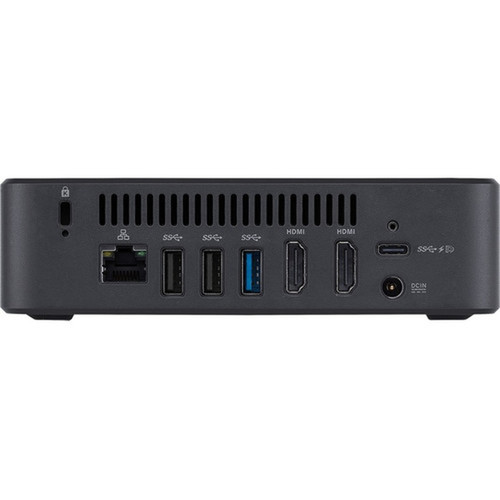
Connectivity is a major strength, with a total of 12 USB ports. This includes two USB 3.2 Gen1 Type-C ports with DisplayPort output and Power Delivery input, five USB 3.2 Gen2 ports, three USB 3.2 Gen1 ports, and two rear USB 2.0 ports. Integrated Gigabit Ethernet provides a stable, high-bandwidth wired network connection essential for business environments.
Relevant factors for this section include Processor Manufacturer, Processor Type, Processor Generation, Chipset Manufacturer. When those points are considered together, they give buyers a clearer picture of how the product is equipped, how it fits into deployment, and what kind of day-to-day role it is meant to support.
Key Product Advantages
The Chromebox 4 combines the simplicity and security of ChromeOS with the versatility of a fully-featured mini desktop. Its design prioritizes seamless integration into managed IT ecosystems and user-friendly operation for day-to-day tasks.
Managed ChromeOS Environment
ChromeOS offers centralized management through the Google Admin console, enabling IT teams to deploy policies, control app access, and push updates automatically. This reduces on-site maintenance and enhances security posture.
- Automatic OS updates
- Integrated Google Workspace
- Built-in virus protection
Compact and Durable Build
The small form factor and solid Gun Metal construction allow flexible placement in space-constrained areas like behind monitors, under desks, or in kiosk setups. A Kensington security slot adds a physical theft deterrent.
- Mini PC footprint
- Robust metal chassis
- Security slot included
Expansive Peripheral Support
With 12 USB ports, including modern Type-C with DP alt mode and PD, the Chromebox 4 can connect multiple displays, storage devices, keyboards, mice, and other accessories simultaneously without requiring hubs in most setups.
Deployment / Use Cases
This Chromebox is engineered for environments where reliable, low-maintenance computing is critical. Its cloud-centric architecture and compact design make it suitable for a variety of business and institutional settings.
In office spaces, it serves as an efficient workstation for employees using web applications, Google Workspace, and SaaS platforms. For digital signage, the small size and multiple video outputs via USB-C enable discreet installation behind displays. In educational labs or thin-client setups, the Chromebox 4 provides a consistent, manageable endpoint that simplifies IT support and reduces total cost of ownership.
Office Productivity Hub
Ideal for general office work, handling email, documents, spreadsheets, and video conferencing through cloud-based applications with fast performance and minimal local storage concerns.
Kiosk & Public Access Terminal
The locked-down nature of ChromeOS kiosk mode, combined with the compact hardware, makes this unit reliable for self-service terminals, information displays, or point-of-sale systems.
Localization and Operating System
The system ships with ChromeOS pre-installed, providing a streamlined experience centered around the Chrome browser and web applications. ChromeOS is designed for always-connected use, with seamless integration into Google's ecosystem, including Google Drive, Gmail, and Google Meet.
Localization for the Canadian market is inherent in ChromeOS, which supports multiple languages and regional settings out of the box. The operating system handles updates automatically in the background, ensuring the latest security patches and features are applied without user intervention, which is a significant advantage for managed deployments.
Relevant factors for this section include Processor Manufacturer, Processor Type, Processor Generation, Chipset Manufacturer. When those points are considered together, they give buyers a clearer picture of how the product is equipped, how it fits into deployment, and what kind of day-to-day role it is meant to support.
Physical Profile
Housed in a sleek Gun Metal enclosure, the Chromebox 4 measures just 5.85 inches square and 1.57 inches tall, occupying minimal desk or mounting space. The compact, lightweight design at 2.2 pounds simplifies installation in versatile locations—mountable behind a monitor with VESA brackets (not included) or neatly tucked away. The finish is professional and durable, suitable for business environments.
The physical profile is practical for deployment planning because the dimensions and weight are clearly defined: 1.57" (40 mm), 5.85" (148.50 mm), 5.85" (148.50 mm), 2.20 lb (1000 g). This helps confirm rack, shelf, desk, or cabinet fit before installation.
- Width
- 5.85" (148.50 mm)
- Depth
- 5.85" (148.50 mm)
- Height
- 1.57" (40 mm)
- Weight
- 2.20 lb (1000 g)
What's in the Box
The package includes all essential components to get the Chromebox 4 up and running immediately.
Highlights
- Intel Core i3-10110U 10th Gen processor for efficient everyday computing
- 8 GB of DDR4 RAM ensures smooth multitasking in ChromeOS
- 128 GB PCIe NVMe M.2 SSD delivers fast boot and load times
- ChromeOS with automatic updates and Google Workspace integration
- Compact Mini PC form factor in a durable Gun Metal chassis
- Gigabit Ethernet for reliable wired network connectivity
- 12 total USB ports, including 2x USB-C with DisplayPort and Power Delivery
- Energy Star certified and RoHS compliant for environmental responsibility
Specifications
| Specifications | |
|---|---|
| Manufacturer | ASUS Computer International |
| Manufacturer Part Number | 90MS0252M01140 |
| Brand Name | Asus |
| Product Line | Chromebox 4 |
| Product Model | CHROMEBOX4-G3023UN |
| Product Name | CHROMEBOX4-G3023UN Chromebox |
| Product Type | Chromebox |
| Processor | |
| Processor Manufacturer | Intel |
| Processor Type | Core i3 |
| Processor Generation | 10th Gen |
| Processor Model | i3-10110U |
| Chipset | |
| Chipset Manufacturer | Intel |
| Memory | |
| Standard Memory | 8 GB |
| Memory Technology | DDR4 SDRAM |
| Storage | |
| Total Solid State Drive Capacity | 128 GB |
| Solid State Drive Interface | PCI Express NVMe 3.0 |
| SSD Form Factor | M.2 |
| Display & Graphics | |
| Graphics Controller Manufacturer | Intel |
| Graphics Controller Model | HD Graphics |
| Graphics Memory Technology | DDR4 SDRAM |
| Graphics Memory Accessibility | Shared |
| Network & Communication | |
| Ethernet Technology | Gigabit Ethernet |
| Interfaces/Ports | |
| Total Number of USB Ports | 12 |
| Number of USB 2.0 Ports (Rear) | 2 |
| Number of USB 3.2 Gen 1 Ports | 3 |
| Number of USB 3.2 Gen 2 Ports | 5 |
| USB Type-C (Rear) | Yes |
| USB Type-C Detail | 1 x USB 3.2 Gen1 Type-C (w/ DP output, PD input); 1 x USB 3.2 Gen1 Type-C (w/ DP output, PD input) |
| Operating System | |
| Operating System Platform | ChromeOS |
| Operating System | ChromeOS |
| Physical Characteristics | |
| Color Family | Other |
| Product Color | Gun Metal |
| Form Factor | Mini PC |
| Height | 1.57" (40 mm) |
| Width | 5.85" (148.50 mm) |
| Depth | 5.85" (148.50 mm) |
| Weight (Approximate) | 2.20 lb (1000 g) |
| Miscellaneous | |
| Package Contents | CHROMEBOX4-G3023UN Chromebox Power Adapter Power Cord User Manual Warranty Card |
| Features | Security Slot |
| Energy Star | Yes |
| Environmentally Friendly | Yes |
| Environmental Compliance | Restriction of Hazardous Substances (RoHS) |
FAQ
What operating system does this Chromebox use, and how are updates handled?
This Asus Chromebox 4 comes with ChromeOS pre-installed. ChromeOS is a cloud-centric operating system developed by Google. A key advantage for IT management is that the OS receives automatic updates in the background. These updates include the latest security patches, new features, and performance improvements, ensuring the device remains secure and up-to-date without requiring manual intervention from users or administrators.
Can this Chromebox 4 connect to multiple monitors?
Yes, the Chromebox 4 supports multi-monitor setups primarily through its USB Type-C ports. It includes two USB 3.2 Gen1 Type-C ports, each supporting DisplayPort video output. This allows you to connect up to two external displays directly via USB-C to DisplayPort or HDMI cables (adapters may be required). The integrated Intel HD Graphics can drive these displays, making it suitable for extended desktop workspaces in office or digital signage scenarios.
Is the 128 GB SSD storage upgradeable or expandable?
The primary 128 GB storage is a PCI Express NVMe 3.0 SSD in the M.2 form factor, which is typically installed internally. While some mini PCs allow user upgrades, the Chromebox 4's design may require technical disassembly, and compatibility must be verified. For expanded storage, ChromeOS is designed for cloud storage integration with services like Google Drive. Additionally, the numerous USB ports (including high-speed USB 3.2 Gen2) allow you to easily connect external hard drives or SSDs for additional local storage capacity.
What kind of performance can I expect from the Intel Core i3-10110U processor?
The Intel Core i3-10110U is a 10th Generation dual-core processor with a base frequency designed for power efficiency. In the context of ChromeOS, which is optimized for web and cloud applications, this CPU provides more than enough performance for everyday business tasks. You can expect smooth operation for web browsing with multiple tabs, email, document editing in Google Workspace, video conferencing, and streaming HD media. It balances responsive performance with low power consumption in the compact Mini PC form factor.
How many USB ports does it have, and what are the different types?
The Asus Chromebox 4 provides a total of 12 USB ports for exceptional peripheral connectivity. The breakdown includes: 2 USB 2.0 ports on the rear, 3 USB 3.2 Gen1 ports, 5 USB 3.2 Gen2 ports, and 2 USB 3.2 Gen1 Type-C ports. The Type-C ports are particularly versatile, as they support DisplayPort video output and can accept Power Delivery input. This extensive selection allows you to connect keyboards, mice, external storage, webcams, and other accessories simultaneously without needing a separate USB hub in most configurations.
Is this Chromebox suitable for a business or enterprise IT environment?
Absolutely. The Chromebox 4 is built with managed business environments in mind. ChromeOS can be centrally administered via the Google Admin console, allowing IT teams to enforce security policies, manage user access, control installed applications, and deploy configurations across a fleet of devices. Features like automatic updates, built-in security, and the compact, durable hardware make it a low-maintenance endpoint. It's an excellent choice for general office workstations, kiosks, conference rooms, or educational labs where simplicity, security, and easy management are priorities.
| Qty | Price | Available |
|---|


