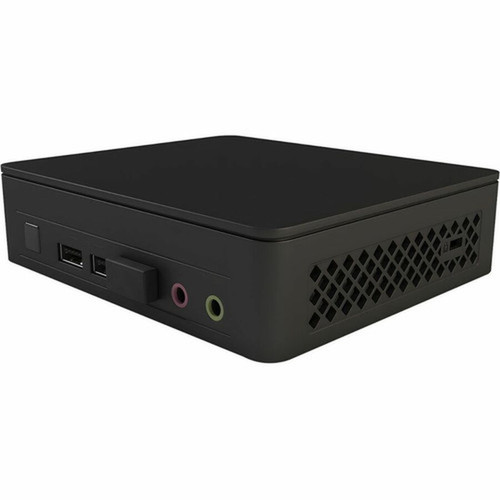
Asus BNUC11ATKC20000 NUC 11 Essential Barebone - Intel Celeron N4505 - 32 GB DDR4 - Mini PC

Business volume discounts
Technical guidance
Preparation & staging
QC · ON · AB · BC
Product Features
Product Overview
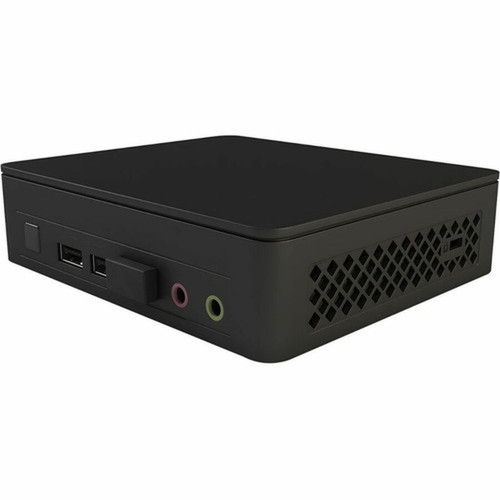
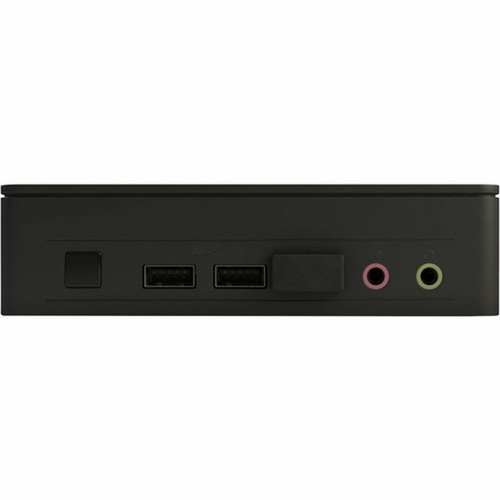
The Asus NUC 11 Essential barebone system (model NUC11ATKC2) delivers an ultra-compact computing platform built around Intel's Celeron N4505 dual-core processor. This mini PC foundation supports up to 32 GB of DDR4-2933 memory across two slots, providing a balanced hardware base for light office workloads, digital signage, kiosk applications, or home media centers.
As a barebone kit, this system requires separate installation of memory, storage, and an operating system, offering IT teams and enthusiasts full control over component selection and configuration. The NUC 11 Essential maintains Asus's reputation for reliable small-form-factor designs while keeping deployment costs manageable for entry-level computing scenarios.
Relevant factors for this section include Processor Type, Processor Model, Processor Core, Chipset Manufacturer. When those points are considered together, they give buyers a clearer picture of how the product is equipped, how it fits into deployment, and what kind of day-to-day role it is meant to support.
Technical Overview
At the heart of this system lies Intel's Celeron N4505, a dual-core processor with a 2.0 GHz base clock and turbo capability up to 2.9 GHz. This 64-bit CPU handles everyday computing tasks efficiently while keeping power consumption low. The integrated Intel UHD Graphics shares system DDR4 memory, providing adequate visual performance for office applications and HD media playback.
Memory configuration is straightforward with two DDR4-2933 slots supporting up to 32 GB total capacity. Storage expansion centers on a single M.2 interface, allowing installation of NVMe or SATA-based solid-state drives. The platform does not support Intel Optane memory technology, keeping the storage architecture simple and cost-effective.
Relevant factors for this section include Processor Type, Processor Model, Processor Core, Chipset Manufacturer. When those points are considered together, they give buyers a clearer picture of how the product is equipped, how it fits into deployment, and what kind of day-to-day role it is meant to support.
Key Product Advantages
This barebone system balances essential performance with practical deployment flexibility. The combination of modern wireless standards, ample USB connectivity, and dual video outputs creates a versatile foundation for various light-computing roles.
Compact Deployment Ready
The mini PC form factor occupies minimal desk or mounting space, making it ideal for environments where physical footprint matters. VESA mounting compatibility (though not explicitly listed in ) is typical for this product category, allowing secure attachment behind monitors or under desks.
- Space-efficient design
- Portable for temporary setups
- Low-profile installation options
Modern Connectivity Suite
Dual-band Wi-Fi 5 (802.11ac) and Bluetooth 5.1 provide reliable wireless connectivity for peripherals and network access. Wired networking is handled by Gigabit Ethernet, ensuring stable connections for bandwidth-sensitive applications.
- Simultaneous dual-band Wi-Fi
- Energy-efficient Bluetooth
- Gigabit wired backup
Deployment / Use Cases
The NUC 11 Essential's hardware profile suits scenarios where compact size, moderate performance, and flexible configuration matter more than raw computing power. Its barebone nature allows organizations to tailor components precisely to their budget and performance requirements.
Additional applications include light-duty home media centers, thin client replacements, educational computer lab stations, or dedicated point-of-sale systems. The platform's Windows and Linux support provides software flexibility across different deployment environments.
Office Productivity Station
Configured with 8-16 GB RAM and a SATA SSD, this system handles email, web browsing, document editing, and video conferencing smoothly. The compact size reduces desk clutter while maintaining full Windows 11/10 compatibility.
- Microsoft Office workflows
- Teams/Zoom meetings
- Multi-tab browsing
Digital Signage & Kiosk Platform
The small form factor and dual video outputs support single or dual-display setups for informational displays, wayfinding systems, or interactive kiosks. Linux compatibility offers additional software options for dedicated applications.
- Retail information displays
- Corporate lobby signage
- Self-service terminals
Highlights
- Intel Celeron N4505 dual-core processor with 2.0 GHz base clock and 2.9 GHz turbo capability
- Supports up to 32 GB DDR4-2933 memory across two accessible slots
- Ultra-compact mini PC form factor ideal for space-constrained deployments
- Wi-Fi 5 (802.11ac) and Bluetooth 5.1 for wireless connectivity
- Gigabit Ethernet provides reliable wired network connection
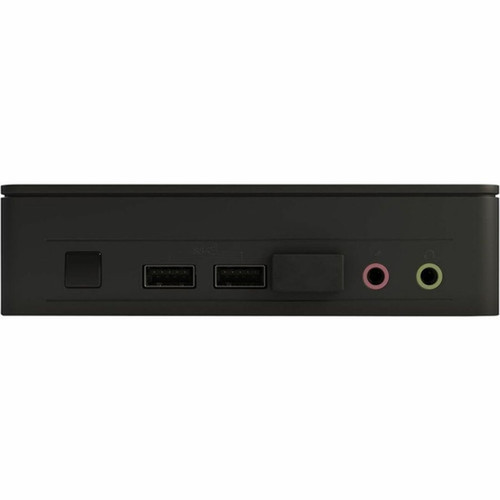
- Six USB ports including USB 3.2 Gen 2, Gen 1, and USB 2.0 options
- HDMI and DisplayPort outputs support dual-display configurations
- Compatible with Windows 11, Windows 10, and Linux operating systems
- Single M.2 interface for NVMe or SATA SSD storage installation
- Barebone design allows custom memory, storage, and OS configuration
Specifications
| Specifications | |
|---|---|
| Manufacturer | ASUS Computer International |
| Manufacturer Part Number | BNUC11ATKC20000 |
| Brand Name | Asus |
| Product Line | NUC 11 Essential |
| Product Model | NUC11ATKC2 |
| Product Name | NUC 11 Essential Kit - NUC11ATKC2 |
| Product Type | Barebone System |
| Processor | |
| Processor Type | Celeron |
| Processor Model | N4505 |
| Processor Core | Dual-core (2 Core) |
| Processor Speed | 2 GHz |
| Maximum Turbo Speed | 2.90 GHz |
| 64-bit Processing | Yes |
| Chipset | |
| Chipset Manufacturer | Intel |
| Memory | |
| Maximum Memory Supported | 32 GB |
| Memory Technology | DDR4 SDRAM |
| Memory Standard | DDR4-2933/PC4-23466 |
| Total Number of Memory Slots | 2 |
| Intel Optane Memory Ready | No |
| Display & Graphics | |
| Graphics Controller Model | UHD Graphics |
| Graphics Memory Technology | DDR4 SDRAM |
| Graphics Memory Accessibility | Shared |
| Network & Communication | |
| Ethernet Technology | Gigabit Ethernet |
| Wireless LAN | Yes |
| Wireless LAN Standard | IEEE 802.11ac |
| Bluetooth | Yes |
| Bluetooth Standard | Bluetooth 5.1 |
| I/O Expansions | |
| Number of M.2 Interfaces | 1 |
| Interfaces/Ports | |
| HDMI | Yes |
| Total Number of USB Ports | 6 |
| Number of USB 3.2 Gen 1 Ports | 2 |
| Number of USB 3.2 Gen 2 Ports | 2 |
| Number of Onboard USB 2.0 Ports | 2 |
| Network (RJ-45) | Yes |
| DisplayPort | Yes |
| Operating System | |
| Operating System Supported | Windows 11,Windows 10,Linux |
| Physical Characteristics | |
| Form Factor | Mini PC |
User Manual
FAQ
What components do I need to add to make this barebone system operational?
To complete this Asus NUC 11 Essential barebone system, you'll need to install DDR4 memory modules (up to 32 GB total across two slots), an M.2 solid-state drive for storage, and a compatible operating system such as Windows 11, Windows 10, or a Linux distribution. The system does not include these components, allowing you to select specific brands, capacities, and performance levels that match your requirements and budget.
What processor does this Asus NUC 11 Essential system use?
This system features Intel's Celeron N4505 processor, a dual-core CPU with a base clock speed of 2.0 GHz and maximum turbo frequency of 2.9 GHz. This 64-bit processor provides sufficient performance for everyday computing tasks like web browsing, office applications, and media playback while maintaining energy efficiency in the compact mini PC form factor.
How much memory can I install in this barebone system?
The Asus NUC 11 Essential supports up to 32 GB of DDR4-2933 memory across two available slots. This allows configurations ranging from a basic 8 GB setup to a maximum 32 GB installation using two 16 GB modules. The memory technology is standard DDR4 SDRAM, compatible with common laptop-style SO-DIMM modules designed for small-form-factor systems.
What wireless connectivity options does this mini PC include?
This system features dual-band Wi-Fi 5 (802.11ac) wireless networking for connecting to 2.4 GHz and 5 GHz networks, along with Bluetooth 5.1 for connecting peripherals like keyboards, mice, headphones, and speakers. The wireless capabilities provide flexible connectivity options without requiring external adapters, though a Gigabit Ethernet port is also available for wired network connections.
What video outputs are available on this Asus NUC system?
The system includes both HDMI and DisplayPort outputs, allowing connection to modern monitors, TVs, or projectors. These dual video outputs support extended or mirrored display configurations, making the system suitable for productivity setups requiring multiple screens or digital signage applications driving separate displays. Both outputs deliver high-definition video quality suitable for office and media applications.
Which operating systems are compatible with this barebone system?
Asus confirms compatibility with Windows 11, Windows 10, and various Linux distributions. This broad operating system support provides flexibility for different deployment scenarios—Windows for standard office environments, Windows 11 for modern feature sets, or Linux for specialized applications, kiosk systems, or development environments. You'll need to purchase and install your preferred OS separately since this is a barebone system.
| Qty | Price | Available |
|---|