












Shipping included*
Exclusions
Additional shipping fees may apply in rare circumstances for deliveries outside standard service areas. In most cases, this only potentially affects shipments to the Northwest Territories and Yukon, as well as certain heavy or oversized items.
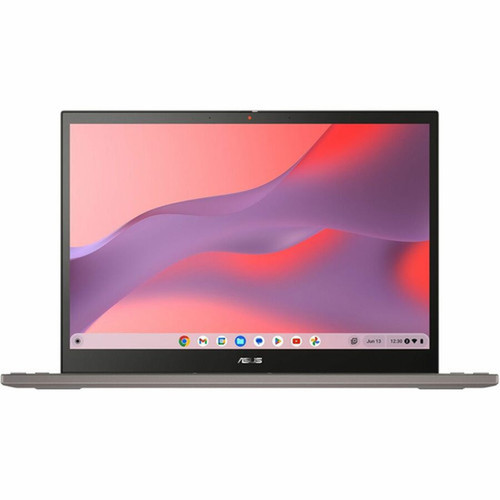
Asus CM3401FFA-DB31T-CB Chromebook CM34 Flip 14" Touchscreen Convertible 2-in-1 - AMD Ryzen 3 7320C - 8 GB RAM - 128 GB SSD - ChromeOS

Business volume discounts
Technical guidance
Preparation & staging
QC · ON · AB · BC
Product Features
Technical Overview
This Chromebook features an AMD Ryzen 3 7320C processor with a maximum turbo speed of 4.10 GHz, paired with integrated AMD Radeon graphics for smooth performance in web-based and light graphical applications. The 8 GB of on-board LPDDR5 memory supports efficient multitasking, and the 128 GB M.2 SSD offers quick boot times and responsive app loading.
Connectivity includes Wi-Fi 6 (802.11ax) and Bluetooth for wireless needs, along with a practical port selection: HDMI for external displays, one USB 3.2 Gen 2 Type-A port, and two USB 3.2 Gen 2 Type-C ports that support data transfer and power delivery. The front-facing webcam enables video calls, and the backlit keyboard aids typing in low-light conditions.
Relevant factors for this section include Processor Manufacturer, Processor Type, Processor Model, Chipset Manufacturer. When those points are considered together, they give buyers a clearer picture of how the product is equipped, how it fits into deployment, and what kind of day-to-day role it is meant to support.
Key Product Advantages
The CM34 Flip combines portability with robust performance, making it an excellent choice for users who need a reliable device for education, remote work, or on-the-go computing.
Long Battery Life
With up to 13 hours of battery runtime, this Chromebook supports full-day use without frequent charging, ideal for classrooms, travel, or extended work sessions.
- 3-cell battery
- 45 W Type-C adapter
- Energy Star 8.0 certified
Flexible Form Factor
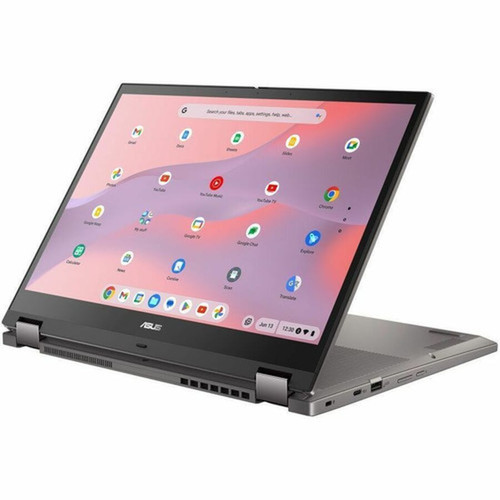
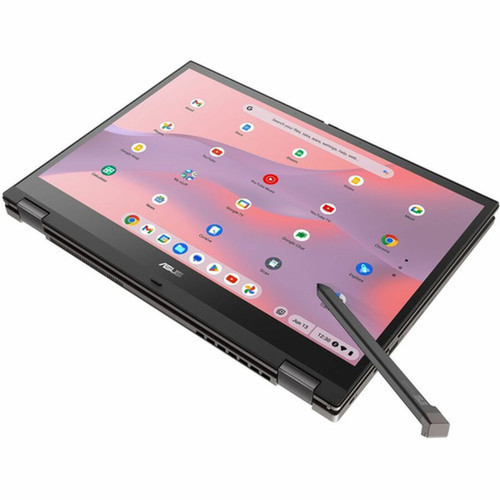
The convertible design allows seamless switching between laptop, tablet, tent, and stand modes, adapting to various tasks and environments.
- 360-degree hinge
- Touchscreen input
- Zinc color finish
Modern Connectivity
Equipped with the latest USB 3.2 Gen 2 ports and Wi-Fi 6, this device ensures fast data transfers and reliable wireless connections.
- USB-C with power delivery
- HDMI output
- Bluetooth compatibility
Deployment / Use Cases
This Chromebook is well-suited for environments where simplicity, security, and mobility are priorities. Its ChromeOS platform minimizes maintenance and offers seamless integration with Google Workspace and Android apps.
In educational settings, the touchscreen and convertible design support interactive learning, while the durable build and long battery life accommodate student use throughout the school day. For professionals, it serves as a lightweight companion for email, document editing, and video conferencing, with the backlit keyboard and webcam enhancing productivity in home offices or co-working spaces.
Relevant factors for this section include Processor Manufacturer, Processor Type, Processor Model, Chipset Manufacturer. When those points are considered together, they give buyers a clearer picture of how the product is equipped, how it fits into deployment, and what kind of day-to-day role it is meant to support.
Localization and Operating System
This device comes pre-installed with ChromeOS, providing a fast, cloud-centric operating system that emphasizes security and ease of use. ChromeOS includes automatic updates, built-in virus protection, and access to the Google Play Store for Android applications.
The keyboard features a standard layout with backlighting for visibility in dim conditions, though specific localization details such as language or regional key markings are not specified in the provided configuration. Users can customize language settings and input methods through the ChromeOS interface.
Relevant factors for this section include Processor Manufacturer, Processor Type, Processor Model, Chipset Manufacturer. When those points are considered together, they give buyers a clearer picture of how the product is equipped, how it fits into deployment, and what kind of day-to-day role it is meant to support.
Physical Profile
The Chromebook CM34 Flip has a slim profile measuring 0.81 inches in height, 12.58 inches in width, and 9.26 inches in depth, making it compact and easy to carry. Weighing 4.08 pounds, it balances portability with a sturdy build suitable for daily travel.
Its Zinc color gives a modern, professional appearance, and the convertible form factor with a 360-degree hinge allows versatile positioning. The NanoEdge bezel design maximizes screen space within a smaller footprint, enhancing the viewing experience.
- Width
- 12.58" (319.60 mm)
- Depth
- 9.26" (235.30 mm)
- Height
- 0.81" (20.70 mm)
- Weight
- 4.08 lb (1850 g)
What's in the Box
The package includes all essential components to start using the Chromebook immediately.
Package contents include Chromebook CM34 Flip CM3401FFA-DB31T-CB 2 in 1 Chromebook AC Adapter, Chromebook CM34 Flip CM3401FFA-DB31T-CB 2 in 1 Chromebook. These included items support setup, installation, and immediate deployment without needing to source the core bundled accessories separately.
Highlights
- 14-inch WUXGA touchscreen with IPS technology for vibrant colors and wide viewing angles
- AMD Ryzen 3 7320C quad-core processor with up to 4.10 GHz turbo speed
- 8 GB LPDDR5 on-board memory for smooth multitasking
- 128 GB M.2 SSD for fast storage and quick boot times
- ChromeOS with automatic updates and access to Android apps
- Up to 13 hours of battery life for all-day productivity
- Convertible 2-in-1 design with 360-degree hinge for flexible use
- Wi-Fi 6 and Bluetooth for reliable wireless connectivity
- Backlit keyboard for typing in low-light environments
- Zinc color finish and slim, portable build
Specifications
| Specifications | |
|---|---|
| Manufacturer | ASUS Computer International |
| Manufacturer Part Number | CM3401FFA-DB31T-CB |
| Brand Name | Asus |
| Product Line | Chromebook CM34 Flip |
| Product Series | CM3401 |
| Product Model | CM3401FFA-DB31T-CB |
| Product Name | Chromebook CM34 Flip CM3401FFA-DB31T-CB 2 in 1 Chromebook |
| Product Type | 2 in 1 Chromebook |
| Processor | |
| Processor Manufacturer | AMD |
| Processor Type | Ryzen 3 |
| Processor Model | 7320C |
| Maximum Turbo Speed | 4.10 GHz |
| Processor Core | Quad-core (4 Core) |
| Chipset | |
| Chipset Manufacturer | AMD |
| Memory | |
| Standard Memory | 8 GB |
| System Memory Form Factor | On-board |
| On-board Memory | 8 GB |
| On-board Memory Technology | LPDDR5 |
| Storage | |
| Drive Type | SSD |
| Total Solid State Drive Capacity | 128 GB |
| SSD Form Factor | M.2 |
| Display & Graphics | |
| Screen Size | 14" |
| Screen Mode | WUXGA |
| Display Screen Technology | NanoEdge,In-plane Switching (IPS) Technology |
| Screen Resolution | 1920 x 1200 |
| Brightness | 300 cd/m² |
| Touchscreen | Yes |
| Dual Screen | No |
| Graphics Controller Manufacturer | AMD |
| Graphics Controller Model | Radeon Graphics |
| Graphics Memory Technology | LPDDR5 |
| Graphics Memory Accessibility | Shared |
| Network & Communication | |
| Wireless LAN | Yes |
| Wireless LAN Standard | IEEE 802.11ax |
| Bluetooth | Yes |
| Built-in Devices | |
| Front Camera/Webcam | Yes |
| Interfaces/Ports | |
| HDMI | Yes |
| Total Number of USB Ports | 3 |
| Number of USB 3.2 Gen 2 Type-A Ports | 1 |
| Number of USB 3.2 Gen 2 Type-C Ports | 2 |
| Operating System | |
| Operating System Platform | ChromeOS |
| Operating System | ChromeOS |
| Input Devices | |
| Keyboard Backlight | Yes |
| Battery Information | |
| Number of Cells | 3-cell |
| Maximum Battery Run Time | 13 Hours |
| Power Description | |
| Maximum Power Supply Wattage | 45 W |
| AC Adapter Frequency | 50 Hz,60 Hz |
| Power Plug Type | Type C |
| Physical Characteristics | |
| Color Family | Other |
| Product Color | Zinc |
| Form Factor | Convertible |
| Height | 0.81" (20.70 mm) |
| Width | 12.58" (319.60 mm) |
| Depth | 9.26" (235.30 mm) |
| Weight (Approximate) | 4.08 lb (1850 g) |
| Miscellaneous | |
| Package Contents | Chromebook CM34 Flip CM3401FFA-DB31T-CB 2 in 1 Chromebook AC Adapter |
| Energy Star | Yes |
| Environmentally Friendly | Yes |
| Energy Efficiency Certification | ENERGY STAR 8.0 |
| Environmental Compliance | Registration, Evaluation, Authorization and Restriction of Chemicals (REACH),Restriction of Hazardous Substances (RoHS) |
User Manual
FAQ
What operating system does this Chromebook use?
This Chromebook runs ChromeOS, a lightweight, cloud-based operating system developed by Google. ChromeOS provides fast boot times, automatic updates, built-in security features, and access to web applications and the Google Play Store for Android apps. It is ideal for users who primarily work online and prefer a low-maintenance computing experience.
How much storage does this Chromebook have?
It includes a 128 GB M.2 solid-state drive (SSD). This SSD offers faster data access and boot times compared to traditional hard drives, though storage capacity is moderate. Users can expand storage via cloud services or external drives, as ChromeOS emphasizes cloud integration for file management.
What is the screen resolution and size?
The screen is 14 inches diagonally with a WUXGA resolution of 1920 x 1200 pixels. This resolution provides sharp detail and a 16:10 aspect ratio, which offers more vertical space for productivity tasks. The IPS panel ensures consistent colors and wide viewing angles, and the touchscreen supports intuitive interaction in tablet mode.
Does this Chromebook have a backlit keyboard?
Yes, it features a backlit keyboard. This allows for comfortable typing in dimly lit environments, such as during evening work sessions or in low-light classrooms. The backlight can typically be adjusted or turned off through ChromeOS settings to conserve battery when not needed.
What ports are available on this device?
It includes three USB ports: one USB 3.2 Gen 2 Type-A port and two USB 3.2 Gen 2 Type-C ports. The Type-C ports support data transfer and power delivery. Additionally, there is an HDMI port for connecting external monitors or projectors, which is useful for presentations or extended desktop setups.
How long does the battery last on a single charge?
The battery provides up to 13 hours of runtime under typical usage conditions, such as web browsing, document editing, and video streaming. This extended battery life is supported by a 3-cell battery and energy-efficient components, making it suitable for all-day use without needing a charger nearby.
| Qty | Price | Available |
|---|


