

Asus NH01 ROG BALTEUS QI ROG Balteus Qi Gaming Mouse Pad - 370 x 320mm Micro-textured Surface - Qi Wireless Charging - 15 RGB Zones - USB Passthrough

Business volume discounts
Technical guidance
Preparation & staging
QC · ON · AB · BC
Product Features
Technical Overview
The Balteus Qi features a hard plastic surface with a micro-textured finish that provides low friction and consistent tracking for optical and laser mice. This surface treatment reduces wear and maintains responsiveness over time, supporting precise cursor movements in fast-paced gaming scenarios.
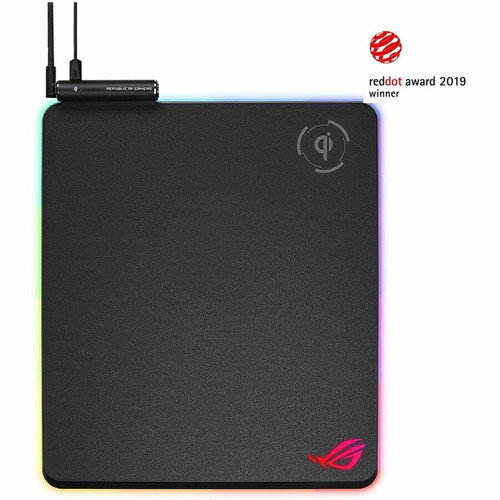
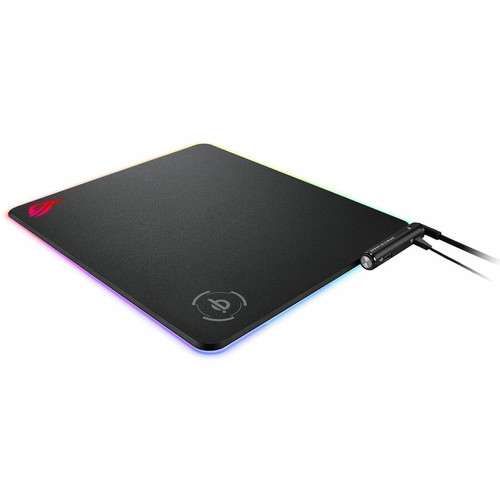
Connectivity includes a built-in USB 2.0 passthrough port for easy device connection, eliminating the need to reach behind the computer. The Qi wireless charging zone, located in a dedicated area, includes a status indicator to confirm charging activity for compatible smartphones and accessories.
This section brings together practical product details such as Features, Printed Design/Pattern/Texture, Durability, Product Material, so buyers can judge configuration, deployment fit, and day-to-day suitability with less guesswork.
A strong technical summary explains how the product's interfaces, hardware profile, and operating characteristics work together in real deployment. Buyers often need this context to confirm compatibility with existing devices, expected performance in daily use, and whether installation will be straightforward for IT staff or end users.
Key Product Advantages
The non-slip rubber base ensures the pad stays firmly in place on desks, even during aggressive mouse movements. This stability is critical for competitive gaming where consistent surface alignment impacts accuracy and reaction times.
Integrated Wireless Charging
The Qi wireless charging zone allows you to power compatible devices directly from the mouse pad, reducing cable clutter and keeping your phone or earbuds charged during use.
- Charges Qi-compatible devices
- Status indicator for charging confirmation
- Eliminates separate charging pads
Customizable RGB Lighting
Fifteen individually addressable RGB zones offer extensive personalization through ASUS Aura Sync software or the onboard lighting mode button, which stores preferences directly on the pad.
- 15-zone RGB lighting
- Onboard memory for lighting profiles
- ASUS Aura Sync ecosystem integration
Deployment / Use Cases
The portrait orientation provides ample vertical space for low-DPI gaming styles, accommodating broad arm movements without requiring excessive desk width. This format is particularly effective for FPS and MOBA gamers who prefer larger sweeping motions.
Competitive Gaming Setup
Ideal for esports and high-performance gaming, the micro-textured surface offers precise tracking, while the USB passthrough simplifies peripheral management for keyboards, headsets, or additional devices.
- Low-friction surface for fast movements
- USB passthrough for clean cable routing
- Stable base prevents shifting during play
Streamlined Home Office
The Qi charging capability and integrated USB port make this pad suitable for productivity environments, allowing users to charge phones and connect accessories without extra adapters or cables on the desk.
- Wireless charging reduces desk clutter
- USB connectivity for peripherals
- Sleek design complements workstation aesthetics
Physical Profile
Measuring 370mm wide by 320mm tall with a slim 7.90mm profile, the Balteus Qi offers a substantial surface without dominating the desk. The non-slip rubber base adheres securely to various surfaces, including wood, glass, and laminate, while the hard plastic surface resists deformation and maintains flatness over time.
- Width
- 14.57" (370 mm)
- Depth
- 0.31" (7.90 mm)
- Height
- 12.60" (320 mm)
What's in the Box
The package includes all necessary components for immediate setup and use, ensuring compatibility with standard USB ports and providing additional accessories for customization.
Highlights
- Qi wireless charging zone with status indicator for compatible mobile devices
- 370 x 320mm portrait-oriented gaming mouse pad with micro-textured hard surface
- 15 individually customizable RGB lighting zones with ASUS Aura Sync support
- Onboard lighting mode button and memory for adjustments without software
- Built-in USB 2.0 passthrough for easy peripheral connectivity
- Non-slip rubber base with ROG cyberpunk design for stability
- Hard plastic surface ensures consistent tracking and durability
- Includes braided USB Y-cable and micro USB charging cable
Specifications
| Specifications | |
|---|---|
| Manufacturer | ASUS Computer International |
| Manufacturer Part Number | NH01 ROG BALTEUS QI |
| Brand Name | Asus ROG |
| Product Line | Balteus Qi |
| Product Name | Balteus Qi Mouse Pad |
| Packaged Quantity | 1 |
| Product Type | Gaming Mouse Pad |
| Product Information | |
| Features | USB Port,Wireless Charging,RGB Lighting,Comfortable |
| Printed Design/Pattern/Texture | Micro-textured |
| Durability | Anti-slip |
| Physical Characteristics | |
| Product Material | Rubber |
| Surface Material | Plastic |
| Height | 12.60" (320 mm) |
| Width | 14.57" (370 mm) |
| Depth | 0.31" (7.90 mm) |
| Miscellaneous | |
| Package Contents | Balteus Qi Mouse Pad 1 x 2-Meter Braided USB Gold-plated Y-cable 1 x 1-Meter Micro USB Charging Cable 1 x ROG Logo Sticker 1 x User Documentation |
| Application/Usage | Computer |
User Manual
FAQ
What devices are compatible with the Qi wireless charging on this mouse pad?
The Qi wireless charging zone supports any Qi-certified mobile device, including most modern smartphones, wireless earbuds, and other accessories that use the Qi standard. The status indicator lights up to confirm when a compatible device is properly aligned and charging.
How do I customize the RGB lighting on the Balteus Qi mouse pad?
You can customize the 15 RGB lighting zones using ASUS Aura Sync software for synchronized effects across compatible devices, or use the onboard lighting mode button to cycle through preset patterns and colors without installing software. The pad stores your preferred lighting profile in its onboard memory.
What is the purpose of the USB passthrough port on this mouse pad?
The built-in USB 2.0 passthrough port allows you to connect peripherals like keyboards, headsets, or flash drives directly to the mouse pad, reducing cable clutter and making it easier to access ports without reaching behind your computer. It uses the included Y-cable for power and data transfer.
Is the surface of this mouse pad suitable for both optical and laser mice?
Yes, the micro-textured hard plastic surface is designed to work effectively with both optical and laser mouse sensors. The texture provides consistent tracking and low friction, ensuring accurate cursor movement for gaming and general computer use.
What dimensions does the Balteus Qi mouse pad have, and is it portrait or landscape oriented?
The mouse pad measures 370mm in width and 320mm in height, with a thickness of 7.90mm. It is portrait-oriented, meaning the longer dimension runs vertically, which is ideal for gaming styles that use broad vertical mouse movements.
Does the non-slip rubber base work on all desk surfaces?
The non-slip rubber base is effective on most common desk surfaces, including wood, glass, laminate, and plastic. It provides strong grip to prevent the pad from shifting during use, even during intense gaming sessions with rapid mouse movements.
What power capacity is listed for this UPS?
Power specifications help show where the unit fits best, including the type of load level, electrical environment, and backup role it is intended to support. These are usually the most decision-critical facts in a UPS or power-protection comparison.
Is this unit designed for rack or tower deployment?
For power-protection products, the most useful FAQ topics are usually capacity, outlet arrangement, runtime characteristics, and installation format. Those details do more to explain real deployment fit than generic marketing language.
| Qty | Price | Available |
|---|