Shipping included*
Exclusions
Additional shipping fees may apply in rare circumstances for deliveries outside standard service areas. In most cases, this only potentially affects shipments to the Northwest Territories and Yukon, as well as certain heavy or oversized items.
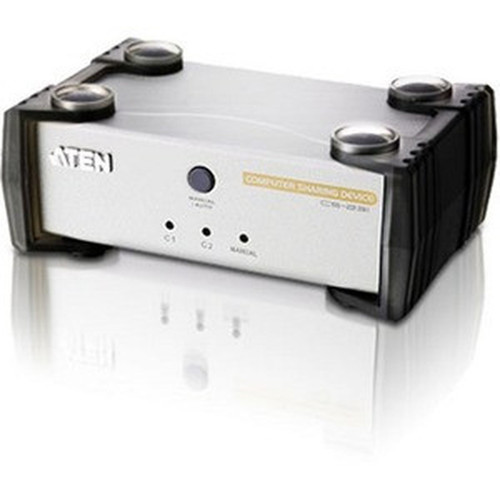
Aten CS231 Computer Sharing KVM Switch - 1-to-2 HD-15 Keyboard Mouse Video Solution

Business volume discounts
Technical guidance
Preparation & staging
QC · ON · AB · BC
Product Features
Technical Overview
This KVM switch employs a hardware-based switching architecture that requires no software drivers or operating system modifications. The unit supports multiplatform environments including Windows, Mac, Unix, and Linux systems through standard USB HID protocols.
Video transmission maintains signal integrity across the supported resolution range, with automatic sync detection for compatible monitors. The physical design incorporates durable connectors and a compact footprint suitable for desktop or rack mounting scenarios.
Relevant factors for this section include Number of Computers Supported, Maximum Video Resolution. When those points are considered together, they give buyers a clearer picture of how the product is equipped, how it fits into deployment, and what kind of day-to-day role it is meant to support.
A strong technical summary explains how the product's interfaces, hardware profile, and operating characteristics work together in real deployment. Buyers often need this context to confirm compatibility with existing devices, expected performance in daily use, and whether installation will be straightforward for IT staff or end users.
Key Product Advantages
The CS231 delivers practical advantages for shared computing environments through intuitive operation and flexible configuration options.
These strengths make the product easier to deploy and manage in real environments, especially where reliability, usability, and day-to-day operational continuity matter. Notable benefits include Flexible Console Selection, Enhanced User Management.
Flexible Console Selection
Choose between manual front-panel switching or automatic console selection based on keyboard/mouse activity. The on-screen display provides clear visual indicators when the system is in use.
- Manual or auto selection
- On-screen status display
- Front-panel controls
Enhanced User Management
Private Mode functionality allows a designated privileged user to maintain exclusive access when required, while the screen saver function helps preserve monitor longevity during idle periods.
- Private Mode for privileged access
- Screen saver function
- Multi-user management
Deployment / Use Cases
The CS231 serves environments where multiple users need occasional or scheduled access to a shared computing resource without the expense of additional hardware.
Typical deployments include training rooms where instructors demonstrate procedures on a central system while students observe from their stations. Help desk configurations benefit from allowing support technicians to collaboratively troubleshoot issues on a single reference machine.
The switch also supports development environments where code review sessions require multiple programmers to examine the same build output. Laboratory settings utilize the sharing capability to maximize equipment utilization across research teams working different shifts.
Relevant factors for this section include Number of Computers Supported, Maximum Video Resolution. When those points are considered together, they give buyers a clearer picture of how the product is equipped, how it fits into deployment, and what kind of day-to-day role it is meant to support.
Physical Profile
With dimensions of 3.43 inches wide by 5.63 inches deep by 2.17 inches high, the CS231 occupies minimal desk space while providing accessible front-panel controls. The 560-gram weight ensures stability during operation without requiring specialized mounting hardware.
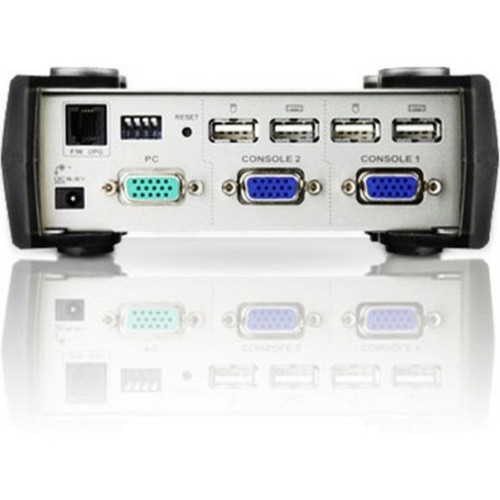
The compact form factor integrates easily into existing workstation arrangements, with rear-panel connectors positioned for straightforward cable management. The unit's construction supports reliable performance in typical office temperature and humidity ranges.
- Width
- 3.43" (87 mm)
- Depth
- 5.63" (143 mm)
- Height
- 2.17" (55 mm)
- Weight
- 560 g
What's in the Box
The package includes all necessary components for immediate deployment of the KVM sharing solution.
Highlights
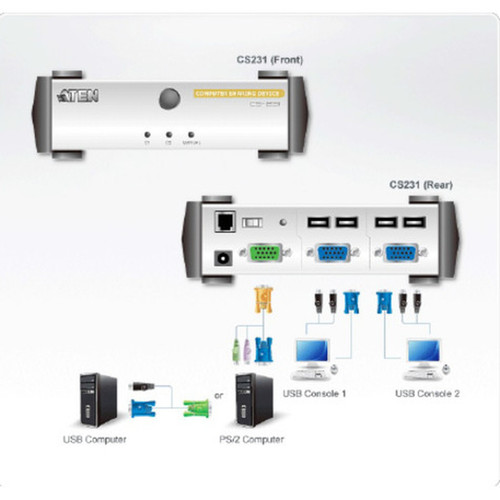
- Shares one computer between two USB console stations
- Supports both USB and legacy PS/2 computer connections
- Works with Windows, Mac, Unix, and Linux operating systems
- Manual or automatic console selection methods
- On-screen display indicates when system is in use
- No software installation required for operation
- Private Mode allows privileged user exclusive access
- Screen saver function preserves monitor longevity
- Compatible with VGA and SVGA Multisync monitors
- Firmware upgradable for future feature enhancements
Specifications
| Specifications | |
|---|---|
| Manufacturer | ATEN Technology, Inc |
| Manufacturer Part Number | CS231 |
| Brand Name | ATEN |
| Product Name | Computer Sharing KVM Switch |
| Product Type | KVM Switchbox |
| Technical Information | |
| Number of Computers Supported | 1 |
| Video | |
| Maximum Video Resolution | 1920 x 1440 |
| Physical Characteristics | |
| Height | 2.17" (55 mm) |
| Width | 3.43" (87 mm) |
| Depth | 5.63" (143 mm) |
| Weight (Approximate) | 560 g |
| Miscellaneous | |
| Package Contents | Computer Sharing KVM Switch Power Adapter Firmware Upgrade Cable DIP Switch Sticker User Manual Quick Start Guide |
| Warranty | |
| Limited Warranty | 2 Year |
User Manual
FAQ
How many computers can I connect to this KVM switch?
The Aten CS231 supports a single computer connection that can be shared between two separate console stations. This 1-to-2 configuration allows two users to access the same computer through independent keyboard, mouse, and monitor setups without requiring additional computer hardware.
What types of computer connections does this switch support?
This KVM switch supports both modern USB computer connections and legacy PS/2 interfaces. This dual compatibility ensures the unit works with a wide range of computer systems, from current USB-based machines to older equipment still utilizing PS/2 ports for keyboard and mouse connectivity.
What is the maximum video resolution supported?
The CS231 supports video resolutions up to 1920×1440 pixels, making it compatible with VGA and SVGA Multisync monitors. This resolution capability handles most standard office and technical display requirements while maintaining signal integrity across the KVM switching circuitry.
Does this KVM switch require software installation?
No software installation is required for the CS231 KVM switch. It operates entirely through hardware-based switching technology that uses standard USB HID protocols. This plug-and-play approach eliminates driver compatibility issues and simplifies deployment across different operating system environments.
What is included in the package with this KVM switch?
The complete package includes the Computer Sharing KVM Switch unit, a power adapter for reliable operation, a firmware upgrade cable for future enhancements, a DIP switch sticker for configuration reference, a comprehensive user manual, and a quick start guide for immediate setup and deployment.
What connectivity or interface options are available?
Connectivity details help confirm how Aten Computer Sharing KVM Switch 1 To 2 HD-15 Keyboard Mouse And Video Solution X CS231 can integrate with your network, accessories, and surrounding peripherals before rollout or replacement planning.
| Qty | Price | Available |
|---|