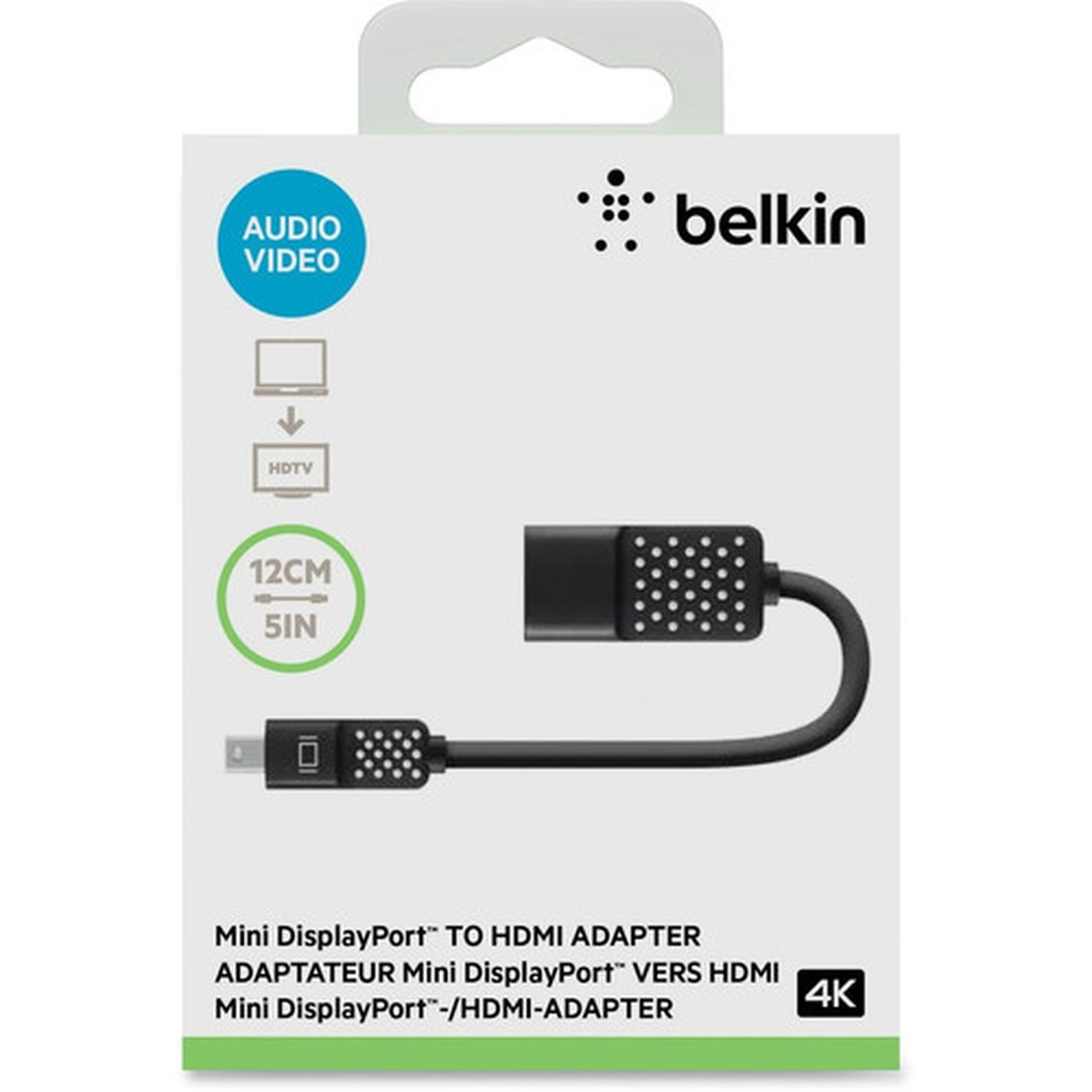

Belkin F2CD079BT Mini DisplayPort to HDMI Adapter - 4K 4096 x 2160 - Black - for MacBook - Surface Pro

Business volume discounts
Technical guidance
Preparation & staging
QC · ON · AB · BC
Product Features
Technical Overview
Engineered for reliable digital signal conversion, this adapter maintains audio and video integrity across compatible devices. It features molded strain relief at connection points to enhance durability and flexibility, reducing wear from frequent plugging and unplugging.
The adapter is compatible with a range of Apple and Microsoft devices, including MacBook, MacBook Air, MacBook Pro (2014 and later models), and Surface Pro 2, 3, and 4 tablets. This broad compatibility ensures it meets the needs of users with diverse hardware setups, from laptops to tablets.
This section brings together practical product details such as Cable Type, Connector Type on First End, Connector on First End Details, Color Family, so buyers can judge configuration, deployment fit, and day-to-day suitability with less guesswork.
A strong technical summary explains how the product's interfaces, hardware profile, and operating characteristics work together in real deployment. Buyers often need this context to confirm compatibility with existing devices, expected performance in daily use, and whether installation will be straightforward for IT staff or end users.
Key Product Advantages
This adapter simplifies connectivity by eliminating the need for complex setups or additional hardware. Its compact design and lightweight construction make it highly portable, ideal for professionals on the go or users who frequently switch between workspaces.
These strengths make the product easier to deploy and manage in real environments, especially where reliability, usability, and day-to-day operational continuity matter. Notable benefits include High-Resolution Support, Broad Device Compatibility.
High-Resolution Support
Delivers crisp 4K video output, enhancing visual clarity for detailed graphics, video editing, or high-definition entertainment.
- 4096 x 2160 resolution
- Full audio/video transmission
Broad Device Compatibility
Works seamlessly with popular Apple and Microsoft devices, reducing compatibility concerns and supporting mixed-ecosystem environments.
- MacBook, MacBook Air, MacBook Pro
- Surface Pro 2, 3, 4
Deployment / Use Cases
This adapter is versatile for various scenarios where extending or mirroring displays is required. In office settings, it facilitates presentations on larger screens or multi-monitor setups, improving productivity and collaboration.
For home users, it enables streaming content from laptops or tablets to HDTVs for a enhanced viewing experience. Educational institutions can use it in classrooms to connect devices to projectors, while creative professionals benefit from high-resolution output for design or video work.
This section brings together practical product details such as Cable Type, Connector Type on First End, Connector on First End Details, Color Family, so buyers can judge configuration, deployment fit, and day-to-day suitability with less guesswork.
Business Presentations
Connect MacBook or Surface Pro devices to conference room displays for seamless slide shows, demos, or video conferences.
Home Entertainment
Stream movies, games, or online content from tablets or laptops to living room TVs with full audio support.
Highlights
- Converts Mini DisplayPort to HDMI for audio and video transmission.
- Supports 4K resolution up to 4096 x 2160 for high-definition output.
- Plug-and-play design requires no drivers or software installation.
- Compatible with Apple MacBook, MacBook Air, MacBook Pro, and Microsoft Surface Pro devices.
- Features molded strain relief for enhanced durability at connection points.
- Compact 5-inch adapter for easy portability and storage.
- Delivers both audio and video signals through a single cable.
- Ideal for presentations, media streaming, and extended desktop setups.
Specifications
| Specifications | |
|---|---|
| Manufacturer | Belkin International, Inc |
| Manufacturer Part Number | F2CD079BT |
| Brand Name | Belkin |
| Product Name | Mini DisplayPort to HDMI Adapter, 4K |
| Packaged Quantity | 1 Each |
| Package Type | Retail |
| Product Type | A/V Cable |
| Technical Information | |
| Cable Type | HDMI/Mini DisplayPort |
| Connector Type on First End | Mini DisplayPort Digital Audio/Video |
| Connector on First End Details | 1 x Mini DisplayPort Digital Audio/Video |
| Connector Type on Second End | HDMI Digital Audio/Video |
| Connector on Second End Details | 1 x HDMI Digital Audio/Video |
| Device Supported | Audio/Video Device,MacBook,MacBook Air,MacBook Pro,Tablet |
| Supported Resolution | 4096 x 2160 |
| Physical Characteristics | |
| Color Family | Black |
| Product Color | Black |
| Miscellaneous | |
| Compatibility | Apple Devices: MacBook MacBook Air MacBook Air 11" MacBook Air 13" MacBook Pro (2014) MacBook Pro 13" MacBook Pro 15" MacBook Pro 17" Microsoft Devices: Surface Pro 2 Surface Pro 3 Surface Pro 4 |
| Country of Origin | China |
FAQ
What devices are compatible with this Belkin adapter?
This adapter is compatible with Apple devices including MacBook, MacBook Air, MacBook Pro (2014 and later models), and Microsoft devices such as Surface Pro 2, 3, and 4. It also supports general audio/video devices and tablets with Mini DisplayPort outputs.
Does this adapter support 4K resolution?
Yes, it supports 4K resolution up to 4096 x 2160, providing high-definition video quality suitable for detailed graphics, video playback, and professional presentations on compatible HDMI displays.
Is audio transmitted through this adapter?
Yes, the adapter transmits both audio and video signals, converting digital audio from the source device to HDMI output. This ensures synchronized sound and video for a complete multimedia experience on HDTVs or monitors.
Do I need to install drivers for this adapter to work?
No, this adapter features plug-and-play functionality, meaning it works immediately without requiring additional drivers or software. Simply connect it between your Mini DisplayPort device and HDMI display for instant use.
What is the length of the adapter, and is it durable?
The adapter is 5 inches long, offering a compact design for easy portability. It includes molded strain relief at the connection points, which enhances flexibility and durability by reducing stress on the connectors during use.
Can I use this adapter with older MacBook Pro models?
Yes, it is compatible with MacBook Pro models from 2014 onwards, as well as earlier MacBook and MacBook Air versions. Check your device's specifications for Mini DisplayPort support to ensure compatibility.
What resolution or display format is specified?
It features a display specification of 4096 x 2160, giving you clear visuals for work and media use.
What refresh rate or brightness details are available?
Display-oriented products are best judged through screen, connectivity, and installation specifications. Those facts help buyers confirm visual fit, mounting flexibility, and deployment suitability more clearly than generic summary text.
| Qty | Price | Available |
|---|