

Shipping included*
Exclusions
Additional shipping fees may apply in rare circumstances for deliveries outside standard service areas. In most cases, this only potentially affects shipments to the Northwest Territories and Yukon, as well as certain heavy or oversized items.
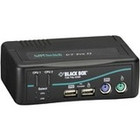
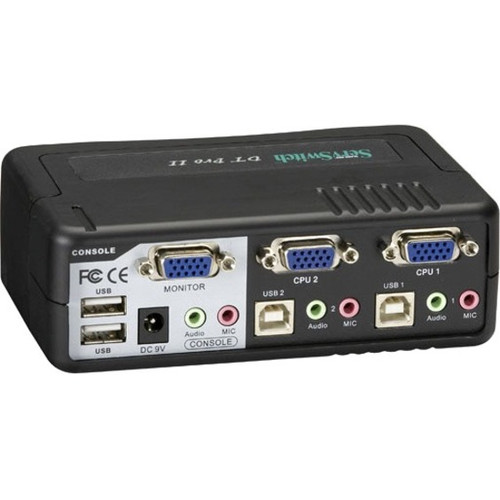
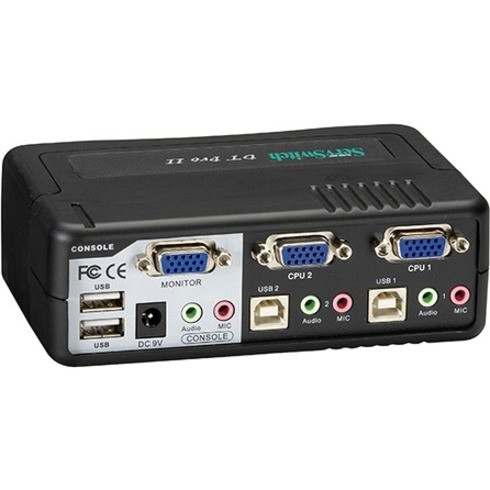
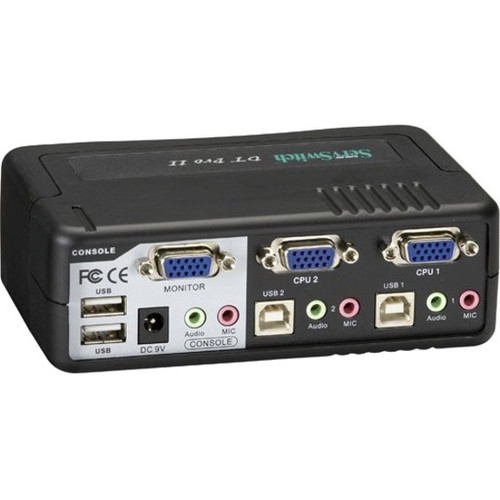
Black Box KV7020A-K DT Pro II Desktop KVM Switch - 2-Port - VGA - USB/PS/2 - Audio - 1920 x 1440

Business volume discounts
Technical guidance
Preparation & staging
QC · ON · AB · BC
Product Features
Technical Overview
This KVM switch delivers hardware-based switching with support for legacy PS/2 and modern USB peripherals. The video circuitry maintains signal integrity for VGA displays at resolutions up to 1920x1440, suitable for standard office monitors and basic graphics work.
With 2 PS/2 ports, 6 USB ports, and 3 VGA ports total, the DT Pro II accommodates the necessary connections for two complete computer setups. The switching mechanism operates through front-panel push buttons or keyboard hotkeys for flexible control without software dependencies.
This section brings together practical product details such as Number of Computers Supported, Number of Local Users Supported, Maximum Video Resolution, so buyers can judge configuration, deployment fit, and day-to-day suitability with less guesswork.
Key Product Advantages
The DT Pro II eliminates the need for multiple monitors, keyboards, and mice when working with two computers. By consolidating control to a single workstation, users reduce desk clutter and improve workflow efficiency while maintaining direct hardware access to both systems.
Dual-Interface Keyboard/Mouse Support
Simultaneously supports both USB and PS/2 keyboard and mouse connections, providing compatibility with older and newer computer systems without requiring adapters.
Integrated Audio Switching
Includes analog audio pass-through alongside video and peripheral switching, creating a complete multimedia control solution for computers with sound output.
Deployment / Use Cases
This desktop KVM switch suits environments where users need simultaneous access to multiple computers but prefer dedicated hardware switching over software solutions. The compact form factor fits easily on standard desks while providing reliable connectivity for daily professional use.
Typical applications include financial trading desks with multiple dedicated systems, security monitoring stations with separate recording and viewing computers, and educational labs where instructors demonstrate across different platforms.
IT Administration Workstations
System administrators can manage a production server and a testing or backup system from one desk, switching between them instantly for maintenance, updates, or troubleshooting.
Multicomputer Development Environments
Software developers working across different operating systems or hardware configurations can access both development machines with shared peripherals, reducing hardware costs and desk space requirements.
Physical Profile
The DT Pro II features a compact desktop enclosure measuring 5.40 inches wide by 3.50 inches deep by 1.80 inches high (137.16 × 88.90 × 45.72 mm). Weighing approximately 816.5 grams, the switch sits unobtrusively on desks or can be mounted in standard equipment racks with optional accessories.
The front panel includes clearly labeled push buttons for manual computer selection, while the rear panel organizes all connection ports for clean cable management. The durable construction ensures reliable operation in typical office environments with moderate daily use.
- Width
- 5.40" (137.16 mm)
- Depth
- 3.50" (88.90 mm)
- Height
- 1.80" (45.72 mm)
- Weight
- 816.5 g
What's in the Box
The package includes all necessary components for immediate deployment of the KVM switch system.
Highlights
- 2-port desktop KVM switch for controlling two computers from one workstation
- Supports VGA video resolutions up to 1920×1440 for clear display quality
- Compatible with both USB and PS/2 keyboard and mouse connections
- Includes analog audio pass-through for complete multimedia switching
- Switch between computers using front push buttons or keyboard hotkeys
- Compact dimensions: 5.40" W × 3.50" D × 1.80" H (137.16 × 88.90 × 45.72 mm)
- Includes 2 DT Pro II CPU cables and power supply for immediate setup
- Environmentally friendly design with 1-year limited warranty
Specifications
| Specifications | |
|---|---|
| Manufacturer | Black Box Corporation |
| Manufacturer Part Number | KV7020A-K |
| Brand Name | Black Box |
| Product Line | ServSwitch |
| Product Series | DT Pro II |
| Product Name | DT Pro II Desktop KVM Switch - VGA, USB or PS/2, Audio, 2-Port |
| Product Type | KVM Switchbox |
| Technical Information | |
| Number of Computers Supported | 2 |
| Number of Local Users Supported | 1 |
| Video | |
| Maximum Video Resolution | 1920 x 1440 |
| Interfaces/Ports | |
| PS/2 Port | Yes |
| USB | Yes |
| VGA | Yes |
| Number of PS/2 Ports | 2 |
| Number of USB Ports | 6 |
| Number of VGA Ports | 3 |
| Physical Characteristics | |
| Height | 1.80" (45.72 mm) |
| Width | 5.40" (137.16 mm) |
| Depth | 3.50" (88.90 mm) |
| Weight (Approximate) | 816.5 g |
| Miscellaneous | |
| Package Contents | DT Pro II Desktop KVM Switch - VGA, USB or PS/2, Audio, 2-Port 2 x DT Pro II CPU Cables ServSwtich DT Pro II Power Supply User's Manual |
| Environmentally Friendly | Yes |
| Country of Origin | China |
| Warranty | |
| Limited Warranty | 1 Year |
User Manual
FAQ
How many computers can I connect to this KVM switch?
The Black Box DT Pro II supports two computers simultaneously. One local user can access both systems through a single set of peripherals (keyboard, mouse, monitor, and speakers) by switching between the connected computers as needed.
What video resolution does this KVM switch support?
This switch supports VGA video resolutions up to 1920 × 1440 pixels. This resolution accommodates standard office monitors and provides clear display quality for most business applications, though actual resolution depends on your connected computers' graphics capabilities and monitor specifications.
Can I use both USB and PS/2 keyboards with this switch?
Yes, the DT Pro II supports both USB and PS/2 keyboard and mouse connections. The switch includes dedicated ports for each interface type, allowing you to connect legacy PS/2 peripherals alongside modern USB devices without requiring adapters or additional hardware.
How do I switch between connected computers?
You can switch between the two connected computers using either the front-panel push buttons on the KVM switch itself or through keyboard hotkey combinations. This dual switching method provides flexibility—use the physical buttons for manual control or keyboard shortcuts for faster switching during active work sessions.
What cables and accessories are included?
The package includes two DT Pro II CPU cables specifically designed for this switch model, a ServSwitch DT Pro II power supply, and a comprehensive user's manual. These components provide everything needed for basic setup, though you may need additional standard VGA or USB cables depending on your existing computer connections.
What are the physical dimensions of this KVM switch?
The switch measures 5.40 inches wide, 3.50 inches deep, and 1.80 inches high (137.16 × 88.90 × 45.72 millimeters). Weighing approximately 816.5 grams, this compact form factor fits easily on most desks while providing all necessary connectivity for two-computer control from a single workstation.
| Qty | Price | Available |
|---|