








Shipping included*
Exclusions
Additional shipping fees may apply in rare circumstances for deliveries outside standard service areas. In most cases, this only potentially affects shipments to the Northwest Territories and Yukon, as well as certain heavy or oversized items.
Canon 4469C003 PIXMA G1220 MegaTank Color Inkjet Printer - 4800 x 1200 dpi - 9. 1/5 ppm - USB - Desktop

Business volume discounts
Technical guidance
Preparation & staging
QC · ON · AB · BC
Product Features
Technical Overview
The PIXMA G1220 operates with ISO-certified print speeds of 9.1 pages per minute for monochrome documents and 5 pages per minute for color output. This performance level balances speed with the high 4800 x 1200 dpi resolution that ensures text appears sharp and graphics display with smooth gradations. The printer's color capability spans the full CMYK spectrum using pigment black (PGBK), cyan, magenta, and yellow inks.
Connectivity is handled through a standard USB 2.0 interface for direct computer connection, with comprehensive driver support for Windows 7 SP1 through Windows 10 and macOS 10.12.6 through 10.15 (Catalina). The included software suite provides essential tools for everyday printing tasks, including the PIXMA G2260 driver for optimal printer communication, Easy-PhotoPrint Editor for photo enhancement and layout, and PosterArtist Lite for creating multi-page posters and banners.
Key Product Advantages
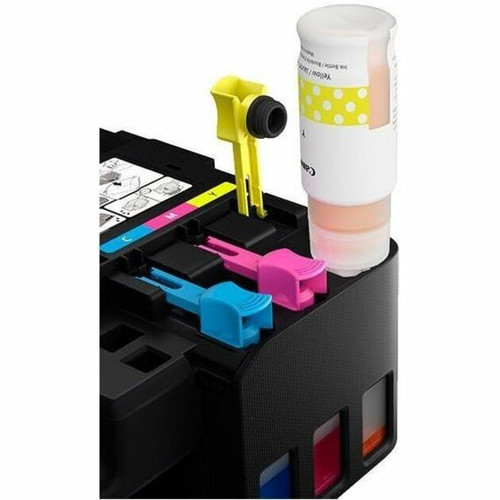
The MegaTank ink system represents a fundamental shift in printing economics, offering substantially lower cost per page compared to traditional cartridge-based systems. With included starter ink bottles plus two bonus black ink bottles, users can begin printing immediately without additional ink purchases for thousands of pages. This system reduces waste and frequent cartridge replacement while maintaining consistent print quality.
High-Volume Efficiency
The refillable ink tank design minimizes operational costs for environments with moderate to high printing volumes, making it economically viable for small offices that previously relied on costly cartridge replacements.
- Starter ink bottles included
- Two bonus black ink bottles
- Reduced per-page costs
- Less frequent refills needed
Media Versatility
Beyond standard office documents, this printer handles creative and specialty media including glossy photo papers, card stock for invitations, envelopes for mailing, and even iron-on transfers for fabric projects.
- Borderless photo printing
- 12+ supported media types
- Letter to Legal size handling
- Specialty paper compatibility
Deployment / Use Cases
The Canon PIXMA G1220 is ideally suited for small offices, home offices, and educational environments where reliable color printing is needed without the high operational costs of traditional inkjet systems. Its combination of respectable speed, high resolution, and media versatility makes it effective for mixed document environments that include everything from business reports and correspondence to marketing materials and occasional photos.
For home office users, the printer handles everyday printing tasks efficiently while also supporting creative projects like photo printing, greeting card creation, and craft projects using specialty papers. Small businesses benefit from the reduced ink costs when producing client documents, proposals, and internal communications. Educational settings can utilize the printer for classroom materials, student projects, and administrative documents where both monochrome and color output are regularly required.
Small Office Document Production
Daily business documents, reports, correspondence, and client materials with professional color output and crisp text quality at sustainable operating costs.
Creative & Photo Applications
Borderless photo printing, greeting cards, invitations, and craft projects using the wide range of supported specialty papers and media types.
Physical Profile
Designed as a compact desktop printer, the PIXMA G1220 measures 17.60" wide × 13" deep × 5.40" high (447 × 330 × 137 mm), fitting comfortably on standard office desks or dedicated printer stands. At approximately 10.6 pounds (4.8 kg), the printer remains stable during operation while remaining portable enough for occasional relocation within an office environment. The desktop form factor requires no special mounting or installation considerations beyond a standard power outlet and sufficient clearance for paper handling.
- Width
- 17.60" (447.04 mm)
- Depth
- 13" (330.20 mm)
- Height
- 5.40" (137.16 mm)
- Weight
- 10.60 lb (4808.08 g)
What's in the Box
The complete package includes everything needed to begin printing immediately upon setup.
Highlights
- MegaTank refillable ink system with starter bottles included
- ISO print speeds: 9.1 ppm mono / 5 ppm color
- 4800 × 1200 dpi maximum resolution
- Borderless printing capability
- Supports 12+ media types including photo papers and card stock
- USB connectivity for direct computer connection
- Windows and macOS compatibility
- Compact desktop form factor (17.6"W × 13"D × 5.4"H)
- Includes bonus black ink bottles for extended monochrome printing
- Complete software suite with driver and creative applications
Specifications
| Specifications | |
|---|---|
| Manufacturer | Canon, Inc |
| Manufacturer Part Number | 4469C003 |
| Brand Name | Canon |
| Product Line | PIXMA |
| Product Model | G1220 |
| Product Name | PIXMA MegaTank G1220 Inkjet Printer |
| Product Type | Inkjet Printer |
| Technical Information | |
| Recommended Use | Plain Paper Print |
| Print Color Capability | Color |
| ISO Mono Print Speed (ipm) | 9.1 |
| ISO Color Print Speed (ipm) | 5 |
| Maximum Print Resolution (dpi) | 4800 x 1200 |
| Interfaces/Ports | |
| USB | Yes |
| Media Types & Handling | |
| Borderless Printing | Yes |
| Media Type | Plain Paper,High Resolution Paper,Photo Paper Plus Glossy II,Glossy Photo Paper,Photo Paper Plus Semi-gloss,Photo Paper Pro Luster,Magnetic Photo Paper,Iron-on Transfer,Card Stock,Greeting Card,Envelope,Recycled Paper |
| Media Size | Letter,4" (101.60 mm) x 6" (152.40 mm),Legal |
| Software | |
| Operating System Supported | Windows:7 Windows® 10, Windows 8.1, Windows 7 SP1 Mac:8 Mac OS® X v10.12.6 - macOS v10.15 (Catalina) |
| Software Included | (WINDOWS/MAC) PIXMA G2260 Driver, Easy-PhotoPrint Editor Software3, PosterArtist Lite Software4 |
| Power Description | |
| Power Source | AC Supply |
| Physical Characteristics | |
| Form Factor | Desktop |
| Height | 5.40" (137.16 mm) |
| Width | 17.60" (447.04 mm) |
| Depth | 13" (330.20 mm) |
| Weight (Approximate) | 10.60 lb (4808.08 g) |
| Miscellaneous | |
| Package Contents | PIXMA MegaTank G1220 Inkjet Printer Set of Ink Bottles (PGBK, C, M, Y) 2 Bonus Black Ink Bottles Documentation Power Cord |
FAQ
What is the MegaTank system and how does it reduce printing costs?
The MegaTank system uses refillable ink tanks instead of traditional cartridges, with included starter ink bottles that provide thousands of pages before needing refills. This design dramatically lowers the cost per page compared to cartridge-based systems, and the included two bonus black ink bottles extend monochrome printing capacity even further for cost-effective document production.
What print speeds can I expect from this Canon printer?
The PIXMA G1220 delivers ISO-certified print speeds of 9.1 pages per minute for black-and-white documents and 5 pages per minute for color output. These speeds represent real-world performance under standard testing conditions, making the printer suitable for everyday office documents, reports, and correspondence where timely output is important but extreme speed isn't required.
What types of paper and media can this printer handle?
This printer supports over 12 different media types including plain paper, high-resolution paper, multiple photo paper varieties (glossy, semi-gloss, luster), magnetic photo paper, iron-on transfers, card stock, greeting cards, envelopes, and recycled paper. It handles media sizes from 4" × 6" photos up to Legal size documents, with borderless printing capability for photos and creative projects.
How do I connect the PIXMA G1220 to my computer?
Connection is via standard USB cable (not included), providing a direct wired connection to your Windows or macOS computer. The printer includes drivers for Windows 7 SP1 through Windows 10 and macOS 10.12.6 through 10.15 (Catalina), ensuring compatibility with most modern operating systems without requiring network configuration or wireless setup.
What software comes with this printer?
The package includes the PIXMA G2260 driver for optimal printer communication, Easy-PhotoPrint Editor software for enhancing and arranging photos before printing, and PosterArtist Lite for creating multi-page posters and banners. These applications provide tools for both everyday printing tasks and more creative projects, all compatible with the supported Windows and macOS versions.
Is this printer suitable for photo printing?
Yes, the PIXMA G1220 supports borderless photo printing with 4800 × 1200 dpi resolution on various photo paper types including Photo Paper Plus Glossy II, Glossy Photo Paper, Photo Paper Plus Semi-gloss, and Photo Paper Pro Luster. While primarily designed for plain paper printing, it produces quality photos for personal use, small projects, or occasional photo printing needs when using appropriate photo media.
What print, scan, copy, or multifunction capability is listed?
the specifications are intended to help buyers confirm fit, compatibility, and expected day-to-day operation. In practical terms, the best reading of this product comes from how its hardware, connectivity, and deployment details work together.
What sheet capacity, media size, or paper handling detail is listed?
Letter,4" (101.60 mm) x 6" (152.40 mm),Legal.
| Qty | Price | Available |
|---|


