










Shipping included*
Exclusions
Additional shipping fees may apply in rare circumstances for deliveries outside standard service areas. In most cases, this only potentially affects shipments to the Northwest Territories and Yukon, as well as certain heavy or oversized items.
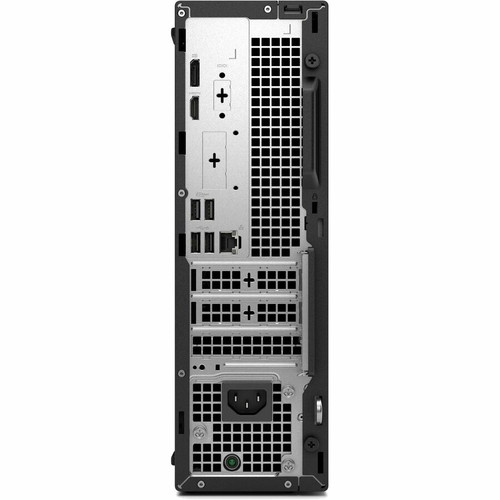
Dell 13J6D Pro QCS1250 Slim PC - Intel Core Ultra 5235 14-Core - 8 GB DDR5 - 256 GB NVMe SSD - Windows 11 Pro - Standard Black

Business volume discounts
Technical guidance
Preparation & staging
QC · ON · AB · BC
Product Features
Product Overview
The Dell Pro QCS1250 is a compact desktop computer engineered for modern business environments where space efficiency and reliable performance are equally important. Built around Intel's Core Ultra 5 235 processor, this system delivers 14-core processing power with integrated AI acceleration through the Intel AI Boost NPU, making it suitable for workloads that benefit from intelligent performance tuning and fast task handling.
Configured with 8 GB of DDR5 memory and a 256 GB PCIe NVMe SSD, the QCS1250 provides a responsive foundation for daily productivity, multitasking, and application responsiveness. Its Slim PC chassis design minimizes desk footprint without sacrificing essential connectivity, including Gigabit Ethernet and a versatile array of USB ports. Pre-installed with Windows 11 Pro, this desktop arrives ready for deployment in professional settings that demand a balance of capability, manageability, and physical practicality.
Technical Overview
At the heart of the Pro QCS1250 is the Intel Core Ultra 5 235, a tetradeca-core processor operating at a base frequency of 3.40 GHz with Intel Turbo Boost technology pushing performance up to 5.00 GHz when needed. This CPU is part of Intel's Core Ultra series, which incorporates a dedicated Neural Processing Unit (NPU) branded as AI Boost. The NPU delivers 13 TOPS of AI performance, offloading AI-driven tasks from the CPU to improve efficiency in scenarios like background blur, noise cancellation, and adaptive system tuning.
System memory utilizes a single 8 GB module of DDR5 SDRAM, providing higher bandwidth and improved power efficiency compared to previous generations. Storage is handled by a 256 GB M.2 SSD using the PCI Express NVMe 4.0 interface, enabling rapid boot times, fast application launches, and quick file transfers. Graphics are powered by Intel integrated graphics with memory shared from the system's DDR5 pool, sufficient for desktop productivity, multimedia playback, and light graphical tasks.
Key Product Advantages
The Dell Pro QCS1250 combines modern hardware architecture with a practical, space-conscious design to address common business computing needs effectively. Its integration of an AI-capable processor, fast storage, and a professional operating system creates a cohesive platform for everyday office tasks, collaborative applications, and managed IT environments.
AI-Enhanced Performance
The Intel Core Ultra 5 processor includes a dedicated AI Boost NPU that handles background AI workloads independently, allowing the CPU to focus on primary application tasks. This can result in smoother performance during video calls, faster photo edits with AI-assisted tools, and more responsive system behavior in applications optimized for NPU offloading.
- 13 TOPS NPU performance for AI tasks
- Reduces CPU load during AI operations
- Supports Windows Studio Effects and Copilot+ PC features
Compact and Serviceable Design
The Slim PC form factor occupies minimal desk space while retaining tool-less access for easier maintenance and upgrades. This design allows IT staff or users to quickly access internal components like memory and storage without specialized tools, supporting future expansion or replacement as needs evolve.
- Small footprint saves desk space
- Tool-less chassis simplifies upgrades
- Security slot for physical asset protection
Professional-Grade Connectivity
With eight USB ports including a front-panel USB Type-C connector, the QCS1250 accommodates peripherals, external storage, and docking stations without requiring additional hubs. Gigabit Ethernet ensures reliable, high-speed wired network access, which is essential for stable connections in office environments where consistent bandwidth is critical.
- USB Type-C on front for modern devices
- Gigabit Ethernet for fast wired networking
- Multiple USB 3.2 Gen 1 ports for faster data transfers
Deployment / Use Cases
This desktop is well-suited for general office productivity, front-desk stations, educational settings, and departmental workgroups where a reliable, compact computer is needed. Its combination of capable processing, fast storage, and professional OS makes it a fit for tasks like document editing, spreadsheet analysis, web browsing, email, video conferencing, and light departmental applications.
The lack of integrated wireless LAN means it is ideally deployed in wired network environments, such as corporate offices with structured cabling, call centers, or retail point-of-sale setups where Ethernet connectivity is standard. The tool-less access and upgrade-friendly design also make it a practical choice for organizations that prefer to maintain and refresh hardware internally over time.
Office Productivity Workstation
Deploy as a primary computer for employees handling Microsoft Office, web applications, PDFs, and business software. The Core Ultra 5 processor and NVMe SSD keep everyday applications responsive, while the multiple USB ports support keyboards, mice, printers, and external drives.
Fixed-Function or Task-Specific Station
Use in environments where the computer serves a dedicated role, such as a reception desk, library catalog terminal, or digital signage controller. The compact size fits neatly in constrained spaces, and the wired Ethernet ensures consistent network availability for cloud-based services or local server access.
Localization and Operating System
The system ships with Windows 11 Pro pre-installed, providing a full-featured professional operating system with enhanced security, management tools, and productivity features like Windows Sandbox and BitLocker encryption. The OS supports multiple interface languages, including English, Spanish, French, and Brazilian Portuguese, allowing deployment in multilingual workplaces or regions.
Keyboard localization is configured for English (United States) layout, matching standard US keyboard conventions. This localization ensures that key placements, shortcuts, and special characters behave as expected for users accustomed to US keyboard formats, reducing training overhead and improving typing accuracy in English-dominant environments.
Physical Profile
The Slim PC chassis measures 11.95 inches in height, 3.74 inches in width, and 11.54 inches in depth, presenting a vertical footprint that conserves desk surface area. Finished in a standard black color, the exterior maintains a professional appearance that blends into most office decors. Weighing approximately 12.99 pounds, the system remains portable enough for occasional relocation or reconfiguration within a workspace.
Its vertical orientation and modest dimensions allow it to be placed beside a monitor, under a desk, or in other space-constrained locations without obstructing workflow. The design includes ventilation appropriate for the 180 W power supply and processor thermal requirements, ensuring stable operation in typical office ambient temperatures.
- Width
- 3.74" (95 mm)
- Depth
- 11.54" (293.12 mm)
- Height
- 11.95" (303.53 mm)
- Weight
- 12.99 lb (5892.16 g)
What's in the Box
The desktop arrives with essential accessories to begin operation immediately after unboxing.
Highlights
- Intel Core Ultra 5 235 processor with 14 cores, 14 threads, and up to 5.00 GHz turbo frequency
- Integrated Intel AI Boost NPU delivers 13 TOPS for AI-accelerated tasks and system optimization
- 8 GB of DDR5 SDRAM memory provides efficient multitasking and application performance
- 256 GB PCIe NVMe 4.0 SSD enables fast boot times, quick application launches, and responsive file access
- Windows 11 Pro operating system with professional management features and multi-language support
- Slim PC form factor conserves desk space with a compact vertical design
- Gigabit Ethernet ensures reliable, high-speed wired network connectivity
- Tool-less chassis access simplifies upgrades and maintenance for memory or storage
- Eight USB ports include a front-panel USB Type-C for modern peripherals
- Standard black finish and professional design suitable for office environments
Specifications
| Specifications | |
|---|---|
| Manufacturer | Dell Technologies |
| Manufacturer Part Number | 13J6D |
| Brand Name | Dell |
| Product Line | Pro |
| Product Model | QCS1250 |
| Product Name | Pro Slim QCS1250 |
| Product Type | Desktop Computer |
| Technical Information | |
| AI-powered | Yes |
| Processor | |
| Processor Manufacturer | Intel |
| Processor Type | Core Ultra 5 |
| Processor Model | 235 |
| Processor Core | Tetradeca-core (14 Core) |
| Processor Threads | 14 |
| Processor Speed | 3.40 GHz |
| Maximum Turbo Speed | 5 GHz |
| NPU Manufacturer | Intel |
| NPU Name | AI Boost |
| NPU Performance | 13 TOPS |
| Chipset | |
| Chipset Manufacturer | Intel |
| Memory | |
| Standard Memory | 8 GB |
| Memory Technology | DDR5 SDRAM |
| Memory Configuration | 1 x 8GB |
| Storage | |
| Drive Type | SSD |
| Total Solid State Drive Capacity | 256 GB |
| Solid State Drive Interface | PCI Express NVMe 4.0 |
| SSD Form Factor | M.2 |
| Display & Graphics | |
| Graphics Controller Manufacturer | Intel |
| Graphics Memory Technology | DDR5 SDRAM |
| Graphics Memory Accessibility | Shared |
| Network & Communication | |
| Ethernet Technology | Gigabit Ethernet |
| Wireless LAN | No |
| Input Devices | |
| Keyboard Localization | English (US) |
| Interfaces/Ports | |
| Total Number of USB Ports | 8 |
| Number of USB 2.0 Ports (Front) | 2 |
| Number of USB 2.0 Ports (Rear) | 2 |
| Number of USB 3.2 Gen 1 Ports | 3 |
| USB Type-C (Front) | Yes |
| USB Type-C Detail | 1 USB 3.2 Gen 1 (5 Gbps) Type-C® port |
| Operating System | |
| Operating System Platform | Windows |
| Operating System | Windows 11 Pro |
| Operating System Language | English/Spanish/French/Brazilian Portuguese |
| Power Description | |
| Maximum Power Supply Wattage | 180 W |
| Physical Characteristics | |
| Color Family | Black |
| Product Color | Standard Black |
| Form Factor | Slim PC |
| Height | 11.95" (303.53 mm) |
| Width | 3.74" (95 mm) |
| Depth | 11.54" (293.12 mm) |
| Weight (Approximate) | 12.99 lb (5892.16 g) |
| Miscellaneous | |
| Package Contents | Pro Slim QCS1250 Keyboard Mouse System Power Cord (US) Quick Start Quide Documentation |
| Features | Security Slot,Tool-less Access |
| Energy Star | Yes |
| Country of Origin | Mexico |
| Environmentally Friendly | Yes |
| Environmental Certification | Electronic Product Environmental Assessment Tool Silver (EPEAT Silver) |
| Warranty | |
| Limited Warranty | 3 Year |
| Additional Warranty Information | 3Y Basic Onsite Service after remote diagnosis with Hardware-Only Support-Disti SnS |
User Manual
FAQ
What processor does the Dell Pro QCS1250 use, and what are its key features?
This desktop is equipped with an Intel Core Ultra 5 235 processor. It features 14 cores and 14 threads, with a base clock speed of 3.40 GHz and a maximum turbo frequency of 5.00 GHz. A significant addition is the integrated Intel AI Boost Neural Processing Unit (NPU), which provides 13 TOPS of AI performance. This NPU handles AI-related tasks independently, improving efficiency in applications that use AI for features like background blur, noise suppression, or adaptive performance tuning.
How much memory and storage are installed, and what types are they?
The system comes with 8 GB of DDR5 SDRAM memory installed as a single 8 GB module. DDR5 offers higher bandwidth and better power efficiency compared to DDR4. For storage, it includes a 256 GB solid-state drive using the PCI Express NVMe 4.0 interface in the M.2 form factor. This NVMe SSD delivers significantly faster read and write speeds than traditional SATA SSDs, resulting in quicker system boot, faster application loading, and snappier overall responsiveness.
Does this computer have wireless networking (Wi-Fi)?
No, the Dell Pro QCS1250 does not include integrated wireless LAN (Wi-Fi). It relies on Gigabit Ethernet for network connectivity, providing a stable, high-speed wired connection. This makes it ideal for office environments with structured cabling, where wired networks are preferred for reliability and security. If wireless connectivity is required, it can be added via a USB Wi-Fi adapter or a compatible PCIe network card, assuming internal expansion is feasible.
What operating system is pre-installed, and what language support does it offer?
The desktop ships with Windows 11 Pro already installed. Windows 11 Pro includes advanced features like BitLocker encryption, Windows Sandbox for safe application testing, and enhanced management tools for IT departments. The operating system supports multiple interface languages, allowing users to switch between English, Spanish, French, and Brazilian Portuguese. This multilingual capability facilitates deployment in diverse workplaces or regions where users may prefer different language settings.
What are the physical dimensions and form factor of this desktop?
The Dell Pro QCS1250 uses a Slim PC form factor, designed to save desk space. Its dimensions are 11.95 inches in height, 3.74 inches in width, and 11.54 inches in depth. This vertical orientation minimizes the footprint on a desk or workspace. The system weighs approximately 12.99 pounds, making it relatively portable for a desktop. The chassis is finished in standard black, offering a professional look that fits well in office environments.
What is included in the box with the desktop computer?
The package contains the Pro Slim QCS1250 desktop computer itself, a keyboard, a mouse, a system power cord with a US plug, a quick start guide, and documentation. These accessories provide everything needed to set up and begin using the computer immediately out of the box for basic operations. The inclusion of a keyboard and mouse means no additional peripherals are required for initial setup, though users may choose to upgrade or supplement them based on personal preference or specific workflow needs.
| Qty | Price | Available |
|---|


