Shipping included*
Exclusions
Additional shipping fees may apply in rare circumstances for deliveries outside standard service areas. In most cases, this only potentially affects shipments to the Northwest Territories and Yukon, as well as certain heavy or oversized items.
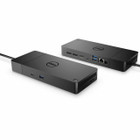
Dell DELL-WD19S130W WD19S 130W USB-C Docking Station - Triple Display 4K Support - Gigabit Ethernet - 6 USB Ports

Business volume discounts
Technical guidance
Preparation & staging
QC · ON · AB · BC
Product Features
Technical Overview
Engineered for professional use, the WD19S features a USB-C host interface that consolidates data, video, and power delivery through one cable. The dock supports DisplayPort 1.4 and HDMI outputs, allowing flexible monitor configurations across three displays. Its USB portfolio includes three USB 3.1 Gen 1 Type-A ports and two USB-C 3.1 Gen 2 ports, plus one MFDP USB-C port for host connectivity.
Network capabilities are anchored by Gigabit Ethernet, ensuring low-latency connections for data-intensive tasks. The dock is compatible with Windows 10, Windows 11, Ubuntu, and Linux operating systems, providing broad software support for diverse IT environments.
This section brings together practical product details such as Number of Displays Supported, Supported Resolutions, Screen Mode Supported, Ethernet Technology, so buyers can judge configuration, deployment fit, and day-to-day suitability with less guesswork.
A strong technical summary explains how the product's interfaces, hardware profile, and operating characteristics work together in real deployment. Buyers often need this context to confirm compatibility with existing devices, expected performance in daily use, and whether installation will be straightforward for IT staff or end users.
Key Product Advantages
The WD19S stands out with its ability to drive three high-resolution displays from a single USB-C connection, reducing cable clutter and simplifying desk management. Its 130W power delivery supports demanding laptops, while the versatile port selection accommodates peripherals, storage devices, and network needs.
These strengths make the product easier to deploy and manage in real environments, especially where reliability, usability, and day-to-day operational continuity matter. Notable benefits include Enhanced Productivity, Robust Connectivity.
Enhanced Productivity
Triple display support expands screen real estate for multitasking, video editing, and financial modeling workflows.
- 4K resolution on each display
- Simultaneous multi-monitor output
- Reduced cable management
Robust Connectivity
Six USB ports and Gigabit Ethernet ensure all essential peripherals and network connections are readily available.
- USB 3.1 Gen 2 speeds
- Wired network stability
- Peripheral expansion
Deployment / Use Cases
This docking station is ideal for professionals who require extended desktop setups, such as software developers, data analysts, and creative designers. Its triple display capability supports complex workflows that benefit from multiple application windows, reference materials, and real-time data visualization.
In corporate environments, the WD19S facilitates hot-desking and shared workspace configurations by allowing users to quickly connect their laptops to full desktop peripherals. The Kensington security slot adds theft deterrence for open office layouts, while the compatibility with Dell commercial laptops ensures seamless integration into existing IT ecosystems.
Office Workstations
Deploy in cubicles or shared desks to provide employees with instant access to monitors, network, and peripherals.
Remote & Hybrid Work
Enable home office setups with a single cable connection to multiple monitors and wired internet for reliable performance.
Physical Profile
The dock measures 8.07 inches in height, 3.54 inches in width, and 1.14 inches in depth, with a weight of approximately 1.29 pounds. This compact design conserves desk space while remaining sturdy enough for daily use. The matte black finish blends with professional office equipment, and the included Kensington security slot allows for physical locking to prevent unauthorized removal.
The physical profile is practical for deployment planning because the dimensions and weight are clearly defined: 8.07" (205 mm), 3.54" (90 mm), 1.14" (29 mm), 1.29 lb (585.13 g). This helps confirm rack, shelf, desk, or cabinet fit before installation.
- Width
- 3.54" (90 mm)
- Depth
- 1.14" (29 mm)
- Height
- 8.07" (205 mm)
- Weight
- 1.29 lb (585.13 g)
What's in the Box
The package includes the docking station with an attached USB-C cable, a 130W power adapter, and the dock unit itself, providing everything needed for immediate setup.
Highlights
- Supports three external displays simultaneously
- Delivers up to 4K UHD resolution on each display
- 130W power delivery charges compatible laptops
- Six USB ports include USB 3.1 Gen 2 and Type-A
- Gigabit Ethernet for stable wired networking
- Compatible with Windows, Ubuntu, and Linux
- Designed for Dell commercial laptops
- Includes Kensington security slot for theft prevention
- Compact footprint saves desk space
- Backed by a three-year warranty
Specifications
| Specifications | |
|---|---|
| Manufacturer | Dell Technologies |
| Manufacturer Part Number | DELL-WD19S130W |
| Brand Name | Dell |
| Product Model | WD19S |
| Product Name | Dock - WD19S 130W |
| Packaged Quantity | 1 |
| Product Type | Docking Station |
| Technical Information | |
| Number of Displays Supported | 3 |
| Supported Resolutions | 3840 x 2160 |
| Screen Mode Supported | 4K,Full HD,QHD |
| Device Supported | Notebook |
| Network & Communication | |
| Ethernet Technology | Gigabit Ethernet |
| Interfaces/Ports | |
| Host Interface | USB Type C |
| Total Number of USB Ports | 6 |
| Number of USB 3.1 Gen 1 Type-A Ports | 3 |
| USB Type-C | Yes |
| USB Type-C Detail | 1 x MFDP USB-C, 2 x USB-C 3.1 Gen 2 |
| USB Type-A | Yes |
| Number of DisplayPorts | 2 |
| DisplayPort | Yes |
| DisplayPort Version | 1.4 |
| Number of HDMI Ports | 1 |
| HDMI | Yes |
| Software | |
| Operating System Supported | Windows 10,Windows 11,Ubuntu,Linux |
| Power Description | |
| Maximum Power Supply Wattage | 130 W |
| Physical Characteristics | |
| Height | 8.07" (205 mm) |
| Width | 3.54" (90 mm) |
| Depth | 1.14" (29 mm) |
| Weight (Approximate) | 1.29 lb (585.13 g) |
| Miscellaneous | |
| Package Contents | Dock - WD19S 130W USB-C Cable attached 1 x 130W Power Adapter |
| Kensington Security Slot | Yes |
| Compatibility | Dell Commercial Laptops |
| Warranty | |
| Limited Warranty | 3 Year |
| Additional Warranty Information | 3Y Basic Hardware Service with Advanced Exchange |
User Manual
FAQ
How many displays can the Dell WD19S docking station support?
The Dell WD19S supports up to three external displays simultaneously. You can connect monitors using the two DisplayPort 1.4 outputs and one HDMI port, with each display capable of resolutions up to 4K UHD (3840 x 2160). This triple display setup is ideal for multitasking, design work, or financial analysis where extended screen real estate improves productivity.
What is the power delivery capability of this docking station?
This docking station provides 130W of power delivery through its USB-C host connection. This wattage is sufficient to charge most compatible Dell commercial laptops while in use, ensuring your device remains powered during intensive tasks without needing a separate charger. The included 130W power adapter supplies the necessary energy for both the dock and the connected laptop.
Which operating systems are compatible with the WD19S dock?
The WD19S is compatible with Windows 10, Windows 11, Ubuntu, and Linux operating systems. This broad OS support makes it suitable for diverse IT environments, from standard corporate Windows deployments to developer workstations running Linux distributions. Drivers are typically available from Dell's support site to ensure full functionality across these platforms.
What types of USB ports are available on the docking station?
The dock features a total of six USB ports. This includes three USB 3.1 Gen 1 Type-A ports, two USB-C 3.1 Gen 2 ports, and one MFDP USB-C port for host connectivity. These ports support high-speed data transfer for peripherals like external storage, keyboards, mice, and smartphones, with the USB-C Gen 2 ports offering faster throughput for demanding devices.
Does the docking station include Ethernet connectivity?
Yes, the WD19S includes a Gigabit Ethernet port. This provides a stable, wired network connection with speeds up to 1000 Mbps, which is essential for large file transfers, video conferencing, and accessing network resources without the latency or interference sometimes associated with Wi-Fi. It's particularly valuable in office environments where network reliability is critical.
What is the warranty coverage for the Dell WD19S docking station?
Dell provides a three-year limited warranty for the WD19S docking station. This warranty includes basic hardware service with advanced exchange, meaning defective units can be replaced promptly to minimize downtime. The coverage applies to manufacturing defects and ensures long-term reliability for business deployments, supporting the dock's use in professional settings.
What screen size is listed?
Dell Dock WD19S Power Delivery USB Type C Docking Station Supports Three Displays 4K Full HD QHD Supported Notebook For AC W X DELL-WD19S130W is best judged through its screen, connectivity, and installation specifications, which help buyers confirm visual fit and deployment suitability.
What resolution or display format is specified?
It features a display specification of 3840 x 2160, giving you clear visuals for work and media use.
| Qty | Price | Available |
|---|