



Dell MS300-BK-R-NA Full-size Wireless Mouse

Business volume discounts
Technical guidance
Preparation & staging
QC · ON · AB · BC
Product Features
Product Overview
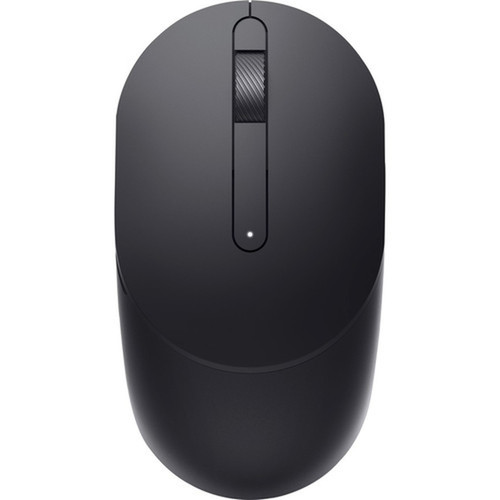
The Dell MS300 wireless mouse delivers dependable everyday pointing performance in a full-size design. Engineered for comfort during extended use, this mouse provides a straightforward wireless solution that eliminates cable clutter while maintaining reliable connectivity.
With its simple plug-and-play setup, the MS300 mouse integrates seamlessly into office, home, or educational environments where basic pointing functionality is required without complex configuration. The full-size form factor accommodates various hand sizes and grip styles, making it suitable for shared workstations or individual users seeking a comfortable daily driver.
Relevant factors for this section include Pointing Device Connectivity Technology, Mouse Size Class, Limited Warranty, Additional Warranty Information. When those points are considered together, they give buyers a clearer picture of how the product is equipped, how it fits into deployment, and what kind of day-to-day role it is meant to support.
Technical Overview
The Dell MS300 mouse operates on wireless technology, providing freedom of movement without the limitations of wired connections. This wireless implementation ensures stable cursor control across typical desktop surfaces while maintaining consistent performance for everyday computing tasks.
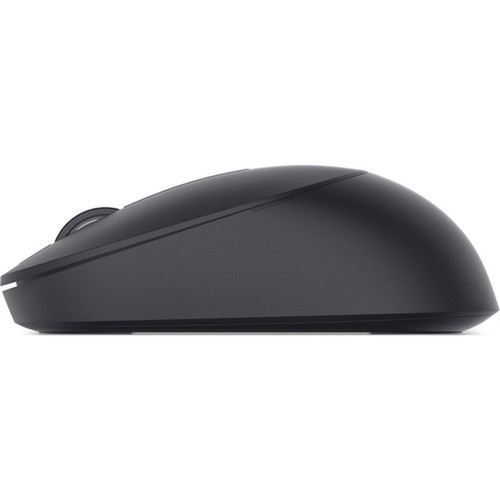
As a full-size pointing device, the MS300 offers a substantial grip area and button placement optimized for standard hand positioning. The design prioritizes ergonomic comfort during prolonged use sessions, reducing strain during document editing, web browsing, and general navigation activities.
Relevant factors for this section include Pointing Device Connectivity Technology, Mouse Size Class, Limited Warranty, Additional Warranty Information. When those points are considered together, they give buyers a clearer picture of how the product is equipped, how it fits into deployment, and what kind of day-to-day role it is meant to support.
A strong technical summary explains how the product's interfaces, hardware profile, and operating characteristics work together in real deployment. Buyers often need this context to confirm compatibility with existing devices, expected performance in daily use, and whether installation will be straightforward for IT staff or end users.
Key Product Advantages
The Dell MS300 mouse combines wireless convenience with full-size comfort to create a practical pointing solution for everyday computing needs. Its straightforward design focuses on reliability rather than complex features, making it an accessible option for users who prioritize dependable performance.
These strengths make the product easier to deploy and manage in real environments, especially where reliability, usability, and day-to-day operational continuity matter. Notable benefits include Wireless Freedom, Comfortable Design.
Wireless Freedom
Eliminate cable management concerns with stable wireless connectivity that maintains consistent performance across standard desktop surfaces.
- No cable clutter
- Reliable connection
- Easy setup
Comfortable Design
The full-size form factor provides ample surface area for comfortable hand positioning during extended use sessions.
- Reduces hand strain
- Accommodates various grip styles
- Suitable for shared workstations
Deployment / Use Cases
The Dell MS300 wireless mouse serves effectively in environments where basic, reliable pointing functionality is the primary requirement. Its straightforward operation makes it suitable for general office workstations, educational computer labs, home office setups, and reception areas where multiple users might share equipment.
This mouse excels in scenarios where users need to transition between tasks without interruption from connectivity issues or discomfort. The full-size design supports extended document editing sessions, spreadsheet navigation, presentation control, and general web browsing where consistent cursor response matters more than specialized gaming or design features.
Office Workstations
Provide reliable pointing for daily productivity tasks without complex setup or maintenance requirements.
Educational Environments
Offer durable, comfortable pointing devices for computer labs and classroom stations where simplicity and reliability are priorities.
Highlights
- Wireless connectivity eliminates cable clutter
- Full-size design for comfortable extended use
- 1-year limited warranty with advanced exchange service
- Plug-and-play setup requires minimal configuration
- Suitable for office, home, and educational environments
- Reliable performance for everyday computing tasks
- Stable cursor control across standard surfaces
- Accessible pointing solution for multiple users
Specifications
| Specifications | |
|---|---|
| Manufacturer | Dell Technologies |
| Manufacturer Part Number | MS300-BK-R-NA |
| Brand Name | Dell |
| Product Model | MS300 |
| Product Name | MS300 Mouse |
| Product Type | Mouse |
| Pointing Device | |
| Pointing Device Connectivity Technology | Wireless |
| Mouse Size Class | Full-size |
| Warranty | |
| Limited Warranty | 1 Year |
| Additional Warranty Information | 1 year Advanced Exchange Service |
FAQ
What type of wireless technology does the Dell MS300 mouse use?
The Dell MS300 mouse utilizes standard wireless connectivity technology that provides reliable cursor control without cables. This wireless implementation maintains stable performance across typical desktop surfaces and offers plug-and-play simplicity for quick setup in office, home, or educational environments.
Is the Dell MS300 mouse comfortable for extended use?
Yes, the Dell MS300 features a full-size design that provides ample surface area for comfortable hand positioning during prolonged use. The form factor accommodates various grip styles and hand sizes, reducing strain during extended document editing, web browsing, and general navigation sessions.
What warranty coverage comes with the Dell MS300 mouse?
The Dell MS300 mouse includes a 1-year limited warranty backed by Dell's advanced exchange service. This warranty support ensures prompt replacement if hardware issues arise, minimizing downtime for users who depend on reliable pointing functionality for daily computing tasks.
Does the Dell MS300 mouse require special drivers or software?
No, the Dell MS300 mouse operates with plug-and-play functionality that typically doesn't require additional drivers or software installation. The wireless connectivity establishes automatically, making it ready for immediate use with standard operating systems in most computing environments.
What environments is the Dell MS300 mouse best suited for?
The Dell MS300 mouse excels in office workstations, educational computer labs, home office setups, and reception areas where basic, reliable pointing functionality is the primary requirement. Its straightforward operation and comfortable design make it suitable for shared workstations or individual users performing everyday computing tasks.
How does the full-size design benefit different users?
The full-size design of the Dell MS300 mouse accommodates various hand sizes and grip styles, making it versatile for multiple users in shared environments. The substantial grip area provides comfort during extended use, whether for standard palm grips or other common holding positions during productivity tasks.
| Qty | Price | Available |
|---|