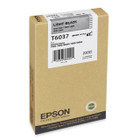
Original Epson T603700 Light Black Ink Cartridge - 220 mL Inkjet - For Stylus Pro 7800/7880/9800/9880

Business volume discounts
Technical guidance
Preparation & staging
QC · ON · AB · BC
Product Features
Technical Overview
This cartridge utilizes Epson's UltraChrome K3 ink technology, which incorporates light black pigment to improve grayscale reproduction and photographic detail. The 220 mL capacity supports extended printing sessions, reducing the frequency of replacements in high-volume environments.
Designed for inkjet print technology, it integrates seamlessly with Epson's print head systems to deliver precise droplet placement and consistent ink flow. The cartridge construction ensures airtight sealing to prevent drying and maintain ink integrity during storage and use.
Key Product Advantages
For buyers comparing similar models, the strongest advantage is usually the balance between dependable day-to-day operation and a simpler rollout experience. That means less time spent troubleshooting fit, compatibility, or user adoption after installation, which is especially important for shared business environments and repeat purchasing decisions.
Deployment / Use Cases
Deploy this cartridge in Epson Stylus Pro 7800, 7880, 9800, and 9880 printers for applications demanding professional print quality. It suits environments such as photo labs, graphic design studios, and corporate printing departments where output consistency and color fidelity are priorities.
Professional Photography and Fine Art
Ideal for photographers and artists requiring precise grayscale reproduction and smooth tonal transitions in black-and-white prints. The light black ink minimizes metamerism and bronzing effects.
- Gallery-quality monochrome prints
- Archival-grade output for exhibitions
Graphic Design and Proofing
Supports color-critical proofing and design workflows where consistent color matching and detail accuracy are necessary. Ensures reliable performance in studio and production environments.
- Color-accurate proofs for client review
- High-volume printing for design studios
Highlights
- Genuine Epson Original Ink Cartridge with part number T603700
- Light Black UltraChrome K3 ink for enhanced grayscale and photo depth
- 220 mL ink volume for extended printing capacity
- Compatible with Epson Stylus Pro 7800, 7880, 9800, and 9880 printers
- Ensures consistent color fidelity and reduces graininess
- Inkjet print technology for precise droplet placement
- Packaged as 1 each for individual replacement
- Manufactured by Epson Corporation for guaranteed performance
Specifications
| Specifications | |
|---|---|
| Manufacturer | Epson Corporation |
| Manufacturer Part Number | T603700 |
| Brand Name | Epson |
| Product Name | Light Black Ink Cartridge |
| Product Condition | Original |
| Packaged Quantity | 1 Each |
| Product Type | Ink Cartridge |
| Technical Information | |
| Print Technology | Inkjet |
| Print Color | Light Black |
| Ink Volume | 220 mL |
| Miscellaneous | |
| Compatibility | Epson Stylus Pro 7880 |
| Country of Origin | China |
FAQ
What Epson printer models is the T603700 cartridge compatible with?
The Epson T603700 cartridge is primarily designed for the Epson Stylus Pro 7880. It is also fully compatible with the Stylus Pro 7800, 9800, and 9880 models, providing consistent performance across these professional-grade inkjet printers.
What is the ink volume of the T603700 cartridge?
This cartridge contains 220 mL of UltraChrome K3 light black ink. This capacity supports extended printing sessions, making it suitable for high-volume environments like photo labs and design studios where frequent cartridge changes are disruptive.
Why is light black ink used instead of standard black?
Light black ink improves grayscale reproduction by providing smoother tonal transitions and reducing graininess in monochrome and photographic prints. It enhances detail in shadows and midtones, which is critical for professional black-and-white output and color-accurate proofing.
Is this an original Epson cartridge or a compatible alternative?
This is a genuine Epson Original Ink Cartridge, manufactured by Epson Corporation. Using original cartridges ensures optimal print quality, maintains printer warranty coverage, and prevents potential issues like clogging or color shifts that can occur with third-party alternatives.
| Qty | Price | Available |
|---|