








HP 5TW10AA#ABA USB-C Dock G5 for Business Notebooks - 100W Power Delivery - 3 Display Support - 4K/QHD/Full HD - 4x USB-A - Ethernet - HDMI

Business volume discounts
Technical guidance
Preparation & staging
QC · ON · AB · BC
Product Features
Technical Overview
Engineered for reliability and broad compatibility, the HP USB-C Dock G5 connects via a 1-meter USB-C cable to your host system. It provides a dedicated USB-C 3.2 Gen 1 port with 15W power output for charging peripherals, alongside four USB 3.2 Gen 1 Type-A ports for high-speed data transfer.
Video connectivity is handled by two DisplayPort 1.4 outputs and one HDMI port, enabling flexible multi-monitor configurations. The integrated Gigabit Ethernet port ensures stable, high-speed network access, while the 3.5mm headphone/microphone combo port supports audio conferencing and media playback.
Relevant factors for this section include Connectivity Technology, Number of Displays Supported, Screen Mode Supported, Ethernet Technology. When those points are considered together, they give buyers a clearer picture of how the product is equipped, how it fits into deployment, and what kind of day-to-day role it is meant to support.
Key Product Advantages
The HP USB-C Dock G5 transforms your notebook into a full-featured desktop workstation with minimal cable management. Its 100W power delivery charges most business laptops at full speed, eliminating the need for a separate power adapter.
Universal Compatibility
Works with Windows 10, Windows 11, macOS, and ChromeOS. Tested with popular business notebooks from Apple, Dell, Google, and Lenovo, including MacBook Pro/Air (Intel and M1), Dell Latitude/XPS, Google PixelBook Go, and Lenovo ThinkPad/ThinkBook series.
- Cross-Platform Support
- Broad Notebook Validation
- No Driver Hassles
Simplified Connectivity
A single USB-C connection handles power, data, and video, reducing desk clutter. The dock includes essential ports for displays, storage, networking, and audio, all accessible from one centralized hub.
- One-Cable Simplicity
- Comprehensive Port Selection
- Clean Workspace
Deployment / Use Cases
This docking station is built for business environments where employees need to quickly connect and disconnect their notebooks while maintaining access to full desktop peripherals. It is particularly effective in hot-desking setups, shared workspaces, and remote work scenarios.
Financial analysts can drive multiple high-resolution displays for real-time data monitoring. Creative professionals benefit from extended screen real estate for design tools and video editing. IT departments appreciate the standardized connectivity for easier support and deployment across diverse notebook fleets.
Hot-Desking & Hybrid Work
Employees plug in one cable to access dual or triple monitors, wired internet, external storage, and audio devices, making desk transitions seamless and efficient.
Conference Room & Meeting Spaces
Install docks in meeting rooms to allow presenters to connect laptops instantly to room displays and audio systems without adapter hunting or compatibility issues.
Physical Profile
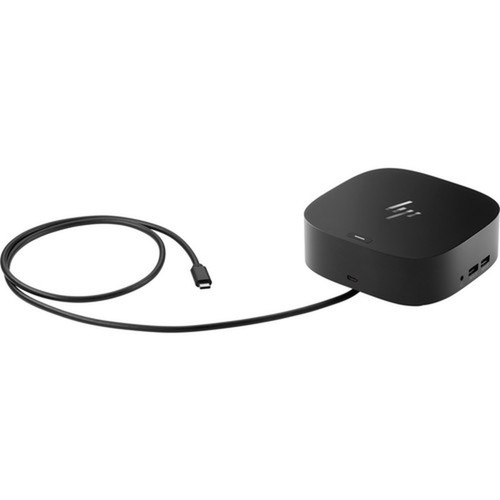
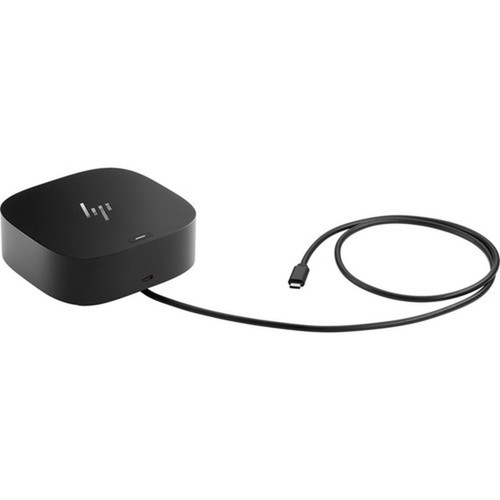
The dock features a sleek black finish that matches professional office aesthetics. Its compact, square design (4.80" wide x 4.80" deep x 1.77" high) occupies minimal desk space. The included Kensington security slot allows physical locking to prevent theft in open or shared environments.
The physical profile is practical for deployment planning because the dimensions and weight are clearly defined: 1.77" (45 mm), 4.80" (122 mm), 4.80" (122 mm), 1.65 lb (750 g). This helps confirm rack, shelf, desk, or cabinet fit before installation.
- Width
- 4.80" (122 mm)
- Depth
- 4.80" (122 mm)
- Height
- 1.77" (45 mm)
- Weight
- 1.65 lb (750 g)
What's in the Box
The package includes everything needed for immediate setup and use.
Highlights
- Supports up to 3 external displays at 4K, QHD, or Full HD resolution
- Delivers 100W of power to charge your notebook through a single USB-C cable
- Includes 4x USB 3.2 Gen 1 Type-A ports for high-speed data transfer
- Provides Gigabit Ethernet, HDMI, and dual DisplayPort 1.4 outputs
- Compatible with Windows, macOS, and ChromeOS operating systems
- Works with popular business notebooks from Apple, Dell, Google, and Lenovo
- Features a 3.5mm headphone/microphone combo port for audio
- Compact black design with Kensington security slot for theft prevention
- Includes AC adapter, power cord, and quick start guide
- Backed by a 1-year limited warranty
Specifications
| Specifications | |
|---|---|
| Manufacturer | HP Inc. |
| Manufacturer Part Number | 5TW10AA#ABA |
| Brand Name | HP |
| Product Name | USB-C Dock G5 for business |
| Packaged Quantity | 1 |
| Product Type | Docking Station |
| Technical Information | |
| Connectivity Technology | Wired |
| Number of Displays Supported | 3 |
| Screen Mode Supported | 4K,QHD,Full HD |
| Device Supported | Notebook |
| Network & Communication | |
| Ethernet Technology | Ethernet |
| Interfaces/Ports | |
| Host Interface | USB Type C |
| Number of USB 3.2 Gen 1 Type-A Ports | 4 |
| USB Type-C | Yes |
| USB Type-C Detail | 1 x USB-C® 3.2 Gen 1 port with data and power out (15W), 1 x USB-C® cable to connect to host system (1 meter cable length) |
| Number of USB Type-A Ports | 4 |
| USB Type-A | Yes |
| Number of RJ-45 Ports | 1 |
| Network (RJ-45) | Yes |
| Number of DisplayPort Outputs | 2 |
| DisplayPort | Yes |
| DisplayPort Version | 1.4 |
| Headphone/Microphone Combo Port | Yes |
| Number of HDMI Outputs | 1 |
| HDMI | Yes |
| USB Power Delivery | 100W |
| Software | |
| Operating System Supported | Windows 10,Windows 11,macOS,ChromeOS |
| Physical Characteristics | |
| Product Color | Black |
| Height | 1.77" (45 mm) |
| Width | 4.80" (122 mm) |
| Depth | 4.80" (122 mm) |
| Weight (Approximate) | 1.65 lb (750 g) |
| Miscellaneous | |
| Package Contents | USB-C Dock G5 AC Adapter AC Power cord Product notices Warranty Quick Start guide |
| Kensington Security Slot | Yes |
| Compatibility | Apple MacBook Pro 16 2020 (Intel Coffee Lake) Apple MacBook Air 2020 (Intel Ice Lake) Apple MacBook Pro 13 2020 (M1 chip) Apple MacBook Air 13 2020 (M1 chip) Dell 5300 Chrome Enterprise 2020 (Whiskey Lake) Dell Latitude 5400 2020 (Whiskey Lake) Dell Latitude 7400 2020 (Whiskey Lake) Dell Latitude 7420 2021 (Tiger Lake-U),Dell XPS 13 2020 (Whiskey Lake) Google PixelBook Go 2020 (Amber Lake Y) Google PixelBook Go 2 2020 (Amber Lake) Lenovo Thinkbook 14 2020 (Ice Lake) Lenovo T14 2020 (AMD Renoir) Lenovo X1 Carbon G8 Thinkpad 2020 (Whiskey Lake) |
| Country of Origin | Taiwan |
| Warranty | |
| Limited Warranty | 1 Year |
FAQ
How many displays can I connect with this docking station?
The HP USB-C Dock G5 supports up to three external displays simultaneously. You can connect monitors using the two DisplayPort 1.4 outputs and one HDMI port. Supported resolutions include 4K, QHD, and Full HD, allowing for flexible multi-monitor setups for productivity, analysis, or creative work.
Does this dock provide power to my laptop?
Yes, it delivers 100W of USB Power Delivery through the host USB-C connection, which is sufficient to charge most business notebooks at full speed. This eliminates the need for a separate laptop power adapter, simplifying your desk setup to a single cable for both power and connectivity.
What types of USB ports are available?
The dock includes four USB 3.2 Gen 1 Type-A ports for connecting peripherals like external drives, keyboards, and mice. It also has one additional USB-C 3.2 Gen 1 port that provides data and 15W of power output, suitable for charging smartphones or tablets while the dock is in use.
Is this docking station compatible with MacBooks?
Yes, it is compatible with many Apple MacBook models, including MacBook Pro 16-inch 2020 (Intel), MacBook Air 2020 (Intel), and MacBook Pro 13-inch 2020 and MacBook Air 13-inch 2020 with M1 chips. The dock supports macOS alongside Windows and ChromeOS for cross-platform flexibility.
What networking features does it include?
It has one Gigabit Ethernet RJ-45 port, providing stable, high-speed wired network connectivity. This is essential for reliable video conferencing, large file transfers, and secure corporate network access, especially in environments where Wi-Fi may be inconsistent or congested.
What is included in the box with the docking station?
The package contains the USB-C Dock G5 unit, an AC adapter, an AC power cord, product notices, warranty information, and a quick start guide. Everything required for immediate setup and operation is included, ensuring you can deploy the dock right out of the box.