
IntekView K95CFW Wired Keyboard - 78 Keys - French (Canada) Layout - USB Cable - Black

Business volume discounts
Technical guidance
Preparation & staging
QC · ON · AB · BC
Product Features
Technical Overview
This keyboard connects via a standard USB cable interface, eliminating the need for drivers or software installation on compatible systems. The 78-key layout includes all essential alphanumeric, function, and navigation keys while maintaining a space-efficient footprint.
Compatibility spans legacy and modern Windows operating systems, from Windows 98 through Windows 10, ensuring utility across diverse PC deployments. The platform support is specifically for PC environments.
Relevant factors for this section include Keyboard/Keypad Connectivity Technology, Number of Keys, Localization, Keyboard/Keypad Host Interface. When those points are considered together, they give buyers a clearer picture of how the product is equipped, how it fits into deployment, and what kind of day-to-day role it is meant to support.
A strong technical summary explains how the product's interfaces, hardware profile, and operating characteristics work together in real deployment. Buyers often need this context to confirm compatibility with existing devices, expected performance in daily use, and whether installation will be straightforward for IT staff or end users.
Key Product Advantages
The K95CFW combines practical functionality with broad system compatibility, making it a versatile choice for organizations managing mixed Windows environments.
These strengths make the product easier to deploy and manage in real environments, especially where reliability, usability, and day-to-day operational continuity matter. Notable benefits include Immediate Deployment, Ergonomic Flexibility.
Immediate Deployment
Plug-and-play operation means no driver installation is required—simply connect the USB cable to start typing immediately.
- No software setup needed
- Works instantly upon connection
Ergonomic Flexibility
The adjustable tilt feature allows users to customize the keyboard angle for reduced wrist strain during extended typing sessions.
- Multiple tilt positions
- Promotes comfortable typing posture
Deployment / Use Cases
This keyboard is ideal for general office workstations, educational computer labs, and home offices where reliable French-language input is required. Its compatibility with older Windows versions makes it suitable for legacy system support or environments with mixed OS deployments.
The compact size and lightweight design allow for easy portability between workstations or for use in space-constrained setups. Organizations can standardize on this model for consistent user experience across different departments or locations.
Relevant factors for this section include Keyboard/Keypad Connectivity Technology, Number of Keys, Localization, Keyboard/Keypad Host Interface. When those points are considered together, they give buyers a clearer picture of how the product is equipped, how it fits into deployment, and what kind of day-to-day role it is meant to support.
Office Workstations
Provides dependable daily typing for administrative tasks, data entry, and general computing in French-language business environments.
Educational Settings
Suitable for computer labs and classroom setups where simple, durable keyboards are needed for student use across various Windows versions.
Localization and Operating System
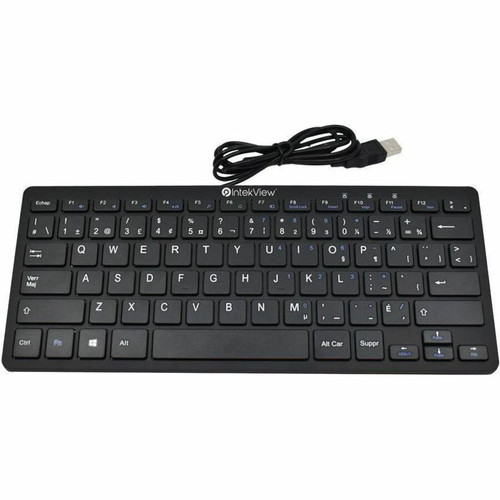
The keyboard features a French (Canada) layout with appropriate key labeling and character placement for Canadian French language requirements. This localization ensures proper accent characters and special symbols are readily accessible.
Operating system compatibility includes Windows 98, Windows XP, Windows 2000, Windows 2003, Windows Vista, Windows 7, Windows 8, and Windows 10. This extensive compatibility range supports both legacy systems and modern Windows installations without requiring additional drivers.
Relevant factors for this section include Keyboard/Keypad Connectivity Technology, Number of Keys, Localization, Keyboard/Keypad Host Interface. When those points are considered together, they give buyers a clearer picture of how the product is equipped, how it fits into deployment, and what kind of day-to-day role it is meant to support.
Physical Profile
With dimensions of 11.02 inches wide, 3.94 inches deep, and 0.39 inches high, the K95CFW maintains a compact footprint that conserves desk space. The black color scheme offers a neutral appearance suitable for professional environments.
Weighing approximately 11.64 ounces (330 grams), the keyboard is lightweight yet stable during typing. No assembly is required—the product is ready for immediate use upon unboxing.
- Width
- 11.02" (279.91 mm)
- Depth
- 3.94" (100.08 mm)
- Height
- 0.39" (9.91 mm)
- Weight
- 11.64 oz (330 g)
Highlights
- 78-key compact layout with French (Canada) localization
- USB cable connectivity for plug-and-play operation
- Compatible with Windows 98 through Windows 10
- Adjustable tilt mechanism for ergonomic typing
- Black finish for professional workstation integration
- No assembly required—ready to use immediately
- Lightweight design at 11.64 oz (330 g)
- Compact dimensions: 11.02" W × 3.94" D × 0.39" H
Specifications
| Specifications | |
|---|---|
| Manufacturer | Intekview |
| Manufacturer Part Number | K95CFW |
| Brand Name | IntekView |
| Product Name | Keyboard |
| Packaged Quantity | 1 Each |
| Product Type | Keyboard |
| Keyboard/Keypad | |
| Keyboard/Keypad Connectivity Technology | Cable |
| Number of Keys | 78 |
| Localization | French (Canada) |
| Keyboard/Keypad Features | Adjustable Tilt,Plug & Play |
| Interfaces/Ports | |
| Keyboard/Keypad Host Interface | USB |
| Physical Characteristics | |
| Color Family | Black |
| Product Color | Black |
| Keyboard/Keypad Height | 0.39" (9.91 mm) |
| Keyboard/Keypad Width | 11.02" (279.91 mm) |
| Keyboard/Keypad Depth | 3.94" (100.08 mm) |
| Weight (Approximate) | 11.64 oz (330 g) |
| Miscellaneous | |
| Operating System Compatibility | Windows 98,Windows XP,Windows 2000,Windows 2003,Windows Vista,Windows 7,Windows 8,Windows 10 |
| Platform Supported | PC |
| Assembly Required | No |
FAQ
What type of connectivity does this keyboard use?
The IntekView K95CFW uses a wired USB cable connection. This provides reliable data transmission without wireless interference concerns and enables plug-and-play functionality—no additional drivers or software installation is required for basic operation on compatible systems.
Which operating systems is this keyboard compatible with?
This keyboard is compatible with Windows 98, Windows XP, Windows 2000, Windows 2003, Windows Vista, Windows 7, Windows 8, and Windows 10. The extensive compatibility range makes it suitable for environments with mixed Windows versions, including legacy systems that might still be in use alongside newer installations.
What language layout does this keyboard feature?
The keyboard has a French (Canada) layout with appropriate key labeling for Canadian French language requirements. This includes accent characters and special symbols specific to French Canadian typing, making it ideal for users who need proper French language input without software remapping.
Does this keyboard require any assembly?
No assembly is required. The IntekView K95CFW comes fully assembled and ready for immediate use. Simply connect the USB cable to an available port on your PC, and the keyboard will be recognized automatically thanks to its plug-and-play design.
What ergonomic features does this keyboard offer?
The keyboard includes an adjustable tilt mechanism that allows users to change the typing angle for improved comfort. This feature helps reduce wrist strain during extended typing sessions by enabling a more natural hand position. The compact 78-key layout also contributes to a comfortable reach across all keys.
What are the physical dimensions and weight of this keyboard?
The keyboard measures 11.02 inches wide, 3.94 inches deep, and 0.39 inches high, with a weight of approximately 11.64 ounces (330 grams). These compact dimensions make it suitable for space-constrained workstations, while the lightweight design allows for easy portability between different computing setups.
| Qty | Price | Available |
|---|