IOGEAR GCS1732 MiniView KVM Switch - 2 x 1 - 2 x SPDB-15 - VGA/SVGA up to 2048 x 1536 - USB/PS/2 Compatible

Business volume discounts
Technical guidance
Preparation & staging
QC · ON · AB · BC
Product Features
Technical Overview
This KVM switch features two USB ports and one VGA port, supporting the connection of two computers to a single user station. The bonded KVM cables included in the package maintain signal integrity for reliable switching between systems. The front panel includes pushbuttons and hotkeys for intuitive computer selection, complemented by an LED display for real-time status monitoring.
Audio support is limited to 2-piece powered speaker systems, making it suitable for basic multimedia applications. The switch's compact form factor measures 5.20" wide x 3.50" deep x 1.70" high, with a lightweight design of approximately 12 ounces for easy placement on desks or in rack environments.
Relevant factors for this section include Number of Computers Supported, Number of Local Users Supported, Graphic Mode, Maximum Video Resolution. When those points are considered together, they give buyers a clearer picture of how the product is equipped, how it fits into deployment, and what kind of day-to-day role it is meant to support.
Key Product Advantages
The GCS1732 enhances workspace efficiency and security by isolating internet-connected and intranet-connected PCs, reducing the risk of cross-network contamination. Its ability to share USB peripherals like printers, scanners, speakers, and microphones between two computers eliminates the need for duplicate devices, lowering hardware costs and desk clutter.
Enhanced Security
Separate PCs on different networks while maintaining single-user control, ideal for environments requiring strict access policies.
- Isolate internet and intranet connections
- Reduce cross-network security risks
Peripheral Sharing
Connect two USB devices to be shared between computers, optimizing resource utilization and minimizing cable management.
- Share printers, scanners, and audio devices
- Eliminate redundant hardware purchases
Deployment / Use Cases
Deploy the IOGEAR GCS1732 in office settings where employees need to manage multiple computers from a single workstation, such as developers testing across different operating systems or IT administrators overseeing server and client machines. Its compact size makes it suitable for space-constrained desks, while the included firmware upgrade cable allows for future enhancements to maintain compatibility with evolving hardware.
In educational labs or training centers, this switch enables instructors to demonstrate software on two different systems without switching physical stations. The support for special keys on Mac and Sun keyboards ensures full functionality across diverse computing environments, making it a versatile choice for mixed-OS workplaces.
Physical Profile
The GCS1732 features a sleek, compact design with dimensions of 5.20" wide, 3.50" deep, and 1.70" high, allowing for flexible placement on desktops or within rack setups. Its lightweight construction at approximately 12 ounces ensures portability for temporary deployments or reconfiguration needs. The durable casing protects internal components while maintaining a low-profile appearance that blends into professional environments.
The physical profile is practical for deployment planning because the dimensions and weight are clearly defined: 1.70" (43.18 mm), 5.20" (132.08 mm), 3.50" (88.90 mm), 12 oz (340.19 g). This helps confirm rack, shelf, desk, or cabinet fit before installation.
- Width
- 5.20" (132.08 mm)
- Depth
- 3.50" (88.90 mm)
- Height
- 1.70" (43.18 mm)
- Weight
- 12 oz (340.19 g)
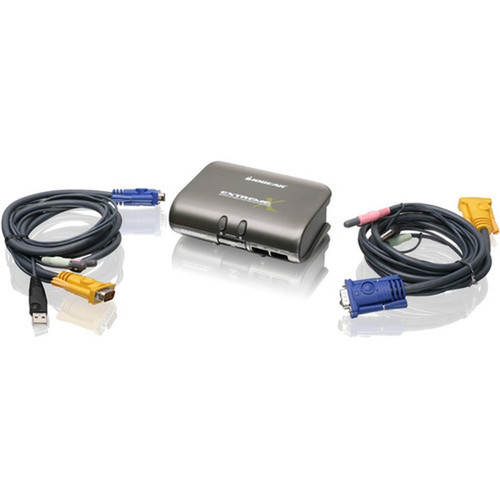
What's in the Box
The package includes all necessary components for immediate setup and operation.
Highlights
- Control two USB or PS/2 computers from one keyboard, monitor, and mouse
- Increase security by separating internet and intranet-connected PCs
- Share two USB peripheral devices like printers and scanners
- High resolution support up to 2048 x 1536
- Multi-OS platform compatibility
- Computer switching via front panel pushbuttons or hotkeys
- Asynchronous hotkey switching between KVM, USB, and audio ports
- Complete keyboard and mouse emulation for error-free booting
- Support for special keys on Mac and Sun keyboards
- LED display for easy status monitoring
Specifications
| Specifications | |
|---|---|
| Manufacturer | IOGEAR, Inc |
| Manufacturer Part Number | GCS1732 |
| Brand Name | IOGEAR |
| Product Line | MiniView |
| Product Model | GCS1732 |
| Product Name | MiniView GCS1732 KVM Switch |
| Product Type | KVM Switchbox |
| Technical Information | |
| Number of Computers Supported | 2 |
| Number of Local Users Supported | 1 |
| Video | |
| Graphic Mode | VGA,SVGA |
| Maximum Video Resolution | 2048 x 1536 |
| Interfaces/Ports | |
| USB | Yes |
| VGA | Yes |
| Number of USB Ports | 2 |
| Number of VGA Ports | 1 |
| Physical Characteristics | |
| Height | 1.70" (43.18 mm) |
| Width | 5.20" (132.08 mm) |
| Depth | 3.50" (88.90 mm) |
| Weight (Approximate) | 12 oz (340.19 g) |
| Miscellaneous | |
| Package Contents | 1 MiniView Extreme Multimedia KVMP Switch 2 bonded KVM Cables 1 Power Adapter 1 Firmware Upgrade Cable 1 User Manual 1 Quick Start Guide 1 Warranty/Registration Card |
| Compatibility | Windows 98, 98SE, ME, 2000, XP Mac OS 8.6 or greater Sun Solaris work station Audio: Only support 2-piece, powered speakers systems |
| Country of Origin | China |
FAQ
How many computers can I connect to the IOGEAR GCS1732 KVM Switch?
The GCS1732 supports two computers, allowing you to control both from a single keyboard, monitor, and mouse setup. This configuration is ideal for managing multiple systems in office, lab, or server environments without needing separate peripherals for each computer.
What video resolutions does this KVM switch support?
This switch supports VGA and SVGA graphic modes with a maximum video resolution of 2048 x 1536. This ensures clear and detailed visual output for most standard monitor setups, making it suitable for general computing, development work, and administrative tasks.
How do I switch between connected computers?
You can switch between computers using the front panel pushbuttons or through hotkey commands. The asynchronous hotkey switching allows you to transition between KVM focus, USB peripherals, and audio ports independently, offering flexible control without interrupting ongoing tasks.
What is included in the package with the GCS1732?
The package includes the MiniView Extreme Multimedia KVMP Switch, two bonded KVM cables, a power adapter, a firmware upgrade cable, a user manual, a quick start guide, and a warranty/registration card. These components provide everything needed for immediate setup and operation.
Can I share USB devices between the connected computers?
Yes, the GCS1732 allows you to share two USB peripheral devices, such as printers, scanners, speakers, and microphones, between the two connected computers. This eliminates the need for duplicate devices and simplifies cable management in shared workspace setups.
What connectivity or interface options are available?
Connectivity support is listed in the product specifications, including the relevant wireless or port options when available.
| Qty | Price | Available |
|---|