Shipping included*
Exclusions
Additional shipping fees may apply in rare circumstances for deliveries outside standard service areas. In most cases, this only potentially affects shipments to the Northwest Territories and Yukon, as well as certain heavy or oversized items.
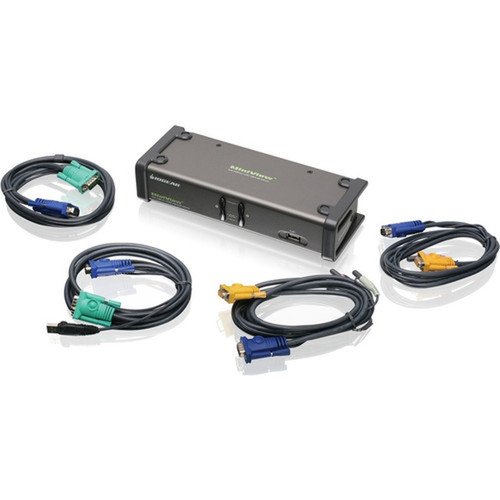
IOGEAR GCS1742 MiniView 2-Port Dual View KVM Switch - 2 x 1 - VGA/SVGA - 2048 x 1536 - 72" Distance

Business volume discounts
Technical guidance
Preparation & staging
QC · ON · AB · BC
Product Features
Technical Overview
This KVM switch supports two computers for one local user, featuring two VGA ports to accommodate dual-display configurations per connected system. It maintains compatibility with multimedia USB keyboards, including Mac and Sun keyboard layouts, ensuring broad peripheral support across different computing platforms.
The switch employs a 2x1 configuration, meaning two computers can be managed from one console. Video signals are transmitted via custom audio/video and USB/video cables, each 6 feet long, which are included in the package. No additional software is required for operation, simplifying installation and reducing setup time.
Relevant factors for this section include Number of Computers Supported, Number of Local Users Supported, Maximum Operating Distance, Graphic Mode. When those points are considered together, they give buyers a clearer picture of how the product is equipped, how it fits into deployment, and what kind of day-to-day role it is meant to support.
Key Product Advantages
The GCS1742 enhances workspace efficiency and security by allowing users to switch between computers seamlessly while sharing USB devices like printers, scanners, and external hard drives. Its independent switching prevents disruptions to USB or audio operations during computer selection.
These strengths make the product easier to deploy and manage in real environments, especially where reliability, usability, and day-to-day operational continuity matter. Notable benefits include Enhanced Security, Flexible Control Options.
Enhanced Security
Separate a PC connected to the internet from one on an intranet to increase network security, all controlled from a single console.
- Isolate sensitive systems
- Centralize access control
Flexible Control Options
Switch between computers using front-panel push buttons, hotkey commands, or the Auto Scan function for automated monitoring.
- Multiple switching methods
- No software dependencies
Deployment / Use Cases
Ideal for office environments, the GCS1742 is suited for users who need to manage multiple computers from a single workstation. Its dual-monitor support makes it effective for tasks requiring extended screen real estate, such as data analysis, graphic design, or multitasking across applications.
Common deployments include IT support desks, security operations centers, and financial trading floors where quick access to different systems is critical. The switch's compact form factor allows it to fit neatly on desks or in rack-mounted setups, and its included cables ensure ready-to-use connectivity without additional purchases.
Relevant factors for this section include Number of Computers Supported, Number of Local Users Supported, Maximum Operating Distance, Graphic Mode. When those points are considered together, they give buyers a clearer picture of how the product is equipped, how it fits into deployment, and what kind of day-to-day role it is meant to support.
Physical Profile
Measuring 7.87 inches wide, 2.93 inches deep, and 1.65 inches high, the GCS1742 has a compact footprint that conserves desk space. Its lightweight design at 1.81 pounds (820 grams) facilitates easy placement and portability. The unit's sturdy construction ensures reliable performance in daily use, and its small size makes it suitable for both desktop and enclosed installations.
The physical profile is practical for deployment planning because the dimensions and weight are clearly defined: 1.65" (42 mm), 7.87" (200 mm), 2.93" (74.50 mm), 1.81 lb (820 g). This helps confirm rack, shelf, desk, or cabinet fit before installation.
- Width
- 7.87" (200 mm)
- Depth
- 2.93" (74.50 mm)
- Height
- 1.65" (42 mm)
- Weight
- 1.81 lb (820 g)
What's in the Box
The package includes all components necessary for immediate operation and maintenance.
Highlights
- Controls 2 dual-monitor computers from one console
- Supports VGA and SVGA graphic modes up to 2048x1536 resolution
- Maximum operating distance of 72 inches (1828.80 mm)
- Independent switching of KVM, USB, and audio functions
- Includes 6-foot audio/video and USB/video cables for easy setup
- Compatible with multimedia USB keyboards, including Mac and Sun layouts
- Switch via push buttons, hotkeys, or Auto Scan function
- No software required—plug-and-play installation
- Compact dimensions: 7.87" W x 2.93" D x 1.65" H
- Backed by a 3-year limited warranty
Specifications
| Specifications | |
|---|---|
| Manufacturer | IOGEAR, Inc |
| Manufacturer Part Number | GCS1742 |
| Brand Name | IOGEAR |
| Product Line | MiniView |
| Product Model | GCS1742 |
| Product Name | MiniView GCS1742 2-Port Dual View KVM Switch |
| Product Type | KVM Switchbox |
| Technical Information | |
| Number of Computers Supported | 2 |
| Number of Local Users Supported | 1 |
| Maximum Operating Distance | 72" (1828.80 mm) |
| Video | |
| Graphic Mode | VGA,SVGA |
| Maximum Video Resolution | 2048 x 1536 |
| Interfaces/Ports | |
| VGA | Yes |
| Number of VGA Ports | 2 |
| Physical Characteristics | |
| Height | 1.65" (42 mm) |
| Width | 7.87" (200 mm) |
| Depth | 2.93" (74.50 mm) |
| Weight (Approximate) | 1.81 lb (820 g) |
| Miscellaneous | |
| Package Contents | 1 x MiniView GCS1742 2-Port Dual View KVM Switch 2 x Custom audio/video cables (6 ft long) 2 x Custom USB/video cables (6 ft long) 1 x Firmware upgrade cable 1 x User Manual 1 x Quick Start Guide |
| Compatibility | Supports multimedia USB keyboards Supports Mac & Sun keyboards |
| Country of Origin | Taiwan |
| Warranty | |
| Limited Warranty | 3 Year |
FAQ
How many computers can the GCS1742 KVM switch support?
The IOGEAR GCS1742 supports two computers, allowing a single user to control both systems from one dual-monitor console. This configuration is ideal for managing multiple workstations or separating tasks across different machines without needing separate peripherals.
What video resolutions and modes does this KVM switch support?
This switch supports VGA and SVGA graphic modes with a maximum video resolution of 2048 x 1536. It includes two VGA ports to enable dual-display setups for each connected computer, providing clear and detailed visuals for standard office and professional applications.
What is the maximum operating distance for the GCS1742?
The maximum operating distance is 72 inches (1828.80 mm), allowing flexible placement of computers relative to the console. This range accommodates typical desk setups and ensures reliable signal transmission through the included 6-foot cables without degradation.
Does the GCS1742 support audio and USB peripheral sharing?
Yes, the GCS1742 provides independent switching for KVM, USB, and audio functions. It includes audio jacks for sharing speakers and microphones, and USB ports allow connected computers to share peripherals like printers, scanners, and external drives without interrupting operations during switching.
How do I switch between computers with this KVM switch?
You can switch between computers using front-panel push buttons, predefined hotkey commands, or the Auto Scan function for automated monitoring. These methods offer flexibility and ease of use, with no software required—switching is instantaneous and does not disrupt USB or audio connections.
What is included in the package with the GCS1742?
The package includes the MiniView GCS1742 2-Port Dual View KVM Switch, two custom audio/video cables (6 ft long), two custom USB/video cables (6 ft long), a firmware upgrade cable, a user manual, and a quick start guide. All necessary components are provided for immediate setup and operation.
| Qty | Price | Available |
|---|