












Shipping included*
Exclusions
Additional shipping fees may apply in rare circumstances for deliveries outside standard service areas. In most cases, this only potentially affects shipments to the Northwest Territories and Yukon, as well as certain heavy or oversized items.
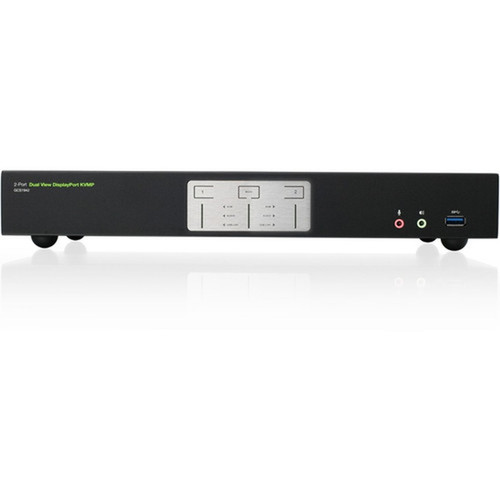
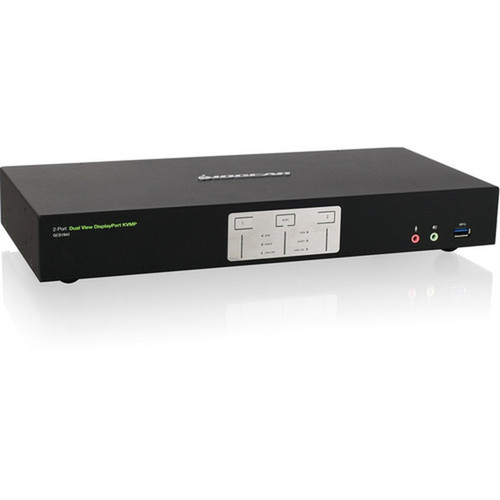
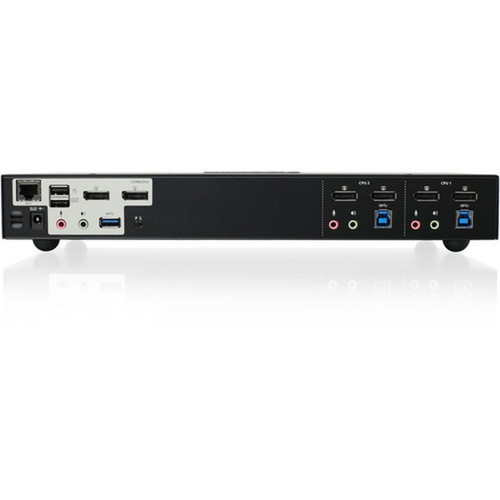
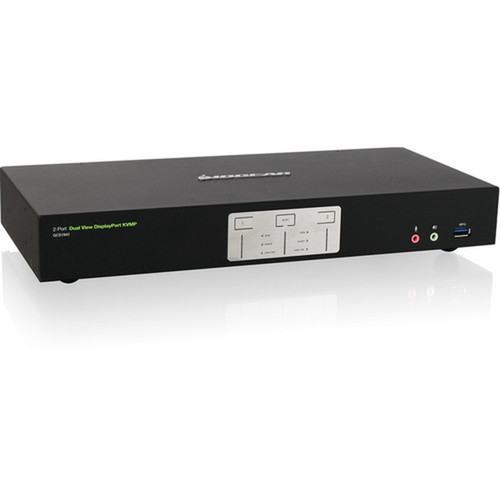
IOGEAR GCS1942 2-Port 4K Dual View DisplayPort KVMP Switch with USB 3.0 Hub and Audio - 4096 x 2160 - 5 USB Ports - 6 DisplayPorts - Desktop Form

Business volume discounts
Technical guidance
Preparation & staging
QC · ON · AB · BC
Product Features
Technical Overview
This KVMP switch supports Multi-Stream Transport (MST) technology, enabling dual 4K monitor output from each connected computer. The six DisplayPort outputs and five USB 3.0 ports provide extensive connectivity options for monitors, storage devices, printers, and other peripherals.
Independent switching functionality allows separate control of KVM, USB, and audio devices, giving users precise management over their workstation components. The switch maintains USB peripheral connectivity on inactive computers, ensuring background tasks continue uninterrupted during system transitions.
Relevant factors for this section include Number of Computers Supported, Number of Local Users Supported, Maximum Video Resolution. When those points are considered together, they give buyers a clearer picture of how the product is equipped, how it fits into deployment, and what kind of day-to-day role it is meant to support.
A strong technical summary explains how the product's interfaces, hardware profile, and operating characteristics work together in real deployment. Buyers often need this context to confirm compatibility with existing devices, expected performance in daily use, and whether installation will be straightforward for IT staff or end users.
Key Product Advantages
The GCS1942 eliminates the need for duplicate peripherals by centralizing control of two complete computer systems. Its 4K dual-view capability ensures professional-grade visual fidelity for design, video editing, and data analysis applications where color accuracy and detail matter.
Cost Efficiency
Share high-quality monitors and USB peripherals between two computers, reducing hardware expenses and desk clutter while maintaining full functionality for both systems.
- Eliminates duplicate monitor purchases
- Reduces peripheral costs by 50%
- Minimizes cable management complexity
Workflow Optimization
Switch instantly between computers without reconnecting cables or reconfiguring displays, maintaining productivity during multi-system operations and testing scenarios.
- Instant system switching
- No display reconfiguration needed
- Continuous peripheral access
Deployment / Use Cases
The GCS1942 excels in environments where users need simultaneous access to multiple computers with high-resolution display requirements. Its dual 4K capability makes it ideal for creative professionals who work across different operating systems or software platforms.
Financial trading floors benefit from the switch's ability to maintain multiple data streams across systems without visual compromise. IT departments use it for A/B testing, server management, and help desk operations where quick system comparison is essential.
Multi-Platform Creative Workstation
Video editors and graphic designers can switch between Windows and macOS systems while maintaining 4K color accuracy across dual professional monitors.
Modular Expansion
Add a second GCS1942 unit to expand support to four 4K monitors, creating scalable workstation configurations for advanced visualization and monitoring applications.
Physical Profile
The desktop form factor measures 13.19 inches wide by 6.13 inches deep by 2.13 inches high, providing a stable base that fits comfortably on standard work surfaces. Weighing 3.50 pounds, the unit remains secure during frequent switching operations while offering easy repositioning when needed.
- Width
- 13.19" (335.03 mm)
- Depth
- 6.13" (155.57 mm)
- Height
- 2.13" (53.98 mm)
- Weight
- 3.50 lb (1587.57 g)
What's in the Box
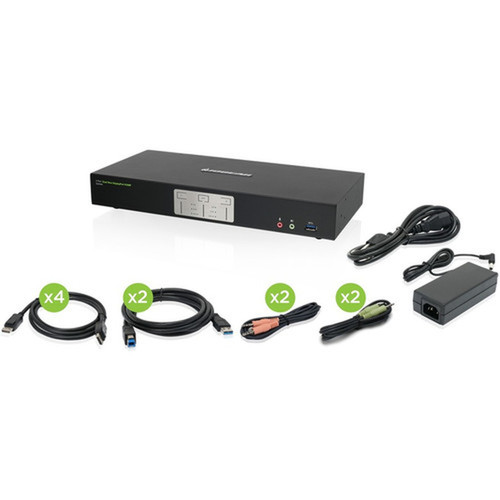
The GCS1942 arrives ready for immediate deployment with all necessary cables for connecting two computers, dual monitors, and audio devices.
Highlights
- Control two DisplayPort computers with one keyboard, mouse, and dual 4K monitors
- Delivers 4096x2160 resolution at 60Hz with DisplayPort 1.2 and HDCP compliance
- Five USB 3.0 ports provide SuperSpeed 5Gbps peripheral sharing
- Independent switching of KVM, USB, and audio devices for precise control
- Multi-Stream Transport (MST) supports dual 4K outputs from each computer
- Maintains USB peripheral connectivity on inactive computers
- Expandable configuration supports up to four 4K monitors with additional units
- TAA compliant for government and educational procurement
- Includes all necessary cables for immediate deployment
- Backed by a 3-year limited warranty
Specifications
| Specifications | |
|---|---|
| Manufacturer | IOGEAR, Inc |
| Manufacturer Part Number | GCS1942 |
| Brand Name | IOGEAR |
| Product Model | GCS1942 |
| Product Name | 2-Port 4K Dual View DisplayPort KVMP with USB 3.0 Hub and Audio (TAA) |
| Packaged Quantity | 1 |
| Product Type | KVM Switchbox |
| Technical Information | |
| Number of Computers Supported | 2 |
| Number of Local Users Supported | 1 |
| Video | |
| Maximum Video Resolution | 4096 x 2160 |
| Interfaces/Ports | |
| USB | Yes |
| DisplayPort | Yes |
| Number of USB Ports | 5 |
| Number of DisplayPorts | 6 |
| Physical Characteristics | |
| Form Factor | Desktop |
| Height | 2.13" (53.98 mm) |
| Width | 13.19" (335.03 mm) |
| Depth | 6.13" (155.57 mm) |
| Weight (Approximate) | 3.50 lb (1587.57 g) |
| Miscellaneous | |
| Package Contents | 2-Port 4K Dual View DisplayPort KVMP with USB 3.0 Hub and Audio (TAA) 4 x DisplayPort Cables 2 x USB 3.0 Cables 2 x Audio Cable Set 1 x Power Adapter 1 x Manual |
| Environmentally Friendly | Yes |
| Environmental Compliance | Restriction of Hazardous Substances (RoHS),Waste Electrical and Electronic Equipment Directive (WEEE) |
| Country of Origin | Taiwan |
| TAA Compliant | Yes |
| Warranty | |
| Limited Warranty | 3 Year |
User Manual
FAQ
How many computers can the GCS1942 KVM switch support simultaneously?
The GCS1942 supports two computers simultaneously. A single user can control both systems with one keyboard and mouse while displaying output on two 4K monitors. The switch maintains separate video, USB, and audio channels for each computer, allowing instant switching between systems without reconnecting cables or reconfiguring displays.
What maximum resolution does this KVM switch support for connected monitors?
This switch supports a maximum resolution of 4096 x 2160 at 60Hz, commonly referred to as Cinema 4K. It maintains this resolution across both connected monitors simultaneously when using DisplayPort 1.2 compliant sources and displays. The HDCP compliance ensures protected content displays correctly across the switched systems.
Can I use this switch to share USB peripherals between the connected computers?
Yes, the integrated USB 3.0 hub with five ports allows peripheral sharing between the two connected computers. The SuperSpeed 5Gbps transfer rate supports fast data transfer for storage devices, while the independent switching functionality lets you work on one computer without interrupting USB peripheral connectivity on the other system.
What cables are included with the GCS1942 for setup?
The package includes four DisplayPort cables for monitor connections, two USB 3.0 cables for computer connections, two audio cable sets for sound output, one power adapter, and a comprehensive manual. These cables provide everything needed to connect two computers to two 4K monitors with full USB and audio functionality immediately upon unboxing.
Is the GCS1942 compliant with government procurement requirements?
Yes, the GCS1942 is TAA (Trade Agreements Act) compliant, making it suitable for government, educational, and institutional procurement where compliance is required. The product also meets RoHS and WEEE environmental standards for hazardous substance restriction and electronic waste management, supporting responsible IT purchasing practices.
How does the independent switching feature work on this KVM switch?
Independent switching allows separate control of the KVM function (keyboard, video, mouse), USB peripherals, and audio devices. This means you can switch video between computers while keeping USB devices active on a specific system, or maintain audio on one computer while working on another. This granular control optimizes workflow in multi-system environments.
| Qty | Price | Available |
|---|


