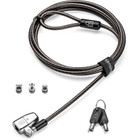

Kensington K68108M ClickSafe 2. 0 Universal Keyed Laptop Lock - Master Keyed for Notebook Security

Business volume discounts
Technical guidance
Preparation & staging
QC · ON · AB · BC
Product Features
Product Overview
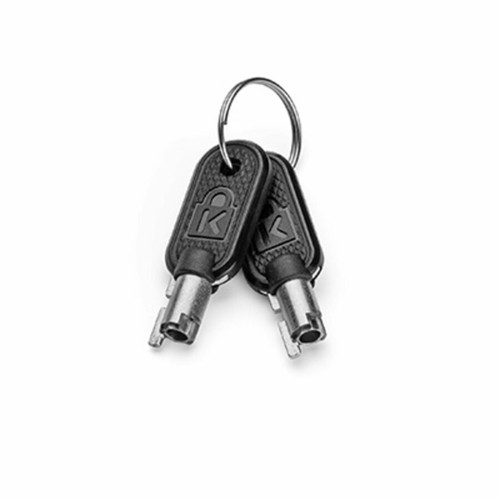
The Kensington ClickSafe 2.0 Universal Keyed Laptop Lock provides a reliable physical security solution for notebook computers in shared or managed environments. This cable lock features a master keyed configuration, allowing authorized personnel to secure and access multiple devices with a single key.
Designed specifically for notebooks, the lock integrates with standard Kensington security slots found on most laptops. The universal compatibility ensures broad deployment across various notebook brands and models, making it a practical choice for IT departments, educational institutions, and corporate settings where device security is a priority.
This section brings together practical product details such as Lock Configuration Type, Device Supported, Country of Origin, so buyers can judge configuration, deployment fit, and day-to-day suitability with less guesswork.
Technical Overview
This Kensington lock utilizes a keyed locking mechanism with master key functionality, providing controlled access in multi-user scenarios. The ClickSafe 2.0 design offers improved durability and ease of use compared to previous generations, with a robust cable that resists cutting and tampering attempts.
The lock connects to notebooks through the universal Kensington security slot, requiring no additional hardware or installation. The master keyed configuration means one key can operate multiple locks, simplifying key management while maintaining security protocols.
This section brings together practical product details such as Lock Configuration Type, Device Supported, Country of Origin, so buyers can judge configuration, deployment fit, and day-to-day suitability with less guesswork.
A strong technical summary explains how the product's interfaces, hardware profile, and operating characteristics work together in real deployment. Buyers often need this context to confirm compatibility with existing devices, expected performance in daily use, and whether installation will be straightforward for IT staff or end users.
Key Product Advantages
The master keyed configuration represents the primary advantage of this security solution, enabling efficient management of multiple secured devices. This approach reduces the number of keys required while maintaining controlled access to valuable notebook assets.
These strengths make the product easier to deploy and manage in real environments, especially where reliability, usability, and day-to-day operational continuity matter. Notable benefits include Master Key Management, Universal Notebook Compatibility, Enhanced Physical Security, Durable Cable Construction.
Deployment / Use Cases
This lock excels in environments where multiple notebooks require secure storage with controlled access. Educational institutions can use it in computer labs or library settings where students need temporary access to secured devices. Corporate IT departments benefit from simplified key management when securing laptops in shared workspaces or during off-hours.
The master key functionality makes it particularly valuable for facilities management, allowing security personnel to access all secured devices while individual users maintain their assigned notebooks. Retail displays, conference rooms, and healthcare settings also benefit from this physical security approach for mobile computing devices.
Educational Environments
Secure notebook carts and computer lab stations with single-key access for authorized staff while preventing unauthorized removal.
- Computer lab security
- Library laptop loans
- Classroom device management
Corporate Security
Protect company assets in shared workspaces and meeting rooms while maintaining access control through master key management.
- Hot desk security
- Conference room laptops
- Overnight device protection
Highlights
- Master keyed configuration for simplified multi-device management
- Universal compatibility with notebook Kensington security slots
- ClickSafe 2.0 design with enhanced durability
- Robust cable construction resists cutting and tampering
- No additional hardware required for installation
- Manufactured in Taiwan with quality standards
- Part number K68108M for precise identification
- Ideal for shared environments with controlled access needs
Specifications
| Specifications | |
|---|---|
| Manufacturer | Kensington Computer Products Group |
| Manufacturer Part Number | K68108M |
| Brand Name | Kensington |
| Product Line | ClickSafe 2.0 |
| Product Name | ClickSafe 2.0 Universal Keyed Laptop Lock |
| Product Type | Cable Lock |
| Lock | |
| Lock Configuration Type | Master Keyed Lock |
| Miscellaneous | |
| Device Supported | Notebook |
| Country of Origin | Taiwan |
FAQ
What does master keyed configuration mean for this laptop lock?
The master keyed configuration allows one key to operate multiple Kensington ClickSafe 2.0 locks. This enables authorized personnel, such as IT staff or security managers, to access all secured notebooks with a single key while maintaining physical security. It simplifies key management in environments with many secured devices.
Which devices are compatible with this Kensington lock?
This lock is specifically designed for notebook computers that feature the universal Kensington security slot. It works with most laptop brands and models that include this standard security feature, providing broad compatibility across business, educational, and personal notebook devices without requiring additional adapters or hardware.
How does the ClickSafe 2.0 design improve security?
The ClickSafe 2.0 design incorporates enhanced durability features compared to previous generations, including a more robust cable that resists cutting attempts and a improved locking mechanism. This provides stronger physical security for valuable notebook assets while maintaining the convenience of keyed access and universal compatibility.
What environments benefit most from this type of laptop lock?
This lock is particularly valuable in shared environments where multiple notebooks require secure storage with controlled access. Educational institutions, corporate offices, libraries, retail displays, and healthcare settings all benefit from the master key management and universal compatibility features for securing mobile computing devices.
Does this lock require special installation or tools?
No special installation or tools are required. The lock simply inserts into the standard Kensington security slot found on compatible notebooks and secures with the provided key. The cable wraps around a fixed object like a desk leg or secure anchor point, creating a simple yet effective physical security solution.
How does the master key system simplify device management?
The master key system reduces the number of keys needed to manage multiple secured notebooks. Instead of maintaining separate keys for each device, authorized personnel can use one master key to access all locks. This streamlines security protocols, reduces key management overhead, and ensures consistent access control across all secured devices in the environment.
| Qty | Price | Available |
|---|