








Shipping included*
Exclusions
Additional shipping fees may apply in rare circumstances for deliveries outside standard service areas. In most cases, this only potentially affects shipments to the Northwest Territories and Yukon, as well as certain heavy or oversized items.
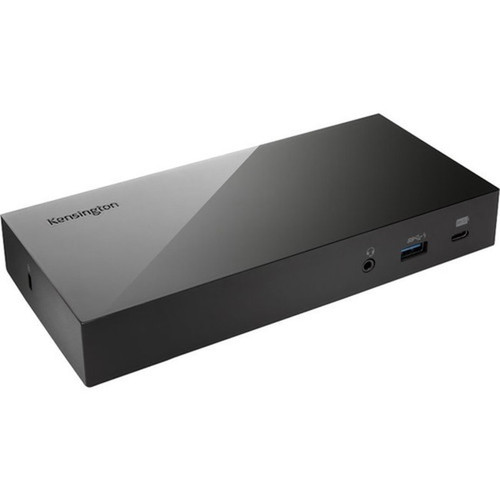
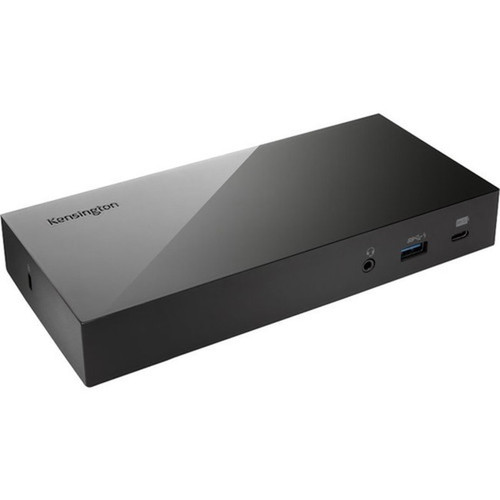
Kensington K38249NA SD4800P Triple Video Docking Station - USB-C Host - 60W Power - 6 USB Ports - 4x USB 3.0 - HDMI - DisplayPort - RJ-45 - Audio

Business volume discounts
Technical guidance
Preparation & staging
QC · ON · AB · BC
Product Features
Product Overview
The Kensington SD4800P Triple Video Dock is a wired docking station engineered to expand the connectivity of modern notebooks through a single USB-C host connection. It transforms a portable laptop into a fully equipped workstation by adding multiple display outputs, high-speed data ports, wired networking, and audio capabilities.
This dock delivers 60W of power to charge compatible notebooks while simultaneously supporting triple video output through HDMI and DisplayPort interfaces. With six total USB ports—including four USB 3.0 ports for fast data transfers—it provides ample connectivity for peripherals like external storage, keyboards, mice, and printers.
Relevant factors for this section include Connectivity Technology, Device Supported, Host Interface, Total Number of USB Ports. When those points are considered together, they give buyers a clearer picture of how the product is equipped, how it fits into deployment, and what kind of day-to-day role it is meant to support.
Technical Overview
The SD4800P uses a USB Type C host interface to establish a wired connection with supported notebooks, ensuring stable data transmission and power delivery. Its 60W maximum power supply supports charging for many business-grade laptops, reducing cable clutter by consolidating power and data over one cable.
Video output is handled through both HDMI and DisplayPort connections, enabling multi-monitor setups for extended desktop or mirrored display configurations. The dock includes a dedicated RJ-45 Ethernet port for reliable wired network access, which is essential for bandwidth-intensive tasks or environments with unstable Wi-Fi.
Relevant factors for this section include Connectivity Technology, Device Supported, Host Interface, Total Number of USB Ports. When those points are considered together, they give buyers a clearer picture of how the product is equipped, how it fits into deployment, and what kind of day-to-day role it is meant to support.
Key Product Advantages
The Kensington SD4800P streamlines workspace organization by centralizing connections and reducing cable mess. Its robust port selection and power delivery make it an ideal solution for users who need to quickly transition between mobile and desktop computing environments.
These strengths make the product easier to deploy and manage in real environments, especially where reliability, usability, and day-to-day operational continuity matter. Notable benefits include Simplified Connectivity, Enhanced Productivity.
Simplified Connectivity
Connect your notebook to multiple displays, peripherals, and network with a single USB-C cable, minimizing setup time and cable tangles.
- Single-cable docking
- Consolidated power and data
- Plug-and-play operation
Enhanced Productivity
Support for triple video output and multiple USB 3.0 ports enables efficient multitasking across displays and fast access to external devices.
- Multi-monitor capable
- High-speed data transfers
- Wired network stability
Deployment / Use Cases
This docking station is designed for business professionals, remote workers, and IT departments that require a reliable and versatile connectivity hub for notebook computers. It excels in environments where users need to quickly connect to office peripherals and displays without reconfiguring multiple cables.
Common deployment scenarios include hot-desking setups, home offices, conference rooms, and IT support stations. The dock’s wired Ethernet port makes it particularly valuable for tasks requiring consistent network performance, such as video conferencing, large file transfers, or accessing cloud-based applications.
Hot-Desking & Shared Workspaces
Provide consistent connectivity across multiple workstations, allowing users to dock their notebooks quickly and access shared peripherals.
Remote & Home Office Setup
Create a productive home office environment with multi-monitor support, wired internet, and centralized device connections.
Highlights
- USB-C host interface for single-cable connectivity to notebooks
- 60W power delivery to charge compatible laptops
- Triple video support via HDMI and DisplayPort outputs
- Six USB ports total, including four high-speed USB 3.0 ports
- Built-in RJ-45 Ethernet port for wired network access
- Headphone/microphone combo audio jack
- Wired connectivity technology for stable data transmission
- 3-year limited warranty for long-term reliability
Specifications
| Specifications | |
|---|---|
| Manufacturer | Kensington Computer Products Group |
| Manufacturer Part Number | K38249NA |
| Brand Name | Kensington |
| Product Model | SD4800P |
| Product Name | SD4800P Triple Video Dock |
| Product Type | Docking Station |
| Technical Information | |
| Connectivity Technology | Wired |
| Device Supported | Notebook |
| Interfaces/Ports | |
| Host Interface | USB Type C |
| Total Number of USB Ports | 6 |
| Number of USB 3.0 Ports | 4 |
| Network (RJ-45) | Yes |
| DisplayPort | Yes |
| Headphone/Microphone Combo Port | Yes |
| HDMI | Yes |
| Power Description | |
| Maximum Power Supply Wattage | 60 W |
| Miscellaneous | |
| Country of Origin | China |
| Warranty | |
| Limited Warranty | 3 Year |
FAQ
What devices are compatible with the Kensington SD4800P dock?
The Kensington SD4800P is designed for notebooks with a USB Type C port that supports data, video, and power delivery over a single connection. It is compatible with many business and consumer laptops from major manufacturers, but you should verify your specific notebook's USB-C capabilities to ensure full functionality.
How many displays can I connect with this docking station?
This dock supports triple video output, meaning you can connect up to three external displays using the HDMI and DisplayPort interfaces. The exact configuration depends on your notebook's graphics capabilities and operating system settings, but it enables extended desktop or mirrored setups for enhanced productivity.
Does the dock provide power to my laptop?
Yes, the Kensington SD4800P delivers up to 60W of power through the USB-C host connection, which can charge many compatible notebooks while in use. This reduces cable clutter by eliminating the need for a separate power adapter, though charging speed and compatibility depend on your laptop's power requirements.
What is the purpose of the RJ-45 port on this dock?
The RJ-45 port provides Gigabit Ethernet connectivity, allowing you to connect your notebook to a wired network for faster and more stable internet access compared to Wi-Fi. This is particularly useful for bandwidth-intensive tasks like video conferencing, large file transfers, or accessing network resources in office environments.
How many USB 3.0 ports does the dock have?
The Kensington SD4800P includes four USB 3.0 ports among its six total USB ports. USB 3.0 offers data transfer speeds up to 5 Gbps, making it suitable for connecting external hard drives, flash drives, and other peripherals that benefit from faster data rates.
What warranty coverage does this product include?
Kensington provides a 3-year limited warranty for the SD4800P Triple Video Dock. This warranty covers defects in materials and workmanship under normal use, offering long-term peace of mind for business and institutional deployments where reliability is critical.
| Qty | Price | Available |
|---|


