








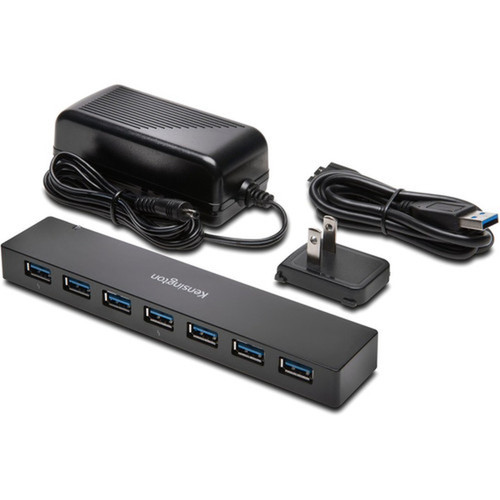

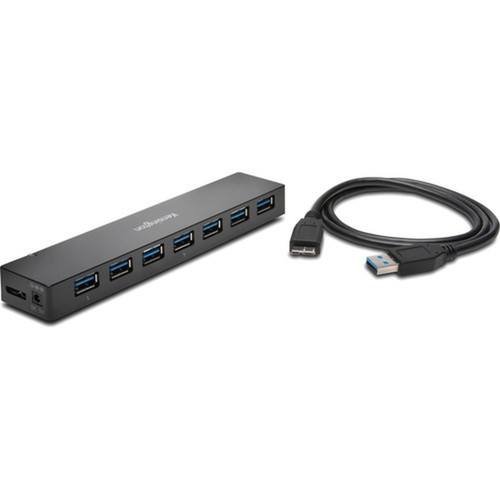
Kensington K39123AM USB 3.0 7-Port Hub with Charging - External Hub for PC and Mac

Business volume discounts
Technical guidance
Preparation & staging
QC · ON · AB · BC
Product Features
Product Overview
The Kensington K39123AM USB 3.0 7-Port Hub with Charging delivers robust peripheral expansion for modern computing environments. This external hub provides seven high-speed USB 3.0 ports, enabling simultaneous connections for keyboards, mice, external drives, printers, and other USB devices while maintaining fast data transfer rates.
Designed for both PC and Mac platforms, the hub supports hot-swapping capabilities that allow you to connect and disconnect devices without shutting down your system. The inclusion of charging functionality ensures compatible devices receive power through the hub, reducing cable clutter and simplifying workstation management.
Relevant factors for this section include Host Interface, Total Number of USB Ports, Number of USB 3.0 Ports. When those points are considered together, they give buyers a clearer picture of how the product is equipped, how it fits into deployment, and what kind of day-to-day role it is meant to support.
Technical Overview
This USB hub operates through a single host USB interface, requiring no additional drivers for basic functionality on supported operating systems. All seven ports utilize USB 3.0 technology, delivering transfer speeds up to 5 Gbps for compatible devices while maintaining backward compatibility with USB 2.0 and 1.1 peripherals.
The external form factor makes the hub portable and easy to position on any desktop surface. The compact design minimizes desk space usage while providing substantial connectivity expansion for workstations with limited built-in USB ports.
Relevant factors for this section include Host Interface, Total Number of USB Ports, Number of USB 3.0 Ports. When those points are considered together, they give buyers a clearer picture of how the product is equipped, how it fits into deployment, and what kind of day-to-day role it is meant to support.
Key Product Advantages
This Kensington hub addresses common connectivity challenges in office and home computing environments by providing substantial port expansion without requiring internal hardware installation.
These strengths make the product easier to deploy and manage in real environments, especially where reliability, usability, and day-to-day operational continuity matter. Notable benefits include Simplified Connectivity, Platform Flexibility.
Simplified Connectivity
The seven USB 3.0 ports eliminate the need to constantly swap cables between devices, creating a more organized and efficient workspace.
- Connect multiple peripherals simultaneously
- Maintain high-speed data transfers across all ports
- Reduce cable management complexity
Platform Flexibility
Compatibility with both Windows and macOS systems ensures the hub works across diverse computing environments without platform-specific limitations.
- Works with PC and Mac computers
- No driver installation required for basic operation
- Seamless integration with existing setups
Deployment / Use Cases
The Kensington K39123AM USB hub serves as an ideal solution for expanding connectivity on computers with limited built-in USB ports. Its external design and charging capabilities make it particularly valuable in environments where peripheral management and power delivery are priorities.
Common deployment scenarios include office workstations requiring connections to multiple input devices and external storage, creative workstations with numerous peripherals like drawing tablets and external drives, and home offices needing to connect printers, scanners, and backup drives to a single computer. The hub also functions well in educational settings and shared computing environments where multiple users need to connect different devices throughout the day.
Office Workstation Expansion
Connect keyboard, mouse, external hard drive, printer, and smartphone charging simultaneously while maintaining fast data transfer speeds for productivity applications.
Creative & Media Workflows
Support multiple storage devices, input peripherals, and charging stations for photography, video editing, and design work without port limitations.
Highlights
- Seven USB 3.0 ports for high-speed peripheral connections
- External form factor requires no internal installation
- Compatible with both PC and Mac computer systems
- Hot-swappable design allows device connection without system shutdown
- Driver-free operation for simplified setup and use
- Includes charging functionality for connected devices
- Backward compatible with USB 2.0 and 1.1 devices
- Backed by a 2-year limited warranty for reliability assurance
Specifications
| Specifications | |
|---|---|
| Manufacturer | Kensington Computer Products Group |
| Manufacturer Part Number | K39123AM |
| Brand Name | Kensington |
| Product Name | USB 3.0 7 Port Hub with Charging |
| Product Type | USB Hub |
| Technical Information | |
| Host Interface | USB |
| Interfaces/Ports | |
| Total Number of USB Ports | 7 |
| Number of USB 3.0 Ports | 7 |
| Physical Characteristics | |
| Form Factor | External |
| Miscellaneous | |
| Platform Supported | PC,Mac |
| Country of Origin | Vietnam |
| Warranty | |
| Limited Warranty | 2 Year |
FAQ
How many USB ports does this Kensington hub provide?
The Kensington K39123AM provides seven total USB ports, all of which are USB 3.0 compatible. This configuration allows simultaneous connections for multiple peripherals while maintaining high-speed data transfer capabilities across all connected devices.
Is this USB hub compatible with both Windows and macOS computers?
Yes, this USB hub supports both PC (Windows) and Mac (macOS) platforms. The hub requires no additional drivers for basic functionality on supported operating systems, making it easy to integrate into diverse computing environments without platform-specific limitations.
What is the data transfer speed of the USB ports on this hub?
All seven ports utilize USB 3.0 technology, which provides transfer speeds up to 5 Gbps when used with compatible USB 3.0 devices. The hub maintains backward compatibility with USB 2.0 and 1.1 peripherals, though those devices will operate at their respective maximum speeds.
Can I connect and disconnect devices without turning off my computer?
Yes, this hub supports hot-swapping capabilities, allowing you to connect and disconnect USB devices without needing to shut down your computer system. This feature enables flexible peripheral management throughout your workday without interrupting workflow.
Does this USB hub require external power or drivers to operate?
The hub operates through a single host USB interface and includes charging functionality for connected devices. No additional drivers are required for basic operation on supported operating systems, though specific device functionality may require their respective drivers as normal.
What warranty coverage does this Kensington USB hub include?
The Kensington K39123AM USB hub comes with a 2-year limited warranty. This coverage provides assurance against manufacturing defects and ensures reliable performance for your connectivity expansion needs over an extended period.
| Qty | Price | Available |
|---|


