








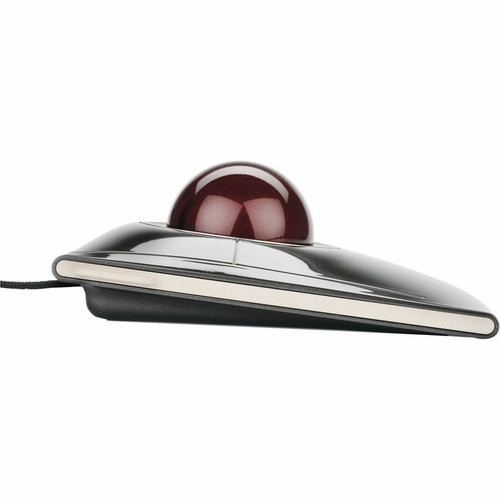


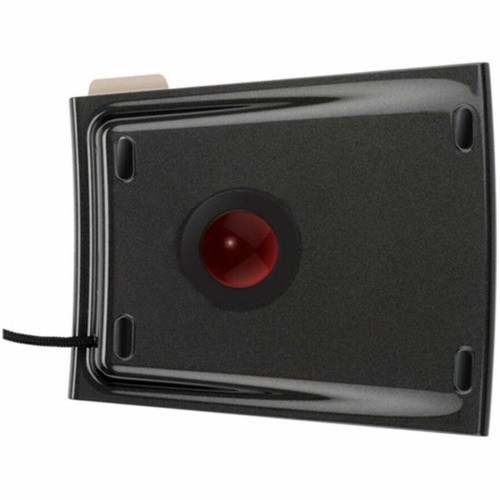

Kensington K72327WW SlimBlade Trackball - Laser - USB Cable - Black - 4 Button Symmetrical Scroll Ball

Business volume discounts
Technical guidance
Preparation & staging
QC · ON · AB · BC
Product Features
Technical Overview
This trackball utilizes laser movement detection for high accuracy and responsiveness, supporting precise cursor control across various surfaces. The USB host interface delivers stable data transmission, and the cable connectivity eliminates the need for recharging or battery replacement.
With a symmetrical ergonomic fit, the design accommodates different hand orientations comfortably. The scroll ball allows multidirectional scrolling, enhancing productivity when navigating large spreadsheets, web pages, or creative software.
Relevant factors for this section include Pointing Device Connectivity Technology, Movement Detection, Total Number of Buttons, Pointing Device Host Interface. When those points are considered together, they give buyers a clearer picture of how the product is equipped, how it fits into deployment, and what kind of day-to-day role it is meant to support.
A strong technical summary explains how the product's interfaces, hardware profile, and operating characteristics work together in real deployment. Buyers often need this context to confirm compatibility with existing devices, expected performance in daily use, and whether installation will be straightforward for IT staff or end users.
Key Product Advantages
The Kensington SlimBlade Trackball combines advanced laser technology with user-friendly features to enhance pointing accuracy and comfort. Its symmetrical shape and scroll ball provide versatile navigation options that adapt to various workflows.
Ambidextrous Design
The symmetrical fit works equally well for left-handed and right-handed users, offering flexibility in workspace setup.
- No handedness restrictions
- Comfortable for all users
Enhanced Navigation
The scroll ball enables 360° scrolling for efficient document and media browsing, reducing strain during prolonged use.
- Smooth multidirectional control
- Ideal for detailed tasks
Reliable Connectivity
USB cable connectivity ensures consistent performance without wireless interference or battery downtime.
- Stable data transmission
- No charging required
Deployment / Use Cases
This trackball is well-suited for office environments where precise cursor control and ergonomic comfort are priorities. Its symmetrical design makes it ideal for shared workstations or users who switch between left and right-hand operation.
Creative professionals, such as graphic designers or video editors, can benefit from the scroll ball's 360° navigation when manipulating timelines or canvases. The laser tracking provides the accuracy needed for detailed work, while the plug-and-play USB interface simplifies integration into existing PC or Mac setups.
Relevant factors for this section include Pointing Device Connectivity Technology, Movement Detection, Total Number of Buttons, Pointing Device Host Interface. When those points are considered together, they give buyers a clearer picture of how the product is equipped, how it fits into deployment, and what kind of day-to-day role it is meant to support.
Office Productivity
Enhances efficiency in spreadsheet management, document editing, and web browsing with smooth scrolling and customizable buttons.
Creative Workflows
Supports precise control in design software, 3D modeling, or video editing applications through accurate laser tracking.
Physical Profile
The trackball features a compact black design measuring 8.10 inches in height, 3.10 inches in width, and 6.10 inches in depth, with a weight of approximately 1.50 pounds. Its low-profile build fits comfortably on most desktops without occupying excessive space, and the matte finish resists fingerprints for a clean appearance.
The physical profile is practical for deployment planning because the dimensions and weight are clearly defined: 8.10" (205.74 mm), 3.10" (78.74 mm), 6.10" (154.94 mm), 1.50 lb (680.39 g). This helps confirm rack, shelf, desk, or cabinet fit before installation.
- Width
- 3.10" (78.74 mm)
- Depth
- 6.10" (154.94 mm)
- Height
- 8.10" (205.74 mm)
- Weight
- 1.50 lb (680.39 g)
Highlights
- Symmetrical design suitable for left-handed and right-handed users
- Scroll ball provides 360° navigation for documents and media
- Plug-and-play USB interface for quick configuration
- Laser resolution ensures silky smooth movement
- Four programmable buttons for customizable control
- Compatible with Windows, Mac, and ChromeOS platforms
- Cable connectivity eliminates battery or charging needs
- Durable black finish with compact dimensions
Specifications
| Specifications | |
|---|---|
| Manufacturer | Kensington Computer Products Group |
| Manufacturer Part Number | K72327WW |
| Brand Name | Kensington |
| Product Line | SlimBlade |
| Product Name | SlimBlade Trackball |
| Product Type | Trackball |
| Pointing Device | |
| Pointing Device Connectivity Technology | Cable |
| Movement Detection | Laser |
| Total Number of Buttons | 4 |
| Scroller Type | Scroll Ball |
| Ergonomic Fit | Symmetrical |
| Rechargeable | No |
| Interfaces/Ports | |
| Pointing Device Host Interface | USB |
| Physical Characteristics | |
| Color Family | Black |
| Product Color | Black |
| Height | 8.10" (205.74 mm) |
| Width | 3.10" (78.74 mm) |
| Depth | 6.10" (154.94 mm) |
| Weight (Approximate) | 1.50 lb (680.39 g) |
| Miscellaneous | |
| Operating System Compatibility | Windows Vista,Mac OS X,ChromeOS 44,macOS 10.8,Mac OS X 10.9 Mavericks,Mac OS X 10.10 Yosemite,Mac OS X 10.11 El Capitan,Mac OS X 10.12 Sierra,Mac OS X 10.13 High Sierra,Windows 7,Windows 8,Windows 8.1,Windows 10 |
| Platform Supported | PC,Mac |
| Country of Origin | Malaysia |
User Manual
FAQ
Is this trackball compatible with both Windows and Mac operating systems?
Yes, the Kensington SlimBlade Trackball K72327WW supports Windows Vista, 7, 8, 8.1, 10, Mac OS X 10.8 through 10.13, and ChromeOS 44. It offers plug-and-play functionality across these platforms without requiring additional drivers for basic operation.
How does the scroll ball enhance navigation compared to a traditional scroll wheel?
The scroll ball allows 360° multidirectional scrolling, enabling smooth vertical and horizontal movement through documents, web pages, and media. This provides more fluid navigation than a standard scroll wheel, especially when browsing large spreadsheets or panoramic images.
What are the advantages of laser movement detection in this trackball?
Laser movement detection offers higher precision and smoother tracking compared to optical sensors, with better performance on various surfaces. It ensures accurate cursor control for detailed tasks like graphic design or data entry, reducing jitter and improving responsiveness.
Can left-handed users comfortably operate this trackball?
Yes, the symmetrical ergonomic fit is designed to accommodate both left-handed and right-handed users equally. The button layout and shape provide a natural grip regardless of hand orientation, making it suitable for shared workstations or ambidextrous preferences.
Does this trackball require batteries or charging?
No, this trackball uses cable connectivity via USB for power and data transmission, so it does not require batteries or recharging. This ensures consistent performance without interruptions for battery changes or wireless connectivity issues.
What is included in the package with this trackball?
The trackball ships as a standalone unit with a USB cable for connectivity. Documentation and user manuals are available for download via the provided links, offering setup guidance and customization options for the programmable buttons.
| Qty | Price | Available |
|---|


