










Kensington K72337WW Orbit Trackball - Optical USB Cable - Symmetrical Scroll Ring - 2-Button

Business volume discounts
Technical guidance
Preparation & staging
QC · ON · AB · BC
Product Features
Product Overview
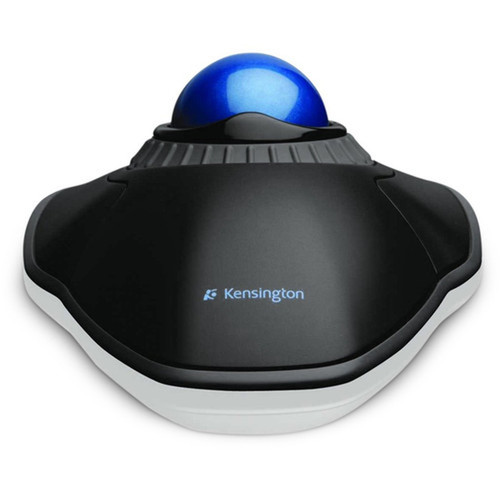
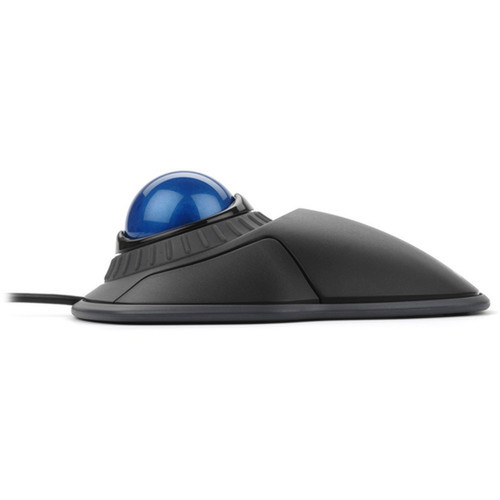
The Kensington Orbit Trackball (K72337WW) delivers precise cursor control through an optical sensor and a large, smooth trackball surface. Its symmetrical shape accommodates both right- and left-handed users without adjustment, making it an accessible pointing device for shared workstations or ergonomic flexibility.
Built around a plug-and-play USB cable interface, this trackball requires no software installation for basic functionality across Windows, macOS, and ChromeOS environments. The scroll ring provides intuitive vertical scrolling through documents and web pages, while two primary buttons handle standard click operations.
Relevant factors for this section include Pointing Device Connectivity Technology, Movement Detection, Total Number of Buttons, Pointing Device Host Interface. When those points are considered together, they give buyers a clearer picture of how the product is equipped, how it fits into deployment, and what kind of day-to-day role it is meant to support.
Technical Overview
This trackball employs optical LED movement detection for accurate tracking on most surfaces without the need for a mousepad. The USB cable ensures a stable, lag-free connection suitable for office, educational, and light productivity tasks where wireless interference is a concern.
The symmetrical design means the button layout and ball placement are identical for left- and right-hand operation, eliminating the need for specialized models. The scroll ring offers tactile feedback and continuous scrolling capability, enhancing navigation efficiency in long documents or spreadsheets.
Relevant factors for this section include Pointing Device Connectivity Technology, Movement Detection, Total Number of Buttons, Pointing Device Host Interface. When those points are considered together, they give buyers a clearer picture of how the product is equipped, how it fits into deployment, and what kind of day-to-day role it is meant to support.
A strong technical summary explains how the product's interfaces, hardware profile, and operating characteristics work together in real deployment. Buyers often need this context to confirm compatibility with existing devices, expected performance in daily use, and whether installation will be straightforward for IT staff or end users.
Key Product Advantages
The Kensington Orbit Trackball stands out for its ambidextrous build and straightforward operation, reducing device clutter and training time in multi-user environments.
These strengths make the product easier to deploy and manage in real environments, especially where reliability, usability, and day-to-day operational continuity matter. Notable benefits include Ergonomic Flexibility, Precise Navigation.
Ergonomic Flexibility
The symmetrical shape allows seamless switching between left- and right-handed users, ideal for shared desks, training labs, or users with alternating hand preferences.
- No left/right-hand model selection needed
- Reduces inventory for IT departments
Precise Navigation
Optical tracking ensures smooth cursor movement, while the scroll ring enables fast, controlled scrolling without repetitive wrist motions.
- Optical sensor works on most surfaces
- Scroll ring reduces finger strain
Deployment / Use Cases
This trackball fits well in environments where space is limited or where traditional mice cause discomfort. Its cable connection avoids battery issues and pairing hassles, making it reliable for long-term stationary use.
Common deployments include office workstations, computer labs, library kiosks, and point-of-sale systems where left- and right-handed users share equipment. The compatibility with legacy Windows versions and modern macOS makes it suitable for mixed-OS networks.
Relevant factors for this section include Pointing Device Connectivity Technology, Movement Detection, Total Number of Buttons, Pointing Device Host Interface. When those points are considered together, they give buyers a clearer picture of how the product is equipped, how it fits into deployment, and what kind of day-to-day role it is meant to support.
Shared Workstations
Ideal for training rooms, help desks, or reception areas where multiple users access the same computer, as the symmetrical design requires no reconfiguration.
Ergonomic Support
Useful for users seeking to reduce wrist strain from traditional mice, as the trackball allows cursor control with thumb and finger movements rather than arm motion.
Highlights
- Symmetrical design works for both left- and right-handed users without adjustment
- Optical LED sensor provides accurate tracking on most surfaces without a mousepad
- Scroll ring enables smooth, continuous scrolling through documents and web pages
- USB cable connectivity ensures stable, plug-and-play operation with no batteries required
- Compatible with Windows 8.1/7/8/10/XP/Vista, Mac OS X 10.8-10.11, and ChromeOS
- Two-button layout supports standard click and select functions
- Ideal for shared workstations, computer labs, and ergonomic setups
- Manufactured by Kensington with part number K72337WW
Specifications
| Specifications | |
|---|---|
| Manufacturer | Kensington Computer Products Group |
| Manufacturer Part Number | K72337WW |
| Brand Name | Kensington |
| Product Line | Orbit |
| Product Name | Orbit Trackball |
| Product Type | Trackball |
| Pointing Device | |
| Pointing Device Connectivity Technology | Cable |
| Movement Detection | Optical |
| Total Number of Buttons | 2 |
| Scroller Type | Scroll Ring |
| Ergonomic Fit | Symmetrical |
| Interfaces/Ports | |
| Pointing Device Host Interface | USB |
| Miscellaneous | |
| Operating System Compatibility | Windows 8.1,Windows 7,Windows 8,Windows 10,Mac OS X 10.8 Mountain Lion,Mac OS X 10.11 El Capitan,ChromeOS,Mac OS X 10.9 Mavericks,Windows XP,Windows Vista,Mac OS X |
| Platform Supported | PC,Mac |
| Country of Origin | China |
FAQ
Is this trackball suitable for left-handed users?
Yes, the Kensington Orbit Trackball features a symmetrical design that works identically for both left- and right-handed users. The button layout and trackball placement are mirrored, so no special configuration or separate model is needed for left-hand operation.
What type of connectivity does this trackball use?
This trackball connects via a wired USB cable. It uses plug-and-play technology, meaning it typically requires no additional drivers for basic functionality on supported operating systems like Windows, macOS, and ChromeOS.
Which operating systems are compatible with this trackball?
The trackball is compatible with Windows 8.1, Windows 7, Windows 8, Windows 10, Windows XP, Windows Vista, Mac OS X 10.8 Mountain Lion through 10.11 El Capitan, and ChromeOS. It supports both PC and Mac platforms out of the box.
How many buttons does the Kensington Orbit Trackball have?
It has two primary buttons. These handle standard left-click and right-click functions. The scroll ring provides additional scrolling control but is not counted as a button in the traditional sense.
Does this trackball require a mousepad?
No, the optical LED movement detection allows the trackball to function on most flat surfaces without a mousepad. The sensor tracks the ball's rotation internally, so surface texture is generally not a factor for accuracy.
What is the scroll ring and how does it work?
The scroll ring is a raised, grooved ring around the trackball that you rotate with your fingers to scroll vertically. It provides tactile feedback and allows continuous scrolling through long documents or web pages, offering an alternative to scroll wheels on traditional mice.
| Qty | Price | Available |
|---|


