






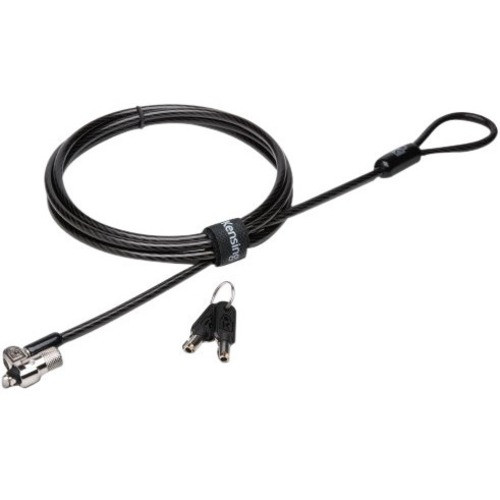
Kensington K65042L MicroSaver 2. 0 Keyed Alike Laptop Lock - Carbon Steel - For Notebooks

Business volume discounts
Technical guidance
Preparation & staging
QC · ON · AB · BC
Product Features
Product Overview
The Kensington MicroSaver 2.0 Keyed Alike Laptop Lock (K65042L) delivers reliable physical security for notebooks in business, education, and shared workspace environments. This cable lock uses a durable carbon steel construction to resist cutting and tampering, providing a straightforward theft-deterrent solution that integrates seamlessly with standard Kensington security slots found on most laptops.
Designed for simplicity and effectiveness, the lock features a keyed-alike configuration that allows multiple locks to be operated with the same key. This eliminates the need to manage separate keys for each secured device, streamlining security management for IT administrators and organizations deploying locks across multiple workstations or mobile devices.
Technical Overview
The MicroSaver 2.0 lock employs a robust mechanical locking mechanism housed within a carbon steel body, offering substantial resistance to physical attacks. The keyed-alike design means each lock in a set shares identical key cuts, enabling centralized key control—a practical feature for environments where numerous devices require simultaneous securing without key confusion.
Compatibility is specifically tailored for notebooks equipped with Kensington security slots, which remain an industry standard on business and consumer laptops. The lock's tethering cable integrates directly into these slots via a secure twist-and-lock interface, preventing casual removal while allowing quick authorized access when needed.
This section brings together practical product details such as Lock Configuration Type, Product Material, so buyers can judge configuration, deployment fit, and day-to-day suitability with less guesswork.
Key Product Advantages
This lock combines durable materials with a user-friendly keyed-alike system to address common security challenges in dynamic IT environments. The carbon steel construction ensures long-term durability against wear and attempted breaches, while the standardized Kensington compatibility guarantees broad device coverage without requiring adapters or modifications.
Keyed-Alike Convenience
Operate multiple locks with a single key, simplifying key management and reducing administrative overhead for IT teams managing large fleets of devices.
- Eliminates key confusion
- Reduces key replacement costs
- Streamlines device audits
Carbon Steel Durability
The lock body and cable are constructed from carbon steel, providing high tensile strength and resistance to cutting, sawing, and prying attempts.
- Resists physical tampering
- Long-lasting material integrity
- Reliable in high-traffic areas
Universal Notebook Compatibility
Designed exclusively for notebooks with Kensington security slots, ensuring broad compatibility across laptop brands and models without additional hardware.
- No adapters required
- Wide industry adoption
- Quick installation and removal
Deployment / Use Cases
The Kensington MicroSaver 2.0 Keyed Alike Laptop Lock is ideal for environments where notebooks are temporarily stationed in accessible locations but require theft deterrence. Its straightforward design makes it suitable for office hot-desking setups, library study carrels, retail point-of-sale stations, and classroom laptop carts where devices are shared among users but need to remain secure during breaks or overnight.
In corporate settings, the keyed-alike feature allows IT departments to deploy locks across entire departments or floors while maintaining a single key set for authorized personnel. This reduces the risk of lost keys compromising security and simplifies the process of securing and unsecuring devices during maintenance, upgrades, or reallocation.
Educational Institutions
Secure laptops in computer labs, libraries, and classrooms where devices are used by multiple students throughout the day, preventing unauthorized removal while allowing easy access for scheduled classes.
- Theft deterrence in shared spaces
- Simplified key management for staff
- Durable for daily student use
Business Workspaces
Protect company-issued notebooks in open-plan offices, meeting rooms, and coworking spaces where devices may be left unattended temporarily, ensuring asset security without impeding mobility.
- Secures hot-desking setups
- Reduces insurance claims
- Maintains device availability
Highlights
- Keyed-alike lock configuration for simplified multi-device security management
- Carbon steel construction provides high durability and tamper resistance
- Compatible with notebooks featuring standard Kensington security slots
- Designed for quick installation and removal without tools
- Ideal for shared environments like offices, classrooms, and libraries
- Reduces administrative overhead with centralized key control
- Offers reliable theft deterrence for temporarily stationary devices
- Manufactured by Kensington, a trusted name in computer security accessories
Specifications
| Specifications | |
|---|---|
| Manufacturer | Kensington Computer Products Group |
| Manufacturer Part Number | K65042L |
| Brand Name | Kensington |
| Product Line | MicroSaver |
| Product Name | MicroSaver 2.0 Keyed Laptop Lock - Like Keyed |
| Product Type | Cable Lock |
| Lock | |
| Lock Configuration Type | Keyed Alike Lock |
| Physical Characteristics | |
| Product Material | Carbon Steel |
| Miscellaneous | |
| Device Supported | Notebook |
| Country of Origin | China |
FAQ
What does 'keyed alike' mean for this laptop lock?
Keyed alike means that multiple Kensington MicroSaver 2.0 locks can be operated with the same key. This allows you to secure several notebooks using locks that share identical key cuts, eliminating the need to manage different keys for each device. It simplifies key distribution, reduces the risk of lost keys affecting multiple locks, and streamlines security management in environments where many devices require protection.
Which devices are compatible with the Kensington MicroSaver 2.0 lock?
The lock is compatible with notebooks that have a standard Kensington security slot, which is a small, reinforced opening typically located on the side or back of most laptops. This includes many business and consumer notebook models from various manufacturers. It is specifically designed for notebooks and does not support other device types without adapters, ensuring a secure fit for laptop tethering.
How durable is the carbon steel construction?
The carbon steel construction offers high tensile strength and resistance to cutting, sawing, and prying attempts, making it a reliable physical deterrent against theft. Carbon steel is known for its durability and ability to withstand wear in high-traffic environments, ensuring the lock maintains its integrity over extended use. This material choice provides a robust security solution without adding excessive weight or bulk.
Can this lock be used in shared workspace environments?
Yes, the Kensington MicroSaver 2.0 is well-suited for shared workspace environments such as offices, libraries, classrooms, and coworking spaces. Its keyed-alike design allows multiple locks to be managed with a single key, simplifying access for authorized personnel while securing devices against unauthorized removal. The quick installation and removal process supports flexible use in dynamic settings where devices may be relocated or reassigned frequently.
What are the advantages of using a keyed lock versus a combination lock?
A keyed lock like the MicroSaver 2.0 offers centralized control through physical keys, which can be easier to manage in organizational settings where IT staff oversee security. Keys provide a tangible access method that doesn't require remembering combinations, reducing the risk of forgotten codes. Additionally, keyed locks allow for quick rekeying or key replacement if needed, offering administrative flexibility that combination locks may lack in multi-user environments.
Is the Kensington MicroSaver 2.0 lock easy to install?
Installation is straightforward and tool-free. Simply insert the lock's T-bar connector into the Kensington security slot on your notebook, then twist to lock it securely in place. The process takes seconds and requires no technical expertise, making it accessible for all users. To remove, use the provided key to unlock and detach the lock, allowing for quick device relocation or storage without damaging the laptop.
| Qty | Price | Available |
|---|


