

Shipping included*
Exclusions
Additional shipping fees may apply in rare circumstances for deliveries outside standard service areas. In most cases, this only potentially affects shipments to the Northwest Territories and Yukon, as well as certain heavy or oversized items.
Kensington K38255NA SD4100v Docking Station - 6x USB 3. 1 Ports - 2x DisplayPort - RJ-45 - Audio - Security Slot

Business volume discounts
Technical guidance
Preparation & staging
QC · ON · AB · BC
Product Features
Product Overview
The Kensington K38255NA SD4100v Docking Station delivers comprehensive connectivity for modern workspace setups. This wired docking solution transforms a single USB 3.1 connection into a full-featured workstation hub, supporting monitors, tablets, and notebooks with professional-grade expansion.
Engineered for reliability and daily productivity, the SD4100v consolidates multiple peripherals through its robust port selection. The docking station maintains Kensington's reputation for durable business accessories, featuring a security slot for physical asset protection and backed by a two-year limited warranty.
This section brings together practical product details such as Connectivity Technology, Device Supported, Host Interface, Audio Line Out, so buyers can judge configuration, deployment fit, and day-to-day suitability with less guesswork.
In practical terms, this overview should help a buyer understand what the product is, the type of environment it suits, and the core reasons it may be chosen over a more generic alternative. That context is especially useful for business purchasing, where fit, consistency, and ease of use usually matter as much as individual specifications.
Technical Overview
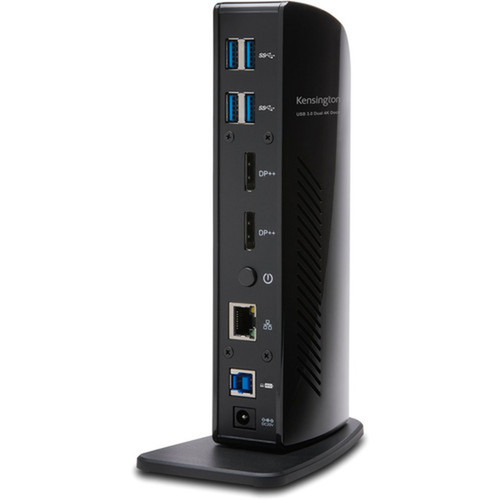
Built around a USB 3.1 Type A host interface, the SD4100v docking station provides high-speed data transfer and video output capabilities. The six USB 3.1 Gen 1 Type-A ports deliver 5 Gbps bandwidth each, enabling simultaneous connections for storage devices, input peripherals, and other USB accessories.
Dual DisplayPort outputs support multi-monitor configurations, extending or mirroring displays from compatible host devices. Integrated RJ-45 Ethernet delivers wired network connectivity, while audio line-out and microphone ports handle voice communication and audio playback needs.
This section brings together practical product details such as Connectivity Technology, Device Supported, Host Interface, Audio Line Out, so buyers can judge configuration, deployment fit, and day-to-day suitability with less guesswork.
A strong technical summary explains how the product's interfaces, hardware profile, and operating characteristics work together in real deployment. Buyers often need this context to confirm compatibility with existing devices, expected performance in daily use, and whether installation will be straightforward for IT staff or end users.
Key Product Advantages
The SD4100v docking station excels at simplifying complex desk setups through intelligent port consolidation and reliable performance.
Expanded Connectivity
Six USB 3.1 ports provide ample connectivity for peripherals, while dual DisplayPort outputs enable multi-monitor productivity. The integrated RJ-45 port ensures stable network performance without relying on wireless connections.
- 6x USB 3.1 ports for peripherals
- 2x DisplayPort for monitors
- RJ-45 for wired networking
Security & Durability
Kensington's security slot compatibility allows physical tethering to prevent unauthorized removal. The docking station is manufactured in Taiwan with quality components, backed by a comprehensive two-year limited warranty for business deployment confidence.
- Kensington security slot
- 2-year limited warranty
- Business-grade construction
Deployment / Use Cases
The Kensington SD4100v docking station serves as an ideal solution for professionals requiring streamlined connectivity across multiple devices and displays.
In corporate environments, IT departments can deploy these docking stations to create standardized workstation setups. Employees benefit from single-cable connectivity that instantly provides access to monitors, network, audio devices, and USB peripherals when docking their notebooks or tablets.
This section brings together practical product details such as Connectivity Technology, Device Supported, Host Interface, Audio Line Out, so buyers can judge configuration, deployment fit, and day-to-day suitability with less guesswork.
Hot-Desking & Shared Workspaces
Provide consistent connectivity across flexible seating arrangements. Users simply connect their device to access full workstation capabilities without reconfiguring multiple cables each time.
Multi-Monitor Productivity Stations
Support dual-display configurations for financial analysis, content creation, or software development workflows. The docking station maintains clean cable management while delivering necessary video outputs.
What's in the Box
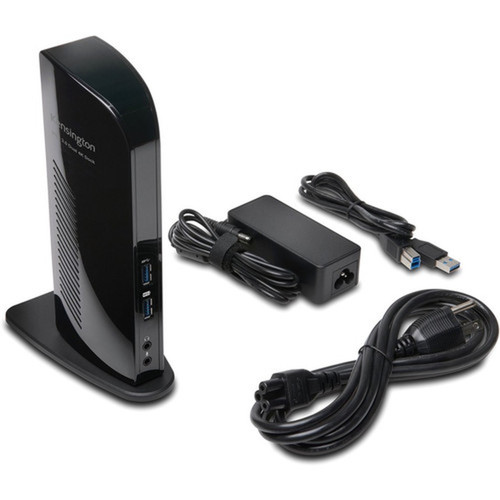
The SD4100v docking station package includes all essential components for immediate deployment in business environments.
Highlights
- Connect monitors, tablets, and notebooks via single USB 3.1 connection
- Six USB 3.1 Gen 1 Type-A ports for peripheral expansion
- Dual DisplayPort outputs for multi-monitor setups
- Integrated RJ-45 Gigabit Ethernet port
- Audio line-out and microphone ports for communication
- Kensington security slot compatible for physical protection
- Includes necessary cables for immediate deployment
- Backed by 2-year limited warranty
- Manufactured in Taiwan with quality components
- Wired connectivity ensures reliable, consistent performance
Specifications
| Specifications | |
|---|---|
| Manufacturer | Kensington Computer Products Group |
| Manufacturer Part Number | K38255NA |
| Brand Name | Kensington |
| Product Model | SD4100v |
| Product Name | SD4100v Docking Station |
| Product Type | Docking Station |
| Technical Information | |
| Connectivity Technology | Wired |
| Device Supported | Monitor,Tablet,Notebook |
| Interfaces/Ports | |
| Host Interface | USB 3.1 Type A |
| Audio Line Out | Yes |
| Total Number of USB Ports | 6 |
| Number of USB 3.1 Gen 1 Type-A Ports | 6 |
| Network (RJ-45) | Yes |
| Number of DisplayPort Outputs | 2 |
| DisplayPort | Yes |
| Microphone | Yes |
| Miscellaneous | |
| Package Contents | SD4100v USB-B to USB-A Cable Docking Station 3m Cable |
| Kensington Security Slot | Yes |
| Country of Origin | Taiwan |
| Warranty | |
| Limited Warranty | 2 Year |
FAQ
What devices are compatible with the Kensington SD4100v docking station?
The SD4100v docking station supports monitors, tablets, and notebooks that feature a USB 3.1 Type A port. Compatible devices include Windows and macOS systems with appropriate drivers, as well as tablets that support display output via USB-C with appropriate adapters. The docking station requires a USB 3.1 host connection for full functionality.
How many monitors can I connect to this docking station?
The Kensington SD4100v docking station supports up to two monitors simultaneously through its dual DisplayPort outputs. You can extend your desktop across both displays or mirror content, depending on your operating system settings and graphics capabilities. Both DisplayPort outputs are active concurrently when connected to compatible monitors.
What is the speed of the USB ports on this docking station?
All six USB ports on the SD4100v are USB 3.1 Gen 1 Type-A, delivering data transfer speeds up to 5 Gbps. This bandwidth supports high-speed storage devices, peripherals, and accessories while maintaining backward compatibility with USB 2.0 and USB 1.1 devices. The ports provide sufficient power for most bus-powered peripherals.
Does this docking station include network connectivity?
Yes, the Kensington SD4100v features an integrated RJ-45 port that provides Gigabit Ethernet connectivity. This allows for wired network access with stable, high-speed internet connections independent of wireless networks. The Ethernet functionality works simultaneously with all other docking station features when connected to a network switch or router.
What security features does this docking station offer?
The SD4100v docking station includes a Kensington security slot compatible with standard locking cables. This allows IT departments to physically secure the docking station to desks or workstations, preventing unauthorized removal in shared or public environments. The security slot works with most Kensington and third-party locking solutions.
What cables are included with the docking station?
The package includes an SD4100v docking station unit, a USB-B to USB-A host cable for connecting to your computer, and a 3-meter connection cable. These cables provide everything needed for basic deployment, though you may need additional DisplayPort cables for monitor connections depending on your existing setup.
What screen size is listed?
Kensington K38255NA SD4100v Docking Station for Monitor - Tablet - Notebook with USB 3. 1 Type A - 6 USB Ports - RJ-45 - DisplayPort is best judged through its screen, connectivity, and installation specifications, which help buyers confirm visual fit and deployment suitability.
What resolution or display format is specified?
Kensington K38255NA SD4100v Docking Station for Monitor - Tablet - Notebook with USB 3. 1 Type A - 6 USB Ports - RJ-45 - DisplayPort is best judged through its screen, connectivity, and installation specifications, which help buyers confirm visual fit and deployment suitability.
| Qty | Price | Available |
|---|