







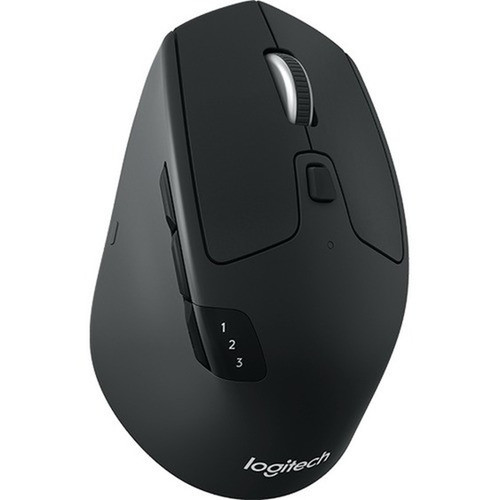
Logitech 910-004790 M720 Triathlon Multi-Device Wireless Mouse - Bluetooth - USB Unifying Receiver - 1000 DPI - 8 Buttons - 2-Year Battery - Black

Business volume discounts
Technical guidance
Preparation & staging
QC · ON · AB · BC
Product Features
Technical Overview
The M720 Triathlon operates on a 2.4 GHz wireless frequency with a 32.8-foot range, ensuring stable connectivity in typical office or home setups. Its optical sensor provides precise 1000 DPI tracking, suitable for detailed work and general navigation.
The tilt wheel enables both vertical and horizontal scrolling, with hyper-fast and click-to-click modes for efficient document and webpage navigation. The eight programmable buttons allow for custom shortcuts through Logitech software, enhancing workflow efficiency.
Relevant factors for this section include Pointing Device Connectivity Technology, Pointing Device Wireless Technology, Pointing Device Wireless Operating Distance, Pointing Device Host Interface. When those points are considered together, they give buyers a clearer picture of how the product is equipped, how it fits into deployment, and what kind of day-to-day role it is meant to support.
A strong technical summary explains how the product's interfaces, hardware profile, and operating characteristics work together in real deployment. Buyers often need this context to confirm compatibility with existing devices, expected performance in daily use, and whether installation will be straightforward for IT staff or end users.
Key Product Advantages
The M720 Triathlon stands out with its multi-device capability, extended battery life, and ergonomic comfort, making it a reliable choice for users who switch between systems regularly.
Dual Connectivity Flexibility
Connect via Bluetooth for direct pairing or use the included Logitech Unifying receiver for a dedicated USB connection. The receiver supports up to six compatible Logitech peripherals, reducing USB port clutter.
Long-Lasting Power
Powered by a single AA battery with an estimated 24-month lifespan, the mouse minimizes maintenance and battery replacements, ensuring uninterrupted productivity.
Multi-Device Workflow with Logitech Flow
Easily control up to three computers with Logitech Flow, enabling seamless cursor movement, text copying, and file dragging across different operating systems without manual switching.
Deployment / Use Cases
The Logitech M720 Triathlon is designed for professionals, students, and home users who require a versatile mouse that adapts to multiple devices and operating systems. Its compatibility and ergonomic features make it suitable for extended use in various environments.
Ideal use cases include office setups where users switch between a desktop and laptop, creative workflows involving tablets and computers, and home offices with mixed-device ecosystems. The mouse's right-handed ergonomic design and rubberized grip provide comfort during long sessions, reducing strain.
Multi-Platform Office
Use with Windows PCs, macOS laptops, and ChromeOS devices in a single workspace, leveraging Logitech Flow for efficient cross-system tasks.
Hybrid Computing Environments
Pair with tablets like iPads running iPadOS or Android devices for presentations, note-taking, or media consumption, supported by broad OS compatibility.
Physical Profile
The mouse features a compact, full-sized design with dimensions of 4.53 inches in height, 2.91 inches in width, and 1.77 inches in depth, weighing approximately 4.76 ounces. Its black rubberized body offers a secure grip, and the sculpted shape conforms to right-handed users for reduced fatigue.
- Width
- 2.91" (74 mm)
- Depth
- 1.77" (45 mm)
- Height
- 4.53" (115 mm)
- Weight
- 4.76 oz (135 g)
What's in the Box
The package includes all necessary components to start using the mouse immediately.
Highlights
- Connect via Bluetooth or included USB Unifying receiver for flexible wireless setup.
- Logitech Flow enables control across up to three computers with seamless cursor and file transfer.
- Up to 24-month battery life from a single AA battery minimizes maintenance.
- 1000 DPI optical sensor delivers precise tracking for detailed work and navigation.
- Eight programmable buttons and a tilt wheel support customizable shortcuts and efficient scrolling.
- Ergonomic right-handed design with rubberized grip ensures comfort during extended use.
- Compatible with Windows, macOS, ChromeOS, Linux, Android, and iPadOS.
- Unifying receiver supports up to six Logitech peripherals, reducing USB port usage.
Specifications
| Specifications | |
|---|---|
| Manufacturer | Logitech |
| Manufacturer Part Number | 910-004790 |
| Brand Name | Logitech |
| Product Line | TRIATHLON |
| Product Model | M720 |
| Product Name | M720 Triathlon Mouse |
| Packaged Quantity | 1 Each |
| Product Type | Mouse |
| Pointing Device | |
| Pointing Device Connectivity Technology | Wireless |
| Pointing Device Wireless Technology | Bluetooth/Radio Frequency |
| Pointing Device Wireless Operating Distance | 32.81 ft (10000 mm) |
| Wireless Operating Frequency | 2.40 GHz |
| Movement Detection | Optical |
| Movement Resolution (dpi) | 1000 |
| Total Number of Buttons | 8 |
| Scroller Type | Tilt Wheel |
| Ergonomic Fit | Right-handed |
| Scrolling Directions | Vertical/Horizontal |
| Interfaces/Ports | |
| Pointing Device Host Interface | USB |
| Battery Information | |
| Number of Batteries Supported | 1 |
| Battery Size Supported | AA |
| Battery Included | Yes |
| Physical Characteristics | |
| Color Family | Black |
| Product Color | Black |
| Height | 4.53" (115 mm) |
| Width | 2.91" (74 mm) |
| Depth | 1.77" (45 mm) |
| Weight (Approximate) | 4.76 oz (135 g) |
| Miscellaneous | |
| Package Contents | M720 Triathlon Mouse Unifying Receiver 1 x AA Batteries User Documentation |
| Device Supported | Tablet,Computer,Notebook |
| Operating System Compatibility | Linux Kernel 2.6+,Windows 10,Windows 11,ChromeOS,macOS 10.5,Android 5.0 Lollipop,iPadOS 13.4 |
| Platform Supported | Mac,PC |
| Environmentally Friendly | Yes |
| Country of Origin | China |
| Warranty | |
| Limited Warranty | 1 Year |
FAQ
What connectivity options does the Logitech M720 Triathlon mouse support?
The M720 Triathlon supports dual wireless connectivity: Bluetooth for direct pairing with compatible devices and a Logitech Unifying receiver for a dedicated USB connection. The Unifying receiver can connect up to six compatible Logitech peripherals, allowing you to use multiple devices with a single USB port.
How long does the battery last, and what type is required?
The mouse uses one AA battery, which is included in the package. Under typical usage conditions, the battery can last up to 24 months, thanks to power-efficient design and automatic sleep modes. This extended lifespan reduces the frequency of battery replacements and maintenance.
What is Logitech Flow, and how does it work with this mouse?
Logitech Flow is a software feature that allows you to control up to three computers with a single mouse. You can move the cursor seamlessly between screens, copy text, and drag files across different operating systems like Windows and macOS. It requires Logitech software installed on each computer to enable cross-device functionality.
Which operating systems are compatible with the M720 Triathlon mouse?
The mouse is compatible with a wide range of operating systems, including Windows 10 and 11, macOS 10.5 and later, ChromeOS, Linux Kernel 2.6+, Android 5.0 Lollipop, and iPadOS 13.4. This broad support makes it suitable for mixed-device environments, from traditional PCs to tablets and mobile devices.
What are the ergonomic features of this mouse?
The M720 Triathlon is designed for right-handed users with a sculpted shape and rubberized body that provides a comfortable palm rest grip. Its full-sized design and tilt wheel support vertical and horizontal scrolling, reducing hand strain during long sessions. The eight buttons are positioned for easy access without excessive finger movement.
Can I customize the buttons and scrolling on this mouse?
Yes, you can customize the eight buttons, scrolling behavior, and other settings using Logitech software available for Windows and macOS. This allows you to assign shortcuts, adjust DPI settings, and configure Logitech Flow preferences to match your workflow, enhancing productivity and personalization.
| Qty | Price | Available |
|---|


