

Logitech 910-007668 Spotlight 2 Wireless Presentation Remote with Haptics - Digital Highlighting - Customizable Actions - Laser Pointer - Rechargeable

Business volume discounts
Technical guidance
Preparation & staging
QC · ON · AB · BC
Product Features
Technical Overview
The Spotlight 2 uses a laser-based movement detection system with a wireless operating distance of up to 98.43 feet (30 m) via 2.4 GHz radio frequency or Bluetooth. It connects to a host device through a USB Type-C interface using the included Logi Bolt USB-C receiver or directly via Bluetooth for added flexibility.
Key technical features include a rechargeable battery that delivers up to 3 months of use on a full charge and a quick charge capability that provides 3 hours of use from just a 1-minute charge. The remote includes an LED indicator, customizable keys, and a presenter mode, and supports plug-and-play operation.
This section brings together practical product details such as Pointing Device Connectivity Technology, Pointing Device Wireless Technology, Pointing Device Wireless Operating Distance, Pointing Device Host Interface, so buyers can judge configuration, deployment fit, and day-to-day suitability with less guesswork.
Key Product Advantages
The Spotlight 2 provides tactile confidence through haptic feedback that confirms your actions, ensuring you stay in control even during high-stakes meetings. Its advanced digital highlighting effects—including Spotlight, Squarelight, Magnify, Annotate, and a digital pointer—let you emphasize slide content precisely and elegantly, while the built-in laser pointer serves as a reliable fallback.
Customizable Action Button
Assign your most-used shortcuts—such as start, pause, or mute—to a single button using the Logi Options+ app, streamlining your presentation flow.
Guided Breathing Exercise
Built into Logi Options+, a haptics-guided breathing exercise helps you gain focus and reduce anxiety before you go on stage.
Quick Charge & Long Battery
Charge for one minute to get three hours of use. A full charge provides up to three months of typical usage, so you rarely need to worry about power.
Deployment / Use Cases
The Logitech Spotlight 2 is ideal for a wide range of presentation environments. In corporate boardrooms, it offers seamless wireless connectivity and professional highlighting tools that make data and charts stand out. Educators can use the magnify and spotlight features to guide student attention during lectures, while remote presenters benefit from reliable Bluetooth or Logi Bolt connections across Windows, macOS, and even mobile platforms.
With support for popular presentation software including PowerPoint, Google Slides, Keynote, Zoom, and Microsoft Teams, the Spotlight 2 integrates into existing workflows without friction. Its compact design and rechargeable battery make it a practical tool for frequent travelers and hybrid workers alike.
Boardroom Presentations
Navigate slides and highlight key data points with customizable actions and haptic feedback, ensuring a polished delivery.
Remote & Hybrid Meetings
Connect via Bluetooth to your laptop or tablet and control presentations from a distance, even when you are not physically at the podium.
Physical Profile
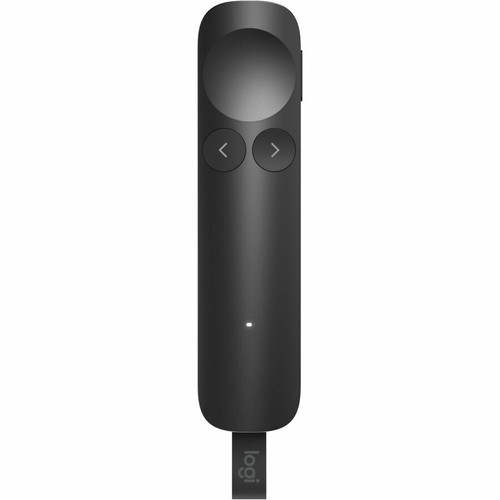
The remote measures just 5.71 x 1.18 x 0.53 inches (145 x 30 x 13.5 mm) and weighs only 1.94 ounces (55 g), making it easy to carry in a pocket or laptop bag. Its graphite color gives it a professional, understated look, while the combination of plastic and aluminum materials provides durability without adding weight.
The slim, tapered form fits comfortably in hand, and the placement of the cursor and action buttons is intuitive for single-handed operation. The included Logi Bolt USB-C receiver is small enough to remain plugged into a laptop without obstructing adjacent ports.
- Width
- 1.18" (30 mm)
- Depth
- 0.53" (13.50 mm)
- Height
- 5.71" (145 mm)
- Weight
- 1.94 oz (55 g)
What's in the Box
The package includes the Spotlight 2 Presentation Remote, a Logi Bolt USB-C receiver, and user documentation.
Highlights
- Haptic feedback confirms actions for confident, professional presentations
- Advanced digital highlighting: Spotlight, Squarelight, Magnify, Annotate, digital pointer, and laser pointer
- Customizable Action Button via Logi Options+ app (start, pause, mute, and more)
- Guided breathing exercise in Logi Options+ to reduce pre-presentation anxiety
- Two ways to connect: Bluetooth or Logi Bolt USB-C receiver with plug-and-play simplicity
- Quick charge: 3 months of use per full charge; 3 hours from a 1-minute charge
- Works with Windows 10/11, macOS 14, ChromeOS, Linux, iPadOS 17, iOS 15, Android 14
- Cross-platform support for PowerPoint, Google Slides, Keynote, Zoom, and Teams
Specifications
| Specifications | |
|---|---|
| Manufacturer | Logitech |
| Manufacturer Part Number | 910-007668 |
| Brand Name | Logitech |
| Product Line | Spotlight 2 |
| Product Name | Spotlight 2 Presentation Pointer |
| Product Type | Presentation Pointer |
| Pointing Device | |
| Pointing Device Connectivity Technology | Wireless |
| Pointing Device Wireless Technology | Bluetooth/Radio Frequency |
| Pointing Device Wireless Operating Distance | 98.43 ft (30000 mm) |
| Wireless Operating Frequency | 2.40 GHz |
| Movement Detection | Laser |
| Pointing Device Features | Fast Charging,Customizable Keys,Plug and Play,LED Indicator,Presenter,Magnifier |
| Rechargeable | Yes |
| Interfaces/Ports | |
| Pointing Device Host Interface | USB Type C |
| Physical Characteristics | |
| Color Family | Gray |
| Product Color | Graphite |
| Product Material | Plastic,Aluminium |
| Height | 5.71" (145 mm) |
| Width | 1.18" (30 mm) |
| Depth | 0.53" (13.50 mm) |
| Weight (Approximate) | 1.94 oz (55 g) |
| Miscellaneous | |
| Package Contents | Spotlight 2 Presentation Remote Logi Bolt for Spotlight 2 Presentation Remote User Documentation |
| Operating System Compatibility | Windows 10,Windows 11,ChromeOS,Linux,iPadOS 17,iOS 15,Android 14,macOS 14 |
| Platform Supported | PC,Mac |
| Warranty | |
| Limited Warranty | 1 Year |
| Additional Warranty Information | 1-year limited hardware warranty |
FAQ
How does the haptic feedback work on the Logitech Spotlight 2?
When you press the highlight button, a subtle haptic vibration confirms the action, giving you tactile reassurance that you have performed the correct operation. This keeps you confident and in control during presentations. The Logi Options+ app also includes a guided breathing exercise that uses haptics to help you focus before you present.
Can I customize the button actions on the Spotlight 2?
Yes, using the Logi Options+ app you can assign commonly used actions to the Action Button, such as starting, pausing, or muting your presentation. This allows you to streamline your workflow and access shortcuts with a single click.
What connectivity options does the Spotlight 2 support?
The remote can connect via Bluetooth or through the included Logi Bolt USB-C receiver for a secure, high-performance wireless connection. The receiver uses 2.4 GHz radio frequency and offers plug-and-play compatibility. The wireless operating distance is up to 98.43 feet (30 meters).
What digital highlighting effects are available?
The Spotlight 2 offers Spotlight, Squarelight, Magnify, Annotate, and a digital pointer to draw attention to slide content. It also includes a traditional laser pointer for physical highlighting. These effects can be cycled through easily during your presentation.
How long does the battery last and how fast does it charge?
A full charge provides up to 3 months of typical use. Quick charge technology gives you 3 hours of use from just a 1-minute charge, making it easy to top up quickly before a meeting. The remote is rechargeable via USB Type-C.
Which operating systems and platforms are compatible?
The Spotlight 2 works with Windows 10, Windows 11, macOS 14, ChromeOS, Linux, iPadOS 17, iOS 15, and Android 14. It supports PC and Mac platforms and is compatible with presentation software including PowerPoint, Google Slides, Keynote, Zoom, and Microsoft Teams.
What refresh rate or brightness details are available?
Display-oriented products are best judged through screen, connectivity, and installation specifications. Those facts help buyers confirm visual fit, mounting flexibility, and deployment suitability more clearly than generic summary text.
What input or connectivity options are listed?
Connectivity options include Bluetooth/Radio Frequency, helping the product integrate into common office or home setups.
| Qty | Price | Available |
|---|