








Logitech 910-007714 Signature Comfort M840 L Wireless Mouse - Bluetooth / RF 2. 4 GHz - Optical 4000 dpi - 6 Buttons - Black - USB - Right-Handed

Business volume discounts
Technical guidance
Preparation & staging
QC · ON · AB · BC
Product Features
Technical Overview
The M840 L uses Logitech's dual-mode wireless technology, allowing users to connect via Bluetooth or the included USB RF receiver. Switching between paired devices is handled by the Easy-Switch button, with support for up to three devices. The optical sensor tracks on a wide range of surfaces and features adjustable DPI settings for precise cursor control.
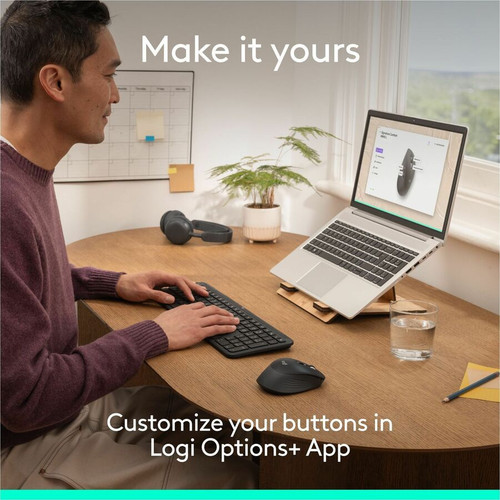
All six buttons are programmable through Logitech Options software (available for Windows and macOS). The scroll wheel enables fast, smooth scrolling through documents and web pages. Silent click technology reduces click noise by over 90% while maintaining tactile feedback, making it ideal for shared workspaces. The mouse runs on a single AA battery with an estimated battery life of up to 24 months (depending on usage and connection type).
Dual Connectivity
Connect via Bluetooth Smart or the included USB RF receiver. Easily switch between three paired devices with the press of a button.
SilentTouch Technology
All buttons and the scroll wheel are engineered for quiet operation, reducing noise without compromising performance or feel.
Key Product Advantages
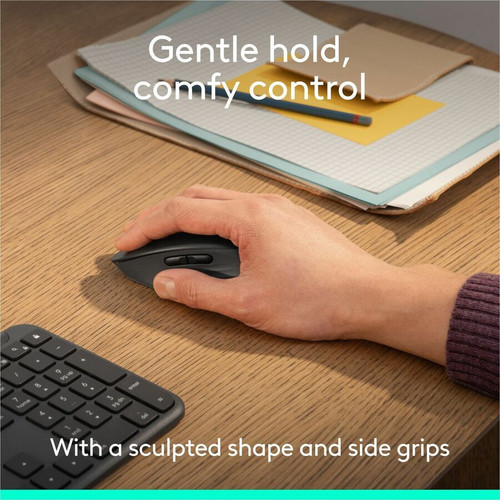
The Signature Comfort M840 L is built to enhance daily productivity with features that reduce fatigue and distraction. Its right-handed contoured design with soft rubber side grips provides a comfortable, secure hold during extended use. The adjustable DPI sensor (up to 4000 dpi) gives users control over cursor speed for tasks ranging from precise editing to rapid navigation.
Wireless flexibility is a core strength: Bluetooth eliminates the need for a USB port, while the RF receiver offers a reliable connection with low latency. Easy-Switch allows seamless toggling between a desktop, laptop, and tablet, minimizing downtime. Silent clicks and quiet scrolling benefit open-plan offices, libraries, or home environments where noise matters.
Additionally, the use of 50% post-consumer recycled plastic aligns with environmentally conscious procurement goals without sacrificing durability or aesthetics.
Deployment / Use Cases
The Logitech Signature Comfort M840 L is suitable for a wide range of professional environments. In the office, its dual connectivity and silent operation make it a strong candidate for hot-desking and shared workspaces. Users can keep the RF receiver plugged into a desktop for instant connection and use Bluetooth with a laptop or tablet when moving between meeting rooms.
For remote workers, the long battery life and compact design reduce the need for frequent battery changes or cable clutter. The customizable buttons streamline workflow by assigning common commands (copy, paste, media control) via Logitech Options. Educational settings and libraries benefit from the quiet clicks and durable construction. The mouse is also compatible with ChromeOS, Linux, and Android devices, broadening its applicability beyond traditional Windows/Mac ecosystems.
Hot-Desk & Shared Workstations
Dual connectivity allows users to pair via Bluetooth while leaving the RF receiver attached to a shared dock. Easy-Switch speeds device transitions.
Multi-Device Productivity
Connect to a PC, tablet, and phone simultaneously. Use the Easy-Switch button to control all three from one mouse without re-pairing.
Physical Profile
Finished in black with a matte texture, the M840 L measures 4.78 x 2.93 x 1.74 inches (121.3 x 74.3 x 44.2 mm) and weighs 3.63 ounces (102.9 g). Its right-handed contoured design includes a sculpted thumb rest and soft rubber side grips for added control. The body is made from 50% post-consumer recycled plastic, providing a durable yet eco-friendly build.
- Width
- 2.93" (74.30 mm)
- Depth
- 1.74" (44.20 mm)
- Height
- 4.78" (121.30 mm)
- Weight
- 3.63 oz (102.90 g)
What's in the Box
The package includes the Logitech Signature Comfort M840 L Mouse, one AA battery (pre-installed), a USB RF receiver (stored inside the mouse), and user documentation.
Highlights
- Dual-mode wireless: Bluetooth and RF 2.4 GHz, 10-meter range
- Optical sensor with adjustable DPI up to 4000
- 6 programmable buttons with silent clicks and quiet scroll wheel
- Right-handed ergonomic design with contoured grip and soft side grips
- Easy-Switch button to toggle between three paired devices
- Made with 50% post-consumer recycled plastic
- Compatible with Windows, macOS, ChromeOS, Linux, iPadOS, Android
- Single AA battery included with long battery life
- Compact dimensions: 4.78 x 2.93 x 1.74 in, 3.63 oz
Specifications
| Specifications | |
|---|---|
| Manufacturer | Logitech |
| Manufacturer Part Number | 910-007714 |
| Brand Name | Logitech |
| Product Line | Signature Comfort |
| Product Model | M840 L |
| Product Name | Signature Comfort M840 L Mouse |
| Product Type | Mouse |
| Pointing Device | |
| Pointing Device Connectivity Technology | Wireless |
| Pointing Device Wireless Technology | Bluetooth/Radio Frequency |
| Wireless Operating Frequency | 2.40 GHz |
| Movement Detection | Optical |
| Movement Resolution (dpi) | 4000 |
| Total Number of Buttons | 6 |
| Scroller Type | Scroll Wheel |
| Pointing Device Features | Silent,Customizable Keys,Comfort Grip,Contour,Side Grip,Fast Scrolling,Quiet Clicks,Adjustable DPI,Easy-Switch |
| Ergonomic Fit | Right-handed |
| Interfaces/Ports | |
| Pointing Device Host Interface | USB |
| Battery Information | |
| Number of Batteries Supported | 1 |
| Battery Size Supported | AA |
| Battery Included | Yes |
| Physical Characteristics | |
| Color Family | Black |
| Product Color | Black |
| Product Material | Recycled Plastic |
| Height | 4.78" (121.30 mm) |
| Width | 2.93" (74.30 mm) |
| Depth | 1.74" (44.20 mm) |
| Weight (Approximate) | 3.63 oz (102.90 g) |
| Miscellaneous | |
| Package Contents | Signature Comfort M840 L Mouse 1 x AA Battery User Documentation |
| Operating System Compatibility | ChromeOS,Linux,Windows 10,Windows 11,Mac OS X 12.0 Monterey,iPadOS 15,Android 12 |
| Platform Supported | PC,Mac |
| Post-consumer-waste% | 50% |
| Warranty | |
| Limited Warranty | 1 Year |
FAQ
How do I connect the Logitech Signature Comfort M840 L Mouse to my computer?
The mouse offers two connection methods: Bluetooth Smart or the included USB RF receiver. For Bluetooth, put the mouse into pairing mode using the Easy-Switch button and select it from your device's Bluetooth settings. For RF, plug the receiver into an available USB port and turn on the mouse. You can pair up to three devices and switch between them via the Easy-Switch button.
Can I adjust the DPI on this mouse?
Yes, the optical sensor supports adjustable DPI up to 4000. You can change the sensitivity using Logitech Options software on Windows or macOS. The mouse does not have a dedicated DPI button, so customization is done through the software, where you can set the desired resolution for different tasks.
Is the Logitech Signature Comfort M840 L Mouse compatible with macOS Monterey?
Yes, the mouse is compatible with macOS Monterey (version 12.0) and later versions. Basic pointing and clicking work without additional drivers. For full customization of buttons and DPI, you can install Logitech Options software for macOS.
How long does the battery last on this mouse?
The M840 L runs on a single AA battery. Estimated battery life is up to 24 months, depending on usage patterns, connection type, and environment. The mouse also features an on/off switch to conserve power when not in use.
Can I use this mouse with an iPad or Android tablet?
Yes, the mouse is compatible with iPadOS 15 and Android 12 or later via Bluetooth. On iPad, it works as a standard pointing device; on Android, it functions as a mouse for navigation and text selection. Some gestures or secondary buttons may require app-specific support.
What materials is the mouse made of?
The mouse body is constructed from 50% post-consumer recycled plastic, contributing to reduced environmental impact. The side grips are made from soft rubber for comfort and control. The overall design is durable and suitable for daily professional use.
What resolution or display format is specified?
It features a display specification of 4000, giving you clear visuals for work and media use.
What refresh rate or brightness details are available?
Display-oriented products are best judged through screen, connectivity, and installation specifications. Those facts help buyers confirm visual fit, mounting flexibility, and deployment suitability more clearly than generic summary text.
| Qty | Price | Available |
|---|


