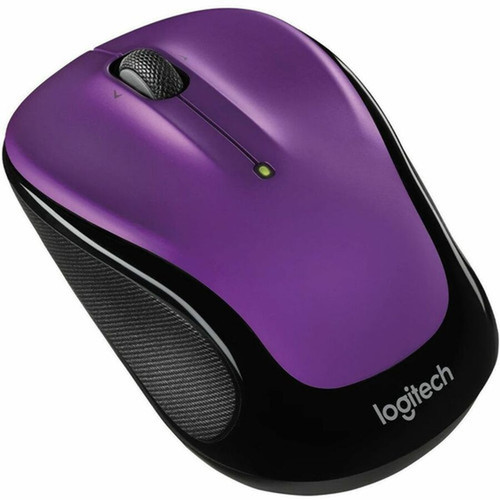


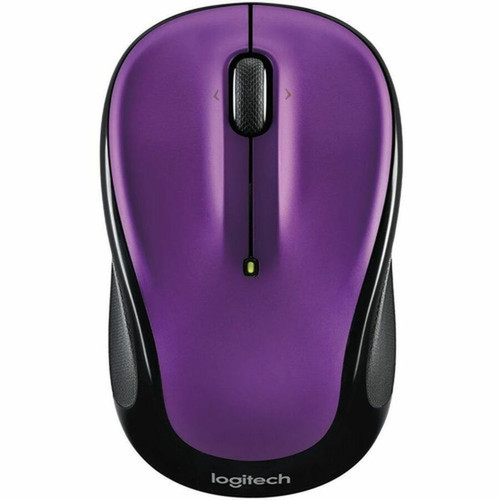
Logitech 910-006826 M325S Wireless Mouse - Violet Compact Optical 5-Button Symmetrical for PC/Mac

Business volume discounts
Technical guidance
Preparation & staging
QC · ON · AB · BC
Product Features
Technical Overview
The M325S employs optical LED technology for precise movement detection on most surfaces, eliminating the need for a mouse pad in typical office environments. Its wireless operation uses a 2.4 GHz connection through the USB receiver, ensuring stable performance without cable restrictions.
This mouse is designed for broad compatibility, supporting Windows 10 and 11, ChromeOS, Linux distributions with kernel 2.6 or later, and macOS 10.5 Leopard onward. The symmetrical ergonomic fit promotes comfortable use during extended sessions, while the violet color adds a touch of personality to any workstation.
This section brings together practical product details such as Pointing Device Connectivity Technology, Movement Detection, Total Number of Buttons, Pointing Device Host Interface, so buyers can judge configuration, deployment fit, and day-to-day suitability with less guesswork.
A strong technical summary explains how the product's interfaces, hardware profile, and operating characteristics work together in real deployment. Buyers often need this context to confirm compatibility with existing devices, expected performance in daily use, and whether installation will be straightforward for IT staff or end users.
Key Product Advantages
The M325S stands out with its symmetrical design that works equally well for left- and right-handed users, a feature not always available in budget-friendly wireless mice. Its optical sensor delivers consistent tracking without the skipping or acceleration issues sometimes found with basic laser sensors.
Broad Platform Support
This mouse works seamlessly across Windows, macOS, ChromeOS, and Linux systems, making it ideal for mixed- environment offices or users who switch between devices.
- No additional drivers required for basic functionality
- Plug-and-play setup with included USB receiver
Environmental Responsibility
Manufactured in compliance with WEEE and RoHS directives, the M325S meets strict standards for hazardous substance restriction and electronic waste management.
- Reduced environmental impact
- Complies with international regulations
Deployment / Use Cases
The Logitech M325S is well-suited for general office use, home computing, and educational settings where reliable pointing performance and platform flexibility are priorities. Its compact size makes it portable for laptop users, while the wireless design simplifies cable management on crowded desks.
In shared workspaces or computer labs, the ambidextrous design allows quick adaptation between different users without requiring left-handed specific equipment. The violet color option provides aesthetic customization for personal workspaces or corporate environments seeking to incorporate brand colors into their hardware selections.
Office Productivity
With five buttons for navigation and smooth optical tracking, this mouse handles spreadsheet work, document editing, and web browsing efficiently.
- Reduces wrist strain during long sessions
- Wireless freedom enhances desk organization
Education & Training Environments
The broad OS compatibility makes the M325S ideal for schools and training centers with mixed Windows, ChromeOS, or Linux systems.
- Durable construction withstands frequent use
- Simple setup minimizes IT support requirements
Highlights
- Wireless optical mouse with USB receiver for cable-free operation
- Symmetrical ambidextrous design works for both left- and right-handed users
- Violet color adds visual appeal to any workspace
- 5-button layout includes standard left/right click, scroll wheel, and additional navigation buttons
- Compatible with Windows 10/11, macOS 10.5+, ChromeOS, and Linux Kernel 2.6+
- Plug-and-play setup requires no additional drivers for basic functionality
- Manufactured in compliance with WEEE and RoHS environmental directives
- 1-year limited warranty from Logitech
Specifications
| Specifications | |
|---|---|
| Manufacturer | Logitech |
| Manufacturer Part Number | 910-006826 |
| Brand Name | Logitech |
| Product Model | M325S |
| Product Name | M325S Mouse |
| Product Type | Mouse |
| Pointing Device | |
| Pointing Device Connectivity Technology | Wireless |
| Movement Detection | Optical |
| Total Number of Buttons | 5 |
| Ergonomic Fit | Symmetrical |
| Interfaces/Ports | |
| Pointing Device Host Interface | USB |
| Physical Characteristics | |
| Color Family | Purple |
| Product Color | Violet |
| Miscellaneous | |
| Operating System Compatibility | Windows 10,Windows 11,ChromeOS,Linux Kernel 2.6+,Mac OS X 10.5 Leopard |
| Platform Supported | PC,Mac |
| Environmentally Friendly | Yes |
| Environmental Compliance | Waste Electrical and Electronic Equipment Directive (WEEE),Restriction of Hazardous Substances (RoHS) |
| Country of Origin | China |
| Warranty | |
| Limited Warranty | 1 Year |
FAQ
Is the Logitech M325S mouse compatible with both Windows and macOS?
Yes, the M325S is fully compatible with Windows 10, Windows 11, and macOS 10.5 Leopard or later. It also supports ChromeOS and Linux distributions with kernel 2.6 or newer, making it a versatile choice for mixed-platform environments. The mouse uses standard HID protocols that work without additional drivers on most modern operating systems.
How many buttons does the M325S mouse have and what are their functions?
The M325S features five buttons: standard left and right click buttons, a clickable scroll wheel for vertical scrolling, and two additional navigation buttons typically configured for forward/backward browsing. These buttons provide essential navigation controls for productivity tasks and web browsing without overwhelming complexity.
Does this mouse work for left-handed users?
Yes, the symmetrical design of the M325S makes it equally suitable for left- and right-handed users. Unlike ergonomic mice molded specifically for right hands, this ambidextrous shape allows comfortable use regardless of handedness. The button layout remains identical, though left-handed users may need to reconfigure button assignments in their operating system settings if desired.
What type of wireless technology does the M325S use?
The M325S uses 2.4 GHz wireless technology with a small USB receiver that plugs into your computer's USB port. This provides reliable connectivity within typical desktop ranges without Bluetooth pairing complexities. The optical sensor works on most surfaces, and the mouse operates on standard batteries (not included) with power-saving features to extend battery life.
What environmental standards does this mouse comply with?
The M325S is manufactured in compliance with the Waste Electrical and Electronic Equipment Directive (WEEE) and Restriction of Hazardous Substances (RoHS) regulations. These European directives restrict specific hazardous materials in electronic products and establish requirements for proper disposal and recycling, reflecting Logitech's commitment to environmental responsibility in their manufacturing processes.
What is included in the box with the M325S mouse?
the M325S typically includes the wireless mouse itself and a USB receiver for connectivity. For complete package contents, please verify with the specific product listing as configurations may vary. The mouse requires standard batteries for operation, which may or may not be included depending on the retailer and packaging.
What screen size is listed?
Logitech M325S Wireless Mouse Violet Compact Optical Pointing 910-006826 is best judged through its screen, connectivity, and installation specifications, which help buyers confirm visual fit and deployment suitability.
What resolution or display format is specified?
Logitech M325S Wireless Mouse Violet Compact Optical Pointing 910-006826 is best judged through its screen, connectivity, and installation specifications, which help buyers confirm visual fit and deployment suitability.
| Qty | Price | Available |
|---|