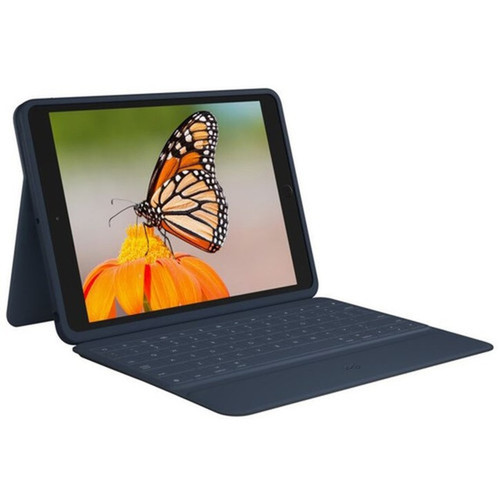




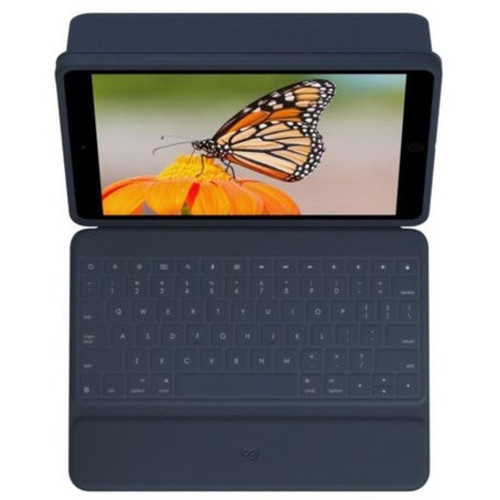
Logitech 920-009320 Rugged Combo 3 Keyboard/Cover Case for iPad (7th/8th/9th Gen) - Blue Folio with Smart Connector

Business volume discounts
Technical guidance
Preparation & staging
QC · ON · AB · BC
Product Features
Technical Overview
This keyboard cover utilizes Smart Connector technology that eliminates Bluetooth pairing and battery replacement. The physical connection provides reliable data transfer while drawing power directly from the iPad.
The fabric construction meets rigorous durability standards with resistance to drops, spills, wear, tears, damage, scratches, prying, and dirt. The magnetic latch system securely closes the folio while providing dedicated storage for digital pens.
This section brings together practical product details such as Style, Closure Type, Rugged, Product Color, so buyers can judge configuration, deployment fit, and day-to-day suitability with less guesswork.
A strong technical summary explains how the product's interfaces, hardware profile, and operating characteristics work together in real deployment. Buyers often need this context to confirm compatibility with existing devices, expected performance in daily use, and whether installation will be straightforward for IT staff or end users.
Key Product Advantages
Beyond basic protection, the Rugged Combo 3 transforms your iPad into a versatile productivity tool. The integrated design eliminates the need to manage separate keyboards and cases while providing all-day comfort and functionality.
These strengths make the product easier to deploy and manage in real environments, especially where reliability, usability, and day-to-day operational continuity matter. Notable benefits include Instant Connectivity, Enhanced Productivity.
Instant Connectivity
The Smart Connector enables immediate pairing and power transfer without Bluetooth setup or batteries. This reliable physical connection maintains secure data transmission between the keyboard and iPad.
Enhanced Productivity
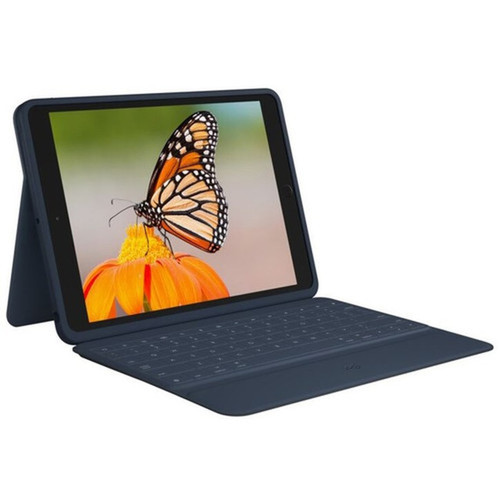
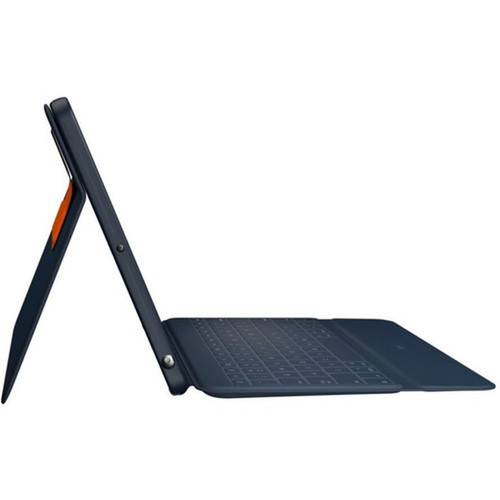
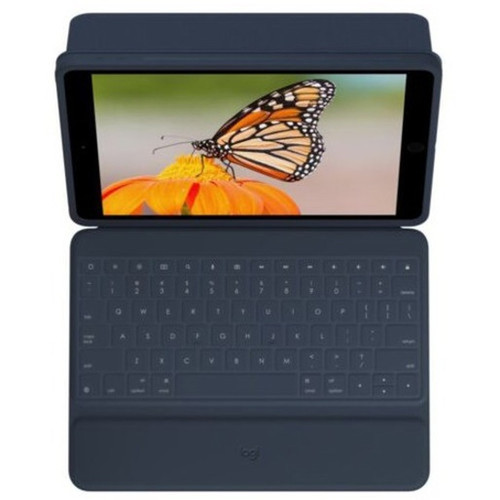
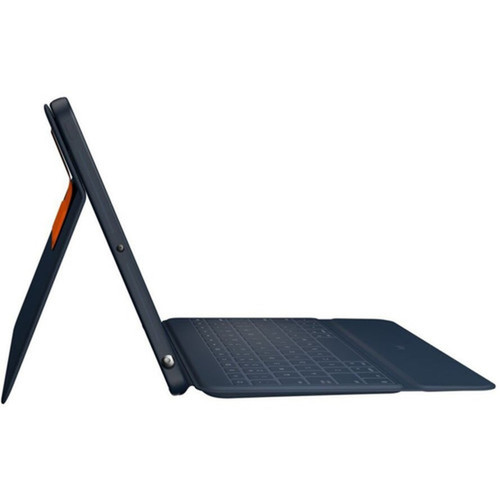
Features a full laptop-style keyboard with well-spaced backlit keys and dedicated iOS shortcut keys. The adjustable kickstand supports five distinct usage modes for typing, viewing, sketching, reading, and camera access.
Deployment / Use Cases
The Rugged Combo 3 serves organizations that deploy iPads in environments where durability and productivity are equally important. From healthcare facilities to retail floors, this solution protects valuable devices while enabling efficient data entry and content creation.
The five usage modes accommodate different work scenarios—from typing reports with the keyboard deployed to using the iPad camera unobstructed for documentation. The integrated pencil storage ensures digital drawing and annotation tools remain immediately available.
Education Environments
Ideal for classroom settings where iPads require both protection and typing capability. The rugged construction withstands student use while the keyboard enhances writing assignments and note-taking.
Field Service & Mobile Work
Perfect for technicians, inspectors, and field workers who need durable iPad protection with full keyboard functionality. The asset tagging window facilitates device management in enterprise deployments.
Physical Profile
Measuring 7.44 inches in height, 10.24 inches in depth, and 0.94 inches in width, the folio maintains a slim profile while providing comprehensive protection. The 1.33-pound weight adds minimal bulk to the iPad, preserving portability.
The blue fabric exterior offers both aesthetic appeal and practical durability. The magnetic latch system provides secure closure while the adjustable kickstand enables stable viewing angles from 0 to 60 degrees in various orientations.
- Width
- 0.94" (23.80 mm)
- Depth
- 10.24" (260 mm)
- Height
- 7.44" (189 mm)
- Weight
- 1.33 lb (602 g)
What's in the Box
The package includes the Rugged Combo 3 keyboard/cover case and documentation. The product ships ready for immediate use with your compatible iPad.
Package contents include Rugged Combo 3 for iPad (7th and 8th generation) - Blue Documentation, Rugged Combo 3 for iPad (7th and 8th generation) - Blue. These included items support setup, installation, and immediate deployment without needing to source the core bundled accessories separately.
Highlights
- Compatible with iPad 7th, 8th, and 9th generations including specific model numbers
- Smart Connector technology for instant pairing and power without batteries
- Well-spaced backlit keyboard with full iOS shortcut keys
- Five versatile use modes with adjustable kickstand
- Integrated storage for Logitech Crayon or Apple Pencil (1st generation)
- Rugged fabric construction with comprehensive durability resistance
- Magnetic latch closure with asset tagging window for device management
- 3-year limited warranty for long-term reliability
Specifications
| Specifications | |
|---|---|
| Manufacturer | Logitech |
| Manufacturer Part Number | 920-009320 |
| Brand Name | Logitech |
| Product Line | Rugged Combo 3 |
| Product Name | Rugged Combo 3 for iPad (7th and 8th generation) - Blue |
| Product Type | Keyboard/Cover Case |
| Product Information | |
| Style | Folio |
| Closure Type | Magnetic,Latch |
| Physical Characteristics | |
| Rugged | Yes |
| Product Color | Blue |
| Product Material | Fabric |
| Durability | Drop Resistant,Spill Resistant,Wear Resistant,Tear Resistant,Damage Resistant,Scratch Resistant,Pry Resistant,Dirt Resistant |
| Height | 7.44" (189 mm) |
| Width | 0.94" (23.80 mm) |
| Depth | 10.24" (260 mm) |
| Weight (Approximate) | 1.33 lb (602 g) |
| Miscellaneous | |
| Package Contents | Rugged Combo 3 for iPad (7th and 8th generation) - Blue Documentation |
| Application/Usage | Tablet,Stylus,Apple Pencil |
| Brand Compatibility | Apple,Logitech |
| Tablet Model Compatibility | iPad (8th Generation),iPad (7th Generation),iPad (9th Generation) |
| Compatibility | Apple - iPad (7th generation) (A2200, A2197, A2198), iPad (8th generation) (A2270, A2428, A2429, A2430), Pencil Logitech - Crayon |
| Country of Origin | China |
| Warranty | |
| Limited Warranty | 3 Year |
User Manual
FAQ
Which iPad models are compatible with the Rugged Combo 3?
The Rugged Combo 3 is designed for the iPad 7th generation (models A2200, A2197, A2198), iPad 8th generation (models A2270, A2428, A2429, A2430), and iPad 9th generation. It uses the Smart Connector found on these specific iPad models for connectivity and power.
How does the keyboard connect to the iPad?
The keyboard connects via Apple's Smart Connector technology, which provides both power and data transfer through a physical connection. This eliminates the need for Bluetooth pairing or batteries, ensuring instant connectivity whenever you attach the keyboard to your iPad.
What durability features does this case offer?
The Rugged Combo 3 provides comprehensive protection with resistance to drops, spills, wear, tears, damage, scratches, prying, and dirt. The fabric construction and reinforced design make it suitable for demanding environments where standard cases might not provide adequate protection.
Does the keyboard require batteries?
No, the keyboard does not require batteries. It draws power directly from the iPad through the Smart Connector connection. This eliminates battery replacement concerns and ensures the keyboard is always ready for use when connected to a charged iPad.
What are the five use modes?
The five use modes are enabled by the adjustable kickstand and foldable keyboard design: typing mode with keyboard deployed, viewing mode for media consumption, sketching mode for drawing with the stored stylus, reading mode for comfortable book-like holding, and camera mode with the keyboard folded completely back for unobstructed camera access.
How is the Apple Pencil or Logitech Crayon stored?
The magnetic latch includes dedicated storage space specifically designed to hold either a Logitech Crayon or Apple Pencil (1st generation). This keeps your stylus securely attached to the case and readily accessible whenever you need it for drawing, note-taking, or annotation.
What refresh rate or brightness details are available?
Display-oriented products are best judged through screen, connectivity, and installation specifications. Those facts help buyers confirm visual fit, mounting flexibility, and deployment suitability more clearly than generic summary text.
What input or connectivity options are listed?
Display-oriented products are best judged through screen, connectivity, and installation specifications. Those facts help buyers confirm visual fit, mounting flexibility, and deployment suitability more clearly than generic summary text.
| Qty | Price | Available |
|---|