







Shipping included*
Exclusions
Additional shipping fees may apply in rare circumstances for deliveries outside standard service areas. In most cases, this only potentially affects shipments to the Northwest Territories and Yukon, as well as certain heavy or oversized items.
MAXHUB V8650 XBoard Collaboration Display - 86" 4K UHD IPS Touchscreen with Webcam - 50-Point Infrared Touch - 40W Audio - OS 7. 0

Business volume discounts
Technical guidance
Preparation & staging
QC · ON · AB · BC
Product Features
Technical Overview
At the core of the V8650 is an 86-inch IPS LCD panel with 4K UHD (3840 x 2160) resolution, delivering crisp visuals with 350 cd/m² brightness and 1200:1 contrast ratio. The display utilizes Direct LED backlight technology and features tempered glass protection with 3mm thickness, ensuring durability in high-traffic meeting environments. An ambient light sensor automatically adjusts brightness based on room conditions.
The infrared touch system supports 50 simultaneous touch points with 8ms response time, enabling smooth multi-user interaction. The display's 178-degree horizontal and vertical viewing angles maintain consistent color and clarity from virtually any position in the room.
This section brings together practical product details such as Display Screen Type, Display Screen Technology, Backlight Technology, Touchscreen, so buyers can judge configuration, deployment fit, and day-to-day suitability with less guesswork.
Key Product Advantages
The V8650 stands out as a complete collaboration solution that reduces meeting room complexity while enhancing participant engagement. Unlike standard displays that require external cameras and audio systems, this integrated approach ensures consistent performance and simplified installation.
Integrated Audio/Video System
The built-in 16-element microphone array captures clear voice from all directions, while the 40W audio system with dual speakers delivers room-filling sound without external components.
- 16-element microphone array
- 40W RMS audio output
- Built-in webcam
Advanced Touch Collaboration
Infrared touch technology enables precise 50-point multi-touch interaction, allowing multiple users to annotate, navigate, and collaborate simultaneously on the large 86-inch canvas.
- 50 simultaneous touch points
- Infrared (IrDA) technology
- 8ms response time
Comprehensive Connectivity
With HDMI, 5 USB ports, RJ-45 Ethernet, Wi-Fi, Bluetooth, audio inputs/outputs, and serial connectivity, the V8650 integrates seamlessly with existing meeting room equipment and supports various input sources.
- 5x USB ports
- Wi-Fi & Bluetooth
- HDMI & serial ports
Deployment / Use Cases
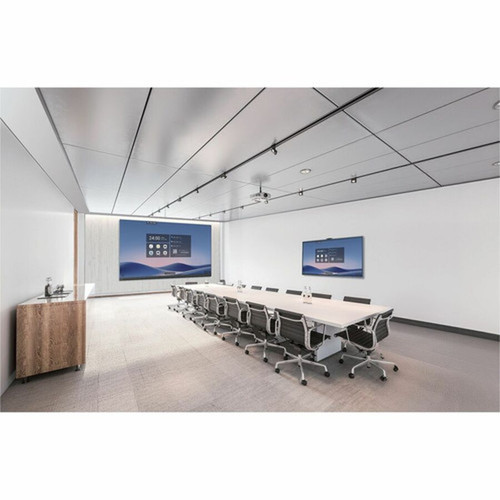
The V8650 excels in conference rooms, training facilities, and collaborative workspaces where visual clarity, interactive capabilities, and integrated audio/video are essential. Its all-in-one design makes it particularly valuable for organizations implementing or upgrading meeting room technology without wanting to manage multiple separate components.
In corporate boardrooms, the display facilitates interactive presentations and remote collaboration with its integrated camera and microphone system. Educational institutions benefit from the large touch surface for interactive lessons and group activities. Creative teams utilize the high-resolution display and multi-touch capabilities for brainstorming sessions and design reviews.
Conference Room Installation
Ideal for mid-to-large conference rooms requiring integrated audio/video capabilities with interactive display functionality for hybrid meetings.
Training & Education
Supports interactive learning environments with multi-user touch capabilities and clear audio/video for both in-person and remote participants.
Localization and Operating System
The V8650 runs MAXHUB OS 7.0 on a Windows platform, providing a familiar interface with enhanced collaboration features specifically designed for meeting room environments. This specialized operating system includes tools for screen sharing, annotation, whiteboarding, and content management optimized for touch interaction.
The Windows platform compatibility ensures seamless integration with existing enterprise software and peripheral devices, while MAXHUB OS 7.0 adds collaboration-specific functionality that enhances meeting productivity without requiring additional software installations.
This section brings together practical product details such as Display Screen Type, Display Screen Technology, Backlight Technology, Touchscreen, so buyers can judge configuration, deployment fit, and day-to-day suitability with less guesswork.
Highlights
- 86-inch 4K UHD IPS display with 178° viewing angles
- Infrared touch technology supporting 50 simultaneous touch points
- Integrated 16-element microphone array for clear voice capture
- 40W RMS audio system with dual speakers
- Built-in webcam for video conferencing
- MAXHUB OS 7.0 on Windows platform for collaboration
- Comprehensive connectivity: HDMI, 5x USB, Wi-Fi, Bluetooth, Ethernet
- Energy Star certified for energy efficiency
- 3-year limited warranty for peace of mind
- Tempered glass protection with ambient light sensor
Specifications
| Specifications | |
|---|---|
| Manufacturer | MAXHUB |
| Manufacturer Part Number | V8650 |
| Brand Name | MaxHub |
| Product Line | XBoard |
| Product Series | V7 |
| Product Model | V8650 |
| Product Name | XBoard V8650 Collaboration Display |
| Product Type | Collaboration Display |
| Display & Graphics | |
| Display Screen Type | LCD |
| Display Screen Technology | In-plane Switching (IPS) Technology |
| Backlight Technology | Direct LED |
| Screen Mode | 4K UHD |
| Screen Resolution | 3840 x 2160 |
| Scan Format | 2160p |
| Aspect Ratio | 16:9 |
| Response Time | 8 ms |
| Contrast Ratio | 1,200:1 |
| Brightness | 350 cd/m² |
| Horizontal Viewing Angle | 178° |
| Vertical Viewing Angle | 178° |
| Tempered Glass | Yes |
| Glass Thickness | 0.12" (3 mm) |
| Ambient Light Sensor | Yes |
| Touchscreen Information | |
| Touchscreen | Yes |
| Multi-touch Screen | Yes |
| Number of Touch Points | 50 |
| Touchscreen Technology | Infrared (IrDA) |
| Audio | |
| Speakers | Yes |
| Number of Speakers | 2 |
| Microphone | Yes |
| Number of Microphone Array Elements | 16 |
| RMS Output Power | 40 W |
| Camera | |
| Webcam | Yes |
| Network & Communication | |
| Ethernet | Yes |
| Wireless LAN | Yes |
| Bluetooth | Yes |
| Interfaces/Ports | |
| HDMI | Yes |
| Total Number of USB Ports | 5 |
| USB | Yes |
| Network (RJ-45) | Yes |
| Audio Line In | Yes |
| Audio Line Out | Yes |
| Serial | Yes |
| Software | |
| Operating System Platform | Windows |
| Operating System | MAXHUB OS 7.0 |
| Miscellaneous | |
| Energy Star | Yes |
| Warranty | |
| Limited Warranty | 3 Year |
User Manual
FAQ
What is the screen size and resolution of the MAXHUB V8650?
The MAXHUB V8650 features an 86-inch display with 4K UHD resolution (3840 x 2160 pixels). This high-resolution IPS panel delivers crisp, detailed visuals suitable for presentations, video conferencing, and collaborative work. The 16:9 aspect ratio matches standard content formats, while the 350 cd/m² brightness ensures good visibility in various lighting conditions.
How many people can use the touchscreen simultaneously?
The V8650 supports 50 simultaneous touch points using infrared (IrDA) touch technology. This allows multiple users to interact with the display at the same time for collaborative activities like brainstorming, annotation, or navigation. The 8ms response time ensures smooth, responsive touch interaction without noticeable lag during use.
Does this display include built-in audio and video components?
Yes, the V8650 includes a complete integrated audio/video system. It features a built-in webcam for video conferencing, a 16-element microphone array that captures clear audio from all directions, and a 40W RMS audio system with two speakers. This eliminates the need for external cameras, microphones, or speakers in most meeting room scenarios.
What operating system does the MAXHUB V8650 use?
The display runs MAXHUB OS 7.0 on a Windows platform. This specialized operating system provides collaboration tools like screen sharing, annotation, and whiteboarding optimized for touch interaction, while maintaining compatibility with Windows-based applications and peripherals. The dual-platform approach combines familiar Windows functionality with enhanced meeting-specific features.
What connectivity options are available on this collaboration display?
The V8650 offers extensive connectivity including HDMI input, 5 USB ports, RJ-45 Ethernet, Wi-Fi, Bluetooth, audio line in/out, and serial port. This comprehensive connectivity suite allows integration with laptops, document cameras, audio systems, and network resources. The wireless options (Wi-Fi and Bluetooth) support screen mirroring and peripheral connections without cables.
Is the display suitable for video conferencing applications?
Absolutely. The V8650 is designed specifically for video conferencing and collaboration with its integrated webcam, microphone array, and speakers. The 4K resolution provides clear video quality, while the audio system ensures all participants can be heard clearly. The display works with popular conferencing platforms and the touch interface allows intuitive control of meeting functions.
What camera resolution or video format is listed?
It features a display specification of 3840 x 2160, giving you clear visuals for work and media use.
What microphone or speaker configuration is listed?
The communications feature set includes Yes, helping clarify how the product supports voice capture, call handling, or day-to-day conferencing use.
| Qty | Price | Available |
|---|


