j5 create JDA159 Mini DisplayPort to 4K HDMI Adapter Cable - 4. 9" White Passive for Mac/PC

Business volume discounts
Technical guidance
Preparation & staging
QC · ON · AB · BC
Product Features
Technical Overview
This adapter supports DisplayPort 1.2 and Thunderbolt 2 standards, converting the digital video signal from Mini DisplayPort to HDMI 1.4 format. The conversion maintains signal quality for resolutions up to 4096 x 2160 pixels, delivering crisp 4K visuals suitable for high-definition content creation, presentations, or entertainment.
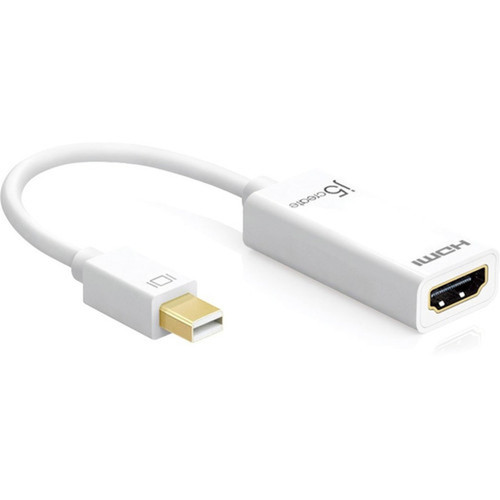
The passive design simplifies setup by eliminating the need for additional power sources or configuration software. The Mini DisplayPort 1.2 male connector interfaces directly with compatible computers, while the HDMI 1.4 female connector accepts standard HDMI cables from displays.
This section brings together practical product details such as Cable Type, Length, Connector Type on First End, Connector on First End Details, so buyers can judge configuration, deployment fit, and day-to-day suitability with less guesswork.
A strong technical summary explains how the product's interfaces, hardware profile, and operating characteristics work together in real deployment. Buyers often need this context to confirm compatibility with existing devices, expected performance in daily use, and whether installation will be straightforward for IT staff or end users.
Key Product Advantages
This adapter delivers essential connectivity with minimal complexity. The combination of compact design, broad compatibility, and high-resolution support makes it a practical addition to any workspace requiring display expansion.
Simplified 4K Connectivity
Transform your Mini DisplayPort output into HDMI connectivity capable of driving 4K displays without compromising visual quality or requiring complex setup procedures.
- Supports 4096x2160 resolution
- Maintains audio and video signals
- No drivers or software needed
Broad Device Compatibility
Works with multiple Apple computer models including iMac, MacBook, MacBook Pro, and Mac Pro systems, plus compatible Windows PCs with Mini DisplayPort outputs.
- Apple ecosystem ready
- PC compatible
- Thunderbolt 2 support
Deployment / Use Cases
This adapter serves multiple practical applications in professional, educational, and personal computing environments. The compact form factor and reliable performance make it suitable for both permanent installations and temporary setups.
Common deployment scenarios include connecting laptops to conference room displays for presentations, extending desktop workspaces with additional monitors, or linking media centers to large-screen televisions for entertainment purposes. The adapter's compatibility with both Mac and PC systems ensures flexibility across mixed computing environments.
This section brings together practical product details such as Cable Type, Length, Connector Type on First End, Connector on First End Details, so buyers can judge configuration, deployment fit, and day-to-day suitability with less guesswork.
Professional Presentations
Connect your MacBook Pro to conference room projectors or large-format displays for crisp 4K presentations without compromising visual quality.
Workspace Expansion
Extend your iMac or PC desktop to additional HDMI monitors for enhanced productivity in multi-tasking workflows.
Physical Profile
The adapter features a 4.9-inch integrated cable that provides sufficient length for flexible positioning while maintaining a compact footprint. The white color scheme complements Apple hardware aesthetics while remaining neutral enough for any computing setup. At just 19 grams, the lightweight design adds minimal bulk to portable configurations.
The physical profile is practical for deployment planning because the dimensions and weight are clearly defined: 19 g. This helps confirm rack, shelf, desk, or cabinet fit before installation.
- Weight
- 19 g
- Length
- 4.9"
Highlights
- Connect Mini DisplayPort computers to HDMI displays
- Supports 4K resolution up to 4096 x 2160 pixels
- Compatible with DisplayPort 1.2 and Thunderbolt 2 standards
- Works with iMac, MacBook, MacBook Pro, Mac Pro, and PC systems
- Passive design requires no external power or drivers
- 4.9-inch cable length for flexible placement
- HDMI 1.4 female connector accepts standard HDMI cables
- White finish matches Apple hardware aesthetics
- Lightweight at just 19 grams
Specifications
| Specifications | |
|---|---|
| Manufacturer | KaiJet Technology International Limited |
| Manufacturer Part Number | JDA159 |
| Brand Name | j5 create |
| Product Model | JDA159 |
| Product Name | JDA159 Mini DisplayPort to 4K HDMI Adapter |
| Product Type | A/V Cable |
| Technical Information | |
| Cable Type | HDMI/Mini DisplayPort |
| Length | 4.9" |
| Connector Type on First End | Mini DisplayPort 1.2 Digital Audio/ |
| Video | |
| Connector on First End Details | 1 x Mini DisplayPort 1.2 Digital Audio/ |
| Video | |
| Connector Type on Second End | HDMI 1.4 Digital Audio/ |
| Video | |
| Connector on Second End Details | 1 x HDMI 1.4 Digital Audio/ |
| Video | |
| Features | Passive |
| Physical Characteristics | |
| Product Color | White |
| Weight (Approximate) | 19 g |
FAQ
What computers is this adapter compatible with?
This adapter works with Apple computers including iMac, MacBook, MacBook Pro, and Mac Pro models that have Mini DisplayPort outputs. It also supports compatible Windows PCs with Mini DisplayPort connections. The adapter is designed for systems supporting DisplayPort 1.2 or Thunderbolt 2 standards.
Does this adapter require external power or drivers?
No, this is a passive adapter that requires no external power source, batteries, or driver installation. The adapter converts the DisplayPort signal to HDMI format without additional power requirements, making setup straightforward and portable.
What is the cable length of this adapter?
The integrated cable measures 4.9 inches (approximately 12.5 centimeters). This compact length provides sufficient flexibility for positioning while maintaining a tidy workspace, suitable for both desktop and portable configurations.
Can this adapter transmit audio along with video?
Yes, the adapter supports simultaneous transmission of high-quality video and audio signals. The HDMI 1.4 specification includes audio support, allowing both visual and sound content to pass through from your computer to the connected display or audio system.
What is the difference between this adapter and an active converter?
This passive adapter directly converts DisplayPort signals to HDMI without signal processing or amplification. Active converters typically include additional electronics for longer cable runs or specific signal conversions. This passive design is simpler, more compact, and suitable for standard connections up to 4.9 inches without signal degradation.
What refresh rate or brightness details are available?
Display-oriented products are best judged through screen, connectivity, and installation specifications. Those facts help buyers confirm visual fit, mounting flexibility, and deployment suitability more clearly than generic summary text.
What input or connectivity options are listed?
Connectivity options include Mini DisplayPort 1.2 Digital Audio/, helping the product integrate into common office or home setups.
Does the display support VESA mounting or adjustment features?
Display-oriented products are best judged through screen, connectivity, and installation specifications. Those facts help buyers confirm visual fit, mounting flexibility, and deployment suitability more clearly than generic summary text.
| Qty | Price | Available |
|---|