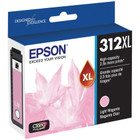
Original Epson T312XL620-S Claria Photo HD Inkjet Ink Cartridge - Light Magenta

Business volume discounts
Technical guidance
Preparation & staging
QC · ON · AB · BC
Product Features
Technical Overview
This cartridge utilizes inkjet print technology with a Light Magenta colorant to achieve smooth gradations and accurate color reproduction. The Claria Photo HD ink set is known for its wide color gamut and high gloss levels, making it ideal for photo enthusiasts.
Epson's MicroPiezo print head technology ensures precise ink droplet placement for sharp details. Each cartridge is manufactured in Japan to stringent quality standards, ensuring consistent output and reliability.
Key Product Advantages
The Epson Claria Photo HD T312XL cartridge offers several advantages for photo printing. The Light Magenta ink works in concert with the complete cartridge set to produce vibrant, true-to-life colors with smooth transitions.
As an original Epson consumable, it is designed to maximize print quality and reliability, reducing the risk of clogs or poor output. The cartridge is easy to install and provides consistent results from start to finish.
Vibrant Photo Quality
Claria Photo HD ink delivers exceptional color gamut and gloss for professional-looking prints.
Reliable Performance
Original Epson ink ensures consistent output and minimizes maintenance issues.
Deployment / Use Cases
This Light Magenta cartridge is an essential component for anyone using Epson Expression Photo printers for high-quality photo printing. It is perfect for printing vibrant portraits, landscapes, and special occasion photos where color accuracy is paramount.
In a home or small office setting, the cartridge can be used to produce borderless photos, scrapbooking prints, or creative projects. Its compatibility with multiple printer models makes it a versatile choice for users who require consistent, gallery-quality results.
Home Photo Printing
Ideal for printing family photos, holiday cards, and personal art projects with vivid colors.
Small Business
Suitable for photographers, designers, and small studios needing reliable, high-quality ink for client proofs and prints.
Highlights
- Original Epson Claria Photo HD ink cartridge for vibrant photo prints
- Light Magenta color for accurate color reproduction
- Compatible with Epson Expression Photo XP-8700, XP-8500, and XP-8600 printers
- Inkjet print technology delivers sharp details and smooth gradations
- Manufactured in Japan for high quality and reliability
- Easy to install and replace
Specifications
| Specifications | |
|---|---|
| Manufacturer | Epson Corporation |
| Manufacturer Part Number | T312XL620-S |
| Brand Name | Epson |
| Product Line | Claria Photo HD |
| Product Model | T312XL |
| Product Name | 312XL Claria Photo HD Ink |
| Product Condition | Original |
| Product Type | Ink Cartridge |
| Technical Information | |
| Print Technology | Inkjet |
| Print Color | Light Magenta |
| Miscellaneous | |
| Compatibility | Epson Expression Photo XP-8700 Wireless All-in-One Printer Epson Expression Photo XP-8500 Small-in-One All-in-One Printer Epson Expression Photo XP-8600 Small-in-One Printer |
| Country of Origin | Japan |
FAQ
What printers is the Epson T312XL Light Magenta cartridge compatible with?
The Epson T312XL Light Magenta cartridge is compatible with Epson Expression Photo XP-8700 Wireless All-in-One Printer, XP-8500 Small-in-One All-in-One Printer, and XP-8600 Small-in-One Printer. Always verify compatibility with your specific printer model before purchasing.
Is this an original Epson cartridge or a compatible/refurbished product?
This is an original Epson cartridge, part of the Claria Photo HD series. It is manufactured by Epson and designed to deliver the best print quality and reliability for your Epson printer.
What type of ink does the T312XL cartridge use?
The T312XL cartridge uses inkjet technology with Claria Photo HD ink, specifically formulated for photo printing. The color is Light Magenta, which is essential for achieving accurate skin tones and vibrant reds and purples.
How do I install the T312XL Light Magenta cartridge?
To install, open your printer's ink cartridge access door, wait for the cartridge carrier to move to the replacement position, then remove the protective cap from the new cartridge and insert it firmly into the correct slot until it clicks into place. Close the access door and follow any on-screen prompts.
| Qty | Price | Available |
|---|