








Plugable UGA-4KDP USB 3. 0 to DisplayPort 4K Adapter - 3840 x 2160 @30Hz - Multi-Monitor DisplayLink

Business volume discounts
Technical guidance
Preparation & staging
QC · ON · AB · BC
Product Features
Technical Overview
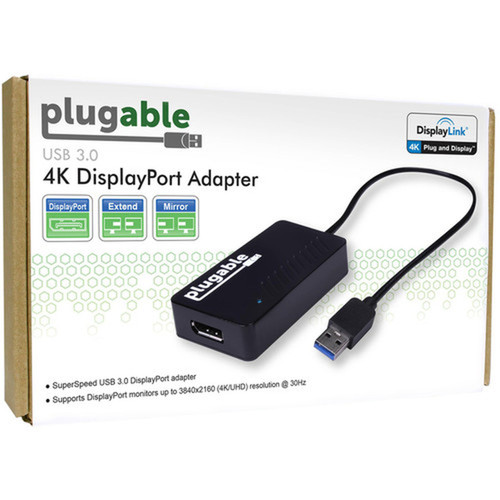
This adapter converts USB 3.0 data signals to DisplayPort video output using DisplayLink compression technology. The USB 3.0 interface provides sufficient bandwidth to support 4K resolution at 30Hz refresh rates, delivering smooth video playback and responsive desktop interaction.
The adapter features a standard USB 3.0 Type-A male connector on the computer end and a DisplayPort female connector on the monitor end. DisplayPort carries both digital video and audio signals, though audio functionality depends on monitor capabilities and driver configuration. The passive design means no external power adapter is required—all power comes directly from the USB port.
This section brings together practical product details such as Adapter Type, Connector Type on First End, Connector on First End Details, Height, so buyers can judge configuration, deployment fit, and day-to-day suitability with less guesswork.
Key Product Advantages
The UGA-4KDP adapter solves common workspace limitations by adding display connectivity where traditional video ports are unavailable or already occupied. Its compact form factor and USB-powered operation make it exceptionally portable for professionals who work across multiple locations.
Multi-Monitor Expansion
Add up to 6 additional displays on Windows systems or 4 displays on macOS when using multiple adapters. Each adapter supports one monitor, enabling extensive workspace configurations for complex workflows.
- Windows: Up to 6 displays
- macOS: Up to 4 displays
- One display per adapter
Broad System Compatibility
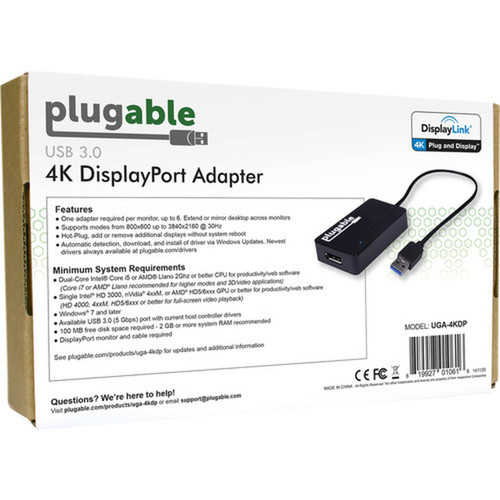
Works with most modern operating systems including Windows 11, 10, 8.1, 7, XP, macOS 10.14+, and ChromeOS. DisplayLink driver installation is required for optimal performance across all supported platforms.
- Windows 7 through 11
- macOS 10.14+
- ChromeOS compatible
Deployment / Use Cases
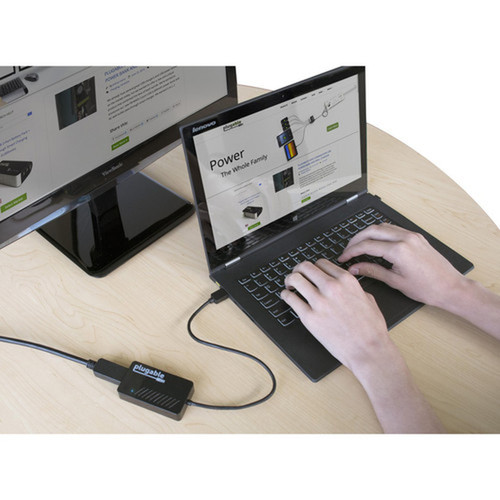
This adapter is particularly valuable in environments where computer video outputs are limited or already allocated. IT departments can deploy these adapters to extend workstation capabilities without replacing existing hardware, while home office users can create dual-monitor setups from laptops with only one video output.
Common deployment scenarios include financial trading desks with multiple data screens, video editing stations requiring timeline and preview monitors, software development environments with code, documentation, and testing windows, and customer service centers with multiple application interfaces. The adapter also serves well in conference rooms where presentations need to mirror to additional displays.
Professional Workspace Expansion
Extend desktop real estate for data analysis, coding, design work, or financial monitoring. Run independent applications on separate screens to maintain context across tasks.
Portable Presentation Solution
Carry the compact adapter for client meetings or remote work. Connect to conference room displays or hotel room monitors using just a USB port and DisplayPort cable.
Physical Profile
Measuring just 1.77 inches wide by 3.35 inches deep by 0.79 inches high, the adapter has a minimal footprint that won't obstruct adjacent ports. The compact design makes it easy to transport in laptop bags or desk drawers. The housing is designed for durability in daily office use while maintaining a professional appearance that blends with workstation aesthetics.
The physical profile is practical for deployment planning because the dimensions and weight are clearly defined: 0.79" (20 mm), 1.77" (45 mm), 3.35" (85 mm). This helps confirm rack, shelf, desk, or cabinet fit before installation.
- Width
- 1.77" (45 mm)
- Depth
- 3.35" (85 mm)
- Height
- 0.79" (20 mm)
What's in the Box
The package includes everything needed to add a DisplayPort monitor via USB, though a DisplayPort cable must be purchased separately for monitor connection.
Highlights
- Adds a 4K DisplayPort monitor via USB 3.0 port
- Supports 3840x2160 resolution at 30Hz refresh rate
- Uses DisplayLink technology for multi-monitor expansion
- Works with Windows, macOS, and ChromeOS systems
- Compact plug-and-play design requires no external power
- Enables up to 6 displays on Windows, 4 on macOS
- Includes 2-year limited warranty
- Comes with quick-install guide and driver CD
Specifications
| Specifications | |
|---|---|
| Manufacturer | Plugable Technologies |
| Manufacturer Part Number | UGA-4KDP |
| Brand Name | Plugable |
| Product Model | UGA-4KDP |
| Product Name | USB 3.0 4K DisplayPort Adapter for Multiple Monitors |
| Product Type | A/V Adapter |
| Technical Information | |
| Adapter Type | DisplayPort/USB |
| Connector Type on First End | USB 3.0 - Male |
| Connector on First End Details | 1 x USB 3.0 - Male |
| Connector Type on Second End | DisplayPort Digital Audio/Video - Female |
| Connector on Second End Details | 1 x DisplayPort Digital Audio/Video - Female |
| Maximum Resolution Supported | 3840 x 2160 |
| Features | Passive |
| Physical Characteristics | |
| Height | 0.79" (20 mm) |
| Width | 1.77" (45 mm) |
| Depth | 3.35" (85 mm) |
| Miscellaneous | |
| Package Contents | USB 3.0 4K DisplayPort Adapter for Multiple Monitors 1 x Quick-Install Guide 1 x Driver CD |
| Country of Origin | China |
| Environmental Compliance | Waste Electrical and Electronic Equipment Directive (WEEE) |
| Warranty | |
| Limited Warranty | 2 Year |
FAQ
What resolution and refresh rate does this adapter support?
The Plugable UGA-4KDP supports maximum resolution of 3840x2160 pixels (4K Ultra HD) at a 30Hz refresh rate. This provides sharp, detailed visuals suitable for productivity applications, video playback, and general desktop use. The 30Hz refresh rate delivers smooth motion for most business applications.
Can I use this adapter with a USB-C laptop?
Yes, the adapter works with USB-C devices when used with a USB-C to USB-A adapter. The adapter itself has a standard USB 3.0 Type-A male connector, so you'll need a separate USB-C to USB-A adapter or dock to connect it to modern laptops with only USB-C ports. Once connected through the appropriate adapter, functionality remains identical.
How many monitors can I connect using this adapter?
Each UGA-4KDP adapter supports one external DisplayPort monitor. For multi-monitor setups, you can use multiple adapters—Windows systems support up to 6 additional displays, while macOS supports up to 4 additional displays when using multiple adapters. Each adapter requires its own USB 3.0 port and DisplayLink driver installation.
Does this adapter require external power or special cables?
The adapter is passive and draws all necessary power from the USB 3.0 port, so no external power adapter is required. However, you will need to purchase a DisplayPort cable separately to connect the adapter to your monitor. The package includes the adapter itself, quick-install guide, and driver CD, but not the DisplayPort cable.
What is the warranty coverage for this adapter?
Plugable provides a 2-year limited warranty for the UGA-4KDP adapter. This covers manufacturing defects and ensures reliable performance throughout typical business use. The warranty is supported by Plugable's North American team of connectivity experts who provide lifetime technical support for installation and troubleshooting assistance.
What resolution or display format is specified?
It features a display specification of 3840 x 2160, giving you clear visuals for work and media use.
What refresh rate or brightness details are available?
Display-oriented products are best judged through screen, connectivity, and installation specifications. Those facts help buyers confirm visual fit, mounting flexibility, and deployment suitability more clearly than generic summary text.
What input or connectivity options are listed?
Connectivity options include USB 3.0 - Male, helping the product integrate into common office or home setups.
| Qty | Price | Available |
|---|


