










Plugable USBC-MD101 USB-C Mini Dock with HDMI - USB 3.0 - Pass-Through Charging - 4K 30Hz - 130W PD

Business volume discounts
Technical guidance
Preparation & staging
QC · ON · AB · BC
Product Features
Technical Overview
The USBC-MD101 operates over a USB 3.1 Gen 1 host interface, providing a wired connection that supports high-speed data transfer and video output. Its HDMI port delivers video signals at up to 3840 x 2160 resolution (4K UHD) at a 30Hz refresh rate, suitable for productivity tasks, media playback, and presentations on compatible monitors and TVs.
The dock integrates two USB 3.0 ports capable of 5 Gbps data transfer rates for connecting peripherals like external storage, keyboards, and mice. It also includes a standard USB Type-A port for broader compatibility with legacy devices. A key technical feature is its USB-C pass-through charging capability, which supports USB Power Delivery (PD) specifications up to 130W, allowing connected laptops or tablets to charge simultaneously while using the dock's other functions.
Key Product Advantages
This Mini Dock stands out by combining essential expansion features with exceptional portability and broad system compatibility. Its design eliminates the need for bulky traditional docking stations while delivering the core connectivity most users require daily.
Ultra-Compact Design
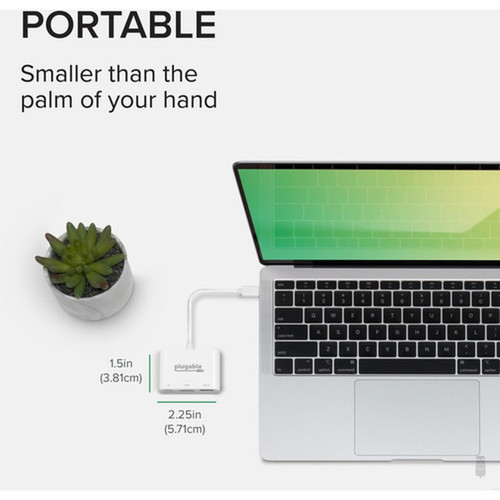
With dimensions of just 2.30" wide and 0.60" tall, and weighing only one ounce, the dock is truly pocket-sized. This makes it easy to carry in a laptop bag or even a pocket, ensuring you have critical ports available wherever you work.
- 2.30" x 0.60" footprint
- 1 oz weight
- No external power required
Simultaneous Charging & Connectivity
The pass-through charging feature allows your device to receive up to 130W of power through the same USB-C connection used for data and video. This means you can keep your laptop charged while connected to a monitor and peripherals, reducing cable clutter and maintaining productivity.
- USB-C PD compatible
- 5-20V @ 3A range
- Charges while docked
Cross-Platform Compatibility
The dock is tested and verified to work with a extensive list of devices from Apple, Dell, Microsoft, Google, HP, Lenovo, and Asus. It supports macOS, Windows, and Linux operating systems without requiring additional drivers for basic HDMI and USB functionality.
- macOS, Windows, Linux
- Wide device compatibility
- No driver installation needed
Deployment / Use Cases
The Plugable USB-C Mini Dock is particularly valuable in scenarios where portability and minimal setup time are priorities. Its compact size and plug-and-play operation make it suitable for dynamic work environments where users frequently change locations.
For remote workers and digital nomads, the dock provides a quick way to convert a laptop into a desktop-like setup at coffee shops, co-working spaces, or hotel rooms. Connect to a portable monitor via HDMI, attach a mouse and external drive via USB, and keep the laptop charging—all through one cable. In educational settings, students can use it to connect their laptops to classroom projectors or larger displays for presentations while maintaining battery life during long study sessions.
Mobile Office Solution
Ideal for professionals who work from multiple locations. The dock enables a consistent workstation experience anywhere by providing monitor output, peripheral connections, and charging through a single USB-C cable that's easy to pack and set up.
- Hot-desking friendly
- Reduces cable clutter
- Quick setup/teardown
Home Workspace Expansion
For users with limited desk space, the Mini Dock offers a neat way to add connectivity without a large docking station footprint. It's perfect for connecting a secondary monitor and a couple of USB devices to create a more productive home office environment.
- Space-efficient design
- Enhances productivity
- Clean cable management
Physical Profile
The dock features a minimalist rectangular design with a brushed metal finish that complements modern laptops. Its small footprint (2.30" wide × 0.60" tall) allows it to sit discreetly on a desk or be tucked behind a monitor. The lightweight construction (1 oz) and lack of external power requirements contribute to its exceptional portability. The included Quick Start Guide provides basic setup instructions, though the dock is designed for intuitive plug-and-play operation.
- Width
- 2.30" (58.42 mm)
- Height
- 0.60" (15.24 mm)
- Weight
- 1 oz (28.35 g)
What's in the Box
The package includes the Plugable USB-C Mini Dock unit and a Quick Start Guide to help users begin connecting their devices immediately.
Package contents include USB C Mini Dock with HDMI, USB 3.0 and Pass-Through Charging Quick Start Guide, USB C Mini Dock with HDMI, USB 3.0 and Pass-Through Charging. These included items support setup, installation, and immediate deployment without needing to source the core bundled accessories separately.
Highlights
- Adds HDMI, USB 3.0, and USB-C charging through a single port
- Supports 4K UHD resolution at 30Hz for external displays
- USB 3.0 ports deliver 5 Gbps transfer speeds for fast data access
- Pass-through USB-C PD charging supports up to 130W power delivery
- Compatible with Windows, macOS, and Linux operating systems
- Works with Apple MacBooks, Dell XPS, Microsoft Surface, and many Chromebooks
- Ultra-compact design at just 2.30" wide and 1 oz weight
- No external power adapter or driver installation required for basic use
- Thunderbolt 3 compatible for devices with Thunderbolt ports
- Ideal for mobile professionals, students, and remote workers
Specifications
| Specifications | |
|---|---|
| Manufacturer | Plugable Technologies |
| Manufacturer Part Number | USBC-MD101 |
| Brand Name | Plugable |
| Product Line | Mini Dock |
| Product Model | USBC-MD101 |
| Product Name | USB C Mini Dock with HDMI, USB 3.0 and Pass-Through Charging |
| Packaged Quantity | 1 |
| Product Type | Docking Station |
| Technical Information | |
| Connectivity Technology | Wired |
| Supported Resolutions | 3840 x 2160 |
| Screen Mode Supported | 4K |
| Device Supported | Notebook,Desktop PC,Tablet PC |
| Interfaces/Ports | |
| Host Interface | USB 3.1 |
| Total Number of USB Ports | 2 |
| Number of USB 3.0 Ports | 2 |
| USB Type-C | Yes |
| USB Type-C Detail | 1 x USB 3.0 Type-C |
| Number of USB Type-A Ports | 1 |
| USB Type-A | Yes |
| Number of HDMI Ports | 1 |
| HDMI | Yes |
| Thunderbolt | Yes |
| Software | |
| Operating System Supported | macOS,Linux,Windows |
| Power Description | |
| Maximum Power Supply Wattage | 130 W |
| Physical Characteristics | |
| Height | 0.60" (15.24 mm) |
| Width | 2.30" (58.42 mm) |
| Weight (Approximate) | 1 oz (28.35 g) |
| Miscellaneous | |
| Package Contents | USB C Mini Dock with HDMI, USB 3.0 and Pass-Through Charging Quick Start Guide |
| Compatibility | Apple iMac (2017) Desktop Computer Notebooks: Asus Chromebook Flip C302 Apple MacBook Pro 13" (Late 2016 without Touch Bar) Apple MacBook Pro 13" (2017 without Touch Bar) Apple MacBook Pro 13" & 15" (Late 2016 with Touch Bar) Apple MacBook Pro 13" & 15" (2017 with Touch Bar) Apple 12" Retina MacBook (2015 / 2016) Asus Zenbook 3 (UX490U) Dell XPS 13 (9350, 9360) Dell XPS 15 (9560) Google Pixelbook HP Chromebook 13 G1 HP Spectre x360 13" (13-ac013dx) Lenovo Yoga 900 13" (80MK) Lenovo Yoga 720 13" (13IKB) Microsoft Surface Book 2 |
| Country of Origin | China |
FAQ
What devices are compatible with this USB-C Mini Dock?
The Plugable USBC-MD101 is compatible with a wide range of laptops, tablets, and desktop PCs that have USB-C or Thunderbolt 3 ports. Specifically tested devices include Apple MacBook Pro (2016-2017 models), MacBook Air (2018), 12" MacBook, Dell XPS 13 (9350, 9360) and XPS 15 (9560), Microsoft Surface Book 2, Google Pixelbook, various Asus, HP, and Lenovo notebooks, and Apple iMac (2017). It supports Windows, macOS, and Linux operating systems.
What resolution and refresh rate does the HDMI port support?
The HDMI port on this Mini Dock supports a maximum resolution of 3840 x 2160 pixels, which is 4K Ultra HD. At this resolution, the refresh rate is 30Hz, which is suitable for productivity work, video playback, and general computing tasks. For lower resolutions like 1080p, higher refresh rates may be achievable depending on the connected device and display capabilities.
Can I charge my laptop while using this dock?
Yes, the dock features USB-C pass-through charging that supports USB Power Delivery (PD) specifications. It can deliver up to 130W of power (5-20V at 3A) to compatible laptops and tablets through the same USB-C connection used for data and video. This allows you to keep your device charged while connected to an external monitor and USB peripherals, eliminating the need for a separate charger during docking sessions.
How many USB ports does the dock have and what are their speeds?
The dock provides three USB ports total: two USB 3.0 Type-A ports and one additional USB Type-A port. The USB 3.0 ports support data transfer speeds up to 5 Gbps (gigabits per second), which is suitable for connecting external hard drives, flash drives, keyboards, mice, and other peripherals. All USB ports are backward compatible with USB 2.0 devices.
Is this dock compatible with Thunderbolt 3 devices?
Yes, the dock is compatible with Thunderbolt 3 devices. It will function with Thunderbolt 3 ports, utilizing the USB-C physical connection. However, it operates at USB 3.1 Gen 1 speeds (5 Gbps) rather than full Thunderbolt 3 speeds (40 Gbps). This means it provides the dock's standard functionality—HDMI output, USB connectivity, and pass-through charging—when connected to Thunderbolt 3 ports on compatible laptops like certain MacBook Pro models.
Does this dock require external power or driver installation?
No external power adapter is required for the dock's basic functionality—it draws power from the host device through the USB-C connection. For most operating systems (Windows, macOS, Linux), no additional driver installation is needed for HDMI video output and USB peripheral connectivity. The dock is designed for plug-and-play operation, though some systems may benefit from updated graphics drivers for optimal 4K display performance.
| Qty | Price | Available |
|---|


