











Shipping included*
Exclusions
Additional shipping fees may apply in rare circumstances for deliveries outside standard service areas. In most cases, this only potentially affects shipments to the Northwest Territories and Yukon, as well as certain heavy or oversized items.
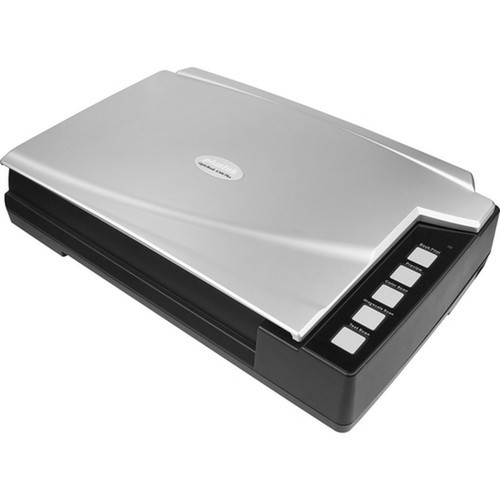
Plustek A300PLUS OpticBook A3 Flatbed/ADF Scanner - 12" x 17" Media Size

Business volume discounts
Technical guidance
Preparation & staging
QC · ON · AB · BC
Product Features
Technical Overview
The A300PLUS leverages Plustek's OpticBook technology to deliver reliable scanning performance for A3 media. Its flatbed component ensures accurate capture of bound materials without damaging spines, while the integrated automatic document feeder streamlines batch scanning of loose documents.
Technical specifications include support for A3 media dimensions, providing a scanning area that handles large-format documents with ease. The scanner's design focuses on usability in professional settings, offering a robust build that meets the demands of daily use in environments requiring consistent document digitization.
This section brings together practical product details such as Media Size, so buyers can judge configuration, deployment fit, and day-to-day suitability with less guesswork.
Key Product Advantages
The Plustek OpticBook A300PLUS stands out with its ability to handle both flatbed and ADF scanning in a single device, optimized for A3 media. This dual functionality reduces the need for multiple scanners, saving space and cost while improving document processing efficiency.
Large-Format Capability
Supports A3 media up to 12" x 17", making it ideal for scanning oversized documents, architectural plans, and books without compromising on detail or quality.
- Accommodates standard A3 sheets
- Handles oversized materials up to 12" x 17"
Versatile Scanning Modes
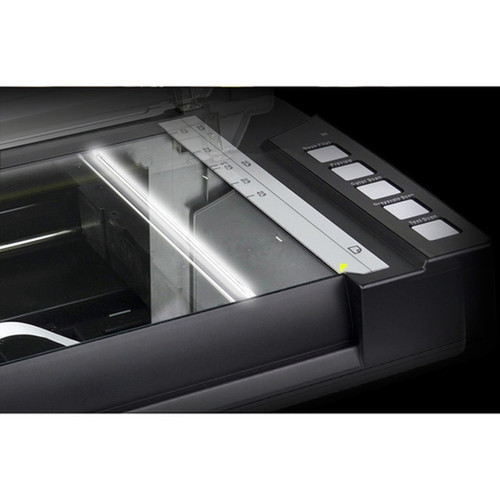
Switch between flatbed mode for delicate items and ADF mode for high-speed batch scanning, providing flexibility for mixed document types in workflows.
- Flatbed for bound materials
- ADF for loose sheets
Deployment / Use Cases
The A300PLUS is deployed in environments where digitizing large-format or bound documents is a regular requirement. Its A3 media support and dual scanning modes make it a practical choice for organizations that need to preserve and archive physical materials in digital form.
Common use cases include libraries digitizing book collections, offices scanning legal or architectural documents, and educational institutions handling oversized teaching materials. The scanner's robust design ensures it can handle daily use in these settings, providing reliable performance for document management and compliance needs.
Highlights
- A3 flatbed and automatic document feeder scanner for large-format media.
- Supports media sizes up to 12" x 17" (304.80 mm x 431.80 mm).
- Dual scanning modes: flatbed for books and ADF for loose sheets.
- Part of the Plustek OpticBook product line, known for book capture optimization.
- Model A300PLUS with manufacturer part number A300PLUS.
- Suitable for offices, libraries, and archival environments.
- Handles oversized documents and bound materials with precision.
- Enhances workflow efficiency with flexible scanning options.
Specifications
| Specifications | |
|---|---|
| Manufacturer | Plustek, Inc |
| Manufacturer Part Number | A300PLUS |
| Brand Name | Plustek |
| Product Line | OpticBook |
| Product Model | A300PLUS |
| Product Name | Opticbook A300PLUS A3 Book Scanner |
| Product Type | Flatbed/ADF Scanner |
| Technical Information | |
| Media Size | A3,12" (304.80 mm) x 17" (431.80 mm) |
User Manual
FAQ
What media sizes does the Plustek OpticBook A300PLUS scanner support?
The Plustek OpticBook A300PLUS supports A3 media, with dimensions up to 12" x 17" (304.80 mm x 431.80 mm). This allows it to handle standard A3 documents and oversized materials, making it suitable for scanning large-format items like architectural plans, books, and legal documents without resizing or cropping.
Does the A300PLUS scanner include both flatbed and automatic document feeder functions?
Yes, the Plustek OpticBook A300PLUS is a flatbed/ADF scanner, meaning it combines both flatbed and automatic document feeder capabilities. The flatbed mode is ideal for scanning bound materials like books without damaging spines, while the ADF mode enables rapid batch scanning of loose sheets, providing versatility for different document types in professional workflows.
What is the primary use case for the Plustek OpticBook A300PLUS scanner?
The primary use case for the Plustek OpticBook A300PLUS is digitizing large-format and bound documents in environments such as offices, libraries, and archival settings. It is optimized for book capture with its flatbed design and supports A3 media, making it effective for scanning oversized materials, legal documents, and educational resources where preserving original quality and handling delicate items is important.
Is the Plustek OpticBook A300PLUS suitable for high-volume scanning tasks?
The Plustek OpticBook A300PLUS is designed for professional use and can handle high-volume scanning tasks, particularly with its automatic document feeder mode for processing loose sheets efficiently. Its robust build and dual scanning modes support consistent performance in daily operations, making it a reliable choice for organizations that require regular digitization of documents and books.
What brand and model is this scanner, and how does it fit into the product line?
This scanner is the Plustek OpticBook A300PLUS, part of the OpticBook product line from Plustek. The model number is A300PLUS, which aligns with the manufacturer part number. The OpticBook line is known for scanners optimized for book and document capture, and the A300PLUS extends this with A3 media support and combined flatbed/ADF functionality for enhanced versatility in professional scanning applications.
Are there any documentation resources available for the Plustek OpticBook A300PLUS scanner?
Yes, documentation resources are available for the Plustek OpticBook A300PLUS scanner, including a user manual and manufacturer brochure. These resources provide detailed information on setup, operation, and specifications, helping users maximize the scanner's capabilities for their specific needs in document digitization and management tasks.
| Qty | Price | Available |
|---|


