








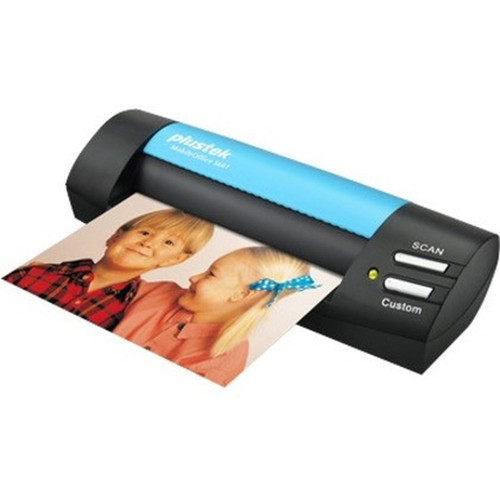
Plustek S602 MobileOffice Portable USB Card Scanner for ID - Driving License - Insurance & Business Cards

Business volume discounts
Technical guidance
Preparation & staging
QC · ON · AB · BC
Product Features
Technical Overview
The S602 card scanner operates via a USB interface, providing plug-and-play functionality for easy setup and use. It is engineered to handle standard card media types, including ID cards, driving licenses, insurance cards, and business cards, delivering clear digital copies for archiving or processing.
This scanner is part of Plustek's MobileOffice line, emphasizing portability and office utility. It does not require external power adapters, drawing power directly from the USB port, which enhances its mobility and reduces cable clutter.
Relevant factors for this section include Media Type, USB. When those points are considered together, they give buyers a clearer picture of how the product is equipped, how it fits into deployment, and what kind of day-to-day role it is meant to support.
A strong technical summary explains how the product's interfaces, hardware profile, and operating characteristics work together in real deployment. Buyers often need this context to confirm compatibility with existing devices, expected performance in daily use, and whether installation will be straightforward for IT staff or end users.
Key Product Advantages
The Plustek S602 offers distinct advantages for card digitization needs, combining ease of use with reliable performance. Its focused design on card media ensures optimized scanning quality and speed for documents like IDs and business cards.
Versatile Media Handling
Scans multiple card types including ID cards, driving licenses, insurance cards, and business cards, making it a versatile tool for various administrative and security applications.
- Supports standard card sizes
- Ideal for identity verification
- Useful for contact management
Portable and Convenient
Designed for mobility with a compact form factor and USB-powered operation, allowing use in different locations without the need for additional power outlets.
- Lightweight and easy to transport
- USB bus-powered
- Minimal setup required
Deployment / Use Cases
The Plustek S602 card scanner is well-suited for environments requiring efficient card digitization. Its portability and simple connectivity make it adaptable to various professional scenarios.
Common use cases include office administration for digitizing employee IDs or business cards, healthcare facilities for scanning insurance cards, government or DMV offices for processing driving licenses, and security checkpoints for ID verification. It supports compliance and record-keeping by creating digital archives of physical cards.
Relevant factors for this section include Media Type, USB. When those points are considered together, they give buyers a clearer picture of how the product is equipped, how it fits into deployment, and what kind of day-to-day role it is meant to support.
Office Administration
Streamlines contact management by digitizing business cards and employee IDs, integrating into CRM systems or digital directories.
Healthcare and Insurance
Facilitates quick scanning of insurance cards and patient IDs, improving data accuracy and reducing manual entry in medical records.
Highlights
- Portable USB card scanner for on-the-go digitization
- Scans ID cards, driving licenses, insurance cards, and business cards
- Plug-and-play USB connectivity for easy setup
- Part of the Plustek MobileOffice product line
- Compact and lightweight design for mobility
- USB bus-powered, no external adapter needed
- Ideal for office, healthcare, and government use
- Supports efficient document management workflows
Specifications
| Specifications | |
|---|---|
| Manufacturer | Plustek, Inc |
| Manufacturer Part Number | S602 |
| Brand Name | Plustek |
| Product Line | MobileOffice |
| Product Model | S602 |
| Product Name | Mobileoffice S602 ID Card Scanner |
| Product Type | Card Scanner |
| Technical Information | |
| Media Type | ID Card,Driving License,Insurance Card,Business Card |
| Interfaces/Ports | |
| USB | Yes |
User Manual
FAQ
What types of cards can the Plustek S602 scanner handle?
The Plustek S602 scanner is designed to digitize ID cards, driving licenses, insurance cards, and business cards. It supports standard card sizes and formats, making it versatile for various professional applications such as identity verification, contact management, and record-keeping.
How is the Plustek S602 connected to a computer?
The Plustek S602 connects via a USB interface, offering plug-and-play functionality. It is USB bus-powered, meaning it draws power directly from the computer's USB port without requiring an external power adapter, which enhances its portability and ease of use.
Is the Plustek S602 scanner portable?
Yes, the Plustek S602 is a portable card scanner with a compact and lightweight design. As part of the MobileOffice line, it is built for mobility, allowing users to easily transport it for on-the-go scanning tasks in different locations like offices, field sites, or client meetings.
What are the primary use cases for this card scanner?
Primary use cases include office administration for digitizing business cards and employee IDs, healthcare facilities for scanning insurance cards, government offices for processing driving licenses, and security applications for ID verification. It helps streamline data capture and improve document management workflows.
Does the Plustek S602 require special software to operate?
The Plustek S602 typically works with standard scanning software provided by the operating system or included drivers. For specific functionalities, users may refer to the manufacturer's documentation or software tools available from Plustek to optimize scanning settings and integration.
What is the advantage of the MobileOffice product line?
The MobileOffice product line from Plustek emphasizes portability and office utility, featuring devices like the S602 that are designed for mobile scanning needs. These scanners are compact, USB-powered, and easy to set up, making them ideal for professionals who require efficient card digitization in various environments.
| Qty | Price | Available |
|---|


