









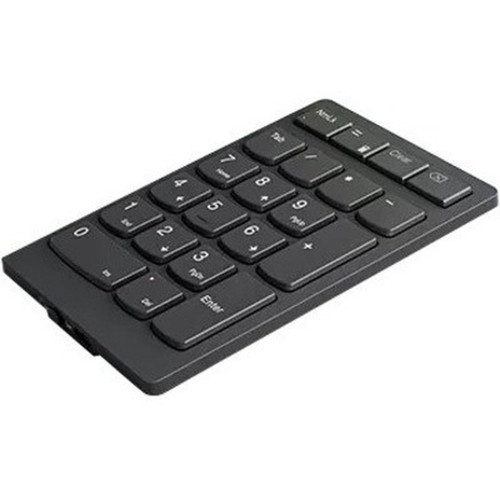
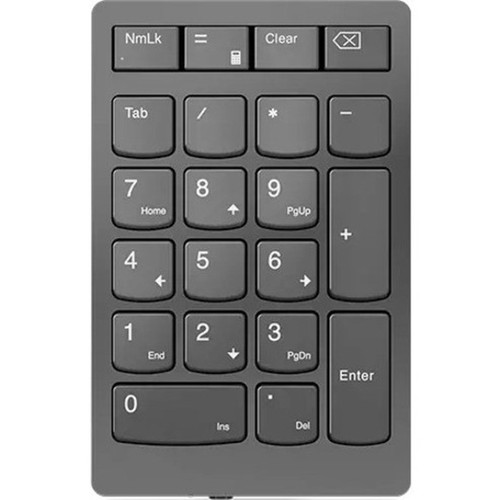


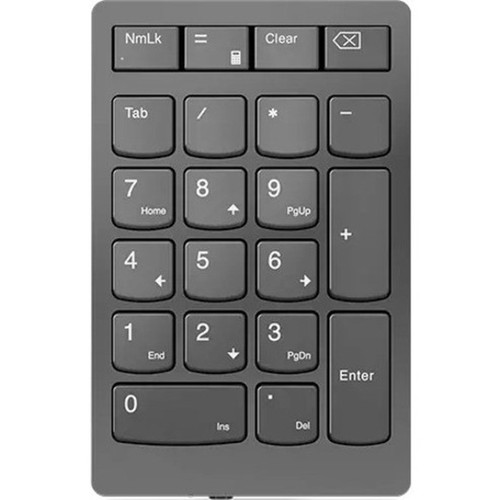
Lenovo 4Y41C33791 Go Wireless Numeric Keypad - RF 2.40 GHz - Scissor Switch - Calculator - TAB - Equal - Esc Hotkeys - Storm Gray

Business volume discounts
Technical guidance
Preparation & staging
QC · ON · AB · BC
Product Features
Technical Overview
This keypad operates on a reliable 2.40 GHz RF wireless connection, ensuring stable performance without the interference concerns common in crowded wireless environments. The scissor switch mechanism beneath each key offers a balanced tactile response and quiet operation, categorizing it as a low-profile input device ideal for extended use.
Compatibility is straightforward, with native support for Windows 10 on both desktop PCs and notebooks. The included battery powers the keypad, eliminating the need for immediate additional purchases and simplifying the initial setup process.
Relevant factors for this section include Keyswitch Technology, Keyboard/Keypad Connectivity Technology, Keyboard/Keypad Wireless Technology, Battery Included. When those points are considered together, they give buyers a clearer picture of how the product is equipped, how it fits into deployment, and what kind of day-to-day role it is meant to support.
Key Product Advantages
These strengths make the product easier to deploy and manage in real environments, especially where reliability, usability, and day-to-day operational continuity matter. Notable benefits include Wireless Freedom, Enhanced Productivity Hotkeys, Portable & Ergonomic Design.
Wireless Freedom
RF connectivity removes cable management headaches and allows flexible placement up to several meters from the host device, maintaining a clean workspace.
- 2.40 GHz frequency for reliable signal
- No Bluetooth pairing required
Enhanced Productivity Hotkeys
Dedicated calculator, TAB, equal, and escape keys provide quick access to common functions, speeding up spreadsheet work, data entry, and navigation tasks.
Portable & Ergonomic Design
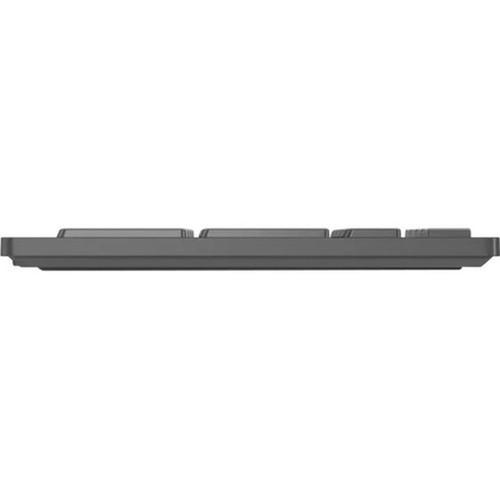
The compact dimensions and light weight make this keypad easy to transport, while the scissor switches offer a comfortable typing experience that reduces finger fatigue.
Deployment / Use Cases
This numeric keypad is tailored for scenarios where efficient numeric input is a priority but desk space is limited. Financial professionals, accountants, and data analysts will appreciate the dedicated calculator key and numeric layout for rapid calculations and spreadsheet navigation.
It also serves as an excellent peripheral for notebook users who miss the full keyboard experience when traveling or working remotely. The wireless design allows quick connection to a laptop without occupying a USB port, making it ideal for temporary workstations, home offices, or shared computing environments.
Relevant factors for this section include Keyswitch Technology, Keyboard/Keypad Connectivity Technology, Keyboard/Keypad Wireless Technology, Battery Included. When those points are considered together, they give buyers a clearer picture of how the product is equipped, how it fits into deployment, and what kind of day-to-day role it is meant to support.
Physical Profile
Measuring 5.28 inches in height and 3.35 inches in depth, the keypad occupies minimal desk real estate. The Storm Gray color provides a neutral, professional look that complements most Lenovo and other brand hardware. At just under 4 ounces, it is lightweight enough for daily transport in a laptop bag or briefcase.
The physical profile is practical for deployment planning because the dimensions and weight are clearly defined: 5.28" (134 mm), 3.35" (85 mm), 3.84 oz (109 g). This helps confirm rack, shelf, desk, or cabinet fit before installation.
- Depth
- 3.35" (85 mm)
- Height
- 5.28" (134 mm)
- Weight
- 3.84 oz (109 g)
Highlights
- RF wireless connectivity at 2.40 GHz for reliable, clutter-free operation
- Scissor key switches deliver a responsive, low-profile typing feel
- Dedicated hotkeys: calculator, TAB, equal, and escape for quick access
- Compact Storm Gray design fits easily beside laptops or on crowded desks
- Plug-and-play setup with Windows 10 on PCs and notebooks
- Battery included, ready to use out of the box
- Lightweight at 3.84 oz for high portability
- Designed specifically for efficient numeric data entry tasks
Specifications
| Specifications | |
|---|---|
| Manufacturer | Lenovo Group Limited |
| Manufacturer Part Number | 4Y41C33791 |
| Brand Name | Lenovo |
| Product Line | GO |
| Product Name | Go Wireless Numeric Keypad |
| Package Type | Retail |
| Product Type | Keypad |
| Keyboard/Keypad | |
| Keyswitch Technology | Scissors |
| Keyboard/Keypad Connectivity Technology | Wireless |
| Keyboard/Keypad Wireless Technology | RF |
| Wireless Operating Frequency | 2.40 GHz |
| Hot Keys | Calculator,TAB,Equal,Esc |
| Keyboard/Keypad Features | Numeric Keypad |
| Battery Information | |
| Battery Included | Yes |
| Physical Characteristics | |
| Color Family | Gray |
| Product Color | Storm Gray |
| Keyboard/Keypad Height | 5.28" (134 mm) |
| Keyboard/Keypad Depth | 3.35" (85 mm) |
| Weight (Approximate) | 3.84 oz (109 g) |
| Miscellaneous | |
| Operating System Compatibility | Windows 10 |
| Platform Supported | PC |
| Device Supported | Notebook |
FAQ
What wireless technology does this keypad use?
It uses RF (Radio Frequency) wireless technology operating at 2.40 GHz. This provides a stable connection without the pairing process required by Bluetooth, and it typically offers a reliable range of several meters in open spaces, reducing desk clutter from cables.
Is the battery included with the keypad?
Yes, a battery is included with the keypad, so you can start using it immediately after unboxing. This eliminates the need to purchase batteries separately and ensures a quick, hassle-free setup right out of the package.
Which operating systems are compatible?
The keypad is compatible with Windows 10. It is designed as a plug-and-play device for PCs and notebooks running this operating system, requiring no additional drivers for basic functionality in most environments.
What are the special hotkeys on this keypad?
It features dedicated hotkeys for calculator, TAB, equal, and escape functions. These keys provide quick access to common tools and navigation commands, enhancing productivity during data entry, spreadsheet work, or general computing tasks.
Can I use this keypad with a laptop?
Yes, the keypad is explicitly supported for use with notebooks. Its wireless RF connectivity allows easy pairing with laptops that have an available USB port for the receiver, making it an ideal portable numeric input solution for mobile professionals.
What type of key switches does it have?
It uses scissor key switches, which are known for a low-profile design and responsive tactile feedback. These switches are generally quieter and more comfortable for extended typing sessions compared to some mechanical alternatives, categorizing the keypad as a comfortable, ergonomic input device.
| Qty | Price | Available |
|---|