








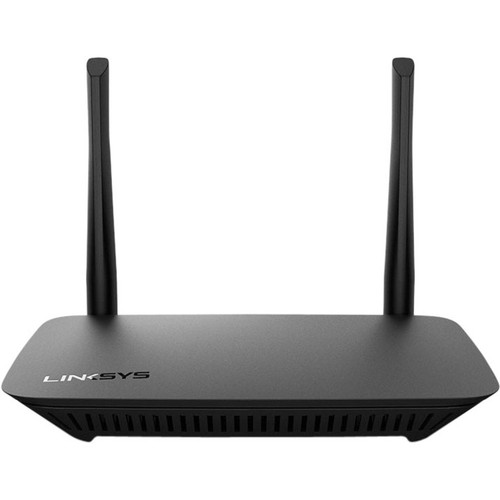


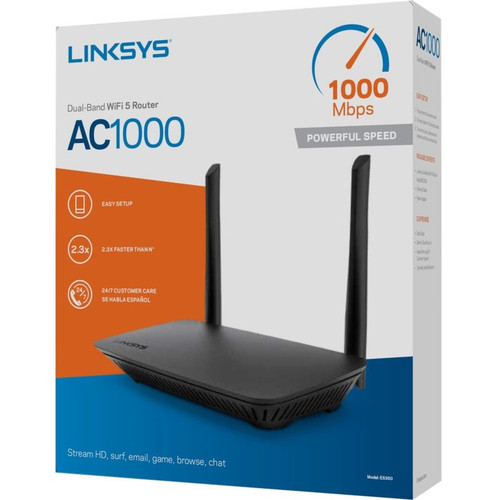
Linksys E5350 Dual-Band AC1000 Wi-Fi 5 Wireless Router - 2x External Antennas - 125 MB/s - 4 LAN + 1 WAN Ports - Fast Ethernet - Desktop/Wall

Business volume discounts
Technical guidance
Preparation & staging
QC · ON · AB · BC
Product Features
Technical Overview
The Linksys E5350 operates on Wi-Fi 5 technology, utilizing the IEEE 802.11ac wireless LAN standard to deliver efficient dual-band performance. It transmits on both the 2.40 GHz ISM band and the 5 GHz UNII band, allowing devices to connect on less congested frequencies for improved throughput. The router's two external antennas are designed to optimize signal strength and range, supporting a total wireless speed of 125 MB/s for smooth data transfer across the network.
On the wired side, the E5350 incorporates Fast Ethernet technology across its five RJ-45 ports: four LAN ports for local device connections and one WAN port for internet uplink. This configuration ensures compatibility with most home and office networking setups, providing reliable connectivity for computers, printers, gaming consoles, and other Ethernet-enabled devices. The router does not support Multi-SIM functionality, focusing instead on traditional broadband and LAN networking.
Key Product Advantages
The Linksys E5350 stands out with its balanced combination of wireless performance, wired flexibility, and installation versatility. Its dual-band capability allows devices to leverage both 2.4 GHz and 5 GHz frequencies, reducing interference and improving network efficiency in mixed-device environments. The external antennas enhance signal propagation, providing broader coverage compared to internal antenna designs.
Flexible Installation Options
The router supports both desktop placement and wall mounting, giving users the freedom to optimize space and cable management. Its compact dimensions (6.69" wide x 4.41" deep x 1.30" high) make it easy to fit in tight spaces or mount discreetly.
- Desktop or wall mountable
- Compact footprint
- Organized cable routing
Reliable Wired Connectivity
With four LAN ports and one WAN port, the E5350 accommodates multiple wired devices while maintaining a stable internet connection. Fast Ethernet technology ensures consistent performance for bandwidth-intensive tasks like file transfers or video streaming over Ethernet.
- 4 LAN ports for local devices
- 1 WAN port for modem
- Fast Ethernet support
Deployment / Use Cases
The Linksys E5350 is ideal for home offices, small businesses, and residential settings where reliable Wi-Fi and basic wired networking are required. Its dual-band design makes it suitable for environments with multiple wireless devices, such as smartphones, tablets, laptops, and smart home gadgets, allowing users to spread traffic across bands to minimize congestion.
Common deployment scenarios include providing whole-home Wi-Fi coverage in apartments or small houses, serving as the primary router in a home office setup with connected computers and printers, or acting as a secondary access point to extend network reach. The wall-mounting feature is particularly useful for installations in entertainment centers, mounted on walls in multi-room setups, or in locations where desk space is limited.
Home Office Networking
Deliver stable Wi-Fi for video conferencing, file sharing, and online collaboration while connecting wired devices like desktop PCs or network printers via the LAN ports.
- Supports remote work tools
- Connects wired office equipment
- Reduces wireless interference
Residential Internet Distribution
Provide consistent internet access throughout living spaces for streaming, gaming, and browsing, with the flexibility to mount the router for optimal signal placement.
- Covers typical home layouts
- Handles multiple connected devices
- Easy to position for best coverage
Physical Profile
The Linksys E5350 features a compact, lightweight design measuring 6.69 inches in width, 4.41 inches in depth, and 1.30 inches in height, with a weight of approximately 172 grams. Its small footprint allows for discreet placement on desks, shelves, or entertainment centers. The router is constructed for both desktop use and wall mounting, with mounting options that help keep cables organized and out of sight. The external antennas are fixed but provide adjustable positioning to fine-tune signal direction. The unit's build emphasizes practicality and space efficiency, making it easy to integrate into various room layouts without dominating the area.
- Width
- 6.69" (170 mm)
- Depth
- 4.41" (112 mm)
- Height
- 1.30" (33 mm)
- Weight
- 172 g
Highlights
- Dual-band Wi-Fi 5 router with IEEE 802.11ac support
- Total wireless transmission speed of 125 MB/s
- Two external antennas for enhanced signal coverage
- Four Fast Ethernet LAN ports and one WAN port
- Desktop or wall-mountable form factor
- Compact dimensions: 6.69" W x 4.41" D x 1.30" H
- Lightweight design at approximately 172 grams
- One-year limited warranty for reliable performance
Specifications
| Specifications | |
|---|---|
| Manufacturer | Linksys |
| Manufacturer Part Number | E5350 |
| Brand Name | Linksys |
| Product Model | E5350 |
| Product Name | WiFi Router Dual-Band AC1000 (WiFi 5) |
| Product Type | Wireless Router |
| Technical Information | |
| Wi-Fi Generation | Wi-Fi 5 |
| Wireless Specifications | |
| Broadband Transmission Technology | Ethernet |
| Wireless LAN Standard | IEEE 802.11ac |
| ISM Band | Yes |
| UNII Band | Yes |
| ISM Maximum Frequency | 2.40 GHz |
| UNII Maximum Frequency | 5 GHz |
| Number of External Antennas | 2 |
| Total Wireless Transmission Speed | 125 MB/s |
| Interfaces/Ports | |
| Number of Network (RJ-45) Ports | 4 |
| Number of Broadband (RJ-45) Ports | 1 |
| Network & Communication | |
| Ethernet Technology | Fast Ethernet |
| Multi-SIM Supported | No |
| Physical Characteristics | |
| Form Factor | Desktop,Wall Mountable |
| Height | 1.30" (33 mm) |
| Width | 6.69" (170 mm) |
| Depth | 4.41" (112 mm) |
| Weight (Approximate) | 172 g |
| Miscellaneous | |
| Country of Origin | Vietnam |
| Warranty | |
| Limited Warranty | 1 Year |
User Manual
FAQ
What Wi-Fi generation does the Linksys E5350 support?
The Linksys E5350 supports Wi-Fi 5, which is based on the IEEE 802.11ac wireless standard. This generation provides improved speed and efficiency over previous Wi-Fi versions, operating on dual bands (2.4 GHz and 5 GHz) to deliver reliable wireless performance for home and office networks.
How many Ethernet ports does this router have?
The router includes five RJ-45 Ethernet ports: four LAN ports for connecting wired devices like computers, printers, or gaming consoles, and one WAN port for linking to your broadband modem. All ports use Fast Ethernet technology, supporting stable wired connections for bandwidth-sensitive tasks.
Can the Linksys E5350 be wall-mounted?
Yes, the Linksys E5350 is designed for both desktop placement and wall mounting. This flexibility allows you to install the router in optimal locations for Wi-Fi coverage while keeping cables organized. The compact size and lightweight build make it easy to mount on walls or place in tight spaces.
What is the total wireless speed of this router?
The Linksys E5350 offers a total wireless transmission speed of 125 MB/s across its dual bands. This speed supports smooth internet browsing, streaming, and file transfers for multiple connected devices, leveraging the efficiency of the IEEE 802.11ac standard to maximize network performance.
Does the router have external antennas?
Yes, the router features two external antennas. These antennas enhance wireless signal strength and range compared to internal designs, providing better coverage throughout your home or office. The antennas are fixed but can be positioned to optimize signal direction for your specific environment.
What is the warranty period for the Linksys E5350?
The Linksys E5350 comes with a one-year limited warranty. This warranty covers defects in materials and workmanship under normal use, providing assurance of product reliability and support from the manufacturer for the first year of ownership.
What throughput, switching capacity, or performance detail is listed?
the specifications are intended to help buyers confirm fit, compatibility, and expected day-to-day operation. In practical terms, the best reading of this product comes from how its hardware, connectivity, and deployment details work together.
What uplink, SFP, fiber, or media support detail is listed?
the specifications are intended to help buyers confirm fit, compatibility, and expected day-to-day operation. In practical terms, the best reading of this product comes from how its hardware, connectivity, and deployment details work together.
| Qty | Price | Available |
|---|


