
Evoluent EKB Essentials Full Featured Compact Keyboard - Scissors Switch - Low-Profile - USB Wired - English/French - Multi-Platform

Business volume discounts
Technical guidance
Preparation & staging
QC · ON · AB · BC
Product Features
Product Overview
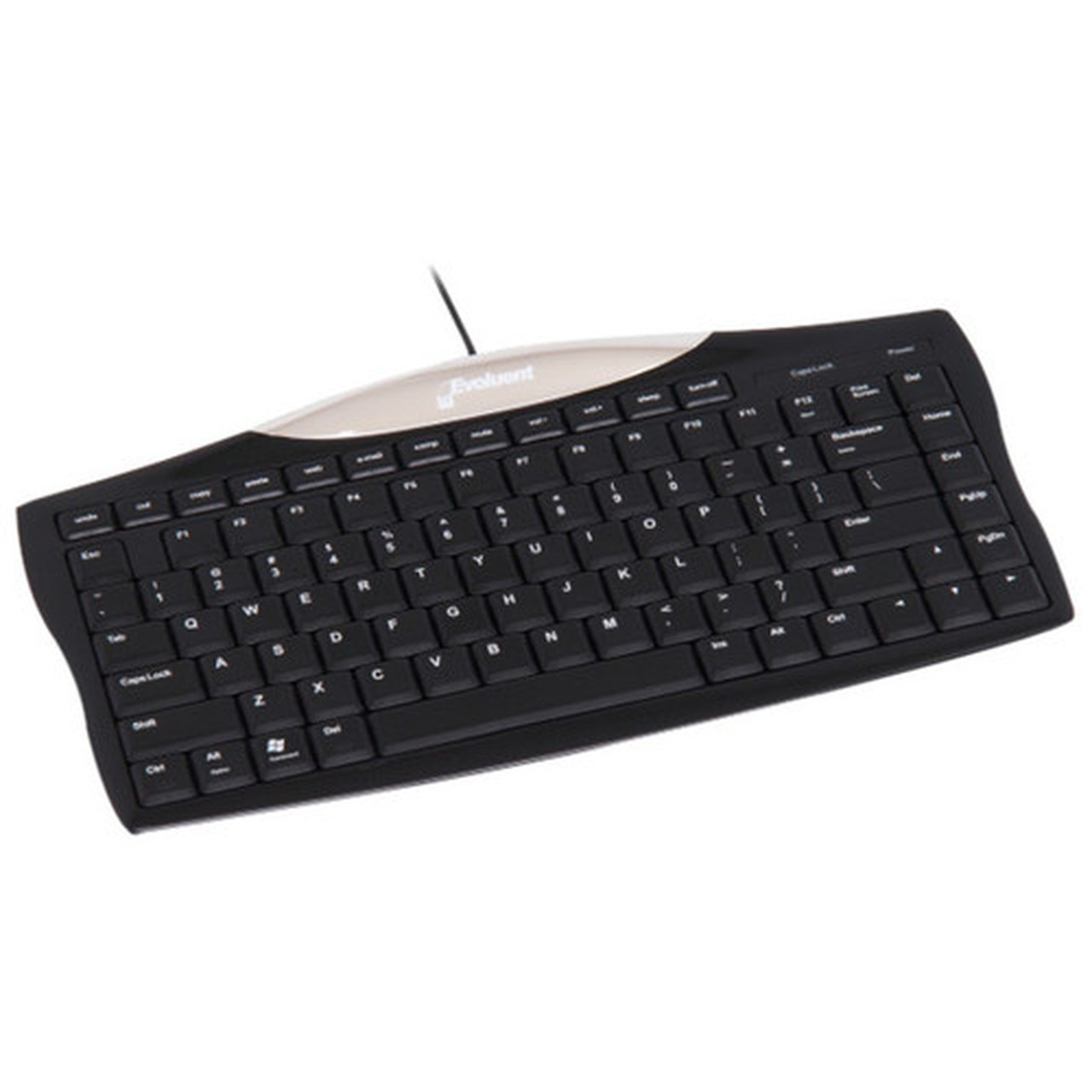
The Evoluent EKB Essentials Full Featured Compact Keyboard delivers a professional typing experience in a space-efficient design. Engineered with scissors key switches, this keyboard combines responsive tactile feedback with a low-profile build that reduces finger strain during extended use. Its compact footprint makes it ideal for crowded desks or mobile workstations where space optimization is critical.
Built for cross-platform compatibility, the EKB connects via a reliable USB cable and supports Windows, Mac, Linux, and Unix systems. The keyboard includes a comprehensive set of hot keys for common tasks like cut, copy, paste, internet navigation, email, volume control, mute, sleep, power, and quick access to My Computer. English and French localization ensures it meets the needs of bilingual environments across Canada.
Technical Overview
The EKB utilizes scissors key switches, which provide a comfortable and responsive typing feel while maintaining a slim profile. This technology reduces key travel distance and actuation force, enhancing typing speed and accuracy for office tasks. The low-profile keys contribute to a sleek aesthetic and ergonomic hand positioning.
Connectivity is handled through a standard USB cable, ensuring plug-and-play operation without drivers or software installation. The keyboard is recognized as a standard HID device across all supported platforms, including Mac, Linux, Windows, and Unix. This universal compatibility makes it a versatile choice for mixed-IT environments and users who switch between operating systems.
Relevant factors for this section include Keyswitch Technology, Keyboard/Keypad Connectivity Technology, Hot Keys, Keyboard/Keypad Host Interface. When those points are considered together, they give buyers a clearer picture of how the product is equipped, how it fits into deployment, and what kind of day-to-day role it is meant to support.
Key Product Advantages
These strengths make the product easier to deploy and manage in real environments, especially where reliability, usability, and day-to-day operational continuity matter. Notable benefits include Ergonomic Scissors Switches, Cross-Platform Versatility, Productivity Hot Keys.
Ergonomic Scissors Switches
Scissors key switches offer a balanced tactile response with reduced noise and fatigue, ideal for prolonged typing sessions in open offices or home offices.
- Responsive actuation
- Low-profile key travel
- Quiet operation
Cross-Platform Versatility
Works seamlessly with Windows, Mac, Linux, and Unix systems, eliminating the need for multiple keyboards in diverse computing setups.
- USB HID compatibility
- No drivers required
- Plug-and-play setup
Productivity Hot Keys
Dedicated hot keys streamline common tasks like copy-paste, volume control, and application launching, boosting efficiency for daily workflows.
- Instant access functions
- Reduces mouse dependency
- Customizable via OS settings
Deployment / Use Cases
The Evoluent EKB is designed for professional environments where desk space, typing comfort, and platform flexibility are priorities. Its compact size fits easily on smaller desks, in kiosks, or alongside laptops, making it suitable for call centers, reception areas, and shared workstations. The wired USB connection ensures reliable performance without wireless interference or battery concerns.
In educational settings, the keyboard's durability and simple connectivity support computer labs and classroom setups across multiple operating systems. For IT administrators and developers, the cross-platform compatibility simplifies support for heterogeneous networks. The English and French localization caters to bilingual workplaces, government offices, and customer service centers across Canada, ensuring consistent user experience regardless of language preference.
Relevant factors for this section include Keyswitch Technology, Keyboard/Keypad Connectivity Technology, Hot Keys, Keyboard/Keypad Host Interface. When those points are considered together, they give buyers a clearer picture of how the product is equipped, how it fits into deployment, and what kind of day-to-day role it is meant to support.
Localization and Operating System
The Evoluent EKB Essentials keyboard is engineered for seamless integration across diverse computing environments, with built-in support for Windows, Mac, Linux, and Unix systems. This cross-platform compatibility eliminates the need for multiple keyboards in mixed-OS setups, making it a versatile choice for IT departments, educational institutions, and offices with heterogeneous hardware. The keyboard uses standard USB HID protocols, ensuring plug-and-play operation without requiring additional drivers or software installation on any supported platform.
Localization is a key strength of this keyboard, featuring English and French key labeling to accommodate bilingual workplaces across Canada. This dual-language support ensures users can type efficiently in either language without confusion over key layouts or special characters, making it ideal for government offices, customer service centers, and any environment where both languages are routinely used. The hot keys, including cut, copy, paste, internet, email, and media controls, are universally functional across all supported operating systems, enhancing productivity regardless of the platform in use.
Multi-OS Compatibility
Works with Windows, Mac, Linux, and Unix systems out of the box, leveraging standard USB HID for reliable plug-and-play connectivity without driver hassles.
- Universal HID protocol support
- No software installation needed
- Ideal for mixed-platform deployments
Bilingual Key Labeling
English and French localization provides clear key markings for both languages, supporting efficient typing in bilingual Canadian workplaces.
- Dual-language key legends
- Reduces layout confusion
- Suitable for government and service roles
Highlights
- Scissors key switches for comfortable, responsive typing with low-profile design
- USB wired connectivity for reliable, plug-and-play operation
- English and French localization supporting bilingual environments
- Compact form factor ideal for space-constrained desks and workstations
- Hot keys for cut, copy, paste, internet, email, mute, volume, sleep, power, and My Computer
- Cross-platform compatibility with Windows, Mac, Linux, and Unix systems
- Low-profile keys reduce finger strain during extended use
- Supports standard HID protocol for seamless integration
Specifications
| Specifications | |
|---|---|
| Manufacturer | Evoluent, LLC |
| Manufacturer Part Number | EKB |
| Brand Name | Evoluent |
| Product Line | Essentials |
| Product Name | Essentials Full Featured Compact Keyboard |
| Product Type | Keyboard |
| Keyboard/Keypad | |
| Keyswitch Technology | Scissors |
| Keyboard/Keypad Connectivity Technology | Cable |
| Hot Keys | Cut,Copy,Paste,Internet,Email,Mute,Volume Down,Volume Up,Sleep,Power,My Computer |
| Localization | English,French |
| Keyboard/Keypad Features | Low-profile Keys |
| Interfaces/Ports | |
| Keyboard/Keypad Host Interface | USB |
| Miscellaneous | |
| Platform Supported | Mac,Linux,Windows,Unix |
| Device Supported | Computer |
FAQ
What refresh rate or brightness details are available?
Evoluent Essentials Full Featured Compact Keyboard - Cable Connectivity - Cut, Copy, Paste, Internet, Email, Mute, Volume Down, Volume (EKB) is best judged through its screen, connectivity, and installation specifications, which help buyers confirm visual fit and deployment suitability.
What input or connectivity options are listed?
Evoluent Essentials Full Featured Compact Keyboard - Cable Connectivity - Cut, Copy, Paste, Internet, Email, Mute, Volume Down, Volume (EKB) is best judged through its screen, connectivity, and installation specifications, which help buyers confirm visual fit and deployment suitability.
Does the display support VESA mounting or adjustment features?
Evoluent Essentials Full Featured Compact Keyboard - Cable Connectivity - Cut, Copy, Paste, Internet, Email, Mute, Volume Down, Volume (EKB) is best judged through its screen, connectivity, and installation specifications, which help buyers confirm visual fit and deployment suitability.
What panel or display technology is mentioned?
Evoluent Essentials Full Featured Compact Keyboard - Cable Connectivity - Cut, Copy, Paste, Internet, Email, Mute, Volume Down, Volume (EKB) is best judged through its screen, connectivity, and installation specifications, which help buyers confirm visual fit and deployment suitability.
What screen size is listed?
Evoluent Essentials Full Featured Compact Keyboard - Cable Connectivity - Cut, Copy, Paste, Internet, Email, Mute, Volume Down, Volume (EKB) is best judged through its screen, connectivity, and installation specifications, which help buyers confirm visual fit and deployment suitability.
What resolution or display format is specified?
Evoluent Essentials Full Featured Compact Keyboard - Cable Connectivity - Cut, Copy, Paste, Internet, Email, Mute, Volume Down, Volume (EKB) is best judged through its screen, connectivity, and installation specifications, which help buyers confirm visual fit and deployment suitability.
| Qty | Price | Available |
|---|