








StarTech. com 107B-USB-HDMI-2 USB-C/USB-A to Dual HDMI Adapter - 1 x 4K30 - 1 x 1080p - 4. 3in Cable - Black

Business volume discounts
Technical guidance
Preparation & staging
QC · ON · AB · BC
Product Features
Technical Overview
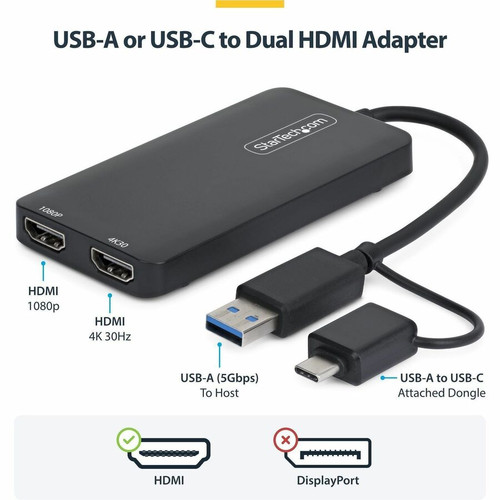
The adapter features a USB 3.2 Gen 1 (5 Gbps) interface, providing sufficient bandwidth to drive dual displays simultaneously. It supports HDMI 1.4 video output with 2-channel audio. The first HDMI port can output up to 3840 x 2160 at 30Hz, while the second port outputs up to 1080p. The maximum resolution for the 4K port is 4K30; 1080p supports standard refresh rates.
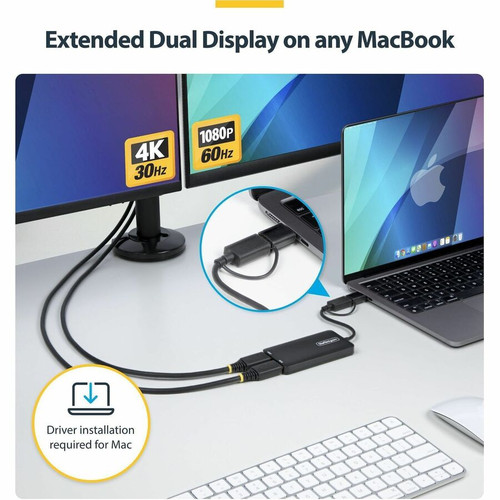
Compatibility extends to Windows, macOS, Chrome OS V98+ (Stable Channel), and Ubuntu. Windows and Chrome OS offer automatic driver installation; macOS and Ubuntu require a driver download. The adapter also works with USB 3.0, USB-C, USB4, and Thunderbolt ports, offering wide interoperability.
Key Product Advantages
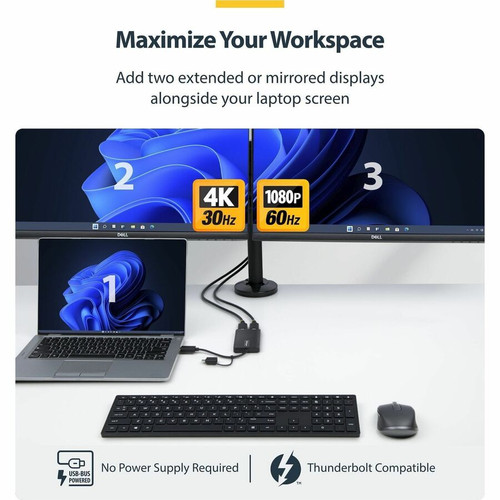
This dual HDMI adapter is designed for professionals who need to expand their screen real estate. It turns a single USB-A or USB-C port into two HDMI video outputs, enabling you to run dual extended or mirrored monitors. The integrated dual-connector dongle eliminates the need for separate adapters or cables, making it an ideal travel companion.
Key benefits include low CPU overhead thanks to Silicon Motion's Content Adaptive Technology, broad OS support, and plug-and-play ease on Windows and Chrome OS. The compact, lightweight design (2.33 oz) fits easily into a laptop bag.
Productivity Boost
Add two external monitors to increase multitasking efficiency. Ideal for spreadsheets, data analysis, and document editing.
Universal Compatibility
Works with USB-A, USB-C, USB4, and Thunderbolt ports on Windows, macOS, Chrome OS, and Ubuntu.
Deployment / Use Cases
This adapter is ideal for hot-desking environments, remote workers, and IT deployments where laptops lack built-in video ports. It provides a simple, cost-effective way to equip laptops with dual-monitor capability without adding a docking station.
Example use cases: connecting two external monitors to an M-Series MacBook for design or coding; adding dual displays to a Windows ultrabook for financial analysis; using mirrored mode for presentations where one display shows 4K content and the other shows 1080p. Note: The adapter is optimized for business productivity and not recommended for gaming.
Finance & Data Analysis
Spreadsheets and trading platforms benefit from dual screens. Keep charts on one monitor and data on another.
Software Development
Code on one screen, reference documentation or output on the second. The 4K output provides crisp text for IDEs.
Physical Profile
The adapter has a compact black enclosure measuring 2.08 in (52.8 mm) wide, 0.43 in (11 mm) tall, and 3.94 in (100 mm) long, with an attached 4.3 in (11 cm) cable. It weighs just 2.33 oz (66 g), making it highly portable. The lightweight design and short cable minimize desk clutter.
- Width
- 2.08" (52.80 mm)
- Height
- 0.43" (11 mm)
- Weight
- 2.33 oz (66 g)
- Length
- 3.94" (100 mm)
Highlights
- Add dual HDMI displays via a single USB-A or USB-C port
- 1x 4K @ 30Hz and 1x 1080p output for extended or mirrored desktops
- Integrated dual connector: USB-A and USB-C males eliminate dongles
- Silicon Motion Content Adaptive Technology reduces CPU load for smooth graphics
- Bus-powered – no external power supply needed
- 4.3-inch (11 cm) attached cable keeps setup tidy
- Works with Windows, macOS, Chrome OS, and Ubuntu (driver required for macOS/Ubuntu)
- Compatible with USB 3.0/3.2 Gen 1, USB-C, USB4, and Thunderbolt ports
- Black color, compact and lightweight (66 g)
Specifications
| Specifications | |
|---|---|
| Manufacturer | StarTech.com |
| Manufacturer Part Number | 107B-USB-HDMI-2 |
| Brand Name | StarTech.com |
| Product Name | USB-C/USB-A to Dual HDMI Adapter |
| Packaged Quantity | 1 |
| Product Type | A/V Adapter |
| Technical Information | |
| Adapter Type | HDMI/USB/USB-C |
| Connector Type on First End | USB 3.2 (Gen 1) Type A - Male,USB 3.2 (Gen 1) Type C - Male |
| Connector on First End Details | 1 x USB 3.2 (gen 1) Type A - Male,1 x USB 3.2 (gen 1) Type C - Male |
| Connector Type on Second End | HDMI 1.4 Digital Audio/Video - Female |
| Connector on Second End Details | 2 x HDMI 1.4 Digital Audio/Video - Female |
| Maximum Resolution Supported | 3840 x 2160 |
| Features | Lightweight |
| Physical Characteristics | |
| Color Family | Black |
| Product Color | Black |
| Height | 0.43" (11 mm) |
| Width | 2.08" (52.80 mm) |
| Length | 3.94" (100 mm) |
| Weight (Approximate) | 2.33 oz (66 g) |
User Manual
FAQ
Does the adapter support 4K at 60Hz?
The 4K HDMI port supports a maximum resolution of 3840 x 2160 at 30Hz. It does not support 4K60. The second port outputs up to 1080p.
Can I use the adapter with an Apple M-Series MacBook?
Yes, the adapter works with Apple M1, M2, and M3 MacBooks using the integrated USB-C connector. Driver installation is required for macOS, available from StarTech.com's support page.
Does the adapter require external power?
No, the adapter is USB bus-powered and draws power directly from the host computer. No external power supply is needed.
How long is the attached cable?
The attached cable is 4.3 inches (11 cm) long. It provides a compact connection directly from the USB port to the adapter body.
Can I use both HDMI ports simultaneously?
Yes, both HDMI ports can be used simultaneously to drive two external monitors. The first port supports 4K30, and the second supports 1080p. You can extend or mirror displays.
| Qty | Price | Available |
|---|


