


Shipping included*
Exclusions
Additional shipping fees may apply in rare circumstances for deliveries outside standard service areas. In most cases, this only potentially affects shipments to the Northwest Territories and Yukon, as well as certain heavy or oversized items.
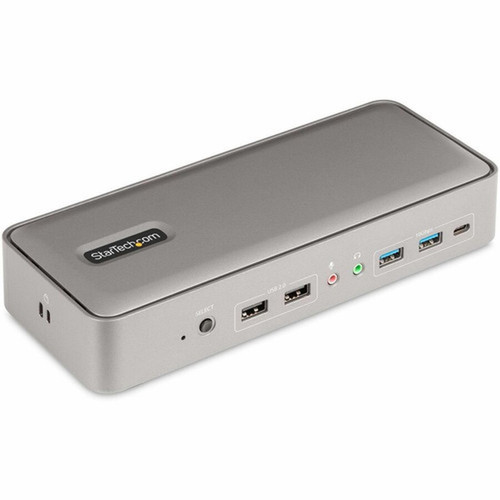
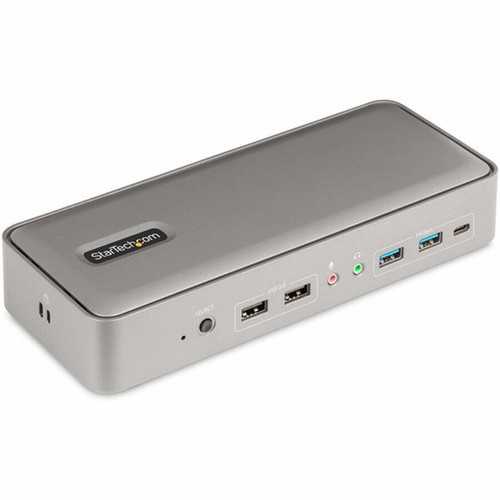
StarTech.com 129N-USBC-KVM-DOCK Dual-Laptop USB-C KVM Docking Station - Dual 4K 60Hz DisplayPort - 7x USB Hub - Gigabit Ethernet - 90W/45W PD

Business volume discounts
Technical guidance
Preparation & staging
QC · ON · AB · BC
Product Features
Technical Overview
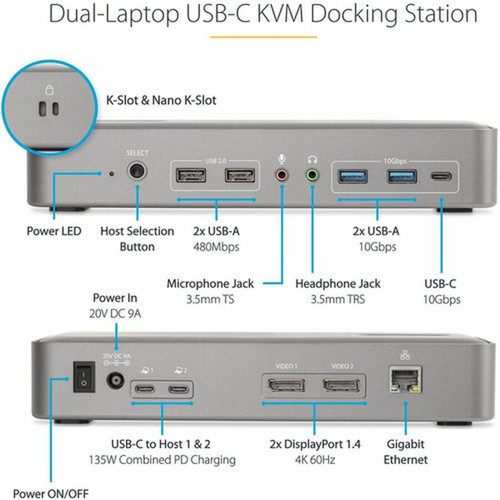
Built with a wired connectivity architecture, the dock supports two displays at 4K 60Hz via its dual DisplayPort 1.4 outputs. The host interface utilizes USB 3.2 Gen 2 Type-C, ensuring high-speed data transfer for connected storage and peripherals.
Connectivity includes seven USB ports: two USB 2.0 Type-A for HID devices, two USB 3.2 Gen 2 Type-A (10 Gbps), one USB 3.2 Gen 2 Type-C (10 Gbps), and two USB-C host ports. Additional ports comprise a Gigabit Ethernet RJ-45, 3.5mm stereo audio line-out, 3.5mm microphone line-in, and two Kensington security slots (Standard and Nano sizes).
Relevant factors for this section include Connectivity Technology, Number of Displays Supported, Supported Resolutions, Ethernet Technology. When those points are considered together, they give buyers a clearer picture of how the product is equipped, how it fits into deployment, and what kind of day-to-day role it is meant to support.
Key Product Advantages
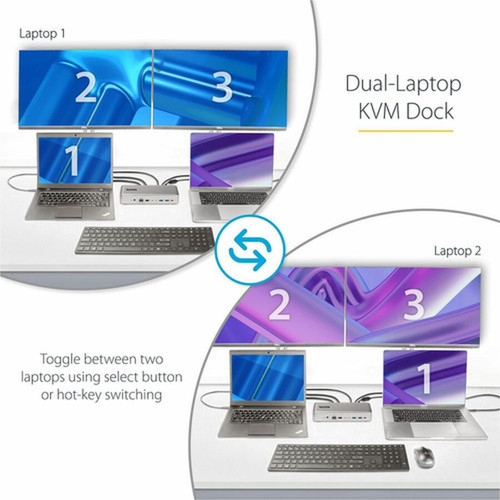
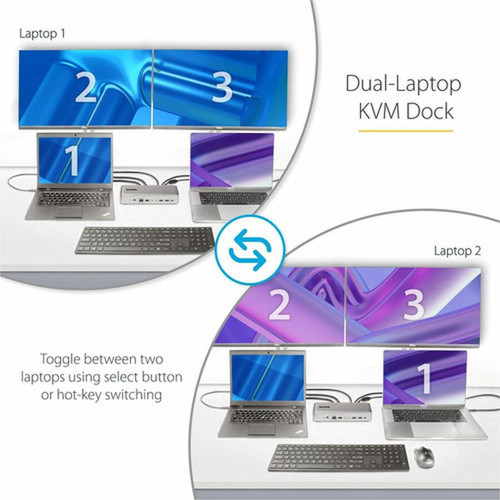
This docking station eliminates desktop clutter by consolidating connections for two laptops, dual monitors, and multiple peripherals into a single, compact device. The KVM functionality reduces hardware redundancy and simplifies cable management in shared or hot-desking environments.
Dual-Laptop Power Management
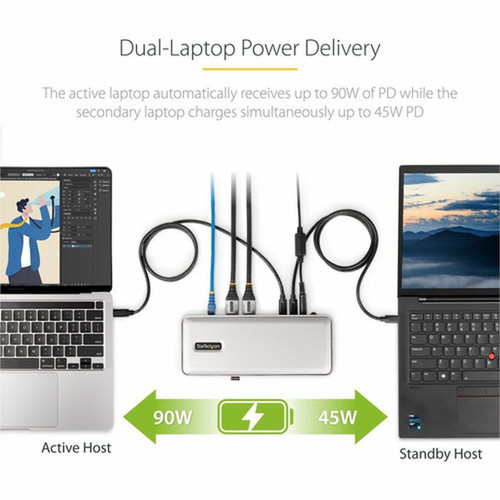
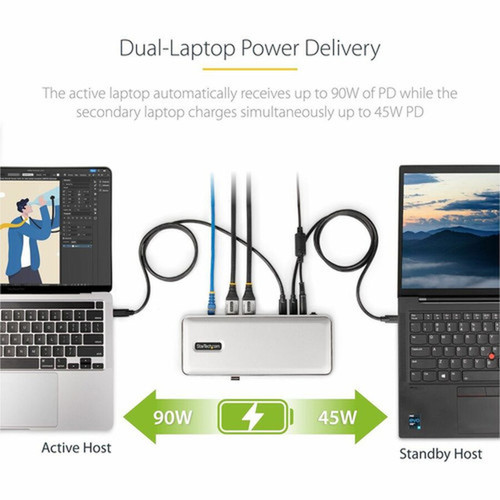
The included 180W power adapter employs USB Power Delivery 3.0 to dynamically allocate 90W to the active host and 45W to the standby host, ensuring both laptops remain charged during operation and standby periods.
IT Administration Tools
Includes advanced features for IT support teams: Network MAC Address Pass-Through maintains network security policies, WiFi Auto Switching optimizes wireless performance, USB Event Monitoring provides device tracking, and Windows Layout preserves application positioning across host switches.
Deployment / Use Cases
Deploy this KVM dock in professional offices, development labs, or financial trading desks where users need immediate access to two systems. Its compatibility with USB-C, Thunderbolt 4/3, and USB-A laptops (via adapter) ensures broad device support across legacy and modern hardware.
The dock is also suitable for content creators and analysts who require dual 4K displays for high-resolution video editing, data visualization, or multi-tasking across applications, with the power delivery keeping laptops operational throughout extended sessions.
Multi-Platform Workspaces
Ideal for users operating both Windows and macOS laptops, allowing simultaneous connection and quick switching between personal and corporate devices without peripheral reconnection.
IT Support and Help-Desk Stations
Enables technicians to troubleshoot multiple laptops efficiently, with dedicated IT tools like MAC address pass-through and USB event monitoring enhancing network security and diagnostic capabilities.
Physical Profile
Housed in a sleek black enclosure, the dock measures 1.60" (40.64 mm) in height and 3.50" (88.90 mm) in width, with an approximate weight of 14.20 oz (402.56 g). Its compact footprint conserves desk space while providing extensive connectivity. The build includes Kensington security slots for physical theft deterrence, and the dock complies with environmental standards like WEEE and RoHS.
- Width
- 3.50" (88.90 mm)
- Height
- 1.60" (40.64 mm)
- Weight
- 14.20 oz (402.56 g)
What's in the Box
The package includes all necessary components for immediate setup and operation.
Highlights
- Switch between two laptops with a front-panel toggle button.
- Supports dual 4K 60Hz monitors via DisplayPort 1.4.
- Seven USB ports include high-speed 10 Gbps USB 3.2 Gen 2.
- USB Power Delivery 3.0 provides 90W to active and 45W to standby hosts.
- DisplayLink certified for guaranteed compatibility with M1/M2 MacBooks.
- Works with mixed operating systems: Windows, macOS, Chrome OS.
- Includes Gigabit Ethernet, audio in/out, and Kensington security slots.
- Advanced IT tools: MAC address pass-through, WiFi auto switching.
- TAA compliant and backed by a 3-year limited warranty.
- Compact black design with universal power adapter included.
Specifications
| Specifications | |
|---|---|
| Manufacturer | StarTech.com |
| Manufacturer Part Number | 129N-USBC-KVM-DOCK |
| Brand Name | StarTech.com |
| Product Name | Docking Station |
| Packaged Quantity | 1 |
| Product Type | Docking Station |
| Technical Information | |
| Connectivity Technology | Wired |
| Number of Displays Supported | 2 |
| Supported Resolutions | 3840 x 2160 |
| Screen Mode Supported | 4K |
| Device Supported | Flash Drive,Notebook,Monitor,Workstation,Keyboard,Mouse,Desktop PC |
| Network & Communication | |
| Ethernet Technology | Gigabit Ethernet |
| Interfaces/Ports | |
| Host Interface | USB 3.2 (Gen 2) Type C |
| Audio Line In | Yes |
| Audio Line Out | Yes |
| Total Number of USB Ports | 7 |
| Number of USB 2.0 Ports | 2 |
| Number of USB 3.2 Gen 2 Type-A Ports | 2 |
| Number of USB Type-C Ports | 3 |
| USB Type-C | Yes |
| USB Type-C Detail | 1 x USB 3.2 Type-C (24 pin, Gen 2, 10Gbps) |
| Number of USB Type-A Ports | 4 |
| USB Type-A | Yes |
| Number of RJ-45 Ports | 1 |
| Network (RJ-45) | Yes |
| Number of DisplayPorts | 2 |
| DisplayPort | Yes |
| DisplayPort Version | 1.4 |
| USB Power Delivery | Type-C 90W |
| Software | |
| Operating System Supported | Windows 10,Windows 11,Mac OS X 10.15 Catalina,Mac OS X 11.0 Big Sur,Mac OS X 12.0 Monterey,Mac OS X 13.0 Ventura,Ubuntu 18.04,Ubuntu 20.04,ChromeOS,Ubuntu 22.04 |
| Power Description | |
| Maximum Power Supply Wattage | 180 W |
| Physical Characteristics | |
| Product Color | Black |
| Height | 1.60" (40.64 mm) |
| Width | 3.50" (88.90 mm) |
| Weight (Approximate) | 14.20 oz (402.56 g) |
| Miscellaneous | |
| Package Contents | Docking Station 2 x 3.3 ft [1 m] USB-C Host Cables 1 x Universal Power Adapter with Attached 5 ft [1.6 m] DC Cable 2 x 6 ft [1.8 m] Regional Power Cables (NA/JP, ANZ) 1 x Quick-Start Guide |
| Kensington Security Slot | Yes |
| Compatibility | Compatible Devices: Apple M1 MacBook Apple M2 MacBook USB-C, Thunderbolt 4/3 & USB-A laptops |
| Environmentally Friendly | Yes |
| Environmental Compliance | Waste Electrical and Electronic Equipment Directive (WEEE),Restriction of Hazardous Substances (RoHS) |
| TAA Compliant | Yes |
| Warranty | |
| Limited Warranty | 3 Year |
User Manual
FAQ
How many monitors does this KVM docking station support, and at what resolution?
The StarTech.com 129N-USBC-KVM-DOCK supports two monitors simultaneously. Each monitor can achieve a maximum resolution of 3840 x 2160 (4K) at a 60Hz refresh rate through the dual DisplayPort 1.4 outputs. This allows for high-resolution dual-display setups suitable for professional design, development, or multi-tasking workflows.
Can I use this dock with Apple M1 or M2 MacBooks?
Yes, this docking station is DisplayLink certified and guarantees compatibility with Apple M1 and M2 MacBooks. It supports dual displays on these devices, which is particularly valuable as many MacBooks have limited native display outputs. The dock works seamlessly with macOS versions from Catalina onward, ensuring reliable performance for Apple users in mixed-OS environments.
What power delivery capabilities does the dock offer for connected laptops?
The dock features USB Power Delivery 3.0, with the included 180W universal power adapter automatically allocating power based on host status. It delivers 90W to the active laptop and 45W to the standby laptop, ensuring both devices remain charged during use and standby. This intelligent power management supports modern laptops that require high-wattage charging for optimal performance.
How many USB ports are available, and what are their speeds?
There are seven USB ports in total: two USB 2.0 Type-A ports for keyboards and mice, two USB 3.2 Gen 2 Type-A ports operating at 10 Gbps for fast data transfer, one USB 3.2 Gen 2 Type-C port (10 Gbps) for peripherals, and two USB-C host ports for laptop connections. This variety accommodates both legacy and high-speed devices, from storage drives to webcams.
Does this KVM dock support operating systems other than Windows?
Yes, it supports multiple operating systems, including Windows 10, Windows 11, macOS from 10.15 Catalina to 13.0 Ventura, Ubuntu 18.04 through 22.04, and ChromeOS. This cross-platform compatibility allows users to mix and match systems, such as connecting a Windows laptop and a MacBook simultaneously, with full peripheral sharing and display support.
What IT-specific features are included for professional deployment?
The dock includes several IT administration tools: Network MAC Address Pass-Through maintains consistent MAC addresses for network security policies, WiFi Auto Switching optimizes wireless connectivity during host changes, USB Event Monitoring tracks connected devices for troubleshooting, and Windows Layout preserves application window positions across switches. These features streamline support tasks in corporate or help-desk environments.
| Qty | Price | Available |
|---|