











StarTech.com C2-H46-UAC-CBL-KVM 2-Port Hybrid USB-C HDMI KVM Switch - 4K 60Hz - Bus-Powered with Integrated Cables

Business volume discounts
Technical guidance
Preparation & staging
QC · ON · AB · BC
Product Features
Technical Overview
This KVM switch delivers robust 4K video at 60Hz across a 3840 x 2160 resolution, ensuring sharp, fluid visuals for productivity and multimedia tasks. It supports USB 2.0 connectivity across four USB ports, facilitating reliable data transfer for keyboards, mice, and other HID devices. The bus-powered operation draws power directly from the connected computers, enhancing portability and simplifying installation.
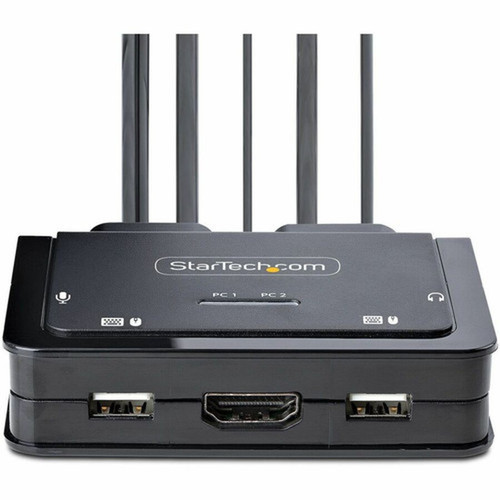
Built with a desktop form factor, the unit includes LED indicators for clear status monitoring and supports hotkey commands or a remote push button (with a 1.5m cable) for intuitive switching between hosts. Its compatibility extends across a wide range of operating systems, including Windows 7 through 11, macOS Sierra through Monterey, and Chrome OS, and works with hardware platforms from Intel, AMD, and Apple M1/M2 devices.
Relevant factors for this section include Number of Computers Supported, Number of Local Users Supported, Features, Graphic Mode. When those points are considered together, they give buyers a clearer picture of how the product is equipped, how it fits into deployment, and what kind of day-to-day role it is meant to support.
Key Product Advantages
This hybrid KVM switch stands out by integrating the cables needed for both USB-A and USB-C hosts, offering a plug-and-play solution that saves time and reduces accessory costs. Its small footprint and lack of external power make it ideal for space-constrained desks or mobile setups, while the 4K 60Hz support ensures high-quality display performance for demanding applications.
Integrated Cable Design
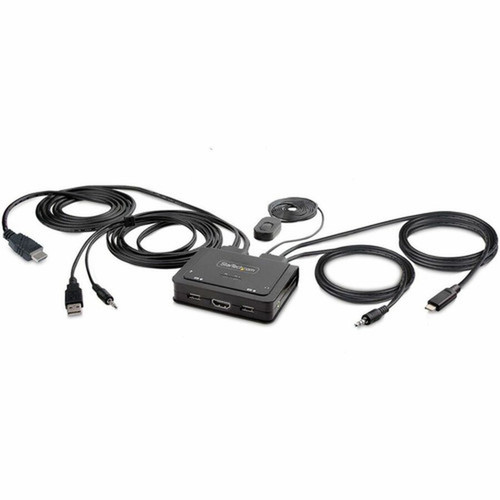
Includes pre-attached 6ft USB-A/HDMI/audio and 4ft USB-C/audio cables, eliminating the need for separate purchases and minimizing setup complexity.
- Ready for immediate use
- Reduces cable management issues
Broad Compatibility
Works with virtually any modern computer, supporting USB-C, USB4, and Thunderbolt 3/4 connections alongside traditional USB-A, and is compatible with Windows, macOS, Linux, and Chrome OS.
- Future-proof for new devices
- Cross-platform functionality
Advanced Switching Features
Offers multiple switching methods including hotkey commands and a remote push button, plus downloadable software for audio passthrough and window layout restoration.
- Flexible control options
- Enhanced user convenience
Deployment / Use Cases
This KVM switch is perfect for IT professionals and help-desk teams who need to manage multiple systems efficiently, such as switching between a primary desktop and a secondary laptop for testing or support tasks. Its hybrid design makes it equally suitable for home office users who want to share peripherals between a personal desktop and a work-issued USB-C laptop, creating a clean, organized workspace.
In educational or training environments, it facilitates easy switching between demonstration computers, while in creative studios, it allows seamless transitions between editing workstations. The included USB Event Monitoring and Windows Layout tools provide additional value for IT administrators by logging device connections and restoring application positions, streamlining workflow and troubleshooting.
Physical Profile
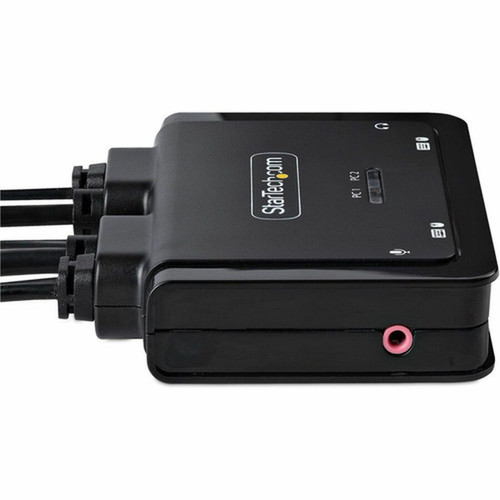
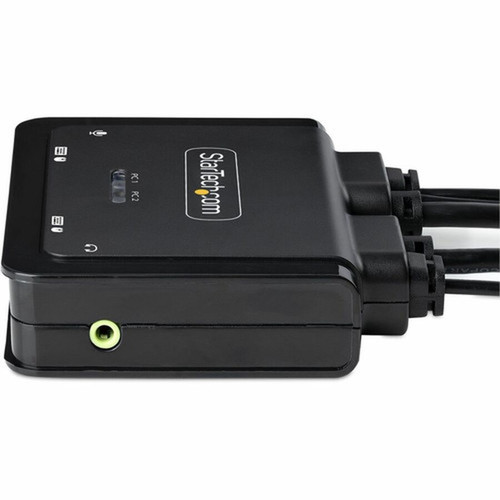
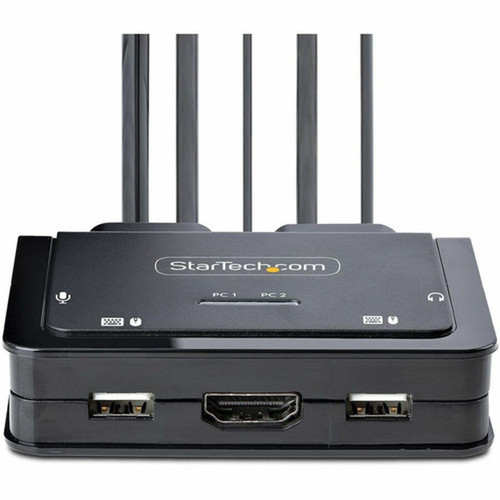
The switch features a compact desktop form factor with dimensions of 3.60" (91.44 mm) wide, 3.80" (96.52 mm) deep, and 0.90" (22.86 mm) high, weighing approximately 9.40 oz (266.49 g). Its small size and lightweight design allow for flexible placement on desks, under monitors, or in cable management trays, while the integrated cables contribute to a tidy setup without bulky external adapters.
- Width
- 3.60" (91.44 mm)
- Depth
- 3.80" (96.52 mm)
- Height
- 0.90" (22.86 mm)
- Weight
- 9.40 oz (266.49 g)
What's in the Box
The package includes all necessary components for immediate operation, ensuring a complete out-of-the-box experience.
Highlights
- Hybrid 2-port KVM switch for USB-A/HDMI desktops and USB-C DP-Alt Mode laptops
- Supports 4K video at 60Hz with a maximum resolution of 3840 x 2160
- Bus-powered design requires no external power adapter
- Integrated 6ft USB-A/HDMI/audio and 4ft USB-C/audio cables included
- Compatible with Windows, macOS, Linux, Chrome OS, and hardware from Intel, AMD, Apple M1/M2
- Switch via hotkey commands or remote push button with 1.5m cable
- Downloadable software for audio passthrough and window layout restoration
- Includes USB Event Monitoring for IT logging and troubleshooting
- Compact desktop form factor with LED indicators
- Backed by a 2-year limited warranty
Specifications
| Specifications | |
|---|---|
| Manufacturer | StarTech.com |
| Manufacturer Part Number | C2-H46-UAC-CBL-KVM |
| Brand Name | StarTech.com |
| Product Name | KVM Switchbox |
| Packaged Quantity | 1 |
| Product Type | KVM Switchbox |
| Technical Information | |
| Number of Computers Supported | 2 |
| Number of Local Users Supported | 1 |
| Features | Bus Powered,LED Indicator |
| Video | |
| Graphic Mode | 4K |
| Maximum Video Resolution | 3840 x 2160 |
| Interfaces/Ports | |
| USB | Yes |
| USB 2.0 | Yes |
| HDMI | Yes |
| Number of USB Ports | 4 |
| Number of HDMI Ports | 2 |
| Physical Characteristics | |
| Form Factor | Desktop |
| Height | 0.90" (22.86 mm) |
| Width | 3.60" (91.44 mm) |
| Depth | 3.80" (96.52 mm) |
| Weight (Approximate) | 9.40 oz (266.49 g) |
| Miscellaneous | |
| Package Contents | KVM Switchbox 1 x 3.5mm 4 Position to 2x 3.5mm 3 Position Headset Adapter 1 x Quick-Start Guide |
| Compatibility | Windows 7 Windows 8 Windows 8.1 Windows 10 Windows 11 macOS Sierra macOS High Sierra macOS Mojave macOS Catalina macOS BigSr macOS Monterey macOS 10.12 macOS 10.15 macOS 11 macOS 12 Chrome OS |
| Environmentally Friendly | Yes |
| Environmental Compliance | Restriction of Hazardous Substances (RoHS),Waste Electrical and Electronic Equipment Directive (WEEE) |
| Warranty | |
| Limited Warranty | 2 Year |
User Manual
FAQ
What computers can I connect to this KVM switch?
You can connect two computers: one with traditional USB-A and HDMI ports (like a desktop PC) and another with a USB-C port supporting DP-Alt Mode (such as modern laptops including MacBooks with M1/M2 chips, or Windows laptops with USB-C/Thunderbolt). It works with Intel, AMD, and Apple Silicon hardware across operating systems like Windows 7 through 11, macOS Sierra through Monterey, and Chrome OS.
Does this KVM switch support 4K resolution at 60Hz?
Yes, it fully supports 4K resolution at 60Hz with a maximum video output of 3840 x 2160. This ensures high-quality, fluid visuals for tasks like video editing, gaming, or multitasking, making it suitable for modern monitors and displays that require high refresh rates and sharp detail.
How is the KVM switch powered?
The switch is bus-powered, meaning it draws power directly from the connected computers via the USB cables. This eliminates the need for an external power adapter, simplifying setup, reducing cable clutter, and enhancing portability for use in various environments like offices or temporary workstations.
What cables are included with the KVM switch?
It includes integrated host cables: a 6ft/1.8m cable bundle with USB-A, HDMI, and audio connectors for the first computer (PC1), and a 4ft/1.2m cable bundle with USB-C and audio connectors for the second computer (PC2). These pre-attached cables make it ready-to-use out of the box, saving you from purchasing separate cables.
Can I switch between computers without using the physical button?
Yes, you can switch between hosts using hotkey commands (keyboard shortcuts) in addition to the remote push button. The remote button has a 1.5m cable for flexible placement. Downloadable software also enhances functionality, allowing features like listening to audio from one computer while controlling the other, providing multiple convenient switching options.
What additional features does this KVM switch offer for IT professionals?
It includes tools like USB Event Monitoring, which logs USB device connections with timestamps for troubleshooting, and Windows Layout software that restores window positions when switching hosts. These features help IT support teams manage setups efficiently, monitor device activity, and maintain productivity in multi-computer environments, adding value beyond basic switching.
| Qty | Price | Available |
|---|


