












StarTech.com DKT30ICHPD USB-C Multiport Adapter - 4K 60Hz HDMI - 100W PD - 3x USB - Audio - Mini Dock

Business volume discounts
Technical guidance
Preparation & staging
QC · ON · AB · BC
Product Features
Technical Overview
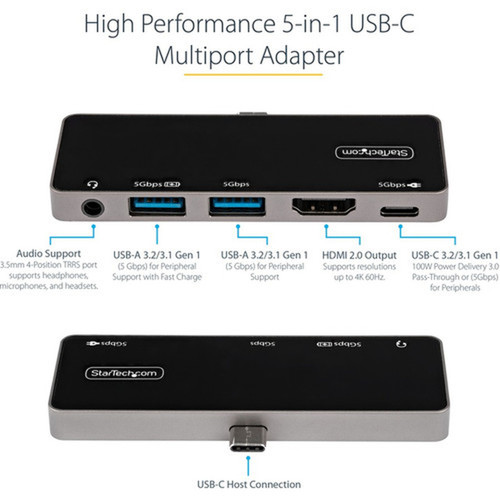
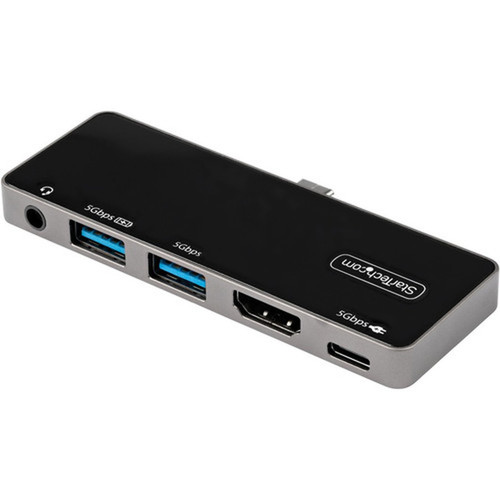
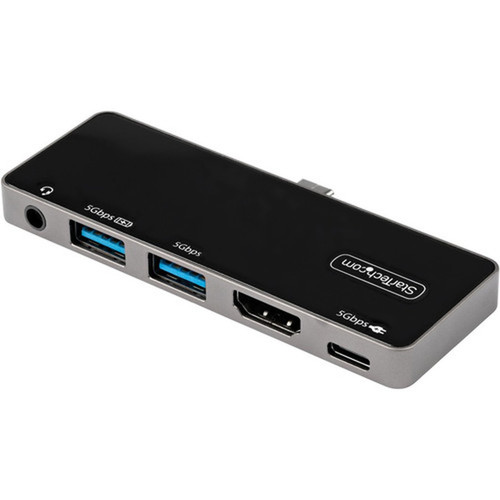
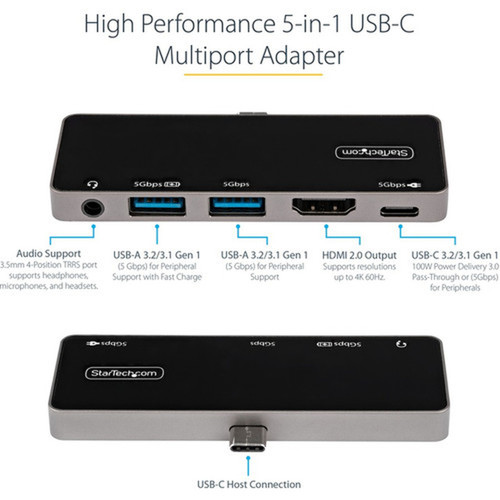
This USB-C multiport adapter leverages USB 3.1/3.2 Gen 1 (5Gbps) technology with DisplayPort 1.4 Alt Mode to deliver up to 4K resolution at 60Hz over HDMI 2.0, supporting HDR content. The video output is complemented by a comprehensive set of ports: one USB-C port for data and power delivery, two USB-A ports (including one with BC1.2 fast charging), and a TRRS audio jack for headsets or microphones.
Power management is a key technical strength. The adapter reserves 8W for its own operation to maintain stable performance, while passing through up to 92W for laptop charging via its 100W Power Delivery 3.0 capability. It can operate via USB bus power or an external USB-C power adapter, ensuring flexibility across different usage scenarios.
Relevant factors for this section include Connectivity Technology, Device Supported, Host Interface, Audio Line Out. When those points are considered together, they give buyers a clearer picture of how the product is equipped, how it fits into deployment, and what kind of day-to-day role it is meant to support.
Key Product Advantages
The DKT30ICHPD stands out with its combination of high-performance video, reliable power delivery, and ultra-portable design. Its cable-free host connection eliminates clutter and enhances durability, while the 100W PD pass-through ensures your devices stay charged without compromising video quality or data transfer.
Stable Power Delivery
Intelligent power allocation prevents overdrawing and maintains consistent video output, avoiding common issues like flickering or disconnections found in lesser hubs.
- 8W reserved for adapter stability
- Up to 92W for laptop charging
- PD 3.0 compliance
Universal Compatibility
Works seamlessly with a wide range of operating systems and devices, from Apple iPad Pro and Microsoft Surface Pro to Google Pixelbook and various Windows laptops.
- Automatic driver installation
- Supports macOS 10.13 to 13
- Windows 8 through 11 ready
Compact Portability
Its slim, lightweight design makes it easy to carry in a laptop bag or leave connected for on-the-go productivity, ideal for hybrid work environments.
- Weighs only 2.9 oz
- 0.3" height profile
- No external cables needed
Deployment / Use Cases
This multiport adapter is tailored for professionals who need to quickly set up a productive workspace anywhere. It enables a single-cable docking experience for presentations, remote work, or mobile office setups, reducing the need for multiple dongles and adapters.
Common use cases include connecting a USB-C laptop to a 4K monitor for detailed design work or video editing, expanding port availability for peripherals like mice, keyboards, and external storage, and providing headset connectivity for video conferences. Its compatibility with tablets and Chromebooks also makes it suitable for educational and light business environments.
Mobile Office Setup
Transform any location into a workstation by connecting your laptop to a monitor, charging it, and adding peripherals through one compact hub.
Presentation Ready
Deliver crisp 4K presentations from a USB-C device to an HDMI display, with audio support for clear narration and audience engagement.
Physical Profile
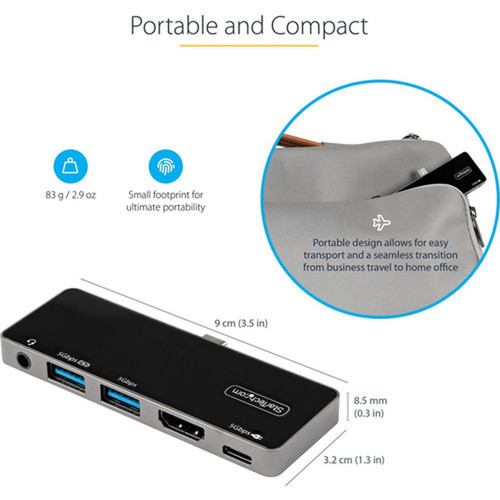
The adapter features a sleek, low-profile design measuring 3.50" wide and only 0.30" thick, with a weight of approximately 2.90 ounces. This compact form factor allows it to sit discreetly on a desk or travel effortlessly in a bag. The built-in USB-C connector ensures a secure, direct attachment to host devices without additional cables, enhancing portability and reducing desk clutter.
- Width
- 3.50" (88.90 mm)
- Height
- 0.30" (7.62 mm)
- Weight
- 2.90 oz (82.21 g)
What's in the Box
The package includes the DKT30ICHPD docking station and a quick-start guide to help you get connected immediately.
Package contents include DKT30ICHPD Docking Station Quick-Start Guide, DKT30ICHPD Docking Station. These included items support setup, installation, and immediate deployment without needing to source the core bundled accessories separately.
Highlights
- 5-in-1 functionality: 4K HDMI, USB-C PD, USB-A hub, audio, and data
- 4K 60Hz HDMI 2.0 video output with HDR support via DisplayPort Alt Mode
- 100W Power Delivery 3.0 pass-through with stable 8W reserve for adapter
- Built-in USB-C connector for cable-free, flush host connection
- Two USB-A ports, including one with BC1.2 fast charging capability
- TRRS audio line-out for headset or microphone connectivity
- Wide OS compatibility: Windows, macOS, ChromeOS, iPadOS, Android
- Compact and portable design, ideal for travel and mobile workspaces
- USB bus powered or external power adapter operation
- 3-year limited warranty and RoHS environmental compliance
Specifications
| Specifications | |
|---|---|
| Manufacturer | StarTech.com |
| Manufacturer Part Number | DKT30ICHPD |
| Brand Name | StarTech.com |
| Product Model | DKT30ICHPD |
| Product Name | DKT30ICHPD Docking Station |
| Product Type | Docking Station |
| Technical Information | |
| Connectivity Technology | Wired |
| Device Supported | Workstation,Tablet,Notebook,Monitor |
| Interfaces/Ports | |
| Host Interface | USB Type C |
| Audio Line Out | Yes |
| USB Type-C | Yes |
| USB Type-C Detail | USB Type-C (24 pin) USB 3.0 (5Gbps) |
| USB Type-A | Yes |
| Number of DisplayPort Outputs | 1 |
| DisplayPort | Yes |
| HDMI | Yes |
| Software | |
| Operating System Supported | Mac OS X 10.13 High Sierra,Mac OS X 10.14 Mojave,Mac OS X 10.15 Catalina,Mac OS X 11.0 Big Sur,Mac OS X 12.0 Monterey,Mac OS X 13.0 Ventura,Windows 8,Windows 8.1,Windows 10,Windows 11,ChromeOS,iPadOS,Android |
| Power Description | |
| Maximum Power Supply Wattage | 100 W |
| Physical Characteristics | |
| Height | 0.30" (7.62 mm) |
| Width | 3.50" (88.90 mm) |
| Weight (Approximate) | 2.90 oz (82.21 g) |
| Miscellaneous | |
| Package Contents | DKT30ICHPD Docking Station Quick-Start Guide |
| Compatibility | Compatible Products: Apple iPad Pro Microsoft Surface Pro 7 Google Notebooks: Pixelbook Chromebooks |
| Environmentally Friendly | Yes |
| Environmental Certification | EU RoHS |
| Environmental Compliance | Restriction of Hazardous Substances (RoHS) 2,Registration, Evaluation, Authorization and Restriction of Chemicals (REACH),Waste Electrical and Electronic Equipment Directive (WEEE) |
| Country of Origin | Vietnam |
| Warranty | |
| Limited Warranty | 3 Year |
User Manual
FAQ
How does the Power Delivery feature work with this hub?
It features 100W Power Delivery 3.0 pass-through, intelligently allocating up to 92W for charging your laptop while reserving 8W for the adapter's own stable operation. This prevents common issues like video flickering or device dropouts by ensuring consistent power distribution.
Which devices are compatible with this USB-C multiport adapter?
It is compatible with a wide range of USB-C devices, including Apple iPad Pro, Microsoft Surface Pro 7, Google Pixelbook, Chromebooks, and many Windows and macOS laptops. The built-in USB-C connector provides a direct, cable-free connection for tablets and notebooks.
What operating systems does this adapter support?
It supports all major operating systems: Windows 8, 8.1, 10, and 11; macOS from 10.13 High Sierra through 13 Ventura; ChromeOS; iPadOS; and Android. Automatic driver installation simplifies setup across these platforms.
Can I use this adapter without an external power source?
Yes, the adapter can operate via USB bus power from your host device for basic functionality. For full power delivery and optimal performance, especially when charging a laptop, connecting an external USB-C power adapter is recommended.
What is included in the package with the DKT30ICHPD?
The package includes the DKT30ICHPD docking station itself and a quick-start guide. No additional cables are needed for the host connection due to the built-in USB-C connector, making it ready for immediate use.
What screen size is listed?
StarTech.com USB C Multiport Adapter, USB-C to 4K 60Hz HDMI, 100W PD Pass-Through, 3xUSB, Audio, USB-C Mini Dock, Portable USB Type-C (DKT30ICHPD) is best judged through its screen, connectivity, and installation specifications, which help buyers confirm visual fit and deployment suitability.
| Qty | Price | Available |
|---|


