

Shipping included*
Exclusions
Additional shipping fees may apply in rare circumstances for deliveries outside standard service areas. In most cases, this only potentially affects shipments to the Northwest Territories and Yukon, as well as certain heavy or oversized items.
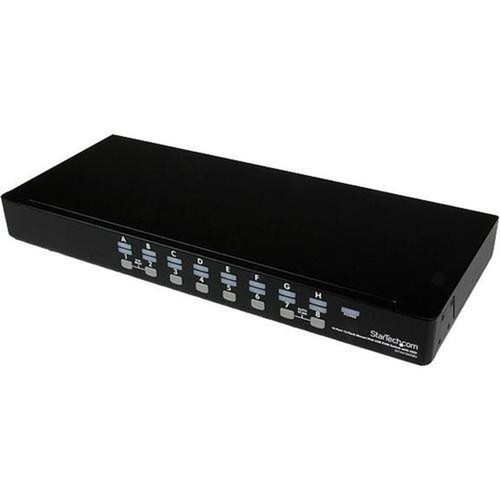
StarTech.com SV1631DUSBU 16-Port 1U Rackmount USB KVM Switch with OSD - 1920 x 1440 Resolution - Plug-and-Play

Business volume discounts
Technical guidance
Preparation & staging
QC · ON · AB · BC
Product Features
Product Overview
The StarTech.com SV1631DUSBU is a professional-grade 16-port USB KVM switch designed for centralized management of multiple computers from a single console. This 1U rackmount unit enables IT administrators to control up to 16 USB computers using one keyboard, mouse, and monitor, streamlining data center, server room, and lab environments.
Built with an integrated on-screen display (OSD), the switch provides intuitive navigation and computer selection without requiring additional software. Its plug-and-play functionality ensures quick deployment across various operating systems, while the robust construction and comprehensive connectivity options make it a reliable solution for demanding multi-computer setups.
Relevant factors for this section include Number of Computers Supported, Maximum Video Resolution. When those points are considered together, they give buyers a clearer picture of how the product is equipped, how it fits into deployment, and what kind of day-to-day role it is meant to support.
Technical Overview
This KVM switch delivers high-performance video support with a maximum resolution of 1920x1440, accommodating both widescreen and 4:3 display formats. The USB console connections provide universal compatibility with modern peripherals, and the dual USB ports facilitate seamless keyboard and mouse integration.
The unit operates on a wide input voltage range of 110V to 240V AC, ensuring compatibility with international power standards. Its rack-mountable design with a 1U height optimizes space in standard server racks, while the included mounting brackets and rubber feet offer flexible installation options for desktop or rack deployment.
Relevant factors for this section include Number of Computers Supported, Maximum Video Resolution. When those points are considered together, they give buyers a clearer picture of how the product is equipped, how it fits into deployment, and what kind of day-to-day role it is meant to support.
Key Product Advantages
The SV1631DUSBU enhances operational efficiency through advanced features that simplify multi-computer management. Its on-screen display allows users to assign custom names to each connected computer, enabling quick identification and selection during switching operations.
Flexible Switching Methods
Choose between front panel push-buttons, hotkey commands, or auto-scan function for seamless computer access. The auto-scan feature automatically cycles through connected computers, while hotkey switching provides rapid manual control.
- Front panel push-button switching
- Hotkey switching for keyboard commands
- Auto-scan sequential selection
Enhanced Security and Management
Implement password protection for individual computers through the OSD security features. The cascade configuration capability allows expansion beyond 16 ports by connecting multiple units, creating scalable solutions for growing infrastructure needs.
- OSD password protection per PC
- Cascade configuration for system expansion
- No drivers or software required
Deployment / Use Cases
This 16-port KVM switch is engineered for environments where centralized control of multiple computers is essential. Data centers benefit from its rack-mountable design and high-density port count, allowing technicians to manage server racks efficiently without cluttering workspaces with multiple peripherals.
IT labs and testing facilities utilize the switch's OS-independent operation to work across different operating systems during development and quality assurance processes. Educational institutions and corporate training rooms deploy it to demonstrate software applications across multiple systems from a single instructor station, while broadcast and media production studios use it to control rendering farms and editing workstations.
Physical Profile
Measuring 21.26" wide, 7.09" deep, and 1.77" high (540 x 180 x 45 mm), this KVM switch fits standard 1U rack spaces while maintaining a compact footprint. The 6.83 lb weight ensures stable mounting without excessive rack load, and the dual form factor support allows placement on desktops when rack mounting isn't required. The unit's construction includes ventilation for optimal thermal management during continuous operation.
- Width
- 21.26" (540 mm)
- Depth
- 7.09" (180 mm)
- Height
- 1U
- Weight
- 6.83 lb (3100 g)
What's in the Box
The package includes all necessary components for immediate deployment in rack or desktop configurations.
Highlights
- Controls 16 USB computers from single keyboard, mouse, and monitor
- 1U rackmount design with desktop mounting options
- On-screen display for intuitive computer selection and naming
- Maximum video resolution of 1920x1440 supports widescreen and 4:3 formats
- Plug-and-play operation requires no drivers or software
- Front panel push-button and hotkey switching methods
- Auto-scan function cycles through connected computers automatically
- OSD security allows password protection for individual PCs
- Cascade configuration expands system beyond 16 ports
- 3-year limited warranty with TAA compliance
Specifications
| Specifications | |
|---|---|
| Manufacturer | StarTech.com |
| Manufacturer Part Number | SV1631DUSBU |
| Brand Name | StarTech.com |
| Product Model | SV1631DUSBU |
| Product Name | 16 Port 1U Rack Mount USB KVM Switch with OSD |
| Packaged Quantity | 1 Each |
| Product Type | KVM Switchbox |
| Technical Information | |
| Number of Computers Supported | 16 |
| Video | |
| Maximum Video Resolution | 1920 x 1440 |
| Interfaces/Ports | |
| USB | Yes |
| Number of USB Ports | 2 |
| Power Description | |
| Input Voltage Range | 110V AC to 240V AC |
| Physical Characteristics | |
| Form Factor | Rack-mountable,Desktop |
| Rack Height | 1U |
| Height | 1.77" (45 mm) |
| Width | 21.26" (540 mm) |
| Depth | 7.09" (180 mm) |
| Weight (Approximate) | 6.83 lb (3100 g) |
| Miscellaneous | |
| Package Contents | 16 Port 1U Rack Mount USB KVM Switch with OSD 2 x Mounting Brackets 1 x Bag of Screws 1 x Pack Rubber Feet 1 x Power Adapter 1 x User Manual |
| Environmentally Friendly | Yes |
| Country of Origin | Taiwan |
| TAA Compliant | Yes |
| Warranty | |
| Limited Warranty | 3 Year |
User Manual
FAQ
How many computers can this KVM switch control simultaneously?
The StarTech.com SV1631DUSBU supports 16 computers simultaneously. You can connect up to 16 USB computers to the switch and control them all from a single console consisting of one keyboard, one mouse, and one monitor. This high port count makes it ideal for data centers, server rooms, and IT labs where managing multiple systems from a centralized location improves efficiency and reduces workspace clutter.
What video resolutions does this switch support?
This KVM switch supports a maximum resolution of 1920x1440. It is compatible with both widescreen resolutions including 1920x1200, 1920x1080, 1680x1050, 1400x1050, 1440x900, and 1360x768, as well as 4:3 resolutions including 1920x1440, 1600x1200, 1280x1024, and 1024x768. This broad compatibility ensures the switch works with various monitor types and display configurations commonly used in professional environments.
Does this KVM switch require special software or drivers?
No, this is a plug-and-play KVM switch that operates independently of any software or drivers. It works across different operating systems without requiring installation of additional applications. The on-screen display and all switching functions are handled by the hardware itself, making deployment straightforward and eliminating compatibility concerns with different OS versions or security restrictions on software installations.
Can I expand this system beyond 16 ports?
Yes, the SV1631DUSBU supports cascade configuration, allowing you to connect multiple units together to expand beyond 16 ports. By cascading switches, you can control 32, 48, or more computers from a single console. This scalability feature makes the switch suitable for growing IT infrastructures where additional computers may need to be integrated into the management system over time without replacing the existing KVM infrastructure.
What switching methods are available for selecting computers?
This KVM switch offers three primary switching methods: front panel push-buttons, hotkey commands from the keyboard, and an auto-scan function. The front panel provides physical buttons for direct selection, while hotkeys allow rapid switching without reaching for the unit. The auto-scan function automatically cycles through connected computers at adjustable intervals, which is useful for monitoring multiple systems or during presentations where different computers need to be displayed sequentially.
What security features does this KVM switch include?
The switch includes OSD security features that allow you to password-protect individual computers. Through the on-screen display menu, you can set unique passwords for each connected PC, preventing unauthorized access to sensitive systems. This is particularly valuable in multi-user environments, shared workspaces, or facilities where different technicians require access to different subsets of computers while maintaining security boundaries between systems.
| Qty | Price | Available |
|---|