

Shipping included*
Exclusions
Additional shipping fees may apply in rare circumstances for deliveries outside standard service areas. In most cases, this only potentially affects shipments to the Northwest Territories and Yukon, as well as certain heavy or oversized items.
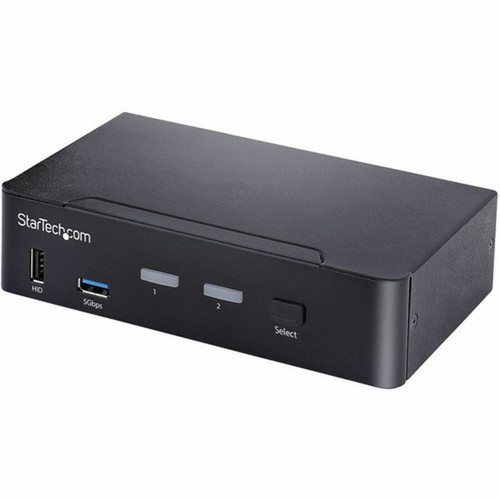
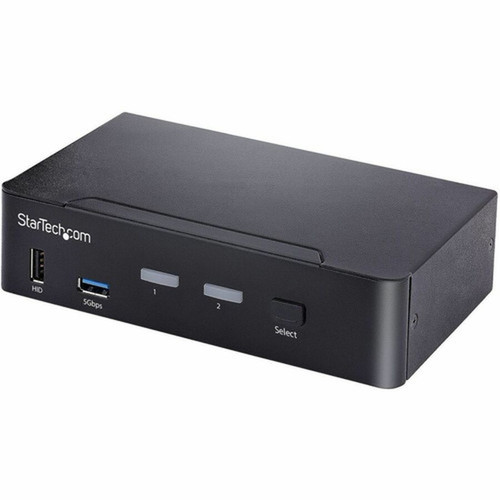
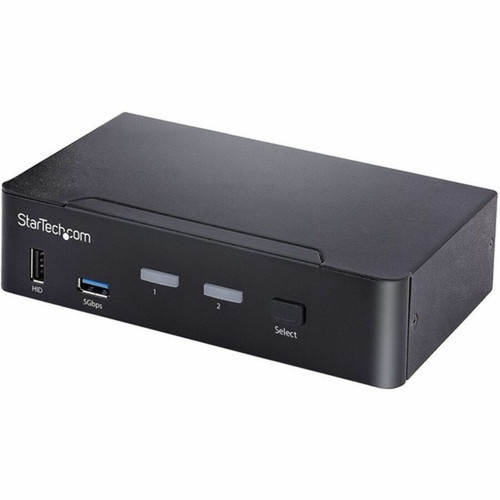
StarTech.com SV231DPUCA USB-C KVM Switch - 2 Port DisplayPort 4K 60Hz HDR with 3.5mm Audio & 6x USB Hub Ports

Business volume discounts
Technical guidance
Preparation & staging
QC · ON · AB · BC
Product Features
Technical Overview
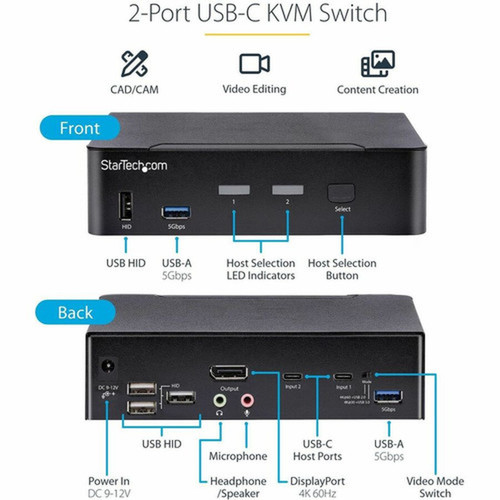
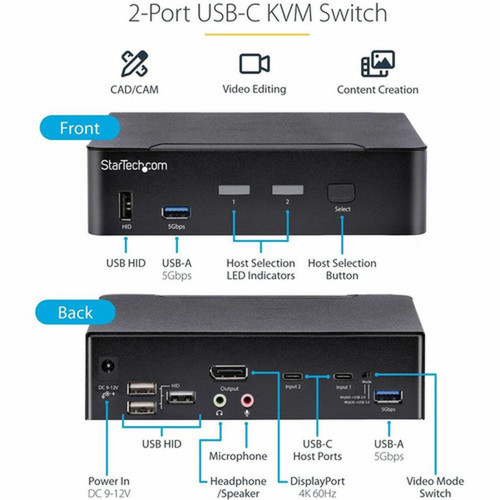
This KVM switch implements DisplayPort 1.2 specifications with HDCP 2.2 content protection, ensuring compatibility with protected media and high-bandwidth video sources. The two USB-C host ports support DP Alt Mode, delivering both video signals up to 4K 60Hz and USB data transfer speeds up to 5 Gbps through a single cable connection to compatible computers.
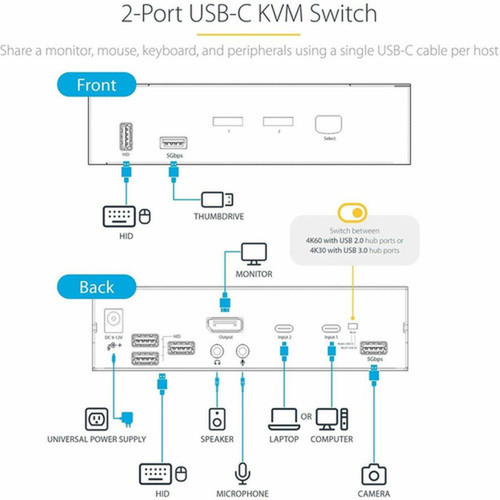
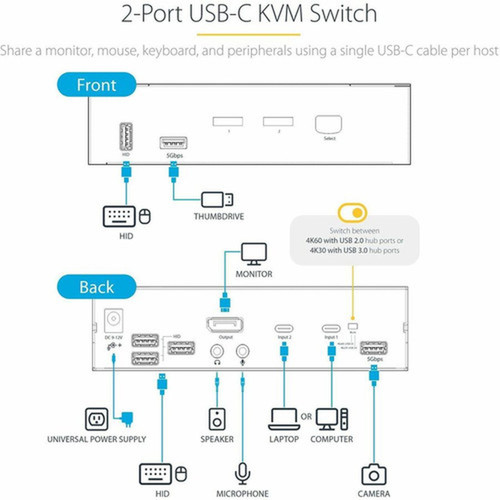
The switch architecture includes four dedicated USB HID ports for keyboard and mouse connectivity, plus two USB-A hub ports operating at 480 Mbps for peripheral expansion. Audio functionality encompasses both 2-channel analog output through the 3.5mm jack and digital audio transmission via USB-C, with microphone input support for complete audio integration.
Relevant factors for this section include Number of Computers Supported, Number of Local Users Supported, USB, DisplayPort. When those points are considered together, they give buyers a clearer picture of how the product is equipped, how it fits into deployment, and what kind of day-to-day role it is meant to support.
Key Product Advantages
This KVM switch eliminates desktop clutter by reducing cable requirements while maintaining full functionality across two computer systems. The USB-C DP Alt Mode implementation simplifies connections to modern laptops and desktops, supporting Thunderbolt 3/4 and USB4 systems without additional adapters.
Centralized Audio Management
The integrated 3.5mm audio jacks and USB audio support allow users to route both analog and digital audio through the KVM switch, enabling centralized control of speakers and microphones without reconnecting cables when switching between computers.
Flexible Switching Options
Users can switch between connected computers using either keyboard hotkeys (Scroll Lock + Scroll Lock + 1/2) or the physical push button on the switch enclosure, providing flexibility for different workflow preferences and accessibility needs.
Deployment / Use Cases
The SV231DPUCA is ideal for professionals who need to efficiently manage multiple computers in space-constrained environments. The 4K 60Hz HDR support makes it particularly suitable for design, video editing, and content creation workflows where color accuracy and high resolution are essential.
In corporate IT environments, this KVM facilitates easy switching between production and testing systems, or between personal and work computers on shared desks. The OS-independent operation ensures compatibility across Windows, macOS, and Linux systems, while the TAA compliance makes it appropriate for government and educational procurement.
CAD/CAM & Design Workstations
Design engineers and architects can switch between rendering and modeling systems while maintaining 4K visual fidelity and precise color reproduction through HDR support, with all peripherals remaining connected to both systems.
Hybrid Work Environments
Employees with both company-issued and personal computers can maintain a clean desk setup with a single monitor and peripheral set, quickly switching between systems for different tasks while keeping all connections organized.
Physical Profile
The desktop form factor measures 5.50" wide × 6.30" deep × 1.60" high (139.70 × 160.02 × 40.64 mm) with a weight of approximately 1.40 lb (635.03 g). The compact design fits easily on desks or under monitors, while the included rubber feet provide stable placement on various surfaces. The universal power adapter supports 100-240V AC input for international deployment.
- Width
- 5.50" (139.70 mm)
- Depth
- 6.30" (160.02 mm)
- Height
- 1.60" (40.64 mm)
- Weight
- 1.40 lb (635.03 g)
What's in the Box
The package includes all necessary components for immediate deployment.
Highlights
- Share one monitor, keyboard, mouse, and audio between two computers
- USB-C DP Alt Mode supports single-cable connection per computer
- 4K 60Hz HDR video with DisplayPort 1.2 and HDCP 2.2
- Six USB hub ports for peripheral expansion
- 3.5mm audio jacks for analog and digital audio management
- Switch via keyboard hotkeys or physical push button
- Compatible with USB4 and Thunderbolt 3/4 systems
- OS independent operation across Windows, macOS, and Linux
- TAA compliant for government and educational procurement
- Two-year limited warranty with RoHS and WEEE compliance
Specifications
| Specifications | |
|---|---|
| Manufacturer | StarTech.com |
| Manufacturer Part Number | SV231DPUCA |
| Brand Name | StarTech.com |
| Product Name | KVM Switchbox |
| Packaged Quantity | 1 |
| Product Type | KVM Switchbox |
| Technical Information | |
| Number of Computers Supported | 2 |
| Number of Local Users Supported | 1 |
| Interfaces/Ports | |
| USB | Yes |
| DisplayPort | Yes |
| Number of USB Ports | 8 |
| Number of DisplayPorts | 1 |
| Power Description | |
| Input Voltage Range | 100 - 240 AC |
| Physical Characteristics | |
| Form Factor | Desktop |
| Height | 1.60" (40.64 mm) |
| Width | 5.50" (139.70 mm) |
| Depth | 6.30" (160.02 mm) |
| Weight (Approximate) | 1.40 lb (635.03 g) |
| Miscellaneous | |
| Package Contents | KVM Switchbox 1 x Set Of Rubber Feet 1 x Universal Power Adapter 1 x Quick-Start Guide |
| Environmentally Friendly | Yes |
| Environmental Compliance | Restriction of Hazardous Substances (RoHS),Waste Electrical and Electronic Equipment Directive (WEEE) |
| Country of Origin | Taiwan |
| TAA Compliant | Yes |
| Warranty | |
| Limited Warranty | 2 Year |
User Manual
FAQ
How many computers can I connect to this KVM switch?
The SV231DPUCA supports two computers simultaneously. You can connect one computer to each of the two USB-C host ports, then switch between them using either keyboard hotkeys or the physical button on the switch. This allows you to share a single monitor, keyboard, mouse, and audio peripherals between both systems without constantly reconnecting cables.
Does this KVM work with USB-C laptops and Thunderbolt systems?
Yes, the USB-C host ports support DP Alt Mode, which makes them compatible with any computer that supports USB-C DisplayPort Alternate Mode, including modern laptops, desktops, and MacBooks. The switch is also compatible with USB4 and Thunderbolt 3/4 systems, providing broad compatibility across current-generation hardware without requiring additional adapters.
How do I switch between connected computers?
You can switch between the two connected computers using either method: keyboard hotkeys (press Scroll Lock twice followed by 1 or 2) or the physical push button located on the KVM switch enclosure. Both methods provide instant switching without disrupting your workflow, and the hotkey method allows switching without reaching for the physical device.
What audio features does this KVM switch include?
The switch includes a 3.5mm audio jack for analog audio output and microphone input, plus support for digital audio transmission through the USB-C connections. This allows you to centralize both analog and digital audio management, with audio profiles that can be toggled via hotkeys. You can connect speakers, headphones, and microphones through the KVM rather than directly to each computer.
What is included in the package with this KVM switch?
The package includes the KVM switchbox itself, a set of rubber feet for stable desktop placement, a universal power adapter that supports 100-240V AC input for international use, and a quick-start guide. The power adapter provides the necessary power for the switch and connected peripherals, while the rubber feet prevent sliding on smooth surfaces.
What connectivity or interface options are available?
Connectivity support is listed in the product specifications, including the relevant wireless or port options when available.
| Qty | Price | Available |
|---|