








Shipping included*
Exclusions
Additional shipping fees may apply in rare circumstances for deliveries outside standard service areas. In most cases, this only potentially affects shipments to the Northwest Territories and Yukon, as well as certain heavy or oversized items.
StarTech.com SV431DPU3A2 4-Port DisplayPort KVM Switch with USB 3.0 Hub - 4K 30Hz - Rack-Mountable 1U

Business volume discounts
Technical guidance
Preparation & staging
QC · ON · AB · BC
Product Features
Technical Overview
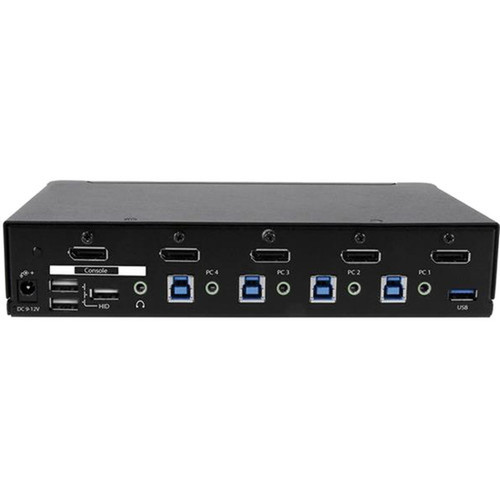
This KVM switch features five DisplayPort connections—four for computer inputs and one for monitor output—ensuring seamless video switching between systems. The integrated USB 3.0 hub includes 11 ports, allowing extensive peripheral sharing without performance degradation. The switch operates on a universal 100-240V AC power input, making it suitable for global deployment in various electrical environments.
No software or drivers are required for operation, ensuring plug-and-play compatibility with most operating systems. The independent HID keyboard and mouse ports maintain reliable input device recognition across all connected computers. A separate 3.5 mm auxiliary port supports audio control, enabling full multimedia management through the KVM interface.
Relevant factors for this section include Number of Computers Supported, Number of Local Users Supported, Maximum Video Resolution. When those points are considered together, they give buyers a clearer picture of how the product is equipped, how it fits into deployment, and what kind of day-to-day role it is meant to support.
Key Product Advantages
This KVM switch streamlines multi-computer management by consolidating control into a single workstation. The built-in USB 3.0 hub enhances productivity by allowing shared access to high-speed peripherals across all connected systems. The rack-mountable design saves valuable space in data centers, while the desktop option provides versatility for office setups.
High-Resolution Support
Delivers 4K Ultra HD video at 30Hz, ensuring detailed visuals for graphic design, video editing, and monitoring applications.
- 3840 x 2160 resolution
- 30Hz refresh rate
- DisplayPort interface
Expanded Connectivity
The 11-port USB 3.0 hub supports multiple peripherals simultaneously, reducing the need for additional hubs and cables.
- USB 3.0 speed
- 11 available ports
- Peripheral sharing
Deployment / Use Cases
Ideal for data centers and server rooms, this KVM switch allows administrators to manage multiple servers from a single console, improving efficiency and reducing physical access requirements. In office environments, it enables users to control both work and personal computers with one keyboard and mouse setup, optimizing desk space and workflow.
Creative professionals benefit from the 4K video support for high-resolution displays used in design and video production. The switch is also suitable for security operations centers, where operators need to monitor multiple surveillance systems on a single display. Educational labs and testing facilities can use it to streamline access to various computer configurations.
Data Center Management
Centralize control of rack-mounted servers with the 1U form factor, reducing cable clutter and improving rack organization.
Multi-Computer Workstations
Switch seamlessly between desktop computers for different tasks, such as development, testing, and personal use, without multiple peripherals.
Physical Profile
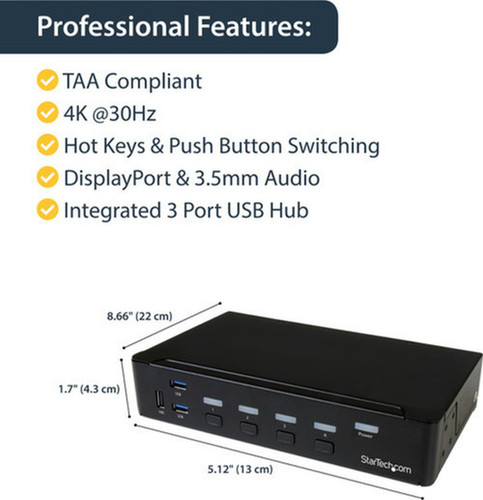
The switch measures 1.70" in height, 5.10" in width, and 8.70" in depth, with a compact footprint suitable for tight spaces. The 1U rack height allows standard mounting in server racks, and included rubber feet provide stable desktop placement. The lightweight design at 2.34 lb ensures easy installation and portability between locations.
The physical profile is practical for deployment planning because the dimensions and weight are clearly defined: 1U, 5.10" (129.54 mm), 8.70" (220.98 mm), 2.34 lb (1063.11 g). This helps confirm rack, shelf, desk, or cabinet fit before installation.
- Width
- 5.10" (129.54 mm)
- Depth
- 8.70" (220.98 mm)
- Height
- 1U
- Weight
- 2.34 lb (1063.11 g)
What's in the Box
This product ships with all necessary components for immediate setup and use.
Highlights
- Controls up to four DisplayPort computers with one keyboard and mouse
- Built-in USB 3.0 hub with 11 ports for peripheral sharing
- Supports 4K Ultra HD resolution at 30Hz for high-quality video
- Rack-mountable 1U form factor with desktop flexibility
- No software or drivers required for plug-and-play operation
- Independent HID keyboard and mouse ports for reliable input
- Separate 3.5 mm auxiliary port for audio control
- Universal 100-240V AC power input for global compatibility
- TAA compliant and RoHS certified for regulatory adherence
- Includes rubber feet and universal power adapter
Specifications
| Specifications | |
|---|---|
| Manufacturer | StarTech.com |
| Manufacturer Part Number | SV431DPU3A2 |
| Brand Name | StarTech.com |
| Product Name | 4-Port DisplayPort KVM Switch - USB 3.0 - 4K |
| Packaged Quantity | 1 Each |
| Product Type | KVM Switchbox |
| Technical Information | |
| Number of Computers Supported | 4 |
| Number of Local Users Supported | 1 |
| Video | |
| Maximum Video Resolution | 3840 x 2160 |
| Interfaces/Ports | |
| USB | Yes |
| DisplayPort | Yes |
| Number of USB Ports | 11 |
| Number of DisplayPorts | 5 |
| Power Description | |
| Input Voltage Range | 100V AC to 240V AC |
| Physical Characteristics | |
| Form Factor | Rack-mountable,Desktop |
| Rack Height | 1U |
| Height | 1.70" (43.18 mm) |
| Width | 5.10" (129.54 mm) |
| Depth | 8.70" (220.98 mm) |
| Weight (Approximate) | 2.34 lb (1063.11 g) |
| Miscellaneous | |
| Package Contents | 4-Port DisplayPort KVM Switch - USB 3.0 - 4K 4 x Rubber Feet 1 x Universal Power Adapter (NA/EU/UK/AU) 1 x Quick Start Guide |
| Environmentally Friendly | Yes |
| Environmental Certification | EU RoHS |
| Environmental Compliance | Restriction of Hazardous Substances (RoHS) 2,Registration, Evaluation, Authorization and Restriction of Chemicals (REACH),Waste Electrical and Electronic Equipment Directive (WEEE) |
| Country of Origin | Taiwan |
| TAA Compliant | Yes |
| Warranty | |
| Limited Warranty | 2 Year |
User Manual
FAQ
How many computers can this KVM switch control simultaneously?
This KVM switch supports up to four computers simultaneously. It allows one local user to switch between these four systems using a single keyboard, mouse, and monitor setup, making it ideal for managing multiple desktops or servers from a centralized workstation.
What video resolution and refresh rate does this switch support?
The switch supports a maximum video resolution of 3840 x 2160, which is 4K Ultra HD, at a refresh rate of 30Hz. This ensures high-definition visual quality suitable for professional applications like graphic design, video monitoring, and general office use.
Does this KVM switch include USB ports, and what type are they?
Yes, it features a built-in USB 3.0 hub with 11 ports total. These ports allow you to connect and share peripherals such as external hard drives, printers, and keyboards across all connected computers, enhancing connectivity without needing additional hubs.
Can this switch be mounted in a server rack?
Yes, this KVM switch is designed with a rack-mountable form factor at a 1U height, making it suitable for installation in standard server racks. It also includes rubber feet for stable desktop use, providing flexibility for both data center and office environments.
What power input does this KVM switch require?
The switch operates on a universal input voltage range of 100V AC to 240V AC. It comes with a universal power adapter that supports North American, European, UK, and Australian outlets, ensuring compatibility in various regions without the need for additional converters.
Is any software installation needed to use this KVM switch?
No software or drivers are required for operation. This KVM switch offers plug-and-play functionality, meaning you can connect it to your computers and peripherals, and it will work immediately with most operating systems, simplifying setup and reducing installation time.
| Qty | Price | Available |
|---|


