








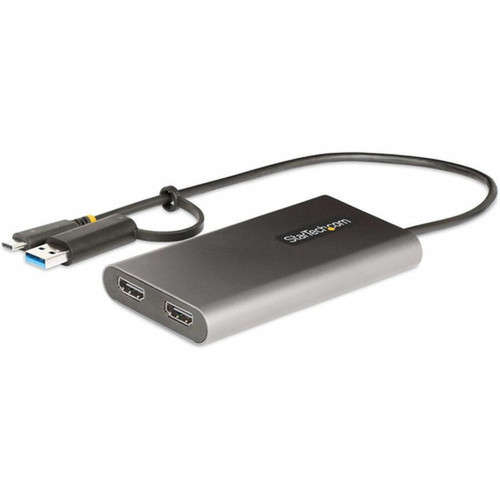


StarTech. com 109B-USBC-HDMI USB-C/A to Dual-HDMI Adapter - 4K 60Hz - 100W PD Passthrough - 1ft Cable - TAA Compliant

Business volume discounts
Technical guidance
Preparation & staging
QC · ON · AB · BC
Product Features
Technical Overview
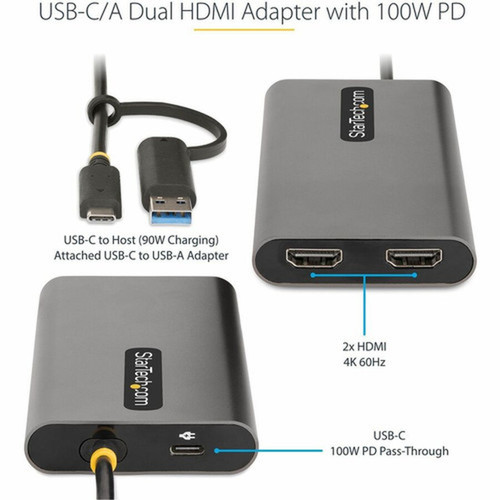
This adapter utilizes DisplayLink technology to convert USB data signals into dual HDMI video outputs, supporting resolutions up to 3840 x 2160 at 60Hz with 5.1 channel HDMI audio. The USB 3.2 Gen 1 (5Gbps) interface ensures sufficient bandwidth for high-resolution video transmission, while compatibility extends to USB-C, USB4, and Thunderbolt 3/4 ports.
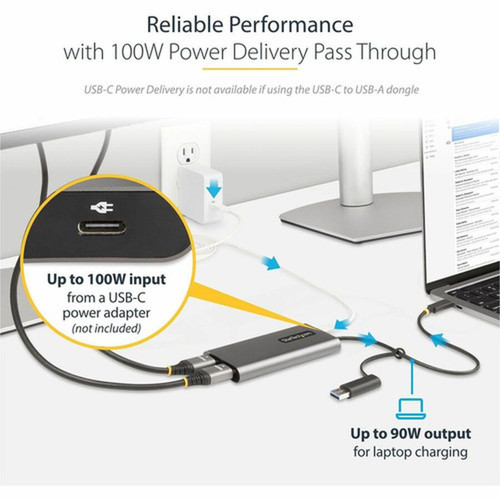
Power management is handled through intelligent USB bus power or the 100W PD passthrough option, which reserves 10W for adapter operation and delivers up to 90W for laptop charging. This prevents power overdraw situations that can cause device dropouts or video flickering. The aluminum enclosure provides effective EMI shielding and thermal dissipation for sustained operation during extended use periods.
This section brings together practical product details such as Adapter Type, Connector Type on First End, Connector on First End Details, Color Family, so buyers can judge configuration, deployment fit, and day-to-day suitability with less guesswork.
Key Product Advantages
This adapter addresses specific connectivity challenges in modern computing environments by providing a reliable, certified solution for expanding display capabilities without requiring internal hardware upgrades.
Apple M1/M2 Compatibility
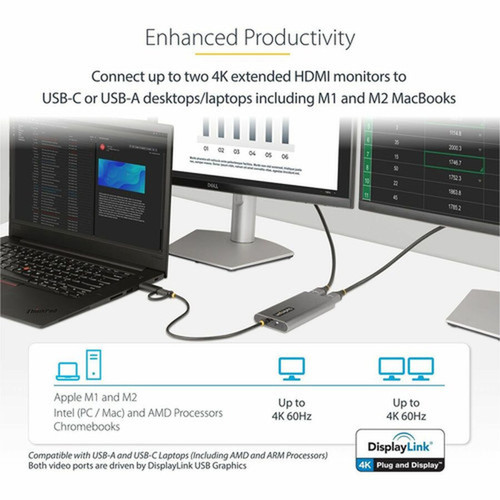
Enables extended dual displays on USB-C and Thunderbolt 3/4 laptops including Apple M1/M2 MacBooks, which lack native multi-display support. Requires driver download for macOS systems.
- Overcomes Apple silicon limitations
- Driver-based solution
- Works with Thunderbolt 3/4
Reliable Business Performance
Designed for productivity applications with features that prevent common connectivity issues in professional environments.
- Prevents video flickering
- Eliminates power overdraw
- Reduces port strain with built-in cable
Compliance & Durability
Meets government procurement requirements with TAA compliance and incorporates durable construction for long-term reliability.
- TAA compliant for government contracts
- Aluminum enclosure for EMI shielding
- Strain relief design
Deployment / Use Cases
This adapter serves as an external video graphics solution for scenarios where additional display ports are unavailable on laptops, docks, or workstations. It transforms a single USB port into a dual-monitor workstation, enabling users to maintain productivity across multiple applications simultaneously.
Ideal for business environments requiring expanded screen real estate for spreadsheet analysis, document comparison, video conferencing with shared content, and multitasking across productivity applications. The adapter is specifically optimized for office productivity workflows rather than gaming or high-frame-rate applications, making it a cost-effective solution for corporate IT deployments.
Laptop Display Expansion
Connect two external monitors to laptops with limited video outputs, creating a triple-display setup with the laptop screen for enhanced productivity.
Dock Enhancement
Augment existing docking stations that lack sufficient video outputs, providing additional monitor connectivity without replacing entire docking solutions.
Physical Profile
The adapter features a compact gray aluminum and plastic enclosure measuring 4.40" (111.76 mm) in length, 2.40" (60.96 mm) in width, and 0.60" (15.24 mm) in height, with an approximate weight of 4.30 oz (121.90 g). This slim profile allows for discreet placement behind monitors or on desk surfaces without occupying significant workspace. The integrated 1ft cable provides sufficient reach for most setups while minimizing cable clutter.
- Width
- 2.40" (60.96 mm)
- Height
- 0.60" (15.24 mm)
- Weight
- 4.30 oz (121.90 g)
- Length
- 4.40" (111.76 mm)
What's in the Box
The package includes all necessary components for immediate deployment in business environments.
Package contents include HDMI/USB-C Audio/Video Adapter, 1 x Quick-Start Guide. These included items support setup, installation, and immediate deployment without needing to source the core bundled accessories separately.
Highlights
- Adds two 4K 60Hz HDMI monitors via USB-C or USB-A port
- 100W Power Delivery passthrough with up to 90W laptop charging
- DisplayLink certified for Windows, macOS, Ubuntu, and ChromeOS
- Compatible with Apple M1/M2 MacBooks for dual external displays
- Built-in 1ft cable reduces port strain and cable clutter
- TAA compliant for government and educational procurement
- Aluminum enclosure provides EMI shielding and heat dissipation
- Prevents device dropouts and video flickering through intelligent power management
Specifications
| Specifications | |
|---|---|
| Manufacturer | StarTech.com |
| Manufacturer Part Number | 109BUSBCHDMI |
| Brand Name | StarTech.com |
| Product Name | HDMI/USB-C Audio/Video Adapter |
| Packaged Quantity | 1 |
| Product Type | A/V Adapter |
| Technical Information | |
| Adapter Type | HDMI/USB-C |
| Connector Type on First End | USB 3.2 Type C - Male,USB Type A - Male |
| Connector on First End Details | 1 x USB 3.2 Type C - Male,1 x USB Type A - Male |
| Connector Type on Second End | HDMI Digital Audio/Video - Male |
| Connector on Second End Details | 2 x HDMI Digital Audio/Video - Male |
| Maximum Resolution Supported | 3840 x 2160 |
| Features | USB- Power Delivery (USB PD),Pass-thru,Active,Strain Relief,EMI Protection,Shielded |
| Physical Characteristics | |
| Color Family | Gray |
| Product Color | Gray |
| Product Material | Aluminum,Plastic |
| Height | 0.60" (15.24 mm) |
| Width | 2.40" (60.96 mm) |
| Length | 4.40" (111.76 mm) |
| Weight (Approximate) | 4.30 oz (121.90 g) |
| Miscellaneous | |
| Package Contents | HDMI/USB-C Audio/Video Adapter 1 x Quick-Start Guide |
| TAA Compliant | Yes |
| Environmentally Friendly | Yes |
| Environmental Certification | EU RoHS |
| Environmental Compliance | Restriction of Hazardous Substances (RoHS) 2,Registration, Evaluation, Authorization and Restriction of Chemicals (REACH),Waste Electrical and Electronic Equipment Directive (WEEE) |
| Warranty | |
| Limited Warranty | 3 Year |
User Manual
FAQ
What computers is this adapter compatible with?
The adapter works with Windows, macOS, Ubuntu, and ChromeOS systems through USB 3.2 Gen 1 (5Gbps), USB-C, USB4, and Thunderbolt 3/4 ports. It is particularly valuable for Apple M1/M2 MacBooks, which lack native support for multiple external displays. Automatic driver installation occurs in Windows and ChromeOS, while macOS requires a manual DisplayLink driver download.
How many monitors can I connect with this adapter?
This adapter supports two external HDMI monitors simultaneously at resolutions up to 3840 x 2160 (4K) at 60Hz. When used with a laptop's built-in display, it enables a triple-monitor workstation configuration. Both monitors receive identical video bandwidth capabilities through the DisplayLink technology implementation.
Does this adapter provide power to my laptop?
Yes, the adapter features 100W Power Delivery passthrough capability. It reserves 10W for its own operation and can deliver up to 90W to charge the connected laptop through the USB-C port. This eliminates the need for a separate power adapter during use, though the adapter can also operate on standard USB bus power when PD isn't available.
What is TAA compliance and why does it matter?
TAA (Trade Agreements Act) compliance means this product meets U.S. government procurement requirements for products purchased with federal funds. It ensures the adapter is manufactured in or substantially transformed in a TAA-designated country. This compliance is essential for sales to government agencies, educational institutions, and other entities bound by TAA regulations.
Is this adapter suitable for gaming?
This adapter is optimized for business productivity applications rather than gaming. While it supports 4K resolution at 60Hz, the DisplayLink technology introduces minimal latency that may be noticeable in fast-paced gaming scenarios. For office applications like spreadsheets, documents, video conferencing, and web browsing, the performance is excellent and reliable.
What cables or additional equipment do I need?
The adapter includes a built-in 1ft (30cm) cable that connects to your computer's USB-C or USB-A port. You will need two standard HDMI cables (not included) to connect your monitors to the adapter's dual HDMI outputs. No additional power adapter is required when using the Power Delivery passthrough feature with a compatible USB-C power source.
What resolution or display format is specified?
It features a display specification of 3840 x 2160, giving you clear visuals for work and media use.
What refresh rate or brightness details are available?
Display-oriented products are best judged through screen, connectivity, and installation specifications. Those facts help buyers confirm visual fit, mounting flexibility, and deployment suitability more clearly than generic summary text.
| Qty | Price | Available |
|---|


