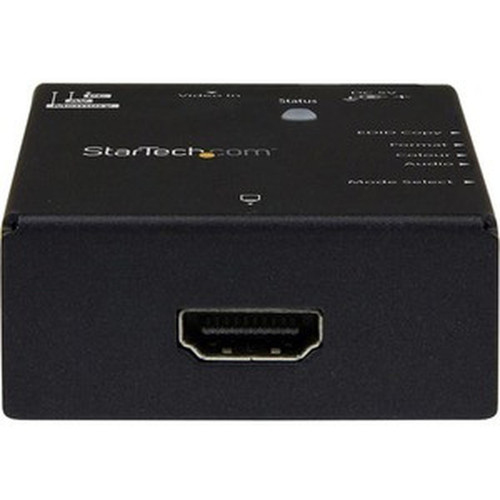
StarTech.com VSEDIDHD EDID Emulator for HDMI Displays - 1080p Video Emulator with EDID Copy/Ghosting - Black

Business volume discounts
Technical guidance
Preparation & staging
QC · ON · AB · BC
Product Features
Technical Overview
This EDID emulator supports HDMI signals with a maximum resolution of 1920 x 1080 (1080p), ensuring high-definition video output. It functions as a video emulator, allowing users to either copy existing EDID data from a display or ghost synthesized settings to enforce specific resolution and timing parameters.
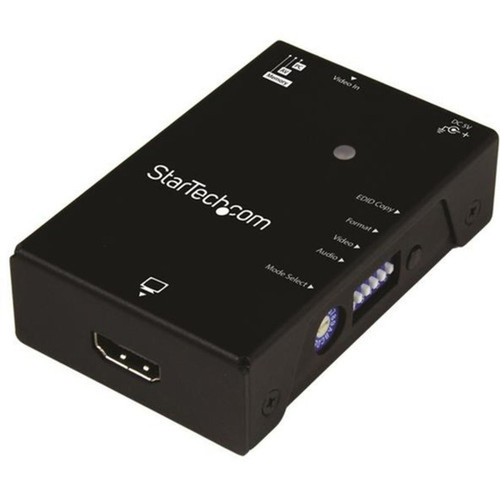
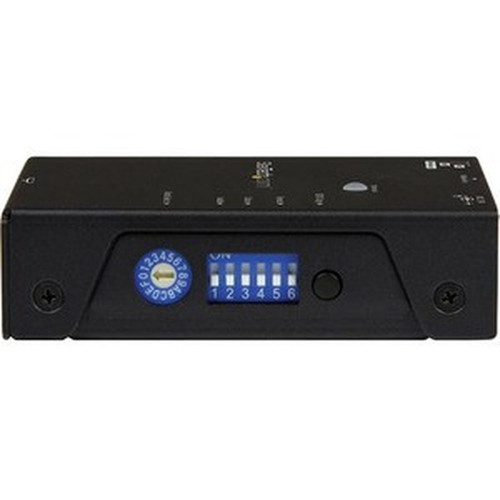
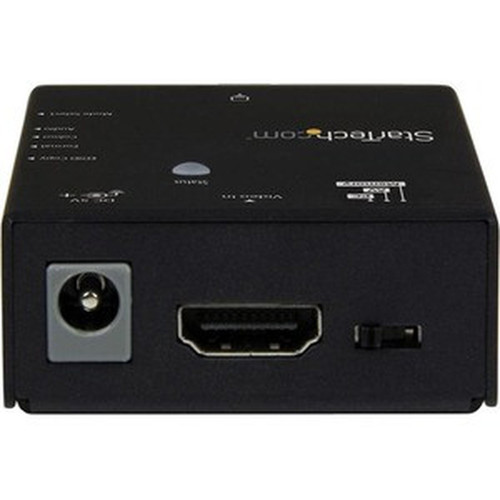
The device features an easy-to-set rotary dial for hassle-free configuration, eliminating the need for complex software or manual adjustments. Power is supplied via an included USB cable, and its compact dimensions—0.90" height, 2" width, and 3.10" length—ensure minimal intrusion in any setup.
Relevant factors for this section include Functions, Maximum Resolution, HDMI. When those points are considered together, they give buyers a clearer picture of how the product is equipped, how it fits into deployment, and what kind of day-to-day role it is meant to support.
Key Product Advantages
The VSEDIDHD simplifies EDID management with practical features that enhance workflow efficiency and system reliability.
EDID Copy and Ghosting
Supports both copying existing EDID from displays and ghosting synthesized settings, providing flexibility for different compatibility scenarios.
- Ensures consistent video output
- Prevents resolution negotiation issues
Persistent Storage
EDID settings are retained even when the device is unplugged, ensuring configurations remain intact across power cycles or hardware changes.
- No need to reconfigure after disconnection
- Ideal for temporary or mobile setups
Easy Configuration
Features a rotary dial for straightforward setup without requiring software installation or technical expertise.
- Quick adjustment of EDID modes
- Reduces setup time and complexity
Deployment / Use Cases
This EDID emulator is essential in environments where HDMI display compatibility must be enforced or standardized. It addresses common issues like resolution mismatches, blank screens, or incorrect timing that arise when video sources and displays negotiate EDID incorrectly.
Typical applications include digital signage networks, where multiple displays need identical EDID settings to ensure uniform content playback; professional AV installations, such as conference rooms or control centers requiring stable video output across different source devices; and testing or development labs, where engineers simulate specific display characteristics without physical hardware.
Digital Signage
Maintain consistent 1080p output across multiple HDMI displays in retail, hospitality, or corporate settings, preventing resolution drops or blank screens.
AV Integration
Ensure reliable video switching and distribution in conference rooms, broadcast studios, or command centers by standardizing EDID across sources and displays.
Physical Profile
The emulator has a compact external design with a black finish, measuring 0.90" in height, 2" in width, and 3.10" in length, and weighing approximately 5.40 oz. Its small size allows for discreet placement behind displays, within rack enclosures, or on bench setups. Four included foot pads provide stability on flat surfaces, and the lightweight construction facilitates easy portability for field use or temporary installations.
- Width
- 2" (50.80 mm)
- Height
- 0.90" (22.86 mm)
- Weight
- 5.40 oz (153.09 g)
- Length
- 3.10" (78.74 mm)
What's in the Box
The package includes all necessary components for immediate deployment.
Highlights
- Maximizes HDMI display compatibility with video sources through EDID emulation
- Supports both EDID copying and ghosting for flexible configuration
- Easy setup with a rotary dial for hassle-free adjustment
- Stores EDID settings persistently, even when unplugged
- Supports resolutions up to 1920 x 1080 (1080p)
- Compact external form factor in black for discreet integration
- Powered via USB cable for convenient connectivity
- TAA compliant and environmentally friendly
- Includes foot pads and screw driver for stable installation
- Backed by a 2-year limited warranty
Specifications
| Specifications | |
|---|---|
| Manufacturer | StarTech.com |
| Manufacturer Part Number | VSEDIDHD |
| Brand Name | StarTech.com |
| Product Name | EDID Emulator for HDMI Displays - 1080p |
| Packaged Quantity | 1 Each |
| Product Type | Video Emulator |
| Technical Information | |
| Functions | Video Emulation |
| Maximum Resolution | 1920 x 1080 |
| Interfaces/Ports | |
| HDMI | Yes |
| Physical Characteristics | |
| Product Color | Black |
| Form Factor | External |
| Height | 0.90" (22.86 mm) |
| Width | 2" (50.80 mm) |
| Length | 3.10" (78.74 mm) |
| Weight (Approximate) | 5.40 oz (153.09 g) |
| Miscellaneous | |
| Package Contents | EDID Emulator for HDMI Displays - 1080p 1 x USB Power Cable 1 x Screw Driver 4 x Foot Pads 1 x Quick Start Guide |
| Country of Origin | Taiwan |
| TAA Compliant | Yes |
| Environmentally Friendly | Yes |
| Warranty | |
| Limited Warranty | 2 Year |
User Manual
FAQ
What is the primary function of this EDID emulator?
The StarTech.com VSEDIDHD EDID Emulator manages Extended Display Identification Data (EDID) for HDMI displays by copying or ghosting settings. This ensures consistent video output, prevents resolution negotiation issues, and maximizes compatibility between video sources and displays in professional AV setups.
What resolutions does this emulator support?
This device supports a maximum resolution of 1920 x 1080 (1080p). It is designed for high-definition video output, making it suitable for digital signage, conference rooms, and other applications requiring stable 1080p performance across HDMI connections.
How do I configure the EDID settings on this device?
Configuration is straightforward using the built-in rotary dial. You can switch between EDID copying mode to replicate settings from a display or ghosting mode to enforce synthesized settings, all without needing software or complex adjustments, which simplifies setup in various environments.
Does the emulator retain settings when disconnected from power?
Yes, the EDID settings are stored persistently even when the device is unplugged. This feature ensures that configurations remain intact across power cycles, hardware changes, or temporary disconnections, providing reliable performance without reconfiguration.
What is included in the package with this emulator?
The package includes the EDID Emulator for HDMI Displays - 1080p, a USB power cable for connectivity, a screw driver for installation, four foot pads for stability, and a quick start guide. These components support immediate deployment in various setups.
Is this device compliant with trade and environmental standards?
Yes, the emulator is TAA compliant, meeting U.S. government procurement requirements, and is environmentally friendly. It is backed by a 2-year limited warranty, ensuring quality and reliability for professional use in compliant and sustainable operations.
| Qty | Price | Available |
|---|