








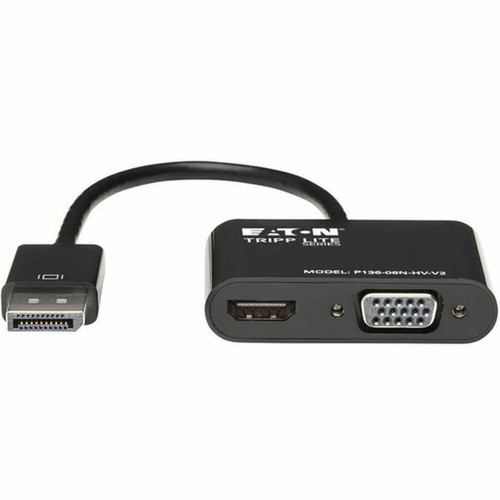

Tripp Lite by Eaton P136-06N-HV-V2 Tripp Lite DisplayPort 1. 2 to HDMI/VGA Adapter - 6" Cable - 4K UHD 3840 x 2160 - Passive - Black

Business volume discounts
Technical guidance
Preparation & staging
QC · ON · AB · BC
Product Features
Technical Overview
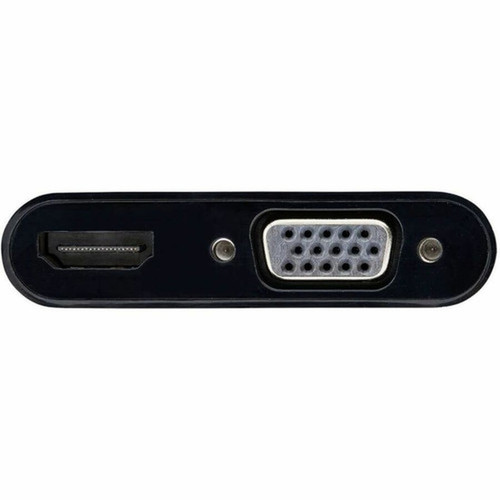
This adapter utilizes a passive design that converts DisplayPort 1.2 signals to both HDMI and VGA outputs simultaneously. The DisplayPort 1.2 input connector is male, while the output side features separate female HDMI and HD-15 (VGA) connectors, allowing flexible connection to a wide range of display devices.
The adapter requires the source computer to have a DP++ (DisplayPort++) port, which provides the necessary signaling for passive conversion. No external power supply, software drivers, or configuration is needed—simply connect the adapter to your DisplayPort output and your choice of HDMI or VGA display for immediate plug-and-play operation.
This section brings together practical product details such as Cable Type, Cable Length, Connector Type on First End, Color Family, so buyers can judge configuration, deployment fit, and day-to-day suitability with less guesswork.
A strong technical summary explains how the product's interfaces, hardware profile, and operating characteristics work together in real deployment. Buyers often need this context to confirm compatibility with existing devices, expected performance in daily use, and whether installation will be straightforward for IT staff or end users.
Key Product Advantages
This Tripp Lite adapter combines multiple connectivity options into one durable, compact unit that simplifies AV setups and reduces cable clutter. The separate HDMI and VGA outputs provide backward compatibility with legacy displays while supporting modern 4K resolution through HDMI.
Space-Efficient Design
The 6-inch integrated cable and compact adapter housing fit easily in laptop bags or briefcases, making this an ideal travel companion for presenters and mobile professionals.
- Short cable reduces desk clutter
- Lightweight and portable
Simplified Connectivity
Eliminates the need for multiple separate adapters by providing both HDMI and VGA outputs from a single DisplayPort connection.
- Single connection point to computer
- Dual display output options
Deployment / Use Cases
This DisplayPort adapter serves as a versatile connectivity solution for numerous professional and educational scenarios. In conference rooms and classrooms, it enables presenters to connect modern laptops to existing HDMI or VGA projectors and displays without compatibility concerns.
For IT departments managing mixed-device environments, this adapter provides a standardized way to connect newer DisplayPort-equipped computers to legacy VGA monitors while still supporting 4K HDMI displays where available. The compact design makes it particularly useful for mobile setups, field presentations, and hot-desking environments where users need reliable video connectivity without carrying multiple adapters.
Presentation Environments
Connect laptops to conference room projectors and displays, ensuring compatibility with both modern HDMI and legacy VGA equipment.
Multi-Monitor Workstations
Extend desktop real estate by adding secondary displays through either HDMI or VGA connections from DisplayPort sources.
What's in the Box
This product includes everything needed for immediate use:
Package contents include DisplayPort 1.2 to VGA/HDMI All-in-One Converter Adapter, 4K x 2K HDMI Owner's Manual, DisplayPort 1.2 to VGA/HDMI All-in-One Converter Adapter, 4K x 2K HDMI. These included items support setup, installation, and immediate deployment without needing to source the core bundled accessories separately.
Highlights
- Supports 4K UHD resolution (3840 x 2160) through HDMI output
- Dual HDMI and VGA female connectors on output side
- Passive design requires no external power or drivers
- 6-inch integrated cable for tidy desk arrangements
- Plug-and-play operation with DP++ compatible computers
- Compatible with notebooks, projectors, monitors, tablets, and TVs
- Compact size ideal for travel and mobile presentations
- RoHS compliant and environmentally friendly
- 3-year limited warranty for peace of mind
- Black color matches professional AV equipment
Specifications
| Specifications | |
|---|---|
| Manufacturer | Eaton Corporation |
| Manufacturer Part Number | P136-06N-HV-V2 |
| Brand Name | Tripp Lite series |
| Product Model | P136-06N-HV-V2 |
| Product Name | DisplayPort 1.2 to VGA/HDMI All-in-One Converter Adapter, 4K x 2K HDMI |
| Product Type | A/V Cable |
| Technical Information | |
| Cable Type | DisplayPort/HDMI/VGA |
| Cable Length | 6" (152.40 mm) |
| Connector Type on First End | DisplayPort 1.2 Digital Audio/Video - Male |
| Connector on First End Details | 1 x DisplayPort 1.2 Digital Audio/Video - Male |
| Connector Type on Second End | HDMI Digital Audio/Video - Female,HD-15 - Female |
| Connector on Second End Details | 1 x HDMI Digital Audio/Video - Female,1 x 15-pin HD-15 - Female |
| Device Supported | Notebook,Projector,Monitor,Tablet,TV |
| Supported Resolution | 3840 x 2160 |
| Physical Characteristics | |
| Color Family | Black |
| Product Color | Black |
| Miscellaneous | |
| Package Contents | DisplayPort 1.2 to VGA/HDMI All-in-One Converter Adapter, 4K x 2K HDMI Owner's Manual |
| Environmentally Friendly | Yes |
| Environmental Compliance | Restriction of Hazardous Substances (RoHS) |
| Country of Origin | Vietnam |
| Warranty | |
| Limited Warranty | 3 Year |
User Manual
FAQ
What resolution does this DisplayPort adapter support?
This Tripp Lite adapter supports up to 3840 x 2160 resolution (4K UHD) through its HDMI output. The VGA output supports standard resolutions appropriate for legacy displays. The adapter maintains signal integrity for crisp, detailed visuals suitable for presentations, multimedia content, and extended desktop configurations.
Does this adapter require external power or software installation?
No, this is a passive adapter that requires no external power supply, software drivers, or configuration. It operates through plug-and-play functionality, drawing power directly from the DisplayPort connection. Simply connect the adapter to your computer's DisplayPort output and your choice of HDMI or VGA display for immediate use.
What type of DisplayPort port does my computer need for this adapter?
Your computer needs a DP++ (DisplayPort++) port to use this passive adapter effectively. DP++ ports provide the necessary signaling for passive conversion to HDMI and VGA. Most modern computers with DisplayPort outputs support DP++, but you should verify your specific model's capabilities if unsure about compatibility.
Can I connect both HDMI and VGA displays simultaneously?
No, this adapter provides separate HDMI and VGA output connectors, but they are not designed for simultaneous dual-display operation from a single DisplayPort source. You can connect either an HDMI display or a VGA display at one time, depending on your needs. The adapter offers flexibility to connect to different display types as required.
What devices are compatible with this DisplayPort adapter?
This adapter is compatible with notebooks, projectors, monitors, tablets, and TVs that have either HDMI or VGA inputs. The DisplayPort end connects to computers with DP++ compatible outputs, while the output end connects to displays with either HDMI or VGA inputs. This makes it suitable for connecting modern laptops to various display equipment in professional environments.
What is included in the package with this adapter?
The package includes the DisplayPort 1.2 to VGA/HDMI All-in-One Converter Adapter with its integrated 6-inch cable and a 4K x 2K HDMI Owner's Manual. The adapter is ready for immediate use without requiring additional components, making setup straightforward for both individual users and IT departments deploying multiple units.
What resolution or display format is specified?
It features a display specification of 3840 x 2160, giving you clear visuals for work and media use.
What refresh rate or brightness details are available?
Display-oriented products are best judged through screen, connectivity, and installation specifications. Those facts help buyers confirm visual fit, mounting flexibility, and deployment suitability more clearly than generic summary text.
| Qty | Price | Available |
|---|


