









VERTIV CBL0104 SC845D 6 ft KVM Cable - All-in-One DisplayPort-to-USB - 4K UHD - Single Head

Business volume discounts
Technical guidance
Preparation & staging
QC · ON · AB · BC
Product Features
Technical Overview
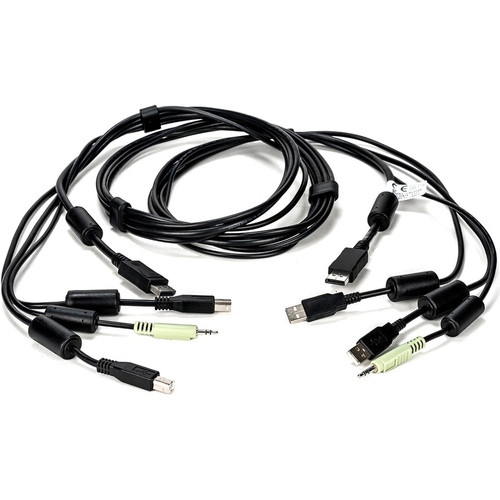
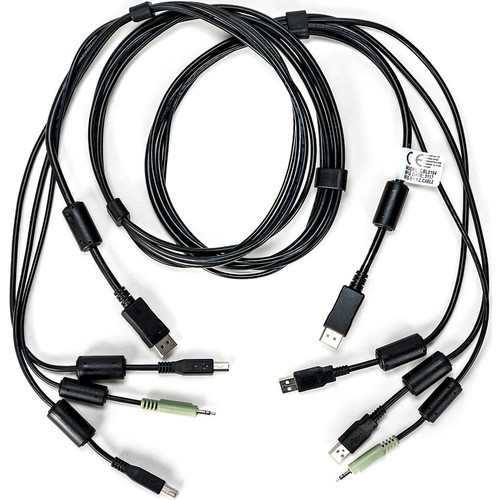
The cable features a DisplayPort connector on one end, handling both digital audio and video signals, and a USB connector on the other end for peripheral connectivity. This configuration allows simultaneous transmission of high-definition video, audio output, and data from USB devices like keyboards and mice.
With a length of 6 feet (1.83 meters), it provides ample reach for flexible installation in various rack and server configurations. The cable is engineered to maintain signal integrity over this distance, ensuring stable performance for 4K UHD video and high-speed USB data transfer.
This section brings together practical product details such as Cable Length, Connector Type on First End, Connector on First End Details, Compatibility, so buyers can judge configuration, deployment fit, and day-to-day suitability with less guesswork.
A strong technical summary explains how the product's interfaces, hardware profile, and operating characteristics work together in real deployment. Buyers often need this context to confirm compatibility with existing devices, expected performance in daily use, and whether installation will be straightforward for IT staff or end users.
Key Product Advantages
This KVM cable offers significant advantages for streamlining IT infrastructure. Its all-in-one design reduces the number of individual cables needed, minimizing clutter and improving airflow in server racks. The support for 4K UHD ensures that video output is sharp and detailed, essential for modern monitoring and management interfaces.
Simplified Connectivity
Combines video, audio, and USB connections into one cable, making setup faster and more organized.
- Reduces cable mess
- Speeds up installation
- Enhances rack management
High-Performance Video
Delivers 4K UHD resolution through the DisplayPort interface, providing clear visuals for administrative tasks.
- Crisp image quality
- Supports high-resolution displays
- Ideal for detailed monitoring
Deployment / Use Cases
The VERTIV CBL0104 is ideal for data centers, server rooms, and enterprise IT environments where KVM switches are used to manage multiple computers from a single console. It connects target servers or workstations to Vertiv Avocent SC800 and SC900 series KVM switches, enabling centralized control over video, audio, and input devices.
Common use cases include remote server management, IT troubleshooting, and multi-system monitoring in rack-mounted setups. The cable's 6-foot length accommodates various rack depths and layouts, while its all-in-one design supports efficient cable management in high-density installations.
This section brings together practical product details such as Cable Length, Connector Type on First End, Connector on First End Details, Compatibility, so buyers can judge configuration, deployment fit, and day-to-day suitability with less guesswork.
Highlights
- 6-foot KVM cable for connecting target computers to KVM switches
- Designed for Vertiv Avocent SC800 and SC900 series KVM switches
- All-in-one cable integrates DisplayPort video, audio, and USB connectivity
- Supports 4K UHD video resolution for high-definition monitoring
- Single head design simplifies connections and reduces cable clutter
- Compatible with keyboards, mice, speakers, and audio devices
- Ideal for data center and enterprise server management
- Reduces installation time and improves rack organization
Specifications
| Specifications | |
|---|---|
| Manufacturer | Vertiv |
| Manufacturer Part Number | CBL0104 |
| Brand Name | Vertiv AVOCENT |
| Product Name | SC845D Cable - 6ft |
| Product Type | KVM Cable |
| Technical Information | |
| Cable Length | 6 ft (1.83 m) |
| Connector Type on First End | DisplayPort Digital Audio/Video,Audio |
| Connector on First End Details | 1 x DisplayPort Digital Audio/Video,1 x Audio |
| Connector Type on Second End | USB |
| Connector on Second End Details | 2 x USB |
| Device Supported | KVM Switch,Keyboard/Mouse,Speaker,Audio Device |
| Miscellaneous | |
| Compatibility | Emerson Cybex KVM Switches: SC800 SC845D |
FAQ
What is the length of the VERTIV CBL0104 KVM cable?
The VERTIV CBL0104 KVM cable is 6 feet long, which is equivalent to 1.83 meters. This length provides sufficient reach for typical rack-mounted server installations, allowing flexible routing between computers and KVM switches without excessive slack or tension.
Which KVM switches is this cable compatible with?
This cable is designed for use with Vertiv Avocent SC800 and SC900 series KVM switches, specifically models like SC800 and SC845D. It ensures reliable connectivity for managing multiple servers or workstations from a central console in data center environments.
What types of connectors does the cable have?
The cable features a DisplayPort connector on one end for digital audio and video, and a USB connector on the other end. The DisplayPort end includes one DisplayPort and one audio connector, while the USB end has two USB ports, supporting peripherals like keyboards and mice.
Does this cable support 4K UHD video?
Yes, the VERTIV CBL0104 supports 4K UHD video resolution through its DisplayPort interface. This allows for high-definition video output, making it suitable for detailed monitoring and management tasks where clear visuals are essential.
What devices can be connected using this KVM cable?
This cable supports KVM switches, keyboards, mice, speakers, and audio devices. Its all-in-one design consolidates these connections, enabling simultaneous control of video, audio, and input peripherals from a single cable for streamlined IT operations.
How does the all-in-one design benefit installation?
The all-in-one design reduces cable clutter by combining video, audio, and USB connections into one cable. This simplifies setup, improves airflow in server racks, and speeds up installation, making it more efficient for IT administrators managing multiple systems.
What refresh rate or brightness details are available?
Display-oriented products are best judged through screen, connectivity, and installation specifications. Those facts help buyers confirm visual fit, mounting flexibility, and deployment suitability more clearly than generic summary text.
What input or connectivity options are listed?
Connectivity options include DisplayPort Digital Audio/Video,Audio, helping the product integrate into common office or home setups.
| Qty | Price | Available |
|---|


